
The term “YouTube backlinks” is often misunderstood because it refers to two different types of links. One talks about websites linking to YouTube videos. While the other talks about the links placed inside YouTube videos or channels that point to a website.
Both are correct, but they do not work the same way or produce the same results. Confusing them often leads to false expectations about rankings or missed opportunities for traffic and visibility.
Key Takeaways:
- YouTube links do not directly boost website rankings, but they can help improve relevant traffic.
- Links from YouTube to the website are nofollow; therefore, they do not directly improve search engine ranking.
- Backlinks from websites to YouTube videos help in discovery and visibility, but they are not guaranteed to rank.
- Website links don’t directly boost ranking, but help the right people find your videos.
- Relevant websites linked to YouTube say that the video is valuable and trustworthy.
- YouTube links attract high-intent referral traffic, which supports engagement, trust, and brand awareness.
What Are YouTube Backlinks
A YouTube backlink is a link that takes people from one page to another. If a website links to your YouTube video, that’s one kind, and if you link from YouTube to your website, that’s another kind.
A backlink does not guarantee trust, rankings, or value. It simply means one platform references content on another platform. What matters is how search engines treat that link and what users do after clicking it.
To understand the value of YouTube backlinks, you first need to know how Google sees links.
How Google Treats Links
Dofollow Link
A dofollow link is a normal link that can pass link equity. Search engines can crawl it (follow it) and consider it as a ranking signal. Most links you see on blogs, articles, and websites are dofollow by default.
Nofollow Link
A nofollow link signals to search engines that the link should not be used as a ranking signal.
Google now officially treats nofollow links as hints, rather than strong ranking signals. This means Google may notice them, but they do not reliably pass authority.
This is important to know because YouTube uses nofollow on external links.
Backlinks From Website To Your YouTube Videos
When a website links to your YouTube video, it is using the video as a reference for its content. The link points directly to the video, so the benefit applies to it.
Website links to YouTube videos mainly help with discovery. It helps search engines to find and understand your video more easily while supporting your broader SCO marketing efforts across multiple platforms. They also bring viewers from other platforms who are already interested in the topic.
When these viewers watch for longer and interact with the video, YouTube gets stronger signals that the video aligns with the user’s search query. This can improve visibility on YouTube over time.
These links do not guarantee rankings, but they help in understanding, rather than control.
Now, let’s look at the simple example to understand it more clearly.
Imagine you created a YouTube video titled “Tour of Paris Streets” A travel blog publishes an article on “10 Things You Must Do on Your First Visit to Paris”.
While writing an article, they decided to add a real video to make the page more helpful and engaging. So they embedded your video and wrote,” If you want to see what these streets actually look like, here is a short tour of Paris.
This will help your video because people who like travel content will watch and engage with the video, and it also tells YouTube that the video is genuinely helpful for the topic.
Video Links vs Channel Links
Links pointing to individual videos work better than links pointing to a channel homepage.
A video focuses on a single, clear topic, making it easier for websites and search engines to understand why the link exists and improve topical relevance.
Channel links are primarily useful for brand or creator mentions. They help with credibility but are less useful for topic-based discovery.
Links From YouTube to Your Website
YouTube allows creators to place external links in video descriptions, channels’ “About” sections, pinned comments, and, for eligible channels, cards and end screens.
These placements are designed to help viewers find related resources.
To better understand this concept, let’s look at a simple example.
Suppose you created a guide called “How to Manifest Your Dreams”. A YouTube creator comes across your guide and decides to make a video on the same topic to help their viewers better understand the concept.
In the video description, the creator adds, “For a detailed step-by-step guide, check this resource” That link points to your website. Viewers who want detailed information will click your guide and read it.
This helps in two ways: you get traffic from YouTube who are already interested in your topic, and more people become aware of your brand and content.
How Google Treats YouTube Links
All external links placed inside YouTube are nofollow. This means they do not pass traditional ranking authority.
Because of this, YouTube links should not be treated as shortcuts to improving SEO rankings.
Why Nofollow YouTube Links Still Matter
Even though YouTube links are nofollow, they still provide real value.
With over 2.7 billion monthly users, YouTube is more than a video platform. People use it for various purposes, such as searching for information, tutorials, and solutions when viewers click a link from a video. They arrive with interest and context, not by accident.
This makes YouTube links effective for referral traffic. Viewers already trust your content, so they are more likely to explore your website and engage with it.
Over time, this can also support brand recognition, because when users repeatedly see your website linked from helpful videos, they begin to connect your brand with that topic.
While these links do not directly affect ranking, they can still lead to indirect benefits. People who find value on your site may later reference or link to it from their own websites.
Why YouTube Backlinks Matter
YouTube backlinks play an important role in how videos are discovered and recognized across the web, not just on YouTube. They support steady growth when used naturally.
This impact can show up in three clear ways, which we’ll break down below.
Visibility
When other websites link to your videos, the content shows up in more places beyond YouTube. Search engines can also find and understand your videos more easily, and users can find and watch them through blogs and articles they already follow.
This increases visibility without relying only on YouTube’s internal search or recommendations.
Trust
When other websites reference your video, it shows that the content is valuable and can be cited. Repeated references help users see the content as more reliable and trustworthy.
This trust does not drive rankings, but it helps people feel confident clicking, watching, and sharing your videos.
Long-Term Growth
Website links can send viewers who are already interested in your topic. These viewers often watch longer and are likely to engage because they come with context.
When more people share your videos, others are more likely to find and refer them. This helps in brand recognition and maintaining traffic beyond YouTube alone.
How to Earn Backlinks for Your YouTube Videos
Uploading a video is only the starting point. If you want more visibility and consistent growth, other websites need a reason to reference or share your video. That usually happens when your content is helpful, easy to understand, and clearly relevant to a specific topic.
Here’s how you can earn backlinks to your YouTube videos step by step
Step 1: Create Videos That Are Worth Referencing
Backlinks are earned through quality content and not by chance. Websites only link to videos that help their audience. When your video solves a problem or explains a topic better than text alone, people naturally want to reference it.
You should focus on one topic per video. Keep the explanation clear and practical. Try to avoid covering too many ideas in a single video.
Videos that earn backlinks often:
- Answer the common questions clearly
- Explain a process step by step
- Offer practical tips or examples
- Have clear audio and visuals
When people find your video helpful, sharing becomes natural.
Step 2: Build a Trustworthy Channel Profile
Many website owners check the YouTube channel before linking to a video. They want to know who created the content and whether the source looks reliable and professional.
A strong channel profile:
- It indicates a clear niche, so people understand your focus
- It uses consistent branding, which signals authenticity
- Explains what your videos offer and who they help
To improve your channel profile:
- Choose a channel name related to your topic
- Use the same logo and style across your channel, website, and social profiles
- Write a simple description that explains what your channel covers
A well-organized channel builds confidence, and confident sources are more likely to be a reference.
Step 3: Create Videos That Websites Can Embed
Some websites embed videos directly into their articles to make them more engaging and help readers understand the content faster through visuals.
To make your videos embed-friendly:
- Choose the topics people are searching for
- Keep the explanations simple and focused
- Avoid unnecessary length
When your video explains any topic more clearly than written text does, websites naturally choose to link it instead of rewriting the explanation.
Step 4: Turn Each Video Into a Blog Post
Don’t limit your content to YouTube. Instead, turn each video into a blog post on your blog. This allows people to read and watch the same content in one place.
Embedding the video in your blog post:
- Improves user engagement
- Increases time spent on the page
- Gives your video extra exposure
It also creates a natural internal backlink from your blog to YouTube video, helping connect the two platforms.
Step 5: Share Videos in the Right Places
Sharing your video in the right place helps people find it. You can give more focus on platforms and communities where users already care about your topic.
Good places to share include:
- Relevant blogs or newsletters
- Niche communities and forums
- Social media groups related to the topic
For example, if you publish a video about speeding up websites, you share it in web development communities where performance is already discussed. This increases the likelihood that your video will be watched, shared, or referenced.
Step 6: Collaborate With Other Content Creators
Collaborations help your content reach new audiences that are already interested in the topic. When creators appear in each other’s videos or mention each other’s content, discovery increases naturally.
Collaborate with creators who:
- Serve to a similar audience
- Cover related topics
- Share a similar content style
These collaborations often lead to mentions, embeds, and backlinks because the content feels relevant and useful.
Step 7: Use Outreach Carefully and Selectively
Outreach is more effective when your video genuinely improves someone else’s content. Instead of just asking for links, focus on explaining how your video adds value.
A simple outreach message could look like this:
Hi,
I created a short video explaining [topic name] and thought it might be helpful to your audience. If it adds value to your content, feel free to embed it as a valuable reference.
Here’s the link: [YouTube Link]
Thank you for your time.
Best regards,
[Your Name]
Only reach out to people where the video truly fits. Targeted, respectful, and relevant outreach leads to better results than bulk messaging.
Where and How to Add Website Links on YouTube
You can add links to YouTube videos in several locations. Each link placement works differently and serves a specific purpose. When you use them correctly, viewers can easily move from your video to your website without being forced to.
Below are the most effective places to add links inside YouTube and how to use each one correctly.
Video description links
The video description is the text box below your YouTube video. It is the easiest and most noticeable place to add external links. Viewers often look here to find resources mentioned in the video.
You can add links to:
- Your website
- Blog posts
- Services or product pages
- Free resources or downloads
Always explain clearly what the viewer will get when they click. Avoid placing mere links without context.
Example: Get the complete checklist here → yoursite.com/checklist
How to add a link in the video description:
- Open YouTube Studio
- Click Content and select the video
- Click Details
- Paste your main link at the top
- Write a short video summary
- Add any extra helpful links
- Click Save
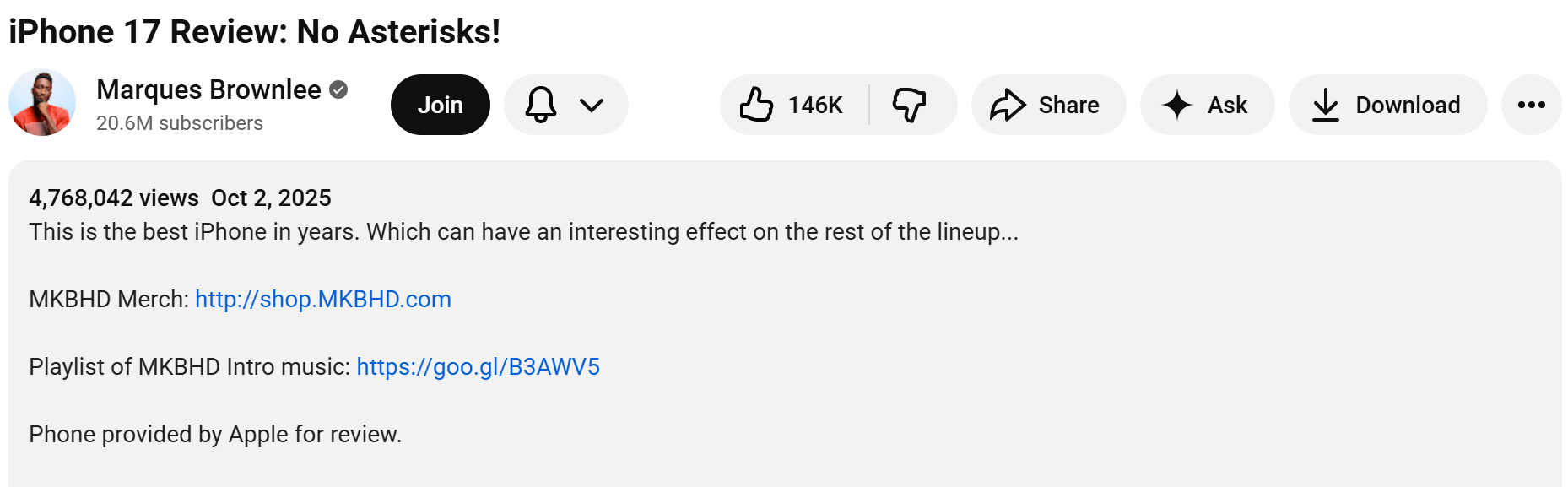
Place your most important link near the top so viewers see it without scrolling.
Channel “About” Section Links
The About section of your channel lets you add links that remain visible at all times. These links are best for permanent pages, rather than campaign-specific offers.
You can add links to:
- Your main website
- Services page
- Contact page
- Key resources
YouTube allows up to 14 links in this section.
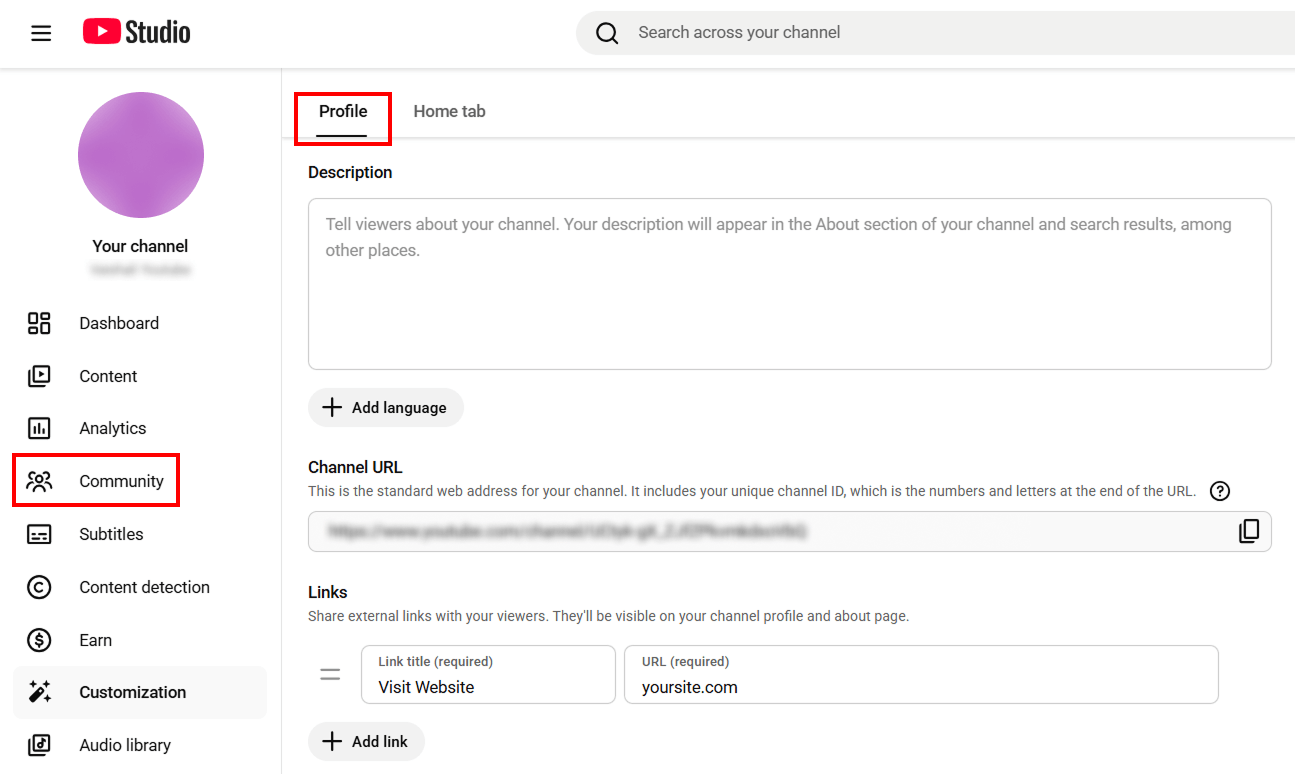
How to add links to the About section:
- Log in to your YouTube channel
- Click your profile picture
- Select YouTube Studio
- Click Customization in the left menu
- Under the Profile tab, click + Add Link
- Enter the link name and paste the URL
Pinned comment
A pinned comment stays at the top of the comment section. This placement works well because many viewers scroll down to the comments section after watching a video.
Pinned comments work especially well because:
- They are easy to notice
- They perform well on mobile
- They keep one clear action visible
How to add a link in a pinned comment:
- Add a comment with your key link
- Click the three dots (⋮) next to the comment
- Select Pin so it stays at the top
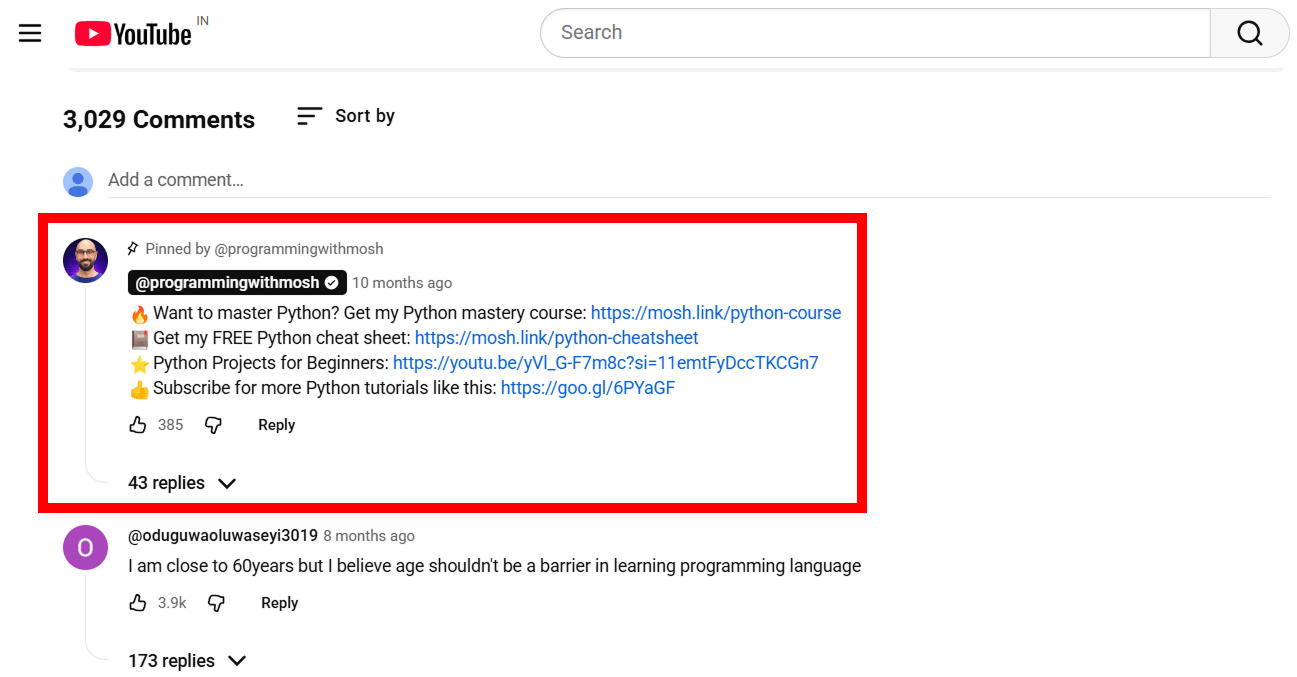
Use pinned comments for a single clear action, such as a related article or free resource.
Card links
YouTube cards are small clickable pop-ups that appear during a video. They are useful when viewers reach a point at which taking action makes sense.
You can use up to 5 cards per video.
Important note:
Only channels in the YouTube Partner Program with a verified website can add cards that link to external websites.
How to add a card link in YouTube:
- Sign in and go to YouTube Studio.
- Select “Content” from the left menu.
- Click the video you want to edit.
- Select “Editor” from the left menu.
- Select “Info cards.”
- Add the card
- Click Save.
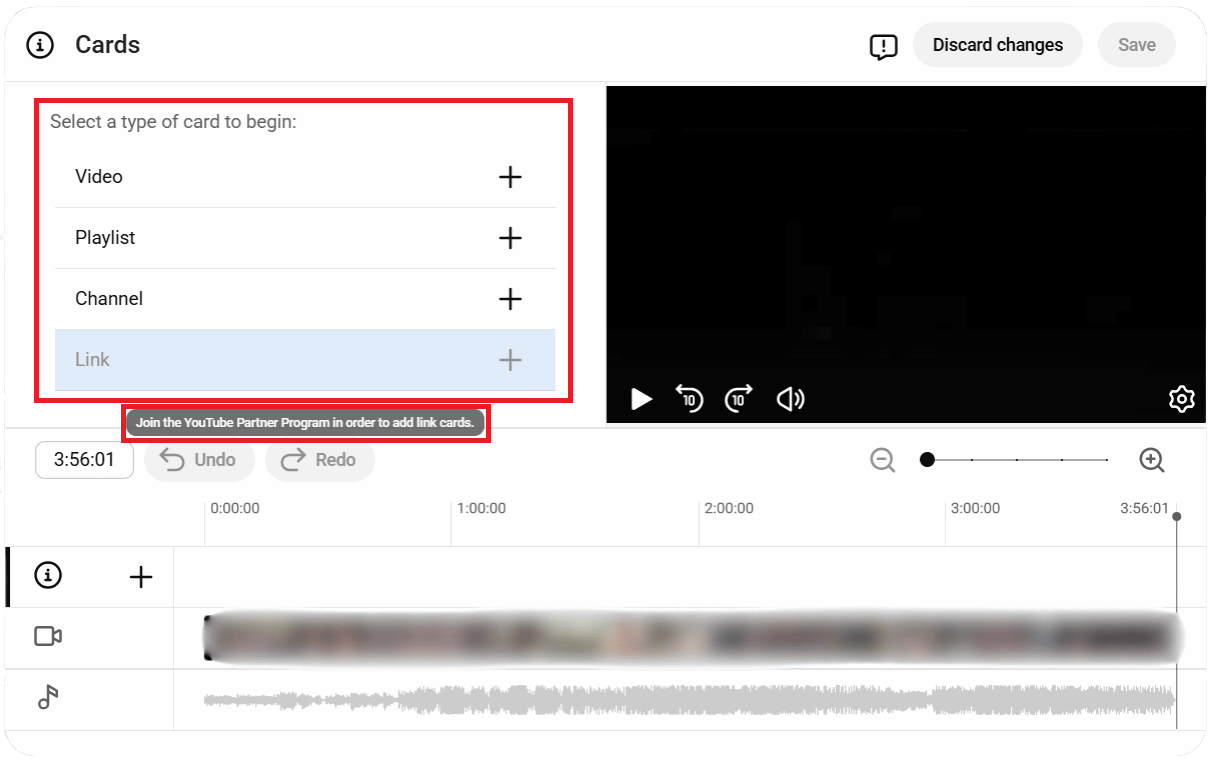
Use cards only when they match the video moment. Consider the timing because poor timing reduces clicks.
End Screen Links
End screen shows up in the final 5-20 seconds of your video. They help guide viewers to the next step after watching.
You can use end screens to:
- Promote another video
- Ask viewers to subscribe
- Link to your website
End screens are only available in videos that are 25 seconds or longer.
How to add an end screen:
- Select “Content” from the left menu.
- Click the video you want to edit.
- Select “Editor” from the left menu.
- Select “End screen”
- Choose from an element (video, Subscribe, Link)
- Enter the required details and click on “Save” button.

End screens work best when you clearly explain the next step before the video ends.
Common Mistakes to Avoid
When people expect fast SEO results, they often misuse YouTube links.
These mistakes usually don’t work, and they can reduce trust and visibility. Knowing why they are harmful makes it easier to avoid them.
Expecting Direct Ranking Boosts
Many people expect YouTube links to improve Google rankings directly, but that is not how they work. Most YouTube links are nofollow, so they don’t pass any ranking power as normal backlinks do.
When you expect rankings instead of traffic and visibility, it’s easy to feel disappointed and give up on strategies that actually work long term.
Using Automated Backlink Tools
Some tools promise to automatically generate hundreds of YouTube backlinks. These links usually come from low-quality or unrelated websites.
Search engines and platforms like YouTube don’t allow the creation of artificial links. Automated links rarely bring real viewers and can make your content look spammy and untrustworthy.
Linking to Irrelevant Pages
Another common mistake is linking to pages that don’t align with the video topic. When viewers click a link and encounter unrelated content, they quickly leave the site.
It ultimately breaks trust and reduces engagement. Links should always support the video, rather than distracting.
Adding Too Many Links in One Place
Stuffing video descriptions or comments with many links can distract viewers. Instead of helping, it creates confusion and reduces clicks.
Using one or two clear links with a simple explanation performs much better than a list of links.
Treating YouTube Links as SEO Shortcuts
YouTube links can not be a shortcut for rankings. They are tools for guiding the interested viewers to a helpful resource.
When you focus on helping viewer instead of manipulating the search engines, results become more consistent.
Ignoring Viewer Experience
If you place links without any proper explanation, viewers may ignore them. But when you clearly state the reasons why the links exist and what users will receive, they are more likely to trust them and engage with them.
Final Summary
YouTube backlinks work best when they come from helpful content and are placed where they make sense.
Videos help people discover your content, links guide them to learn more, and your website provides detailed information.
When these work together naturally, growth becomes consistent over time.
Do YouTube backlinks help with SEO?
Yes, it helps indirectly, while YouTube links are nofollow and they don’t pass direct link equity. Still, YouTube can support SEO by driving referral traffic, increasing brand visibility, and helping your videos earn natural backlinks when embedded on other websites.
Are YouTube backlinks safe and white hat?
Yes. YouTube backlinks are completely white hat and safe when used naturally.
Do YouTube backlinks help with branded search results?
Yes. When your website and videos link to each other, Google understands they belong to the same brand. So your videos and pages may appear together in branded search results.
Can embedded videos help with SEO or drive traffic?
Yes. Embedded videos keep people on your page longer, which is good for engagement. And when other websites embed your video, you get more referral traffic and natural backlinks, both of which support your SEO.
Need backlinks for your YouTube video?
We help YouTube videos earn relevant, manual backlinks through ethical outreach and real placements.


