Link building outreach is how you earn backlinks by reaching out to other websites and explaining why your content deserves a link.
Most pitches fail, not because the content is weak, but because the email looks exactly like every other email in the editor’s inbox.
You don’t need to rely on volume. Better emails tend to perform better. The sites that consistently earn links follow a consistent process. They research well, personalize genuinely, and follow up without being annoying.
Key Takeaways
- Most outreach fails because relevance and value are missing, not effort
- Small, targeted outreach lists consistently outperform high-volume campaigns
- Personalized emails with clear value get more replies and placements
- Follow-ups drive a large share of total responses when done right
- Strong content and clear value exchange decide whether you earn the link
What is Link Building Outreach
Link building outreach is the process of contacting website owners, bloggers, editors, and content creators to earn high-quality backlinks to your site.
These valuable backlinks help strengthen your site’s authority and visibility in search results, through personalized email campaigns.
You proactively reach out to them and provide a reason for them to add your content to their site or page. Outreach can lead to editorial links, guest posts, or resource placements depending on your angle.
In practice, this means you send a personalized email that explains who you are, what value your content will provide to their readers, and how linking to you will benefit them.
Why Most Link Building Outreach Fails
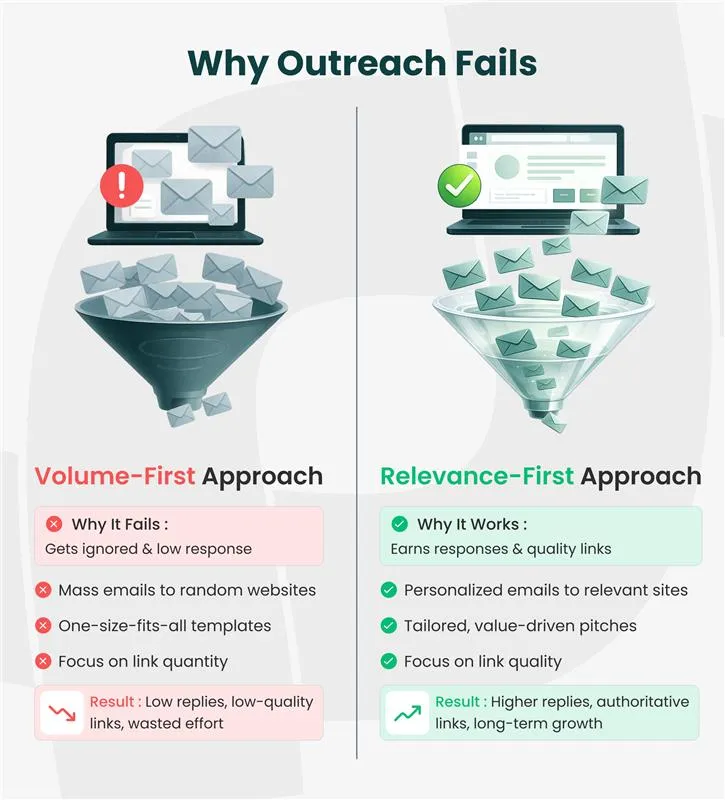
Most link building outreach emails get ignored or get low response.
Most cold email sequences achieve reply rates around 3.43% according to Instantly’s reports. Link building outreach works differently. You need a smarter, more personal approach to get results.
You’re not selling anything. You’re showing up with something worth linking to. But most campaigns still fall flat, and the reasons are pretty predictable.
The Pitch is About You, Not Them
When your email template is all about what you want instead of what they gain from your content, editors are more likely to ignore your email. This happens because they receive dozens of these templates in their inbox regularly, and they can spot self-serving requests in seconds.
The Targeting is Too Broad
Mass emails to random websites consistently underperform compared with outreach focused on a small, relevant group of sites.
Hunter.io’s report found that campaigns with 21-50 recipients achieved a 6.2% reply rate, compared to just 2.4% for campaigns exceeding 500+ recipients. Relevance will become harder to maintain when you scale beyond what you can genuinely personalize.
There’s no Value Exchange
Both sides need to win for outreach to work. So before you write anything, find the gap in their article, the data they haven’t cited, the resource their readers are missing. Make that the center of your pitch. Once you can clearly say what they gain, you’re ready to send.
How to Build a Prospect List That’s Worth Emailing
Your outreach process decides whether your link building campaign earns placements or gets ignored. Get the workflow right, and everything else follows.
1. Start with Relevance, Not Metrics
It’s tempting to sort your link targets by site authority and start from the top. But relevance matters more than raw numbers. A link from a niche-relevant blog with moderate traffic often does more for your rankings than one from a high-authority site that has nothing to do with your topic.
Start with sites that already cover your subject and link to similar content. Three ways to find them:
- Analyzing competitor link profiles:
Look at who links to your competitors’ best-performing pages. Those sites have already shown they’re willing to link to content like yours.
- Searching for resource pages:
Use search operators like “your topic” + “resources” or “useful links” + “your industry” to find resource pages that actively curate links on your subject.
- Checking who cites the data you cite:
If you reference a specific study, find other articles that cite it as well. Those authors are already interested in the topic and may find your content worth linking to.
2. Find the Right Person, Not Just the Right Site
Emailing a generic info@ or contact@ address is one of the most common outreach mistakes. You want the person who wrote the article, manages the content, or makes editorial decisions.
Check the author byline. Look for a bio page. Search LinkedIn for their name and the publication. Many writers also list their email on their personal site or in their social bio.
Reaching the actual author of a relevant article consistently beats a general inbox. The author already has context. They understand why your content fits. A general inbox creates a handoff problem, and most people won’t bother forwarding.
3. Qualify Before You Pitch
Not every relevant site deserves a spot on your list. Before you write a single email, check for a few signals that tell you the site is actually worth your time.
- Is the site actively publishing?
If they are not regularly updating their site with the latest data, or if their last uploaded post was 6 months ago, there is a good chance your email will remain unread for quite some time.
- Do they link out to external content?
Scan a few recent articles from the prospect site to check whether they reference or link to other sources, as some might have a strict policy against outbound links.
- Is the traffic real?
Verify real organic traffic before adding to your send list. Check the site’s organic traffic using the Ahrefs Website Traffic Checker, a free tool, to filter out sites that primarily exist to sell links rather than provide value to readers.
Crafting Outreach Emails That Actually Get Opened
Your email gets a few seconds to earn the attention of the recipient. If your subject line doesn’t earn you an “email open” or if the first sentence in your email does not earn you a read, nothing else matters.
Subject Lines
Write short, specific subject lines that are free of anything that signals a mass email. Clear, tailored subject lines tend to perform better because they feel relevant and personal instead of generic or automated.
What works:
- Specific and low-commitment lines such as “Quick idea for your [article topic] post.”
- Subject lines that are instantly useful, such as “Found a broken link on [their site name].”
- Lines that appeal to their editorial interest, like “New data on [topic they’ve covered].”
What doesn’t:
- Lines like “Link exchange opportunity” scream spam.
- Too vague lines like “Collaboration request.”
- Unbelievable lines like “I love your content” that nobody easily believes when it comes from a stranger.
The Email Body
Structure your email keeping these three things in mind: Context, Value, and Ask.
Context
Show them that you know who they are and what they have written. Mention a specific article or data point. This doesn’t need any elaboration. Just one sentence is enough to prove that you’ve read their content.
Value
Share exactly what you have to offer to their audience and why it matters. Ask yourself:
- Are you pointing to a resource that fills the gap in their article?
- Are you sharing data they haven’t seen?
- Are you offering a guest contribution on a topic they have not covered?
If you have a valuable answer or content, only then share.
Ask
Make your request simple and low-friction. Do not ask them to read your whole article and decide where to link. Suggest a specific spot where your resource fits and explain why it fits.
This structure works consistently:
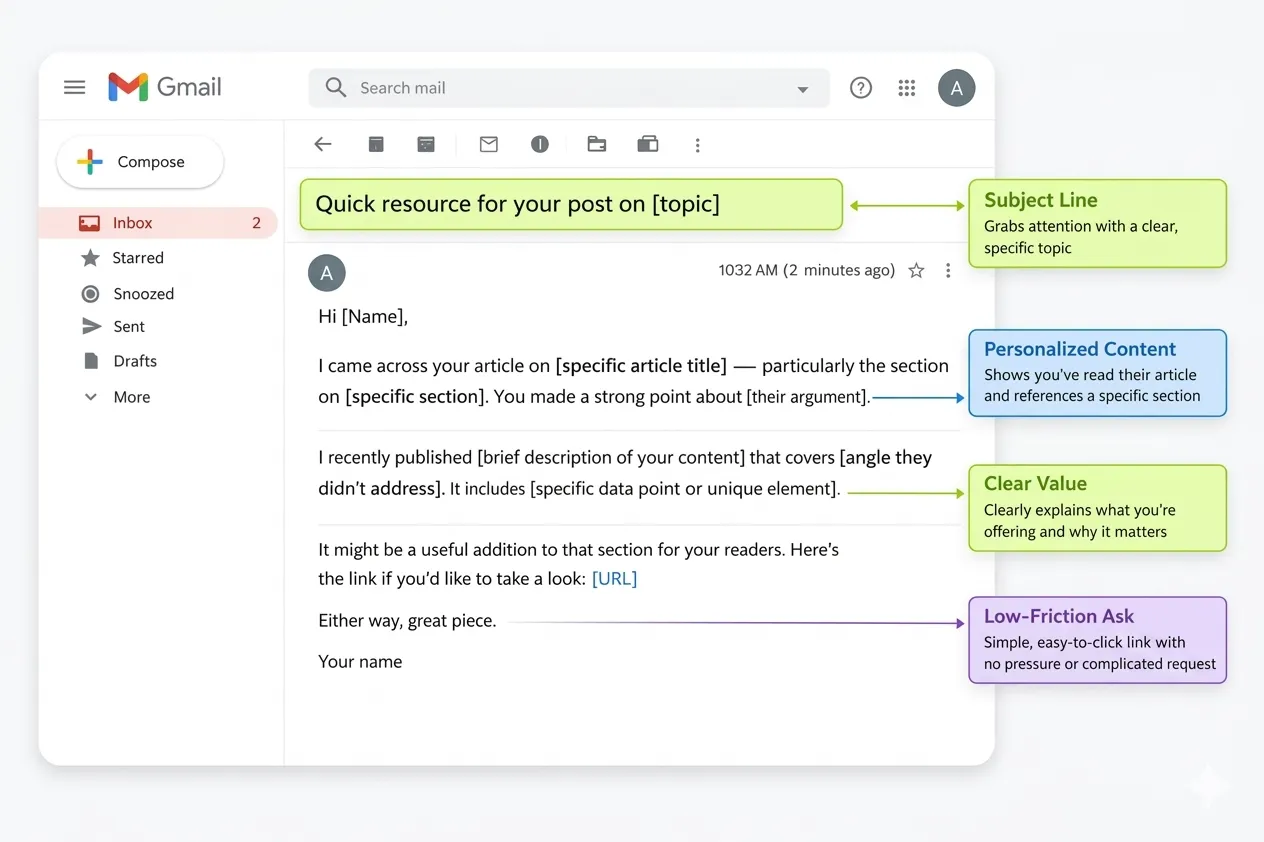
This email template works because it is short, specific, and provides a clear reason for them to consider your content. No begging. No fake flattery. No walls of text.
Here is an outreach template you can adapt:
Subject: Quick resource for your post on [topic]
Hi [Name],
I came across your article on [specific article title] — particularly the section on [specific section]. You made a strong point about [their argument].
I recently published [brief description of your content] that covers [angle they didn’t address]. It includes [specific data point or unique element].
It might be a useful addition to that section for your readers. Here’s the link if you’d like to take a look: [URL]
Either way, great piece.
[Your name]
Personalization at Scale
Personalization is no longer optional. Infraforge data shows that campaigns with real personalization achieve reply rates of up to 18%. Generic emails average around 9%. Same list, same number of sends, double the responses.
But “personalization” doesn’t mean writing every email from scratch. It means adding personal elements to your email, such as:
- The article you’re referencing.
- The specific gap you’re filling.
- The reason this person should actually care.
These parts need to be real, even if the surrounding structure follows a template.
The emails that feel templated? They’re the ones where personalization is a thin layer on top.
“Hi [First Name], I love your blog!”
This is worse than no personalization at all. It signals the recipient that you didn’t actually read their site. You just found their name and sent an email.
Follow-up Strategy: Where Most Links Are Actually Won
Most people send one email and wait. But they are not aware that most of the responses do not come from the first email. The Instantly 2026 Benchmark Report adds more detail. 58% of replies come after the first email, but the remaining follow-ups generate another 42% of total responses.
This means that every time you stop at one email, you are walking away from nearly half of your potential responses.
So send a follow-up email without being annoying:
Wait 3-5 Business Days
After sending the first email, wait for at least 3-5 business days. Send follow-up on the 4th or 5th day. Give them some time to check your email on their own schedule.
Add New Value
Say something new in your 1st follow-up email, instead of just saying “bumping this up”. Share a new perspective, a recent update to your content, or just add one more genuine reason on how your content would benefit their readers.
Stay in the Thread (or Pivot)
Send follow-ups in the same thread to keep the context. However, if they didn’t open your first two emails, start a new thread with a Pivot Subject Line like “New data for [Topic]” to test if a different angle grabs their attention.
Keep it Shorter Than the Original
Send a 2nd follow-up message on the 10th or 12th day. Make sure your follow-up message is shorter in length than the previous email you sent. It should be 2-3 sentences long.
They already have context from your two emails. You’re just bringing that email back to the top of their inbox.
Stop After 2-3 Attempts
If the recipient did not respond to your 2nd or 3rd follow-up email, then take that as a sign that they are not interested right now.
So instead of annoying them consistently with more follow-ups, just move on.
You can use this Follow-Up Email Template:
Subject: Re: [Original Subject] ( or use your Pivot subject if starting a new thread )
Hi [Name],
Just circling back on my note from last week about [specific resource]. Since then, I’ve updated it with [new data point or section], which might make it even more relevant for your [article section].
Happy to answer any questions if you’d like to take a look.
[Your name]
Note:
Response rates vary based on targeting, personalization, and relevance. Follow-ups improve results only when the initial outreach is well matched to the recipient.
Tools That Make Outreach More Efficient
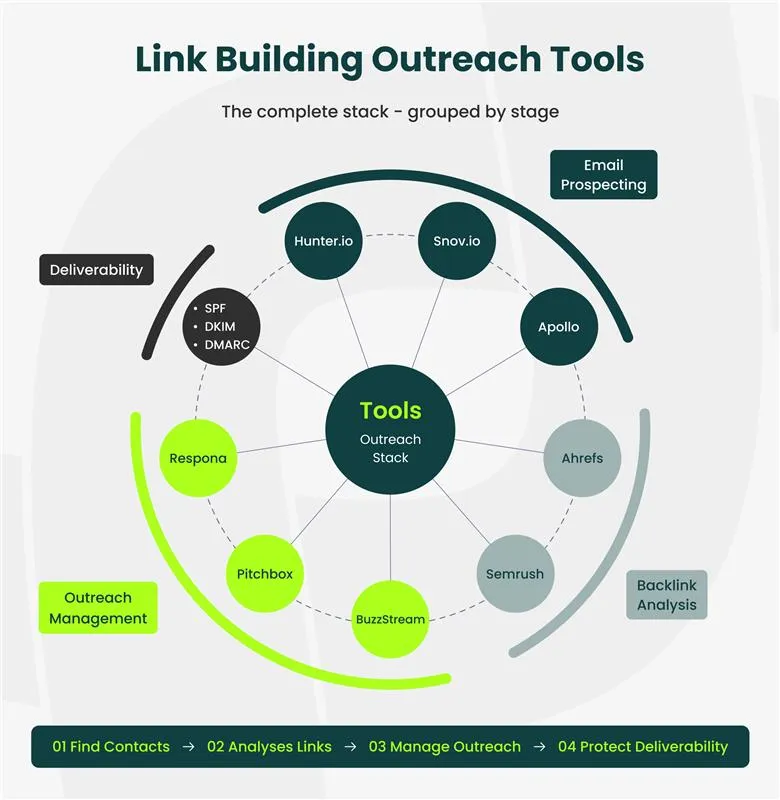
You just need a few right link building tools that handle the parts of your manual outreach work.
Prospecting and Contact Finding
Hunter.io, Snov.io, and Apollo are the go-to options for finding email addresses at scale.
Hunter.io and Snov.io offer limited free credits. Whereas Apollo’s monthly billing free plan offers limited credits per user per month. These free credits are enough to run smaller campaigns before you hit the limit and need a paid plan.
Backlink Analysis
Free tools like Ahrefs backlink checker and Semrush’s backlink checker are where your prospect lists of competitors come from.
These tools let you reverse-engineer competitor link profiles, find broken links, and spot unlinked brand mentions. Start with these tools before you touch any other outreach tool.
Outreach Management
BuzzStream, Pitchbox, and Respona handle the organizational side. You can manage contacts, send personalized emails, and track responses.
If you’re sending more than 20 outreach emails a week, managing all of them manually in a spreadsheet is a bit time-consuming, and there is always a chance of something falling through the cracks.
Email Deliverability
This one gets skipped. It’s also the reason many well-written emails land in spam instead of in inboxes. Before anything else, make sure your emails actually arrive in their inbox.
Set up SPF, DKIM, and DMARC authentication for your domain before your first send. Start by sending a small number of emails and then increase that number gradually, not all at once.
Insight
SPF, DKIM, and DMARC are email authentication protocols that tell receiving servers your emails are coming from a legitimate domain, not a spammer.
Hunter.io’s 2026 report found that sending from a custom domain drives 108% higher reply rates than free email addresses. That gap is too large to ignore.
How to Measure Outreach Performance
Track these numbers to check whether your outreach is working and where to improve:
Response Rate
If your email response rate is below 5%, something’s off. This means you need to check where the problem lies. Whether that’s your
- Targeting,
- Your personalization, or
- Your deliverability
A response rate above 10% on your emails indicates your relevance and messaging are strong.
Link Placement Rate
Of all the people who reply positively, how many actually place the link? Keep a track of that.
A high response rate with low placements usually points to one of two things: weak follow-through or content that isn’t compelling enough once they look at it.
Links Per Campaign
How many placements did you earn relative to the number of emails sent? This is your real efficiency metric.
A well-targeted list of 40 to 60 prospects produces 5 to 10 placed links. That’s a 10-20% conversion rate. It’s a useful benchmark when you’re setting expectations.
Time to Placement
Track how long it takes from sending your first email to getting your link live. Most editorial links take 2 to 6 weeks from first contact to placement. Knowing this keeps your project timelines realistic and stops you from following up too early or too late.
Link Quality
Track the relevance and authority of the sites linking to you, not just the count. 5 links from niche-relevant, actively trafficked sites will do more for your rankings than 50 links from generic directories. Understanding link equity helps you prioritize which placements matter most.
Check this out for a quick scan:
| Metric | Measurements |
|---|---|
| Response Rate | <5% (low), 5–10% (average), 10%+ (strong) |
| Link Placement Rate | <10% (low), 10–20% (average), 20%+ (strong) |
| Links per Campaign | <5% (low), 10–20% (average), 20%+ (strong) |
| Time to Placement | 2–6 weeks (typical) |
| Link Quality | Relevance > Volume |
Common Outreach Mistakes to Avoid
If your outreach is not getting replies, these are the common gaps to look at first:
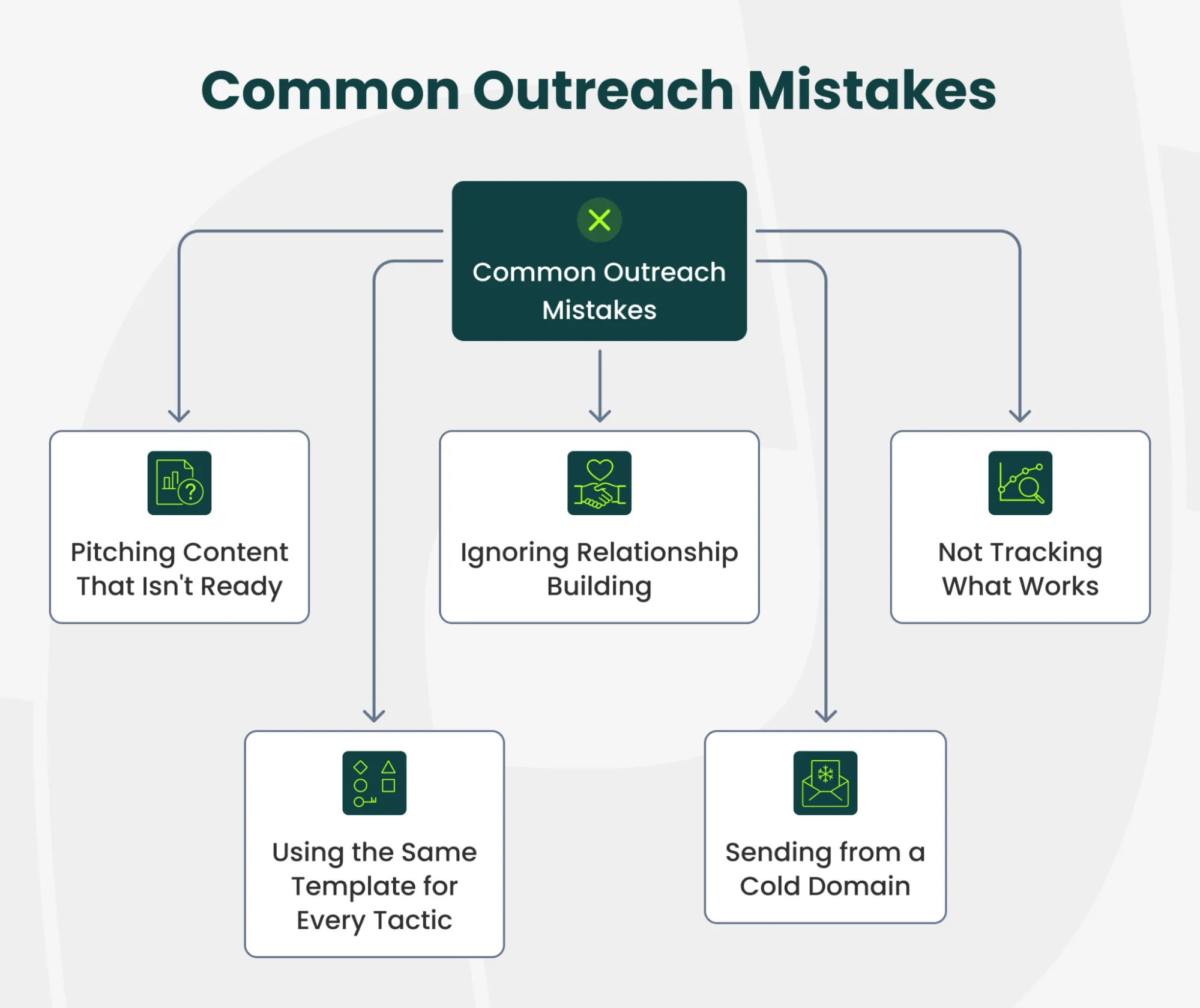
Pitching Content That Isn’t Ready
Do not pitch the content to anyone until it’s fully ready. Imagine sharing half-finished content to the editor via email, asking for a backlink. He clicks your link and lands on a thin, half-finished page.
Do you think they would link to it? They won’t. And that editor won’t open your emails again. Your linkable asset needs to be fully built and genuinely strong before the first outreach email goes out, not after.
Using the Same Template for Every Tactic
Do not use the same outreach email template for different link building strategies.
A broken link outreach email and a guest post pitch are completely different strategies with different value propositions and require different email templates.
If your templates look the same, your reply rates will reflect that.
Ignoring Relationship Building
The strongest link builders don’t treat outreach as a cold transaction. They engage with prospects on social media before sending an email.
They share the prospect’s content. They show up as a familiar name before they ask. This doesn’t have to take weeks. A few LinkedIn interactions before your first email can noticeably shift how it lands.
Sending From a Cold Domain
If you start sending 50 emails a day from a new email address, you’ll likely land in spam. Start by sending fewer emails initially and then gradually increase the number of emails a day, over 2-3 weeks. Ignoring this step can hurt your results.
Not Tracking What Works
If you don’t know which subject lines, which email structures, and which prospect types drive placements, you’re repeating the same experiment in every campaign. Log everything. Test one variable at a time. Double down on what works and cut what doesn’t.
How to Scale Outreach Without Losing Quality
Most teams get it wrong when it comes to scaling outreach. They adopt the Volume-First approach instead of the Relevance-First approach.
The solution here is building repeatable systems that maintain personalization as you grow.
Create Prospect Segments
Group targets by outreach strategy (guest post, broken link, resource page) and topic cluster. Broken-link building prospects receive a different email from resource-page prospects. Each segment has its own template, its own personalization points, its own angle. Don’t adopt a one-size-fits-all approach.
Batch Your Research
Dedicate specific blocks to finding and qualifying prospects. Doing both in the same session leads to shallow work on both.
Then dedicate separate blocks to writing and sending. Context switching between research mode and outreach mode costs you more time than it saves.
Build Templates With Flexible Sections
Build email templates with a consistent email structure: context, value, ask. But the specific details inside each section should change for every recipient.
That’s the balance. A framework that saves time on structure while leaving room for real personalization is what will save you time.
Set Weekly Volume Caps
30 to 50 well-researched emails per week will consistently outperform 200 poorly targeted ones. Don’t sprint through your prospect list in week one and leave nothing good for week three.
And honestly, if you’re running campaigns at scale, it’s worth asking whether outsourcing link building to a team with established relationships and proven systems is a better use of resources than building the whole operation in-house.
Build Authority Through Outreach That Respects Both Sides
The links you build compound into the authority that drives long-term rankings. This compounding only works if each link comes from a site whose audience actually overlaps with yours. Start with your 30 most relevant prospects. Write 30 emails that prove you read their content. See what comes back. Then scale what works.
Struggling to get replies from your outreach emails?
If you want an outreach strategy aligned with your growth goals, get a personalized plan that helps you earn high-quality backlinks.
What is a good response rate for link building outreach?
A response rate between 5% and 15% is solid. A value above 15% indicates that your targeting and messaging are working well.
A score below 5% usually signals a problem with relevance, personalization, or deliverability. But response rate is only part of the picture.
Your link placement rate, the share of positive replies that turn into live links, is the number that actually tells you whether the campaign worked.
How many outreach emails should I send per day?
For most teams, 20-40 personalized emails per day from a domain properly conditioned for outreach is the right volume. Hunter.io’s data shows that range achieves 27% higher reply rates than campaigns sending fewer or more. Start at 10 to 15 per day from a new domain and scale up gradually over 2-3 weeks. Quality matters more than speed here.
Should I use an outreach tool or send emails manually?
Under 20 emails per week, manual sending through Gmail or Outlook works fine. Beyond that, a tool like BuzzStream, Pitchbox, or Respona keeps things organized and stops contacts from slipping through. The risk with tools is over-automation. If your emails read like they were generated by software, reply rates will drop regardless of the platform you’re using.
How long should I wait before following up?
Before your first follow-up email, wait for 3-5 business days. For a second follow-up, wait for 5-7 days. Most professionals stop following up after the 2nd or 3rd follow up email. Instead of repeating your original pitch in every follow-up email, add something new. You can add a data update, a fresh perspective or a simpler ask too.
Does link building outreach still work in 2026?
Yes. Inboxes are more crowded and spam filters are tighter, but outreach is still one of the most reliable ways to earn high-quality links. What’s changed is the approach. Smaller, more targeted lists with stronger personalization consistently outperform volume-based campaigns. The fundamentals still work. The shortcuts don’t.
What’s the difference between link building outreach and SEO outreach?
Link building outreach is a type of SEO outreach specifically focused on earning valuable backlinks to your site. Whereas SEO outreach is a broader category which includes any communication aimed at improving your search visibility, from link requests to content collaborations to digital PR pitches.