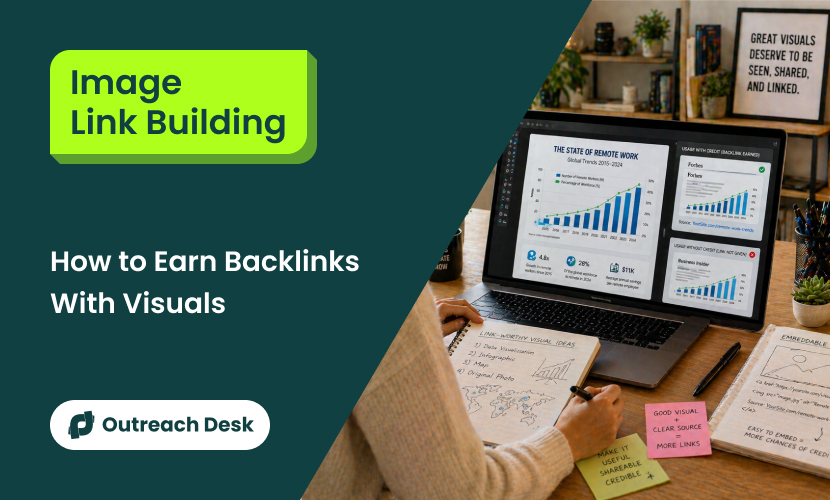
Image link building means creating images that other websites actually want to use, and in turn, you earn a backlink when they use your image.
You’ve probably published dozens of blog posts with custom graphics, charts, or infographics, and never earned a single backlink from any of them. Most teams use images only to make their blog posts look better, not to earn backlinks.
Blog editors, journalists, and content teams pull charts, infographics, and original photos from other sites every day. If they credit you, you get a link pointing to you. But when they don’t, you can ask them to add one.
What You’ll Learn:
- Understand how image link building earns backlinks through visual attribution.
- Identify which visual asset attracts the most links and why.
- Create embeddable images that publishers can reuse and add credit.
- Find incredible image usage and reclaim backlinks through outreach.
What Is Image Link Building?
Image link building involves earning high-quality backlinks by creating original images, such as images, charts, infographics, maps, photographs, screenshots, or data visualizations that other websites want to add to their own content.
When a publisher uses your image and credits you as the source, that credit counts as a backlink to your site.
There’s a clear difference between adding images to your content and creating others to reuse. The second approach is what earns backlinks. The first is just about making your content look good, and the second is to acquire links.

Google treats image attribution links as real backlinks, just like links in blog content. The alt text on an image link works like anchor text, helping search engines understand the linked page.
Since image links usually appear in the main body of a page (not in footers or sidebars), they carry genuine value.
At Outreach Desk, we’ve run image link campaigns across SaaS, ecommerce, and finance. The best images work because they explain something faster than text.
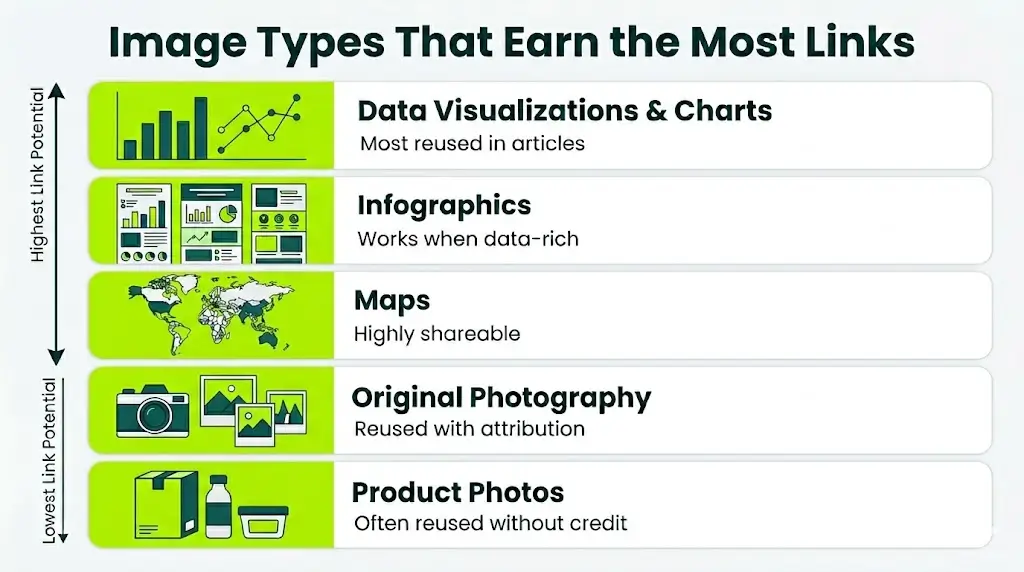
Which Image Types Earn the Most Links?
Some image formats consistently attract backlinks, while others get ignored. Here’s what actually works.
Data Visualizations and Charts
Charts and graphs earn the most backlinks because they make complex data easier to understand.
It worked because its original data is presented clearly, updated annually, and genuinely useful to writers covering content marketing topics.
Whenever a blogger writes about how long it takes to write a blog post, they require a chart to back up the claim. Yours could be that chart.
Infographics
Infographics still work, but the bar is higher. The older “10 tips for X” format doesn’t work anymore; it simply doesn’t earn links.
The ones that earn links are specific, data-rich, and visually engaging, so other websites willingly feature them.
The infographic in the right niche can earn hundreds of referring domains over time. At the Outreach Desk, we’ve seen this in competitive industries like healthcare and finance.
Maps
Maps earn links because they’re shareable and difficult for others to recreate.
For example, a map like “most popular X by country” or “average Y by state” can attract links from news outlets, niche blogs, and social media.
Maps work best when they visualize data people are curious to know about but haven’t seen displayed geographically before.
Original Photography
If you shoot original photos, product photography, event coverage, or location-specific images, those photos get reused consistently.
The Unsplash model proves this: high-quality photographs are uploaded, people use them everywhere, and a polite outreach email requesting attribution converts at a surprisingly high rate.
Product Photos
Product images are frequently reused without credit. This creates an opportunity for ecommerce brands to track where their visuals appear and request credit through target outreach.
Most publishers won’t add a link manually, but give them an embed code and they’ll add attribution.
How to Create Images That Publishers Want to Use
For image link building to work, the visuals have to pass a test that most teams never consider: would a blogger, journalist, or content manager want to embed this in their own articles?
Start With the Data, Not the Design
Most teams make the mistake of hiring a designer first and then figuring out the data later.
Instead, do it the other way around. Start by identifying a data point, comparison, or process that your target audience searches for and argues about.
Here are some good sources for link-worthy data:
- Your own priority data
Survey results, platform analytics, campaign benchmarks, anything only you can produce.
- Public data is presented differently
Government databases, industry reports, and academic studies contain data that haven’t been well visualized. That gap is your opportunity.
- Updated data on outdated topics
Find popular infographics in your space that are at least 3 years old. Recreate those with the current data.
Design for Embeddability, Not Just Aesthetics
If your image looks good on your site but breaks or looks bad on other websites, people won’t use it.
Here are some practical rules:
- Keep dimensions web-friendly
1200px wide maximum, vertical infographics should be under 5000px tall.
- Use readable fonts at small sizes
Your chart will be embedded at a width of 600-800px on many sites. If the labels disappear, then it won’t get used.
- Include your brand and URL subtly
Include a small source link in a button like “Source: xyz.com,” (give a link to your website), that gives credit even when someone forgets to link.
Add an Embed Code
Embed codes turn a simple image into a backlink opportunity. By adding the embed code below your image, anyone can copy a single snippet and paste it into their website, automatically crediting you with a backlink.
<a href=”https://yoursite.com/page”><img src=”https://yoursite.com/image.png” alt=”Description” /></a><br /><small>Source: <a href=”https://yoursite.com/page”>Your Site</a></small>
Most publishers won’t bother to find your URL and add an attribute link manually. However, they’ll pass an embedded code.
Finding Sites That Already Use Your Images (Without Credit)
You probably already have an image-like opportunity sitting right in front of you.
This is the fastest way to get backlinks because the image is already being used. You aren’t required to create any new linkable asset; you just need to identify unauthorized uses.
The Manual Method: Reverse Image Search
Google’s reverse image search is the starting point. Start by downloading your original image, drag it into Google Images, and review the results.

You’ll see the sites that have embedded your image without linking back to your page.
For each result:
- Check whether the page links to your site. Check that your domain name appears on the page using Ctrl+F.
- If there’s no link, record the URL, the site’s contact info, and the page context.
- Then move to outreach.
The manual method works well for 5-10 images. If beyond that, then you need automation.
The Automated Method: Image Monitoring Tools
Use tools like TinEye, Image Raider, and Pixsy to scan the web consistently for copies of your images.
At Outreach Desk, we’ve found that combining Google reverse image search for the initial audit with an automated monitoring tool for ongoing detection gives you depth and coverage.
The Outreach: Turning Unauthorized Use Into Backlinks
The outreach email for image reclamation differs from standard link building outreach. You’re not asking for a favor; you’re pointing out that someone is already using your work and requesting appropriate credit.
A strong reclamation email contains:
- Opens with a compliment about their content and not about your image.
- States clearly that they’ve used your image by including the URL of their page and the URL of your original source.
- Asks for a simple attribution link, don’t demand, don’t threaten, don’t mention copyright.
- Make it easy by providing the exact HTML they need to add.
In our experience, reclamation outreach converts at a much higher rate than cold link building outreach. Publishers have already chosen your image. They usually didn’t mean to skip attribution; they just forgot or didn’t know the source.
Optimizing Images So Search Engines (and Publishers) Find Them
Creating a link-worthy image and burying it in a poorly optimized page is like printing a brilliant report and locking it in a drawer.
Image SEO puts your visuals in front of the people most likely to use and link to them.
Alt Text That Actually Helps
Alt text serves mainly two purposes: accessibility, screen readers need it, and search engines like Google use alt text to understand what your image shows.
Write alt text that’s descriptive and specific. “Bar chart showing average blog post length by industry in 2026” beats “blog post chart” or “image1.png.”
Avoid stuffing keywords into alt text. One accurate description per image is enough. Google’s image algorithm has been smart enough to detect keyword stuffing for years.
File Names, Compression, and Technical Basics
This is a technical setup that causes most teams to lose links they could have earned. The image exists; it’s good enough, but it’s named IMG_4892.jpg and is around 2MB.
Fix these four things before you publish anything:
- File names:
It should be a mix of descriptive, hyphenated, lowercase
Average-blog-post-length-by-industry-2026.webp not IMG_4892.jpg.
- Compression:
Use the WebP format and compress to under 200KB for in-content images without visible loss of quality. Tools like Squoosh handle this in seconds.
- Responsive images:
Use srcset to serve appropriate sizes across devices. A 1200px image served to a 400px mobile screen wastes bandwidth and hurts page speed.
- Image sitemaps:
If you’re publishing a high volume of original visuals, submit an image sitemap to Google Search Console. It speeds up indexing.
Structured Data for Images
Adding the ImageObject schema helps Google to understand your image’s subject, creator, and license. For the image link building, especially, the license and acquireLicensePage properties are useful, as they tell search engines and publishers browsing Google images to properly attribute your work.

Promoting Images to Accelerate Link Acquisition
Optimizing your image helps people find you. Promotion helps your images reach people who might reuse them and link back to you. Promoting it regularly can cut the waiting time from months to just weeks.
Targeted Email Outreach
The most reliable promotion method of link building is to identify publishers who’ve written about your topic and email them directly with your visual asset.
Four-step pitch that converts:
- Reference their article by name, and prove to them that you’ve read it.
- Explain how your image improves their content; it can be either the data they’re missing, a visual their readers would find useful, or basically what you added in your image.
- Offer the image and embed code.
- Make the ask, “If you use the chart, a link to [source page] as attribution would be great.”
Social Distribution and Community Sharing
Posting your visual on platforms where your target audience and publishers spend time creates organic pickup opportunities:
- LinkedIn and X (Twitter)
Don’t try to be everywhere at once. Focus on 1 or 2 platforms where people are most likely to link to you and actually spend their time.
Infographic Directories
Submitting your infographics to directory sites like Visual.ly, Infographic Journal, and Daily Infographics will get you a few low-quality backlinks, but more importantly, it helps the publishers to find your visuals when they’re searching for images on a specific topic.
The direct SEO value of directory links is minimal. The indirect value is worth 15 minutes.
Someone finds your infographic in a directory, uses it in their blog post, and links back to you.

Building a Repeatable Image Link Building System
A reputable system can help you earn links consistently without the need to start from scratch every time.
The Quarterly Cycle
Month 1: Audit and Reclaim
Search for your existing images online. Find the sites using them without credit. Reach out and ask for a link.
This provides the fastest results because the images already exist, and the opportunities are already there.
Month 2: Create and Optimize
Create 2-3 new visuals based on the topics or data that are missing in your niche. Optimize the file names, alt text, and embed codes properly. Then publish it on your site.
Month 3: Promote and Monitor
Reach out to relevant publishers and bloggers in your niche. Post it in the relevant communities and submit it to directories. Set up automated image monitoring for ongoing detection.
If pitching takes too long in-house, managed blogger outreach campaigns cover the publisher contact step.
That should be repeated every quarter; you’re reclaiming old opportunities, creating new assets, and promoting strategically.
What to Track
Most teams don’t treat image link building as separate from their overall link efforts. That’s a problem.
If you don’t measure it on its own, you’ll never know whether your images are actually earning links or whether those links came from other link building campaigns.
You need to track these:
- Referring domains per image asset
To see which visuals are actually earning links and which aren’t.
- Reclamation conversion rate
Out of all the sites using your image without credit, how many gave you a link after you reached out?
- Time to first link
How long does it take for a newly published image to earn its first backlink?
- Link quality distribution
Are the links coming from trusted, relevant sites or just low-quality scrap sites?
If fewer than 1 in 4 sites are providing a link after you reach out, your outreach email needs improvement. If a new image isn’t earning its first link within 60 days, then either your promotion strategy or the image itself needs work.
Where Most Image Link Building Campaigns Go Wrong
After running dozens of image-link campaigns, we’ve seen the same mistakes recurring. Avoiding those saves months of wasted time and effort.
Creating Images Nobody Needs
This is the most common mistake. When teams focus on creating “beautiful” infographics for topics that don’t need visual explanation, they waste most of their time and effort on the wrong things.
If the content works perfectly well as a list or a paragraph, visualizing it adds zero link value.
The image has to solve a problem that texts can’t. It should simplify the complex topics, reveal patterns in the data, or show geographic distribution.
Skipping Promotion Entirely
Just creating and publishing an image and hoping people will find it doesn’t work, the same way it doesn’t work for blog posts.
Original visuals need to be pushed in front of the right people. Most images that never earned a single link weren’t bad; they were simply never seen.
Ignoring Reclamation
If you’ve been publishing original images for more than 6 months, there are almost certainly sites out there using them without crediting you. These are warm leads; the site has already chosen your image.
A quick 10-minute email could turn each one into a backlink. Ignoring this is leaving free links on the table.
Optimizing for the Wrong Keywords
Image SEO matters, but some teams spend too much time trying to rank in Google Images and not enough time making their visuals actually useful to the publishers.
The goal isn’t just to get traffic from Google Images. The real goal is to create images that people reuse and link to.
Not Updating Old Visuals
A chart with outdated data stops earning links. Sites that once linked to it may swap it out for a more current source.
Updating your best-performing visuals once a year keeps them relevant and protects the backlinks you’ve already built.
Conclusion
Your competitors’ images are probably being used across dozens of websites right now, without credit or a link. Yours can be one of them.
Start by running a reverse image search on your five best visuals. Find the site using them without credits. Send the emails. That’s the backlink opportunity most brands don’t even know they’ve.
Once you’ve claimed what’s already yours, build a system that keeps working on link-worthy visuals, be it every quarter, every cycle, growing stronger over time.
Want to build an image link strategy that fits your niche?
Get a clear approach to create visuals that earn backlinks.
Do image links help SEO as much as regular text backlinks?
Yes, Google treats a linked image the same as the link. The alt text on the image functions similarly to anchor text, passing topical relevance to the linked page. The reason is that the link appears within the main body content of a page and carries editorial context. which Google values more. The only scenario where image links are weaker is, however, when the linking page laces the image in a sidebar or footer, which carries less weight than in-body placement.
How do I find out if someone is using my images without permission?
Start with Google reverse image search, then download your original image and search it. For ongoing monitoring, use tools like TinEye, Pixsy, and Image Raider to automatically scan the web for copies of your images. At the Outreach Desk, we run an initial manual audit first to catch the bigger opportunities, then set up automated monitoring for continuous detection. Pixsy’s free plan supports up to 500 images, which is enough for most campaigns.
What’s the best image format for earning backlinks?
Data visualizations and original charts consistently outperform other formats. They’re hard to recreate, easy to cite, and useful across many types of content. Infographics hold second place, but only when they’re rich in data, specific, and visually strong enough for a publisher to be proud to embed. Listicle-style infographics earn very few links in 2026. Maps perform well when the topic has geographical relevance. Product photos are underrated for reclamation, review sites, and affiliate blogs use them constantly without attribution.
How long does image link building take to produce results?
Reclamation outreach, finding sites that are already using your images without credit, can produce backlinks within 1-2 weeks of sending emails. Whereas creating new image campaigns takes longer. You can expect 30-60 days before a new visual earns its first organic backlink, assuming you’ve promoted it through outreach and social channels. But, the compounding effect is real: a library of 20+ original visuals, each are monitored for unauthorized use, generates a steady trickle of link opportunities without constant effort.
Can AI-generated images earn backlinks?
They can, but they face a credibility gap. Publishers are more careful about embedding AI-generated visuals because they can’t verify the accuracy of AI-generated data visualizations or the originality of AI-generated artwork. Original data charts, original photography, and carefully crafted infographics still outperform AI-generated images in link acquisition. You can use AI as a design accelerator, but make sure the data and creativity directions are human-oriented.