You spotted a suspicious backlink in your reports, and you’re wondering whether to disavow it.
For almost every website in 2026, the honest answer is no, do not disavow. Google’s disavow tool exists for one narrow purpose: telling Google to ignore specific links pointing to your site, and most sites no longer need that.
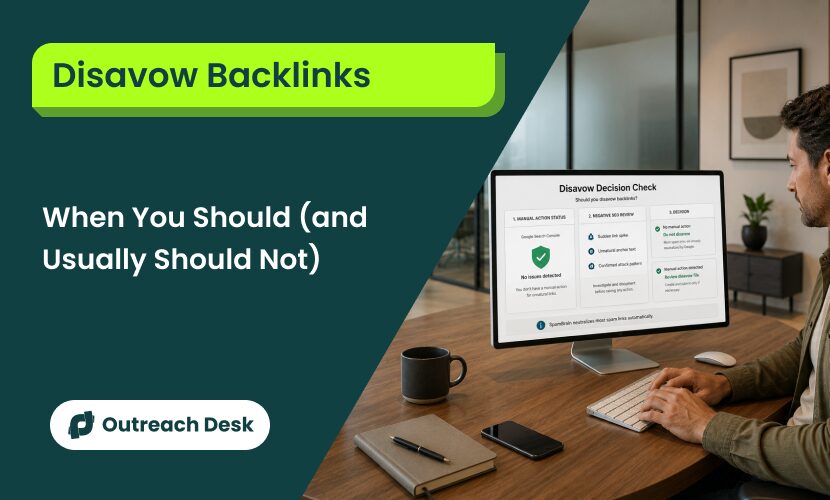
You should reach for it in only two situations: a manual action in Search Console for unnatural links, or a documented negative SEO event you can’t resolve at the source.
Key Takeaways
- For most sites in 2026, the right move is doing nothing.
- Google’s automated system already neutralizes most spam links before they count.
- The disavow tool applies in one common case: a manual action in Search Console for unnatural links.
- A second, rarer case applies: a documented negative SEO attack with links you can’t remove at the source.
- Third-party toxicity scores aren’t Google’s signal and shouldn’t drive your decision.
- The Manual-Action-First Decision Tree at the end of this guide tells you which case, if any, fits your site.
What the Disavow Tool Does
The disavow tool tells Google to ignore specific backlinks when it calculates your rankings. That’s the whole job, and it’s smaller than most site owners assume.
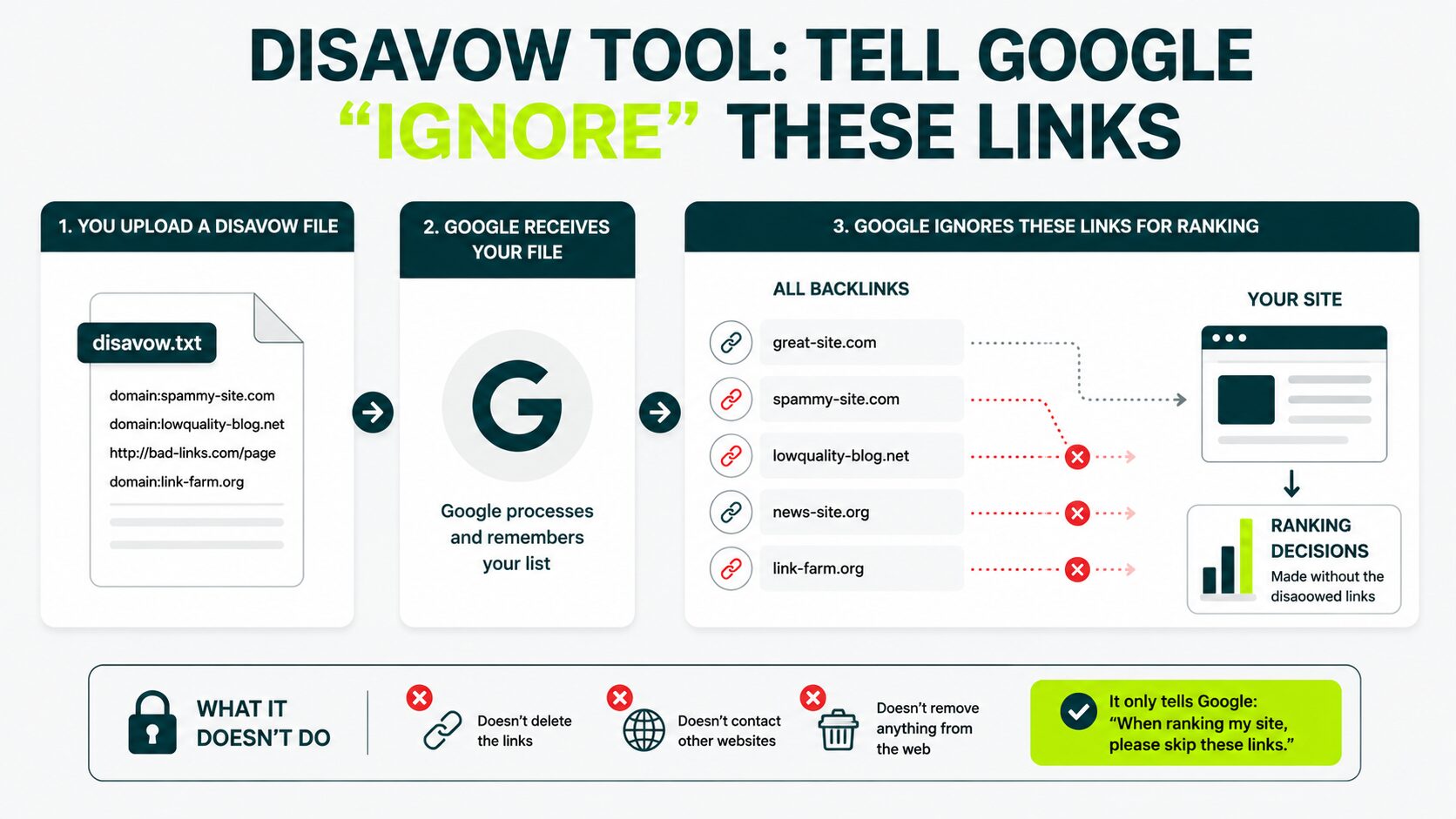
You upload a plain-text file listing the URLs or domains you want disregarded. Google treats those links as if they never existed for ranking purposes.
Nothing else happens.
The link stays live on the web, the site that posted it never hears from you, and your disavow file simply tells Google: when you decide how to rank my site, please skip these specific links.
Here’s where the confusion usually starts. Understand it with the following example.
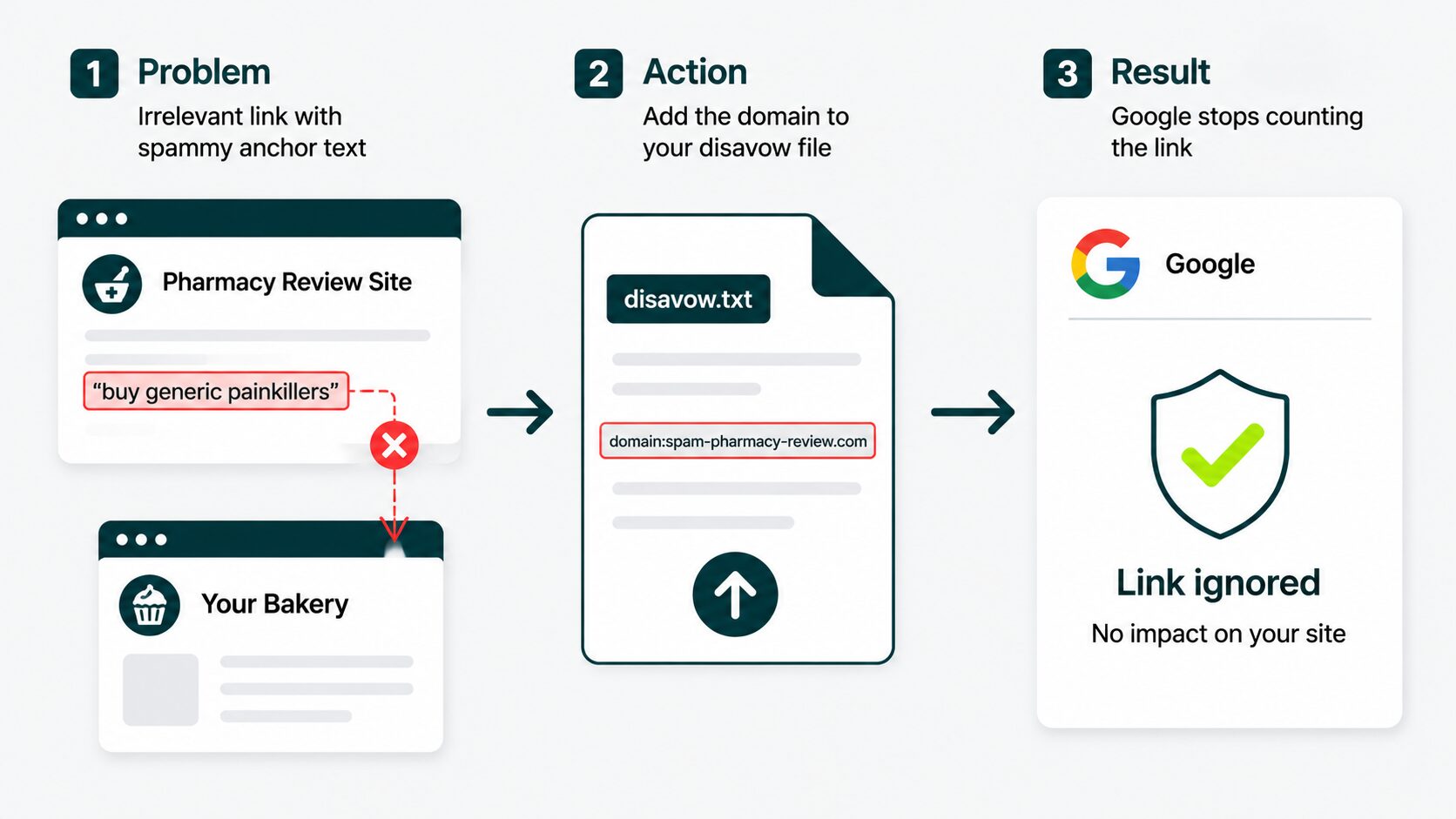
A pharmacy review site you’ve never heard of links to your bakery’s homepage. The anchor text reads “buy generic painkillers.” It makes no sense next to your product, and that’s exactly why it catches your eye in a backlink report.
If that link is part of a wider pattern that is hurting you, add the domain to your disavow file. Google, stop counting that link in your ranking calculation.
Most readers who land on this guide are reacting to a link like that one. The tool exists for a narrow problem, and the next two sections explain why you don’t have it.
Situations Where Disavow Is the Right Move
You should use the disavow tool in only two situations. The first is a manual action in Search Console for unnatural links.The second is a documented negative SEO event involving links you can’t get removed at the source. Google’s own tool page adds a close cousin of the first case: if you paid for links or joined a link scheme and expect a manual action because of them, remove what you can and disavow the rest.
Outside those situations, skip it. Most site owners who reach for the disavow tool are reacting to a messy backlink report, not to an actual problem Google has flagged.
Google’s December 2022 link-spam update confirmed that spammy links are automatically neutralized, and any ranking credit they carried disappears.
You don’t need to file anything for that to happen. The system already does the work.
The disavow tool isn’t a routine hygiene tool you run every quarter to keep your link profile clean. It’s a remediation lever for one specific, documented problem.
Ask yourself: do you have a manual action or a real negative SEO event?
If the answer is no, close the tab.
How to Tell If You Have a Manual Action (the Most Common Trigger)
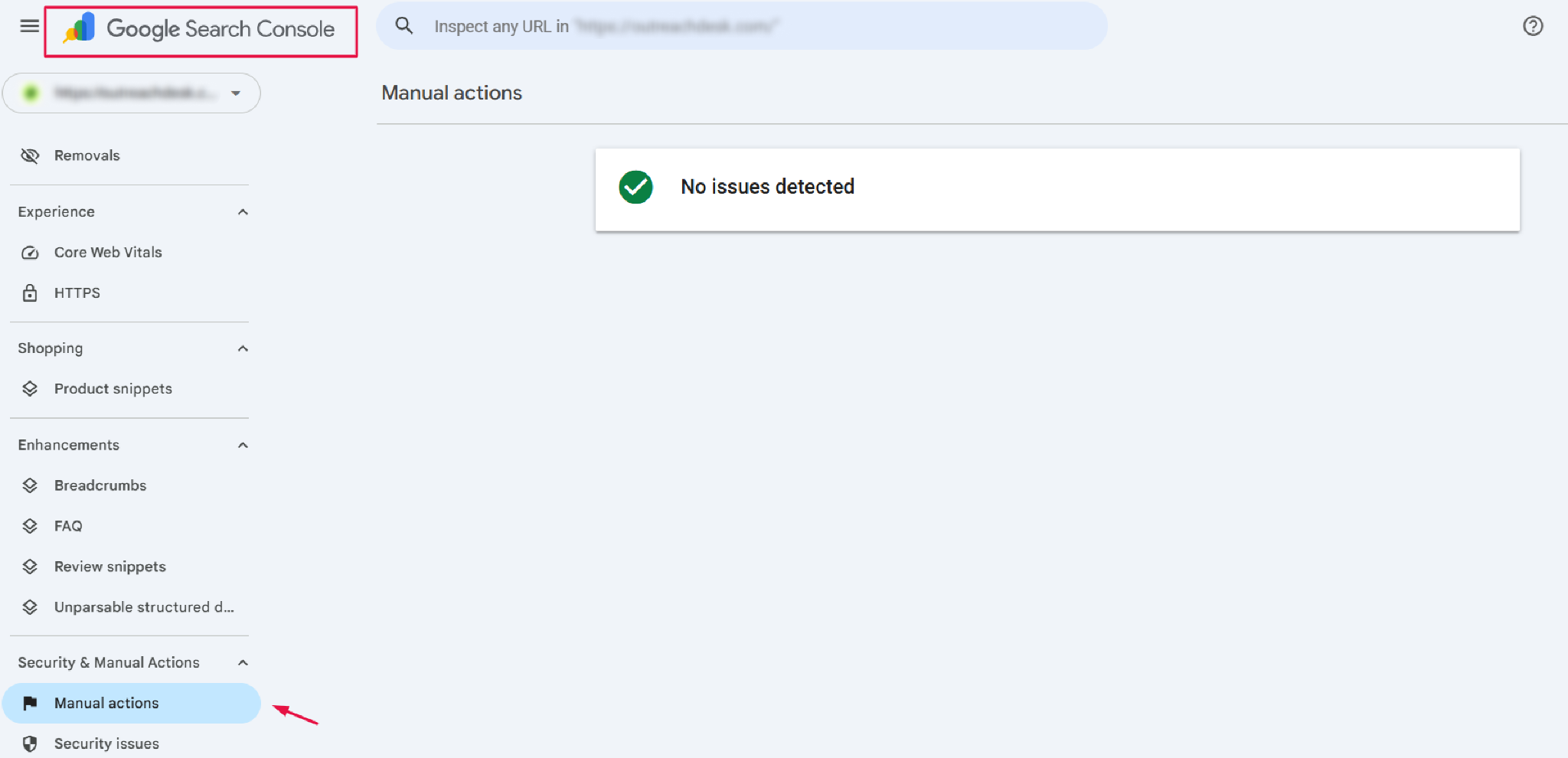
To check whether you have a manual action, open Google Search Console and read the Manual Actions report in the left sidebar.
If the page says “No issues detected,” you don’t need to disavow anything.
Most people skip straight to a third-party toxicity score before checking this page. That’s backward.
The toxicity score doesn’t decide your rankings. This page does.
Follow this step-by-step process:
- Sign in to Google Search Console and pick the property (the website) you want to check.
- In the left sidebar, find the Security & Manual Actions section and click Manual Actions.
- Look at the top of the page. If you see a green check mark and the words “No issues detected,” your site is clean.
- If you see anything else, read the message. The one that matters for the disavow tool is titled “Unnatural links to your site.” Click into it to see which pages Google flagged and a short explanation of what triggered the action.
A manual action is not a ranking drop.
It’s an explicit notification from a human reviewer at Google. The Manual Actions report holds the full details, and Google also posts a message in your Search Console inbox. No third-party tool surfaces it.
If you don’t see one here, you don’t have one. That single check is the gate.
Skip it, and every other step in this guide is guesswork.
Why Most Sites Don’t Need to Disavow in 2026
Most sites don’t need to disavow in 2026 because Google’s own anti-spam system, SpamBrain, automatically identifies and neutralizes spam links.
SpamBrain is the artificial intelligence layer Google built to handle low-quality content and links at scale.
Think of it like the spam filter on your email, but for links. It spots the suspicious ones coming in and quietly drops them before they reach your ranking.
When it spots a link that came from paid link placements or other manipulative patterns, it doesn’t delete the link from the web. Instead, it simply removes that link’s voting power. Google drops whatever ranking signal the link was going to pass.
That’s what “neutralize” means in Google’s language. It’s just dropped from the calculation rather than penalized or punished.
For the small business owner staring at a backlink report full of unfamiliar referring domains, this matters more than any tool.
The math’s shifted. Ten years ago, strange-looking links could drag your rankings down by default. Today, those same links rarely count for you in the first place.
This is also why the usual verdict on a disavow consult is “you don’t need to do this.” In our experience, most consults end with no disavow action.
What “Toxic” Really Means (and What It Doesn’t)
“Toxic” is a marketing word, not a Google word.
Google uses “spammy” and “manipulative” in its own documentation. What your audit tool labels as toxic and what Google treats as a problem are usually two different sets of links.
Knowing the difference matters because the wrong instinct is to disavow everything an audit tool flags red. That instinct can cost you good links.
Use this cleaner model to tell the two apart. The guide to toxic backlinks goes deeper on the label.
What Google Treats As Link Spam
Google’s spam policy targets specific patterns of manipulation. The clearest examples are:
- Paid links, where someone exchanged money or a product for a dofollow link.
- Links from private blog networks (PBNs) and link farms, which exist only to host outbound links.
- Automated comment, forum, or directory spam.
- Hidden links that the page author has tucked away from real readers.
- Links with anchor text matching commercial keywords in suspicious quantities.
- Excessive link exchanges where two sites swap links specifically to game rankings.
These are patterns of intent. The site that placed the link intended to manipulate rankings, and Google’s system can usually tell.
What Audit Tools Often Label “Toxic” but Google Mostly Ignores
Most third-party tools weigh signals that correlate weakly, at best, with Google’s actual treatment.
Examples:
- Low Domain Rating or low traffic on the referring site.
- A referring site in a different language or country.
- A referring site with many outbound links.
- An unfamiliar or newly registered domain.
Domain Rating is a 0 to 100 score from SEO tools like Ahrefs that estimates the strength of a site’s backlinks. A high score doesn’t equal a good link, and a low score doesn’t equal a bad one.
A link with a low Domain Rating isn’t automatically harmful. A link from a small site in another language isn’t automatically harmful. A site that links to many places isn’t automatically a link farm scheme.
What audit tools have is a shortcut for scoring.
What Google has is a model trained on years of spam patterns.
They aren’t the same thing, and one of them determines your rankings.
This is why the practitioner’s approach to a toxicity report is “skim it, don’t act on it.”
For example, in a recent Outreach Desk audit, a third-party tool flagged 27 links as toxic. On review, all 27 were either high-quality niche references or industry-relevant citations that positively contributed to the client’s rankings.
How to Audit Your Backlinks Before Deciding to Disavow
To audit your backlinks before disavowing, pull a current link list from two sources and filter for the spam patterns Google cares about.
Sort the survivors into ‘remove at source first’ and ‘leave alone,’ then decide whether anything still needs a disavow file.
Follow these steps to audit your backlinks.
Step 1: Pull Your Link List From Two Places
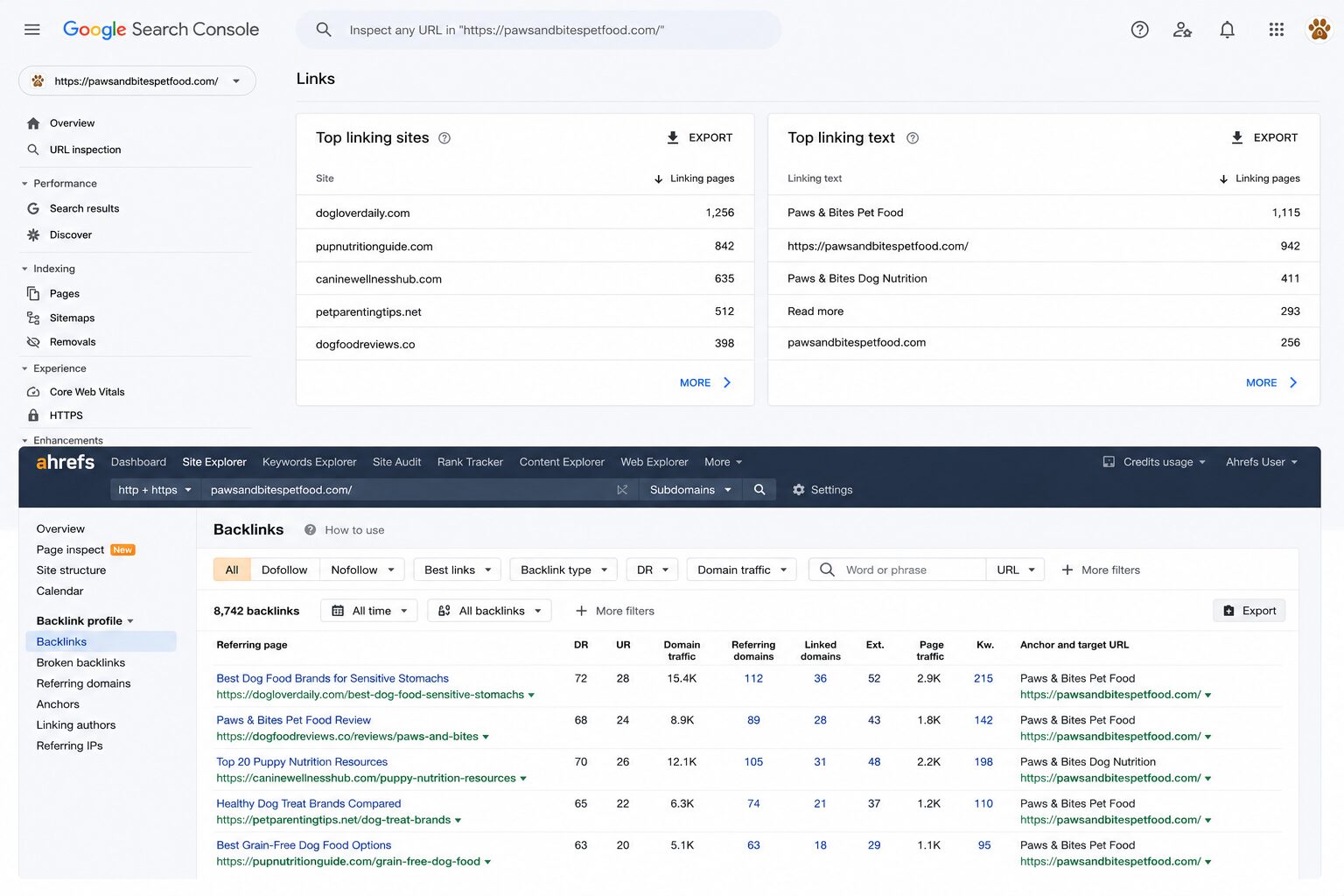
Inside Search Console, open the Links report.
Download both the “Top linking sites” list and the “Top linking text” list.
Then pull a second list from a third-party tool you trust, like Ahrefs or Semrush. Two sources catch links that one tool missed.
Step 2: Sort by Recency
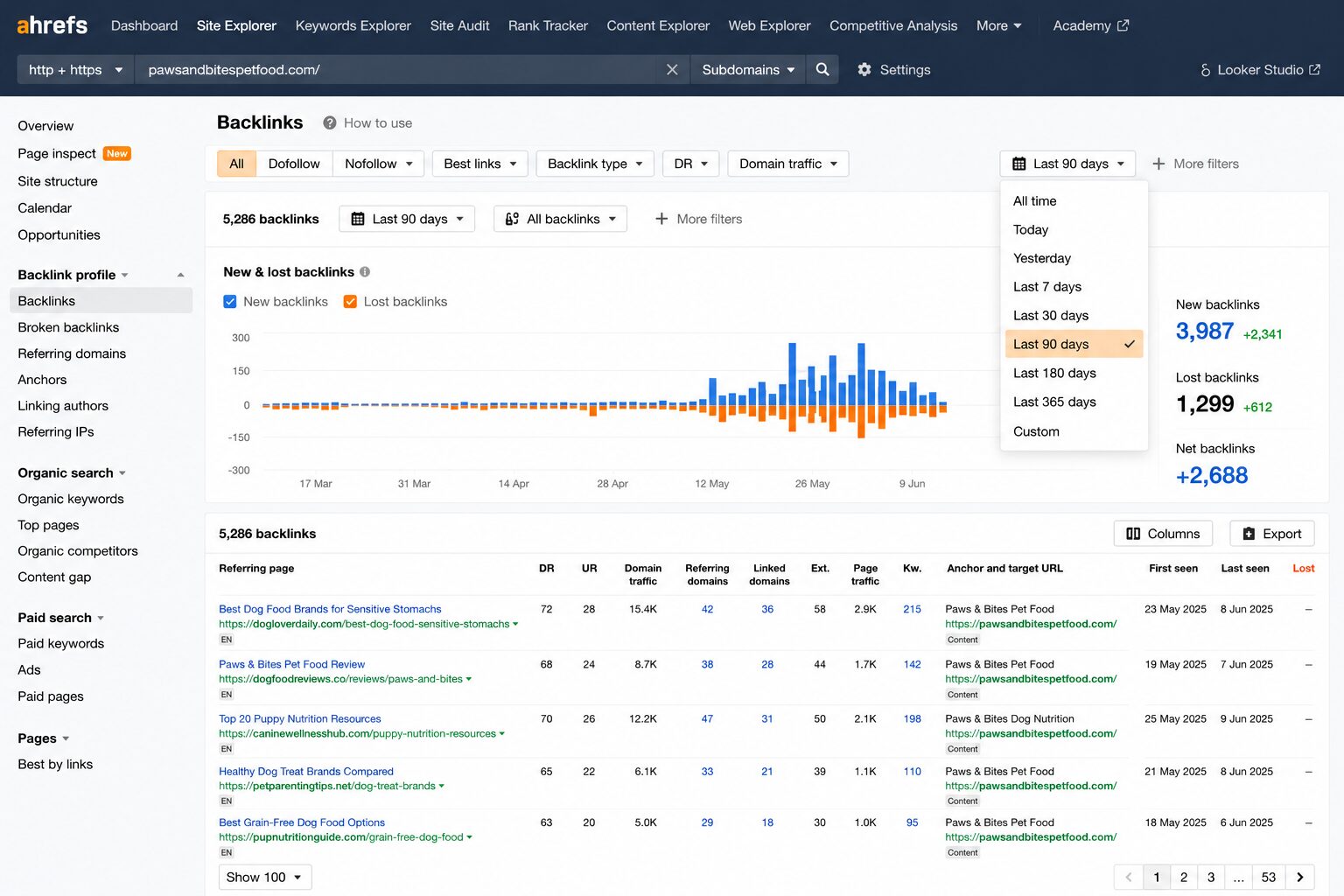
Next, look at the links added in the last 90 days first. A sudden cluster of new low-quality links is what triggers a real disavow conversation.
An old, stable backlink profile rarely needs cleanup at all.
Step 3: Filter for the Patterns
Search for the genuine spam signals: paid placements, link farms, irrelevant directories, and suspicious anchor text.
Ignore the tool’s toxicity score and focus on the link itself.
If you can open the page and read it, that’s almost always more informative than the score.
Step 4: Sort the Flagged Links
Sort the flagged links into two buckets.
The first bucket is “try to remove at source.” Email the site owner or webmaster and ask them to take down the link. Many will comply.
The second bucket is “links I can’t get removed, and that I’ve decided are causing harm.”
This second bucket is what goes in a disavow file, if anything does.
If by the end of this process you have an empty second bucket, you don’t need a disavow file.
The audit is the work, and the file is the formality.
Plenty of audits of your backlink profile end in zero disavow entries, and that’s the right outcome for most websites.
How to Create a Disavow List: Format, Syntax, and Limits
A disavow file is a plain-text file that ends with .txt. It uses UTF-8 (the standard plain-text encoding for the web) or basic ASCII characters and lists either a single URL or an entire domain per line.
The full specification is short. You can build a working disavow file in a text editor in a few minutes.
The Line Types
You can include two kinds of entries.
A single URL on its own line tells Google to ignore exactly that one URL.
A domain entry, prefixed with domain:, tells Google to ignore all links from that domain (including subdomains). This is the heavier option, and the one you’ll use more often when a single site has thrown a cluster of bad links at you.
Lines that start with # are comments. Google ignores them. Use comments to remind yourself why each entry is in the file.
The Hard Limits
Google enforces three caps on the file itself.
- Maximum file size: 2 megabytes.
- Maximum lines (counting blanks and comments): 100,000.
- Maximum characters in any URL: 2,048.
For most sites, these limits are theoretical.
A realistic disavow file is dozens of lines, not thousands.
A Worked Example
Here’s a small file that shows the two entry types and a comment block:
# Disavow file for example.com
# Created 2026-03-12, after manual action review
# Single URLs from a one-off spam page
https://random-blog-network.example/post-12
https://random-blog-network.example/post-44
# Whole domain that posted dozens of low-quality links
domain:spamdomain.example
domain:another-link-farm.example
Two things to notice.
First, the comment lines explain context to your future self.
Second, the domain: prefix is the workhorse.
A single-domain line removes all links from that entire site at once.
How to Submit Your Disavow File in Search Console
To submit your disavow file, open the disavow tool, pick the correct Search Console property, click Upload Disavow List, choose your text file, and confirm the upload.
Step 1: Find the Official Google Disavow Tool Page
Go to the disavow tool inside Google Search Console. The tool sits on its own page (the regular Search Console sidebar doesn’t link to it directly), so the easiest path is to search Google for “Google disavow tool” and follow the link to the official page.
Step 2: Select the Correct Search Console Property
Select your property. Make sure you pick the exact site that has a manual action. If you have several properties in Search Console, this is the easiest place to make a mistake.
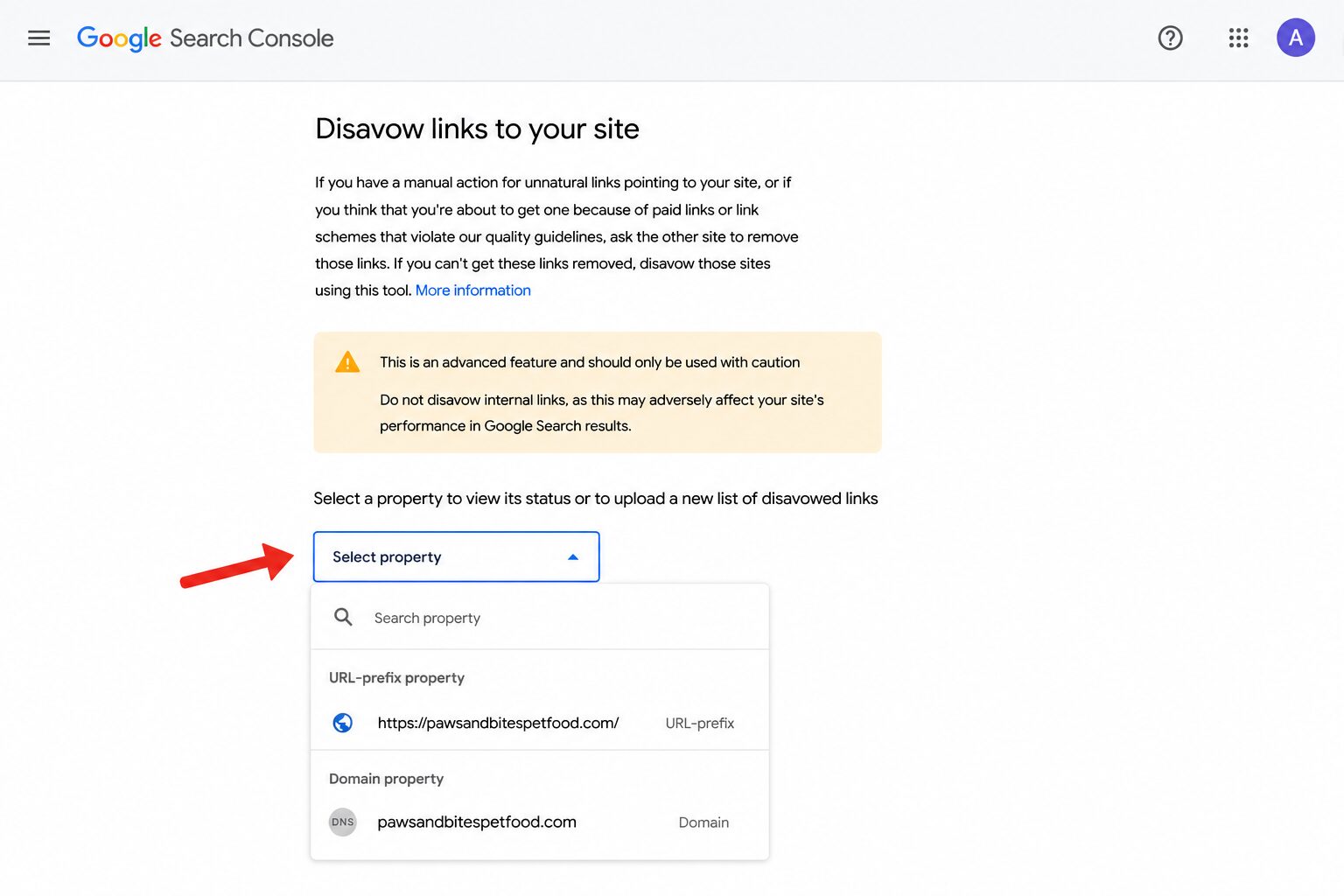
A domain property covers every subdomain and protocol of your site, while a URL-prefix property covers one exact address.
Step 3: Upload Your TXT Disavow File
Click Upload Disavow List. Choose the .txt file you built in the previous section. The tool will scan it for syntax errors before accepting it.
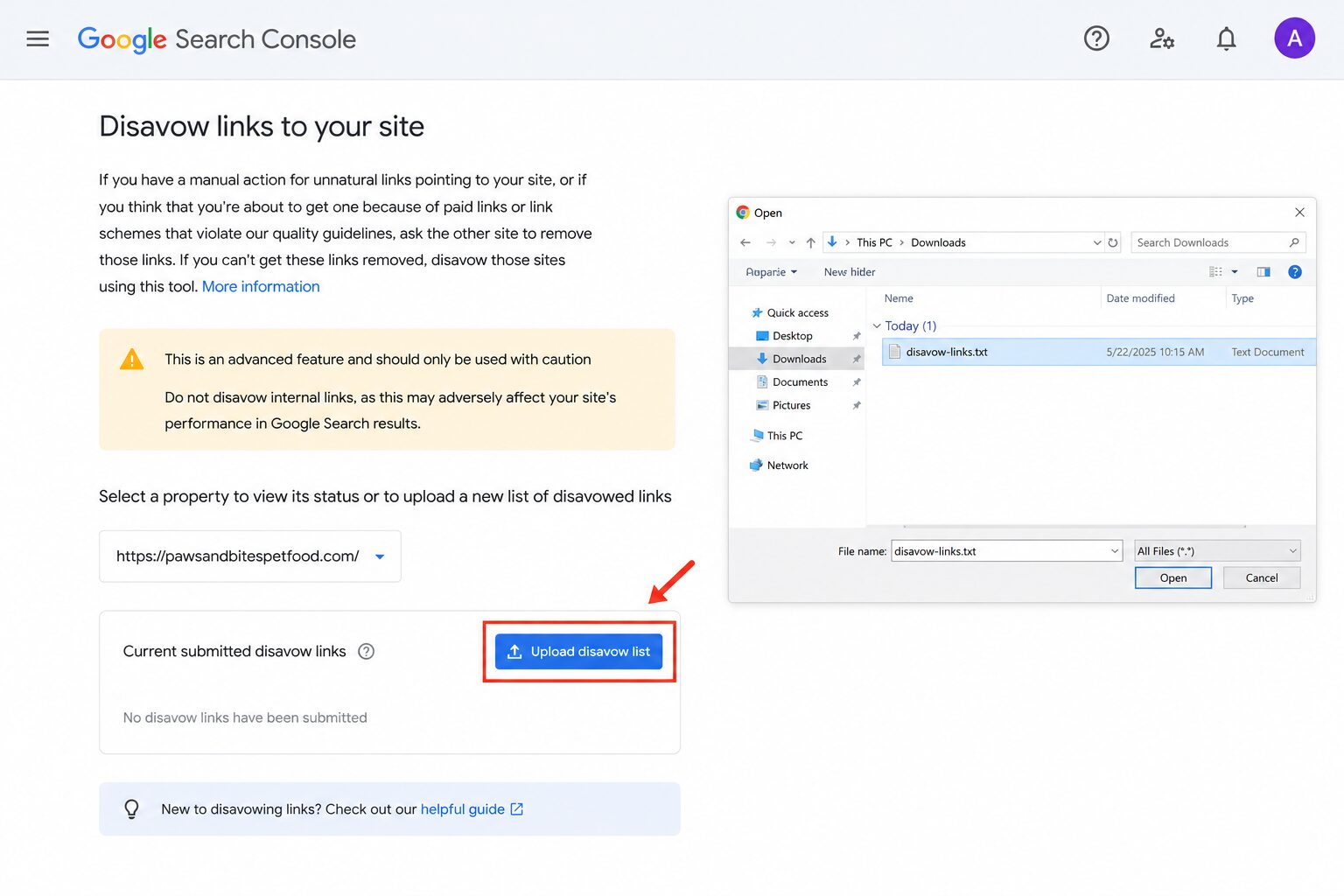
Step 4: Check for Syntax Errors Before Confirming
Confirm the upload. The tool will show you any line it couldn’t parse. Fix those lines in your text file and re-upload before you walk away.
Step 5: Save a Local Copy of the Uploaded File
Save a copy of the file you uploaded. Save it somewhere you’ll remember. If you ever need to update the list (and you almost certainly will), you’ll edit the saved file and re-upload the new version.
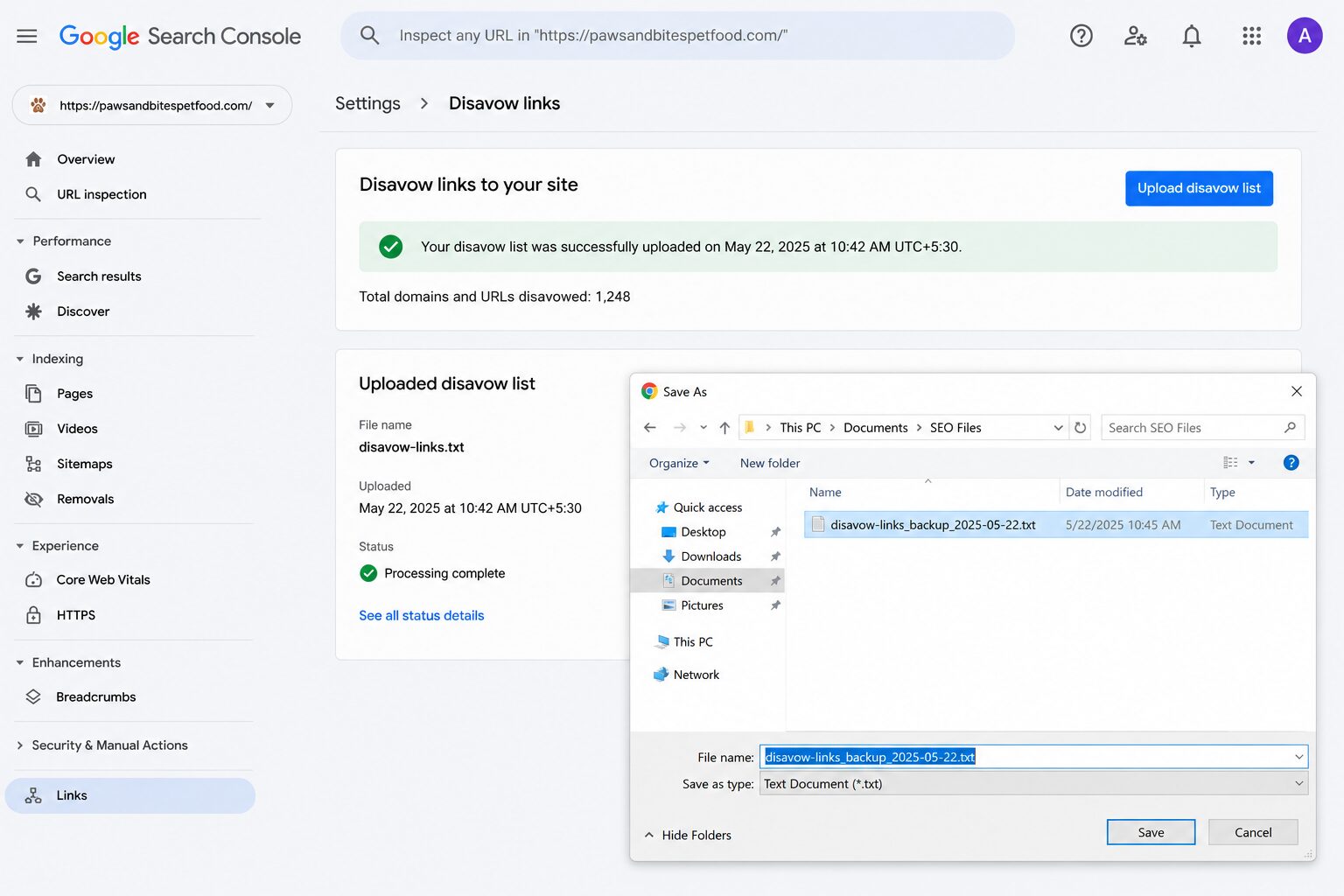
Each upload replaces the previous list entirely, so the saved local copy is the only record you have of what you disavowed and when.
A clean upload returns no error message. There’s no “disavow processed” confirmation email and no rank change to watch for in the days that follow.
The file is in. Google will incorporate it on its own timeline.
After You Submit: Processing Time, What to Expect, and What Not to Expect
After you submit a disavow file, Google takes a few weeks to recrawl the affected pages and apply the changes. You won’t receive a confirmation email, and you won’t see an immediate change in ranking.
The timeline is the boring part of the process, and it’s where expectations slip the most.
The processing window is several weeks to a few months, not days.
Google must recrawl each referring URL or domain in your file before it can apply the disavow signal to your rankings. Some of those URLs get crawled quickly. Others, especially pages on tiny low-traffic sites, may not be re-crawled for weeks.
You won’t see a “disavow processed” notification. There’s no green checkmark confirming the file was applied. Search Console only confirms that the file was accepted, not that the disavow has taken effect.
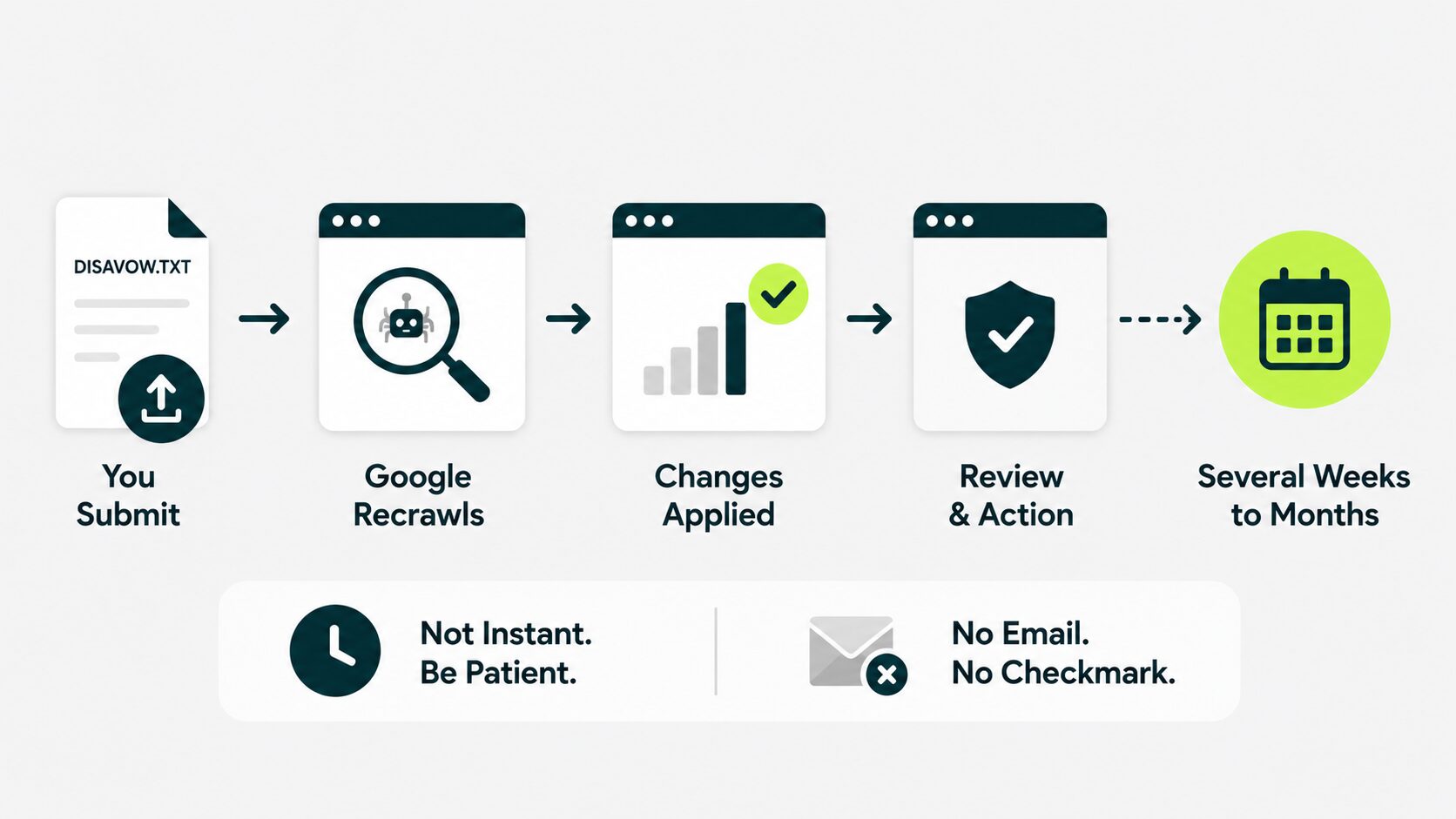
A disavow doesn’t lift a manual action on its own. If your reason for disavowing was a manual action, the next step is to file a reconsideration request in Search Console.
A reconsideration request is a short note asking Google to review the action on your site and clear it once you’ve fixed the underlying issue.
The disavow file is half the recovery. The reconsideration request is the other half. The action stays on your site until a Google reviewer clears it.
If your rankings were never affected by the links in question, you may see no change at all. This is the most common outcome when sites disavow without a real underlying problem. Nothing happens because nothing was ever pulling the rankings down.
The disavow file is a quiet tool. Treat its quietness as the design, not as a failure.
If You Change Your Mind: Removing or Replacing a Disavow
You can’t undo a single disavow entry without re-uploading a whole new file.
You can either upload a new file that removes the entries you want to reverse or remove all disavows at once using the tool’s reset option.
The mechanic is simple. Each upload replaces the previous file in its entirety. There’s no diff and no append.
To reverse one entry, open your saved copy, delete that line, and upload the edited file as the new disavow list.
To wipe the slate completely, use the “Cancel disavow links” option inside the tool. This removes every disavow you ever uploaded and restores Google’s natural treatment of those links.
Be patient with timing. Re-evaluation after a removal takes the same several-week-to-months window as the original disavow.
Google has to re-crawl the affected pages before any links you reauthorized start contributing again.
This is the single biggest reason to disavow carefully. Reversal works, but reversal is slow.
When Disavow Can Hurt You
Yes, the disavow tool can hurt you in two ways. You can disavow legitimate links that were carrying real ranking signals, or disavow whole domains that might send you useful links later.
Both mechanisms are quiet. You don’t see the loss because it’s the absence of a gain.
The first mechanism is the more common mistake.
A site owner sees a long list of “toxic” links in an audit tool, panics, and dumps the whole list into a disavow file. Some of those links were perfectly fine. A few were high-quality backlinks that had been quietly contributing for months.
The ranking signal those links carried is gone. The site’s profile is now slightly thinner, and the owner doesn’t know which links did the damage because the loss looks like nothing.
The second mechanism is a slower bleed.
A domain: entry tells Google to ignore every link from that domain, both the one that’s on it today and any future link from that domain.
If a publication that you disavowed in 2024 publishes a great article about your industry in 2027 and links to you, Google will ignore that future link, too. You wouldn’t know.
The article would still drive traffic. It just wouldn’t drive ranking.
The conservative move is the right one. If a link is borderline, leave it.
Let SpamBrain do its job. The disavow file is for the cases you’re sure about.
What About Bing? The Disavow Feature Is Gone
Bing retired its disavow links feature in October 2023, which means the only major search engine still offering a disavow tool is Google.
The reason Bing gave is the same reason most sites don’t need to use Google’s tool either. Bing’s webmaster team said its AI link evaluation had improved enough to tell natural links from unnatural ones on its own. Site owners no longer had to flag anything.
A second search engine deciding the tool was redundant is a useful directional signal.
It isn’t proof that Google will follow, but it’s evidence that the broader industry view of link disavowal has shifted.
For practical purposes, this section is here to answer a question, not to change your process. If you were going to use Google’s disavow tool, you still can.
Bing’s exit just means there’s no equivalent step for Bing rankings to worry about. Their algorithm will handle it for you.
Negative SEO Attacks: The Rare Edge Case Where Disavow May Still Apply
A negative SEO attack is the second narrow situation where disavow still has a role. The signal of a real attack is a sudden, documentable surge of low-quality referring domains pointing at your site. The pattern wasn’t built by you.
Real negative SEO attacks are rare. Most things site owners label “negative SEO” turn out to be either ordinary scraper activity (which Google handles) or a misread of a normal backlink pattern. But they do happen, especially in competitive niches.
The Signs You’re Looking at a Real Attack
Sign 1: A Sudden Spike
A normal backlink profile gains links steadily. A negative SEO attack typically shows up as a spike of dozens or hundreds of new referring domains over a few weeks, with no marketing activity from you to explain it.
Sign 2: A Repeated Pattern
The new domains tend to share characteristics: the same auto-generated subdomains, the same template-built pages. The same anchor text appears on dozens of unrelated sites in quick succession.
Sign 3: Irrelevant Sources
The attacking links come from sites unrelated to your topic, often in other languages. They often point to a single page on your site rather than being spread across your homepage and key URLs.
If you have all three signs, document them first. Take screenshots. Save the Search Console link export.
Then try to reach the hosts of the worst-offending domains and ask for removals. Many won’t respond. The ones you can’t get removed are what go into a disavow file.
Knowing the basic tactics behind black hat link building helps you tell what kind of attack you’re looking at and which links Google’s spam systems are built to ignore.
The Disavow Decision in One Chart
To decide whether to disavow, walk through these four questions in order. If any answer says stop, stop. If you reach the bottom of the tree with a clear yes, build the file.
This is the Manual-Action-First Decision Tree. It’s the test that the practitioners at the Outreach Desk run on every audit conversation before a disavow file is even opened.
Question 1: Do You Have a Manual Action in Search Console for Unnatural Links?
If yes, skip ahead to Question 3.
If no, continue to Question 2.
Question 2: Can You Document a Real Negative SEO Event?
Use the three signs from the previous section: sudden spike, repeated pattern, irrelevant sources.
If yes, continue to Question 3.
If no, stop. You don’t need the disavow tool. Close the tab.
Question 3: Have You Tried Removing the Problematic Links at the Source First?
If no, do that first. Most sites will quietly take a link down when asked.
If yes (or the site owners won’t respond), continue to Question 4.
Question 4: After Source Removal Attempts, Do You Still Have Spam Links That You Can Document as Causing Harm?
If yes, build the disavow file using the steps earlier in this guide.
If not, stop. You don’t need the file.
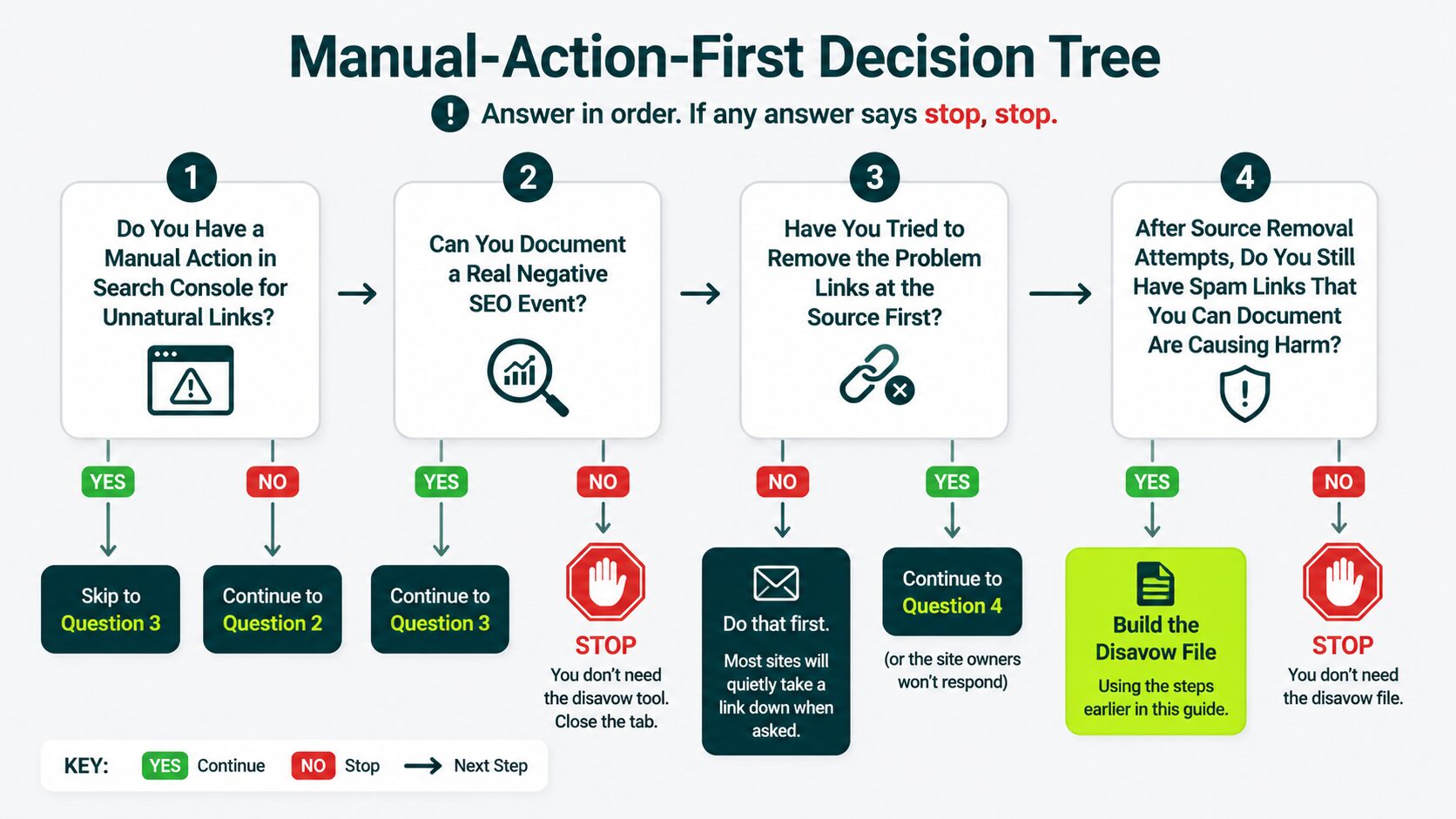
The strict ordering matters. A manual action or a documented negative SEO event is the entry point, not “I see something I don’t recognize in my backlink report.”
Source removal is the next step, not the file. The file itself is the final step, not the first.
When the tree returns ‘no’ at any point, and you still feel uneasy, the right move is to keep building good links. Let your profile dilute the bad ones over time.
When to Get Help (and When to Keep Doing Nothing)
If the decision tree returned “don’t disavow” for you, the right move is to keep doing nothing on the disavow tool and to keep building healthy links over time.
If the tree returned “disavow” and you want a second set of eyes, an outside audit can save you from the over-aggressive mistakes covered earlier.
For most readers, the action plan is simple. Close this guide. Open your backlink reporting once a quarter, not weekly.
Spend the time you’d have spent reading toxicity scores on building one or two genuinely useful pieces of content instead. That work shows up in your rankings. The disavow file does not.
For readers who do have a manual action or a real negative SEO situation, the audit is worth doing carefully. Review your backlink profile thoroughly, consult with an experienced link building team, and walk through your specific case before building any file. A few hours of conversation can save you months of re-evaluation that a wrong decision would cost.
Keeping your link profile healthy over the long run is what protects you from the rare events that would ever justify a disavow in the first place. Most of that work happens upstream, by being careful about the links you build, not downstream by cleaning up after.
Most people who arrive at this guide are looking for permission to do something. The honest answer is that doing nothing is the responsible move for almost every site in 2026.
Walk the decision tree once, find that you don’t fit either valid case, and close the file. The hours you save are worth more than the imaginary cleanup they would have funded.
Not sure if you need a disavow file or a stronger backlink strategy?
Get expert guidance on protecting your backlink profile while building long-term authority.
How often should I update my disavow list?
For most sites, the answer is “never, because you don’t have a list.” For the small number of sites that genuinely need one, the right update cadence is “when something changes.” If you recover from a manual action, ask Google to clear it via a reconsideration request, then reassess whether the disavow file still serves a purpose.
Should I disavow a single URL or the whole domain?
Disavow the whole domain when the same site has produced more than a small handful of bad links to you, or when the site is clearly low-quality across the board. Disavow a single URL when one specific page is the problem and the rest of the site is fine.
In practice, the domain: entry is what most disavow files use, because most spam links come from sites where every link is suspect. The single-URL form exists for the rare case when a single article on an otherwise reputable site has gone bad.
Do I need to disavow links if Google already ignores them?
No. If Google’s system has already neutralized a link, disavowing it adds nothing.
The disavow tool only matters when a link is still counting against you: one tied to a manual action or a documented negative SEO attack. For routine “this link looks weird in my report” anxiety, the answer is to trust the automatic neutralization and move on.
Does Bing still have a disavow tool?
No. Bing retired its disavow feature in October 2023. The Bing webmaster team said its AI link evaluation had improved enough that the tool was no longer necessary.
For Bing-only rankings, you don’t need to do anything. For Google rankings, the disavow tool is still available, but the same logic applies: use it only for a manual action or a real negative SEO event.
Can disavowing links hurt my website?
Yes, in two ways. You can accidentally disavow legitimate links that were quietly contributing ranking signals.
A domain: entry kills future links from that domain, including those that haven’t been written yet. Both losses are invisible at the time. This is why the conservative move (leaving borderline links alone) is usually right.