You spotted “Backlink Profile” in an SEO tool, an article, or a sales pitch. Now you’re wondering whether it’s something you should actually care about.
The answer is yes.
Your backlink profile shapes how search engines evaluate your website. That’s why businesses invest serious time improving it.
Start with the definition, work through the six signals Google reads, and you’ll know exactly where your profile stands.
Key Takeaways
- Every external link shapes your profile as Google reads referring domains, anchor text, and topical relevance.
- Focus on earning relevant links, aiming for 10 to 30 referring domains in year one because quality beats volume.
- Google evaluates links using six signals: referring domains, anchor text, follow status, authority, topical relevance, and link velocity.
- Start with Search Console, earn relevant links, and ignore toxic-link panic until real patterns emerge.
- A relevant DR 30 link beats a random DR 80, so check your profile every 6 to 8 weeks to earn instead of over-optimizing.
What Is a Backlink Profile
A backlink profile is the complete set of external links pointing to your website, along with the overall quality, relevance, and authority those links collectively represent.
In practice, a backlink profile measures two things: the individual links themselves, and the patterns search engines see across all of them.
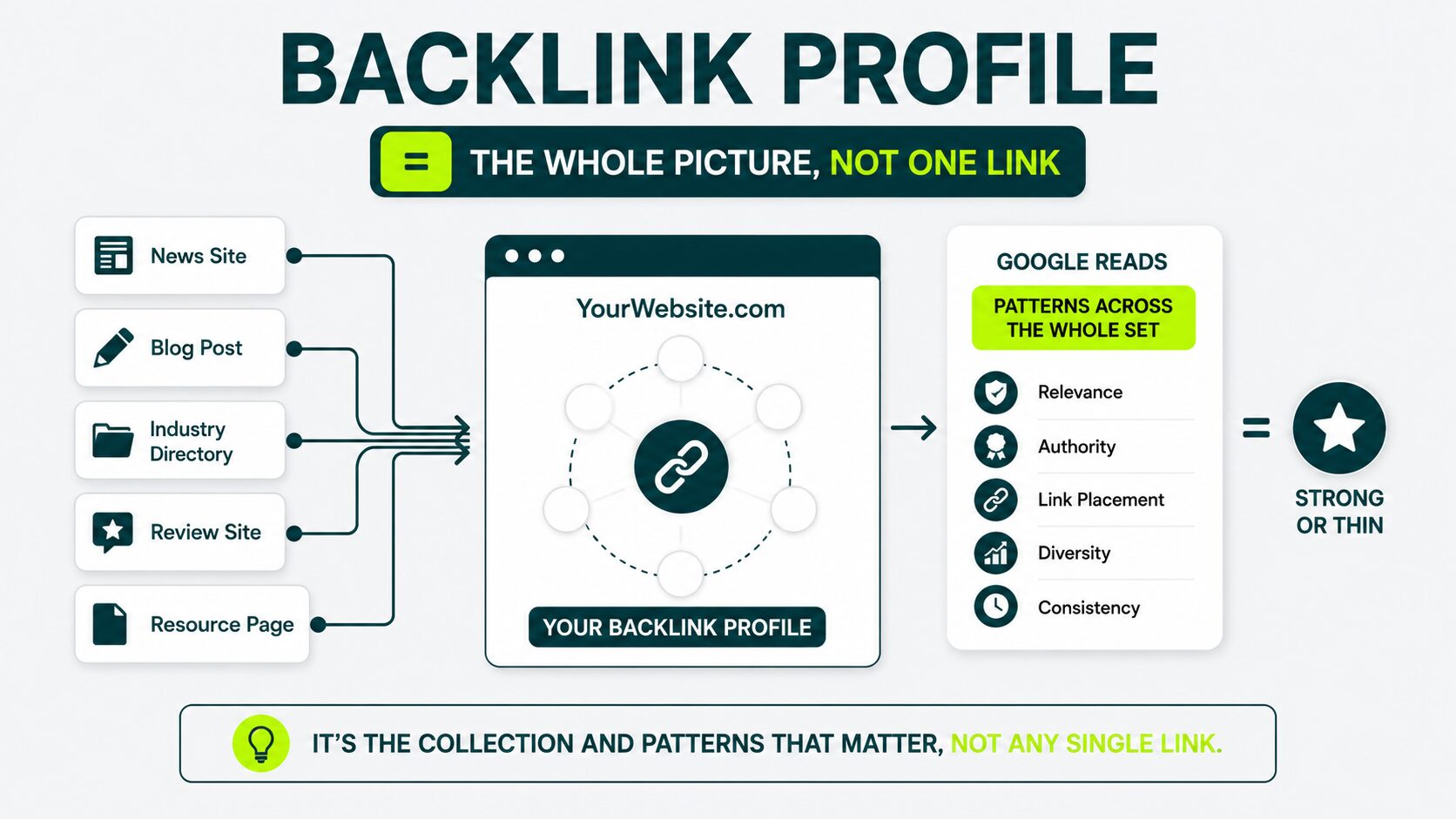
When someone calls your profile “strong” or “thin,” they’re judging your whole backlink profile instead of a single link.
Google analyzes patterns across your full backlink profile. That pattern covers:
- How many separate sites link to you
- What those sites are about. Relevance matters
- The anchor text readers click to reach your page
- Whether each link passes ranking strength (or gets ignored)
- How fast your link count grows (a sudden spike looks unnatural)
One link rarely moves the needle on its own. The shape of your whole profile is what shifts your rankings.
If you want to build that foundation the right way, see our pillar on backlink fundamentals that breaks down what a backlink is and why search engines weigh them. Start there.
The Pieces of Your Profile That Google Actually Reads
Google evaluates six qualities of your backlink profile, in addition to the total count: referring domains, anchor text, follow status (dofollow or nofollow), authority of linking sites, topical relevance, and link acquisition pace.
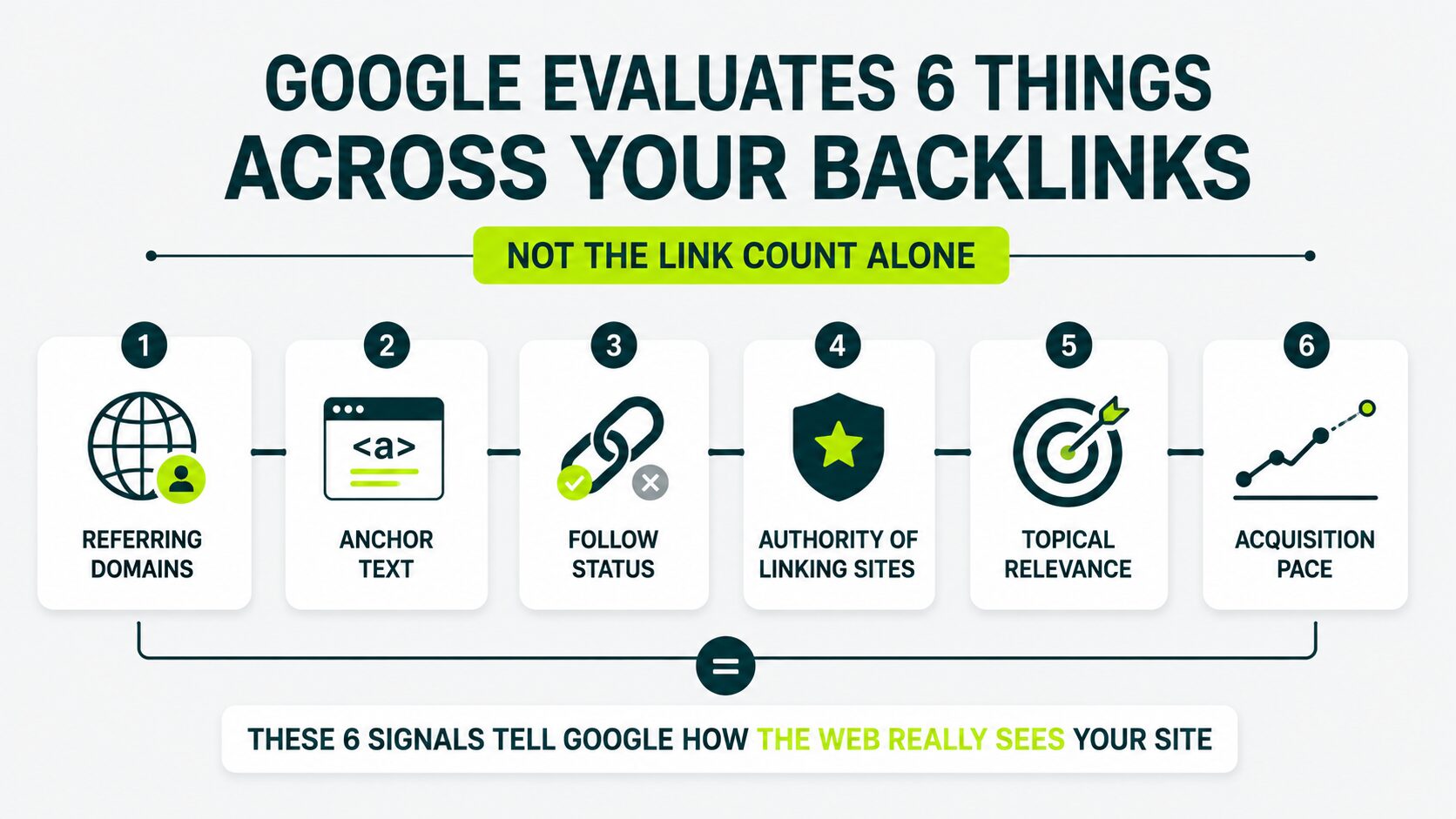
Each signal tells the algorithm something specific about how the rest of the web treats your site.
Referring Domains
Referring domains are the unique websites linking to you, and they are the most important number to track first.
Each referring domain is like a new person vouching for you. Ten recommendations from ten different people usually carry more weight than ten recommendations from the same person.
Ten referring domains = ten different websites endorsing you.
Ten backlinks from one site? That’s one site endorsing you ten times, and search engines treat it roughly the same as a single endorsement.
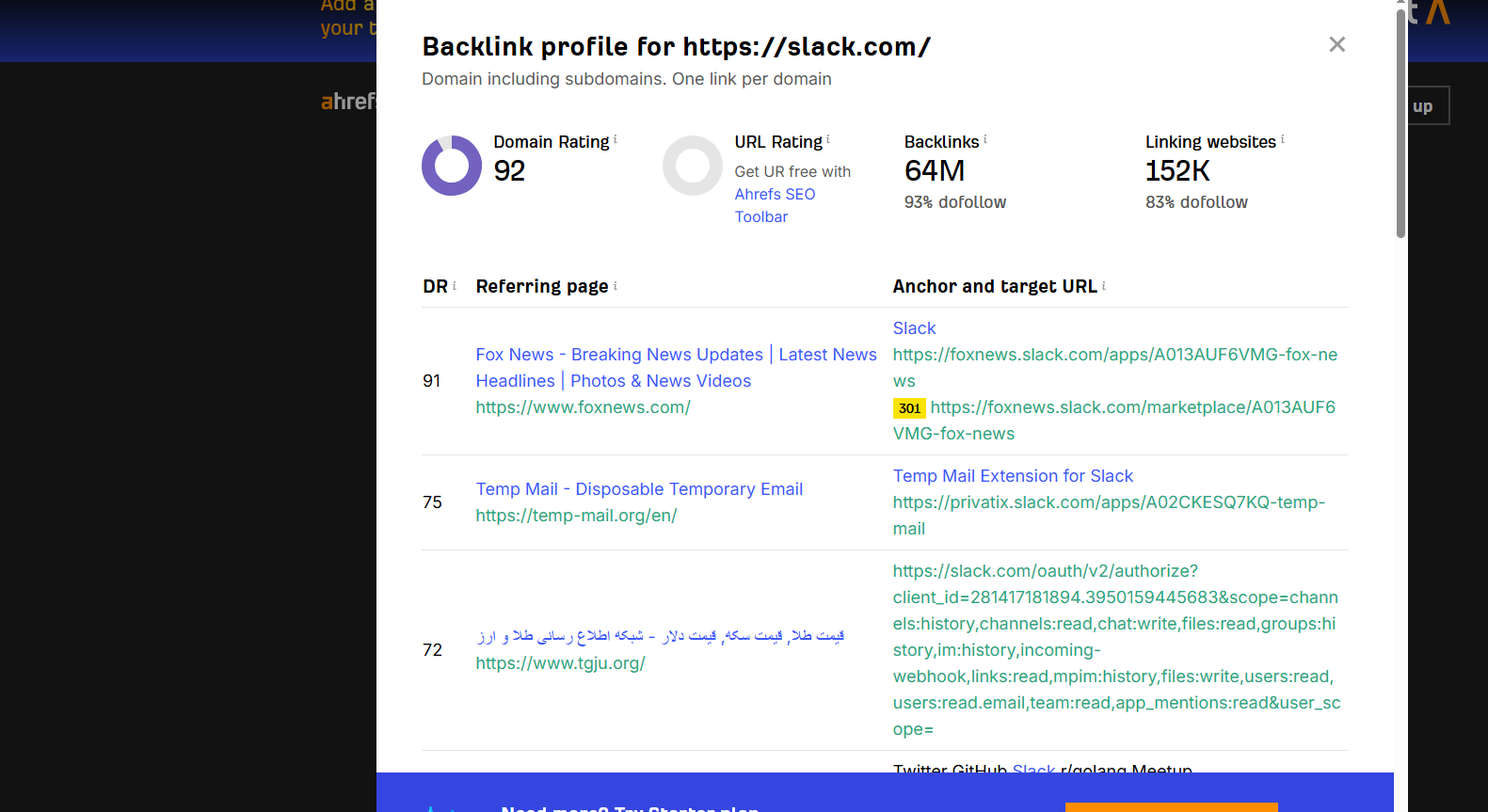
You can check the number of referring domains from the Ahrefs backlink checker tool. The image shows Slack.com’s backlink profile, with 78K referring domains linking back to it.
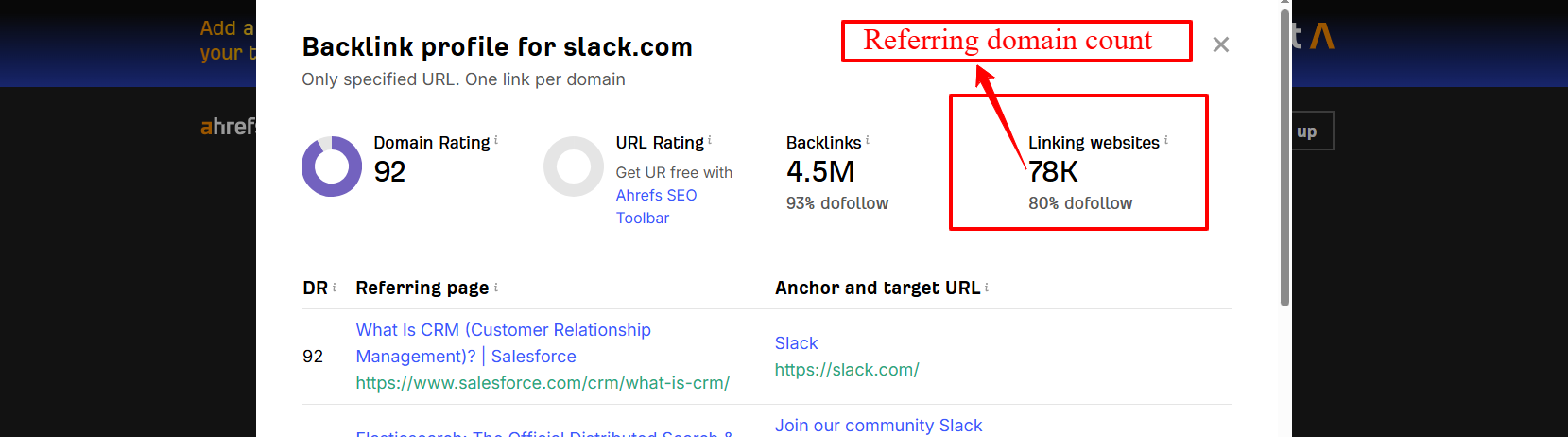
More referring domains build broader authority. That’s what moves your rankings.
Anchor Text
Anchor text is the clickable text in a hyperlink that helps users and search engines understand what the linked page is about.
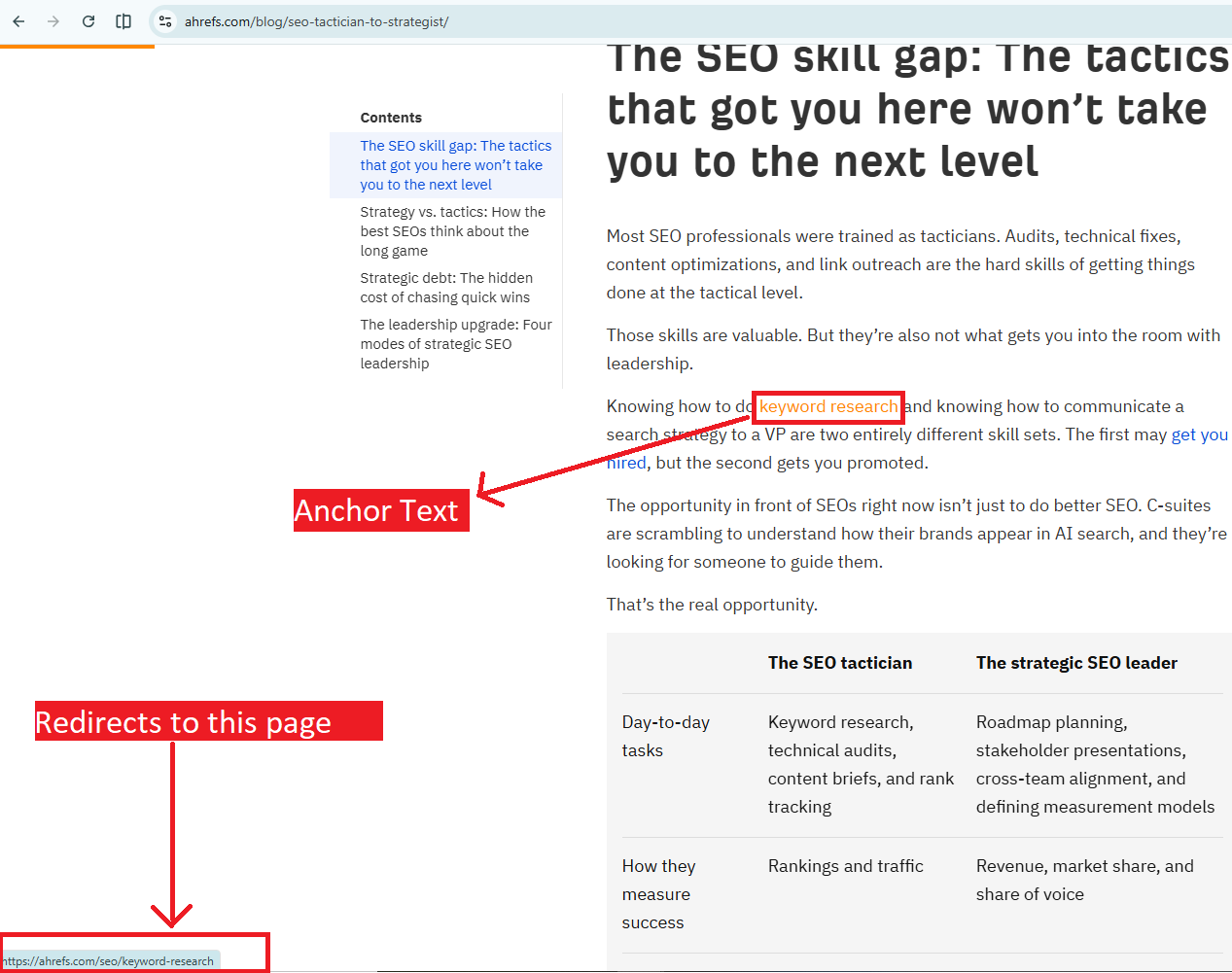
Anchor text works like a sign on a door, telling visitors what’s inside. A natural anchor mix blends a few types: your brand name, plain URLs, descriptive phrases, and just a small share of exact-keyword wording.
That mix looks messy on purpose. Real people across the web rarely link to you with the same words twice, so variety is the signal of authenticity.
When every link points to you with the identical exact-keyword anchor, that pattern looks engineered, and search engines notice. For a closer look at how that mix should actually break down, see anchor text distribution.
Follow Status (Dofollow vs Nofollow)
A dofollow link passes ranking authority directly to your site. A nofollow link doesn’t pass that authority, but it still builds your brand signal.
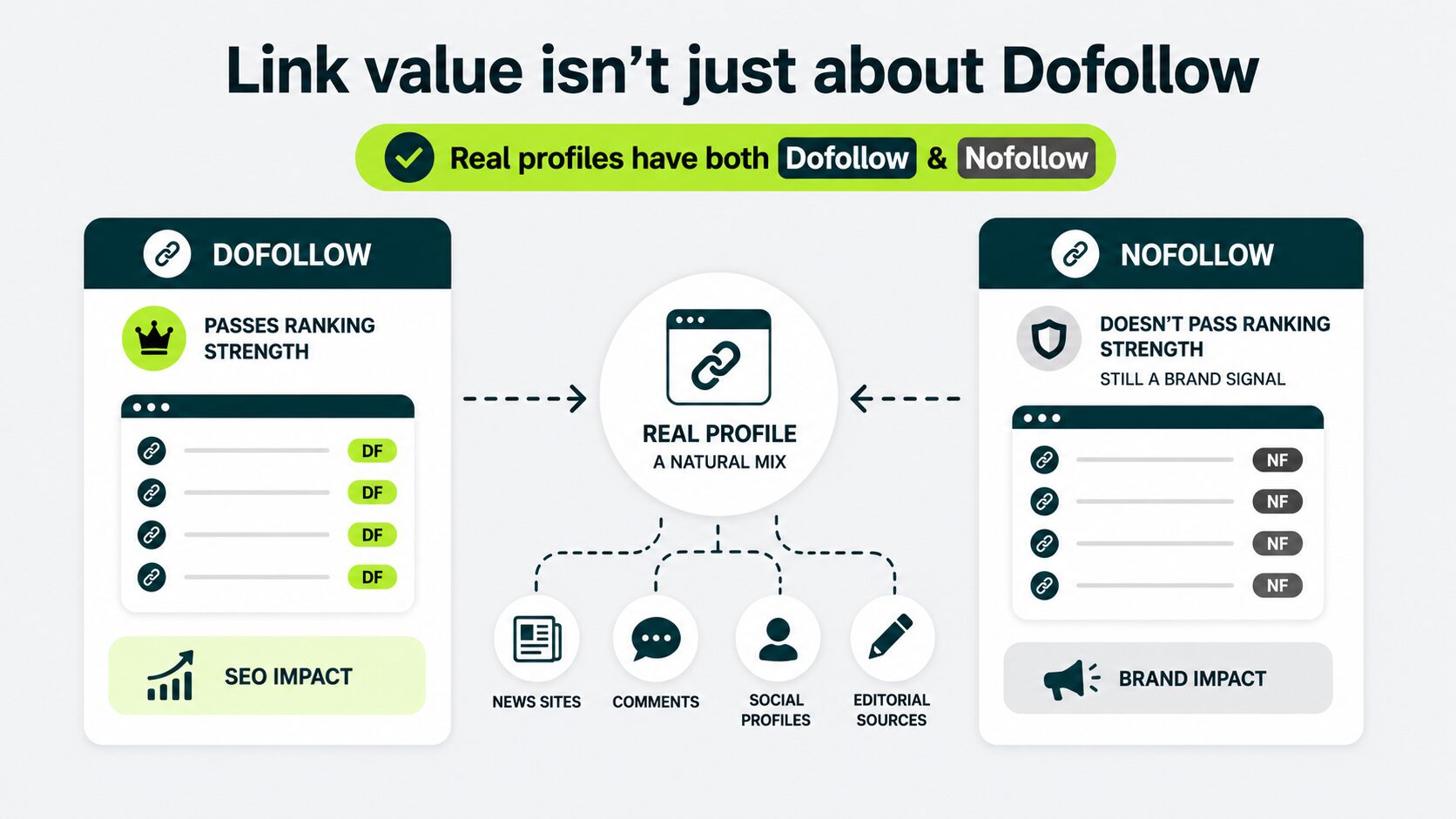
Strong, natural backlink profiles carry both nofollow and dofollow links. When your site earns enough visibility from news outlets, editorial sources, social profiles, and comment mentions, they naturally send you nofollow links.
A profile full of only dofollow links signals to Google that those links were placed instead of earned. Pure dofollow profiles are rare. Most sites naturally earn a mix.
Authority of the Linking Sites
Authority is an SEO tool’s estimate of how strong a linking website is overall.
Different SEO tools measure authority differently. Ahrefs uses Domain Rating (DR), a 0 to 100 score that measures the relative strength of your backlink profile based on the quality and quantity of unique referring domains linking to your site.
For example, you can check the domain rating score for Starbucks.com.
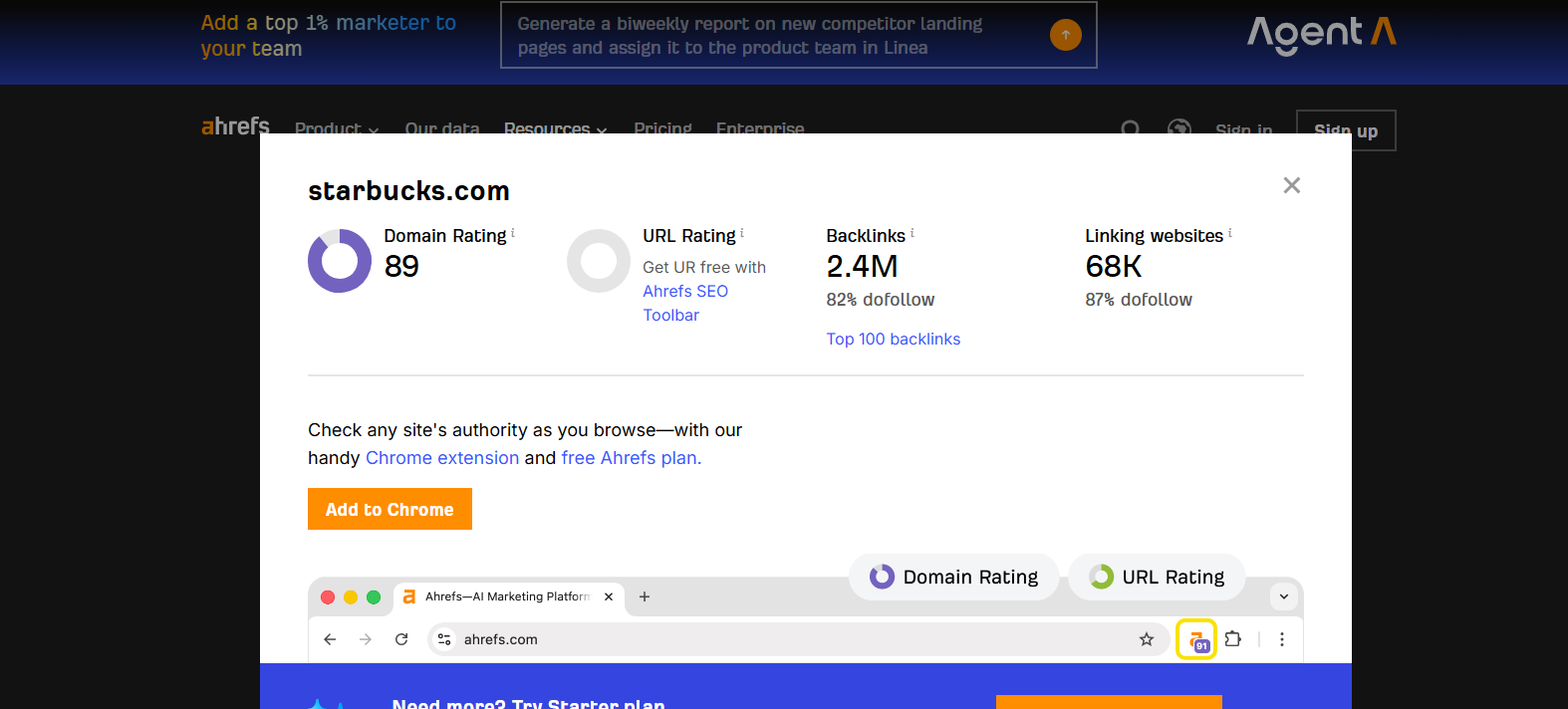
Similarly, Moz uses Domain Authority, a 100-point metric that predicts how likely your site is to rank in search results. For example, you can check the domain authority score of the same domain.
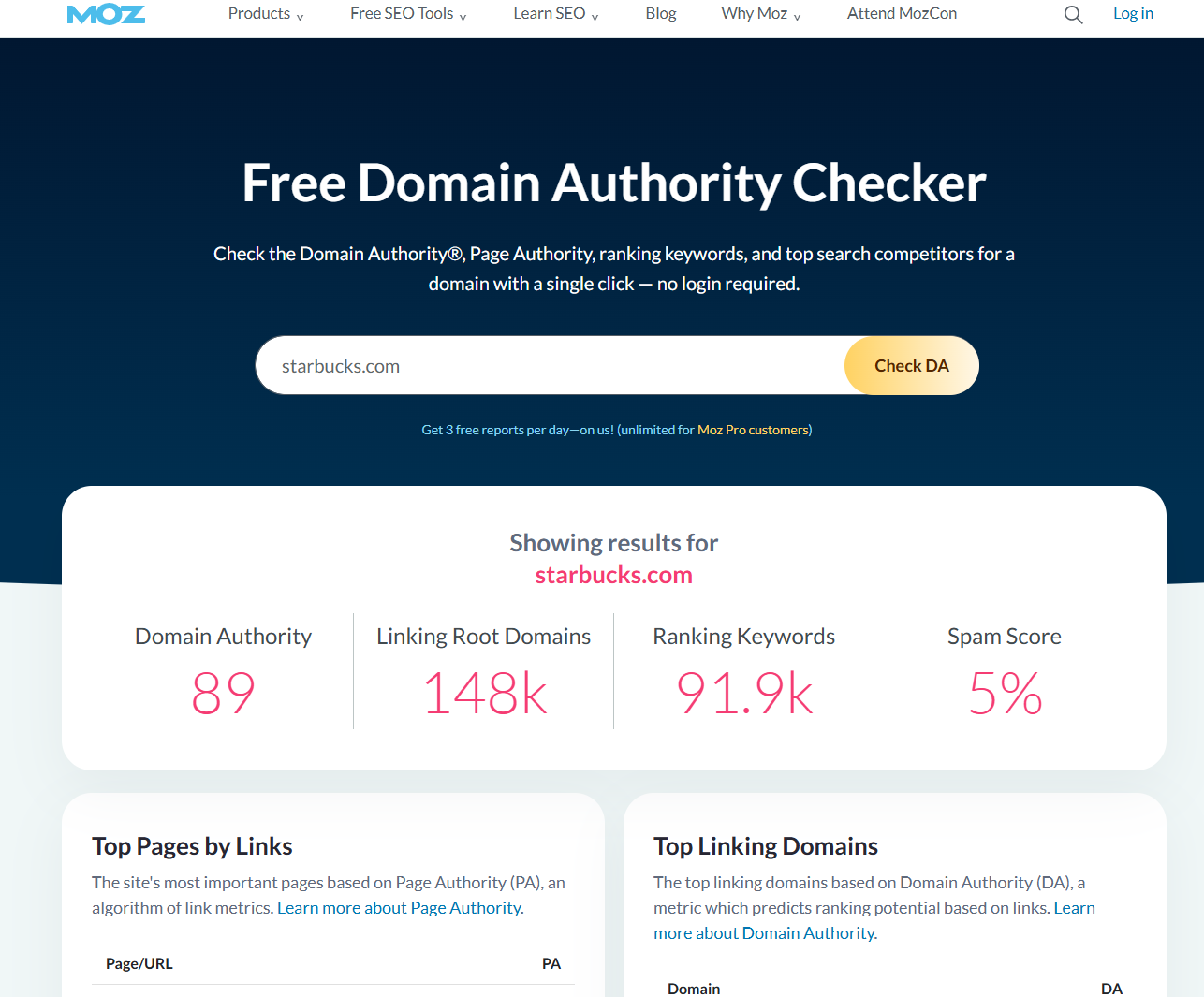
Google doesn’t share its own score. Tools build their estimates around the same signals Google’s algorithm uses.
If you’re just starting out, treat it as a rough guide. A link from a DR 70 site often carries more weight than one from a DR 5 site, but a topically relevant DR 30 link can outperform a random DR 80 link from a completely different industry.
Our comparison of Domain Authority versus Domain Rating explains how the two differ.
Topical Relevance
Topical relevance means the linking site covers topics close to yours.
A garden tools brand linking to a garden blog reads as natural. The same brand linking to a cryptocurrency site doesn’t.
Topical relevance quietly helps your link profile grow. It matters more than a high authority score alone. For a closer look at how that plays out in practice, see what makes a link relevant.
Acquisition Pace (Link Velocity)
Link velocity is how fast your referring domain count grows. Google has never confirmed it as a ranking factor. But a spike of 400 new domains in a week, with no launch or press coverage to explain it, looks manipulated.
Natural growth is slow. It’s uneven. And that’s exactly how it should be.
You’ll have months that add seven referring domains and months that add zero. Both are fine.Our guide to natural link velocity shows what healthy pacing looks like.
Note
You can see most of these metrics for free inside Google Search Console. For deeper analysis, tools like Ahrefs and Moz add authority scores, link growth trends, and additional backlink data.
What a Healthy Backlink Profile Looks Like in 2026
In 2026, a healthy backlink profile grows steadily, pulls links from sites in your topic area, and shows anchor text that reads like natural writing rather than a keyword wishlist.
The image shows Backlinko’s backlink profile.
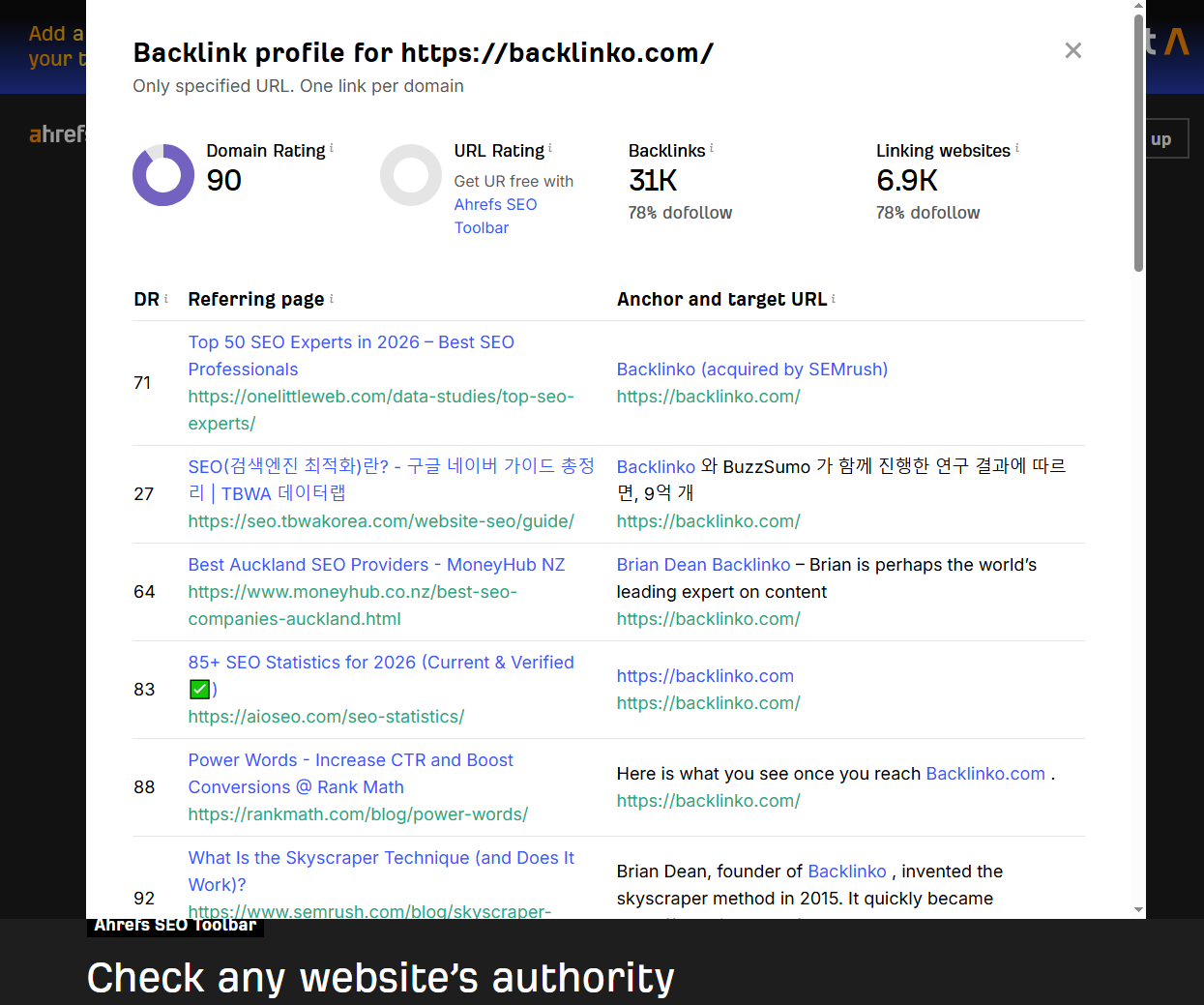
“Healthy” looks different depending on which stage you are in. These stages are: a new profile or a growing profile. What works for a six-month-old site won’t work for a five-year-old site now in the AI era.
A Small, New Profile (Under About 30 Referring Domains)
At this stage, track three things: your referring domain count, the topical relevance of sites linking to you, and whether Google Search Console shows any activity at all.
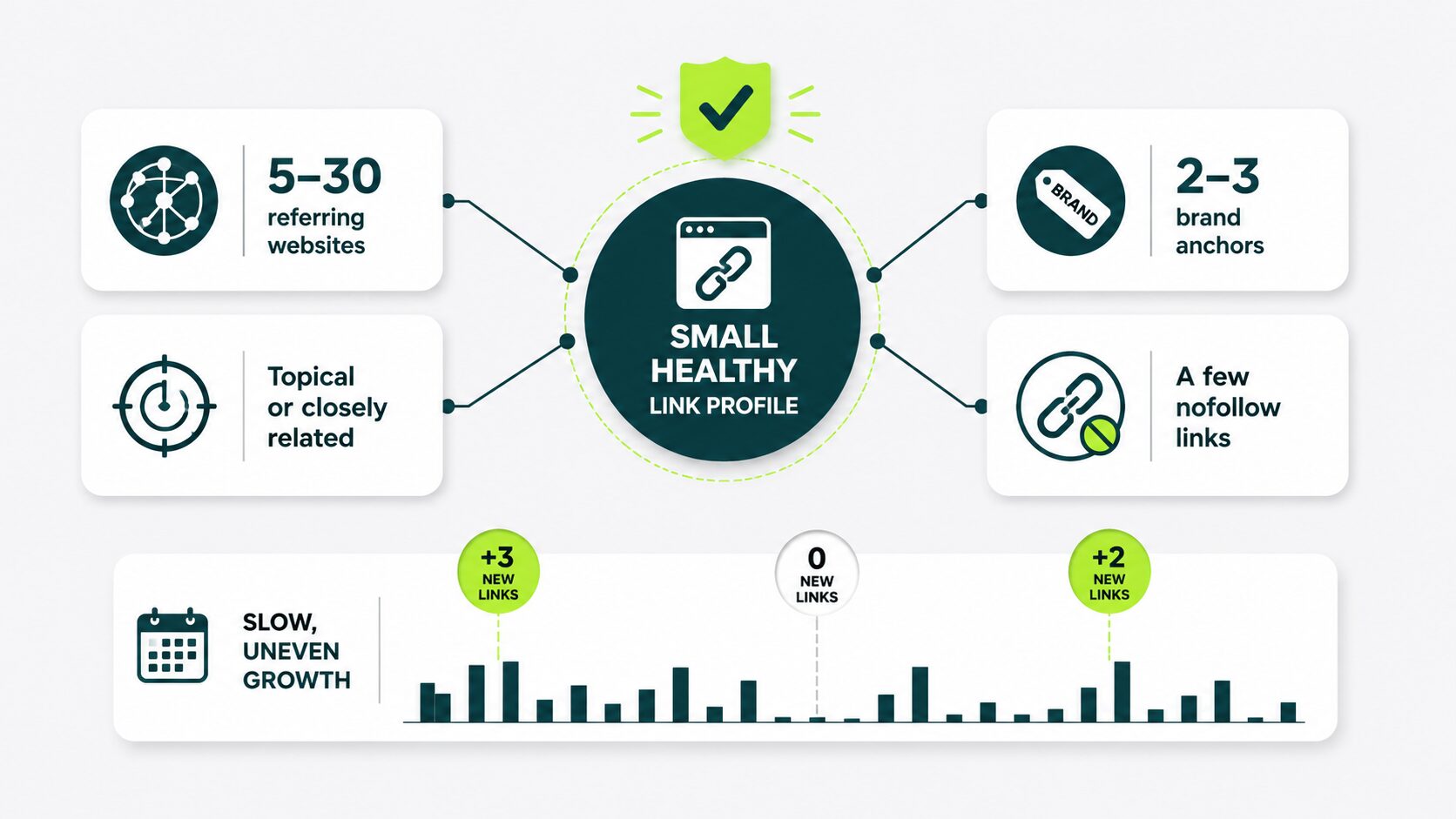
5 signs your small, new profile is growing the right way:
| SIGNAL |
WHAT HEALTHY LOOKS LIKE |
|---|---|
| Referring domains |
5–30 separate websites linking to you |
| Topical relevance |
Most linking sites cover your topic or something close to it |
| Brand anchors |
At least 2–3 anchors include your brand name |
| Link type mix |
A handful of nofollow links from listings, communities, or press |
| Growth pattern |
Slow and uneven. Some months add 3 links, others add zero |
At this size, ratios and authority distributions don’t tell you much. You don’t have enough data points to spot a real pattern yet.
In early-stage profiles, the topical relevance of those first links matters more than the total count. A handful of links from relevant sites outpace a larger batch of off-topic ones.
In our experience, a strong first-year backlink profile is defined less by the number of referring domains and more by the quality, relevance, and diversity of the sites linking back.
A Growing Profile (Roughly 100 to 300 Referring Domains)
At this stage, your profile has enough data to reveal patterns. You can spot anchor mixes, authority distributions, and topical clusters.
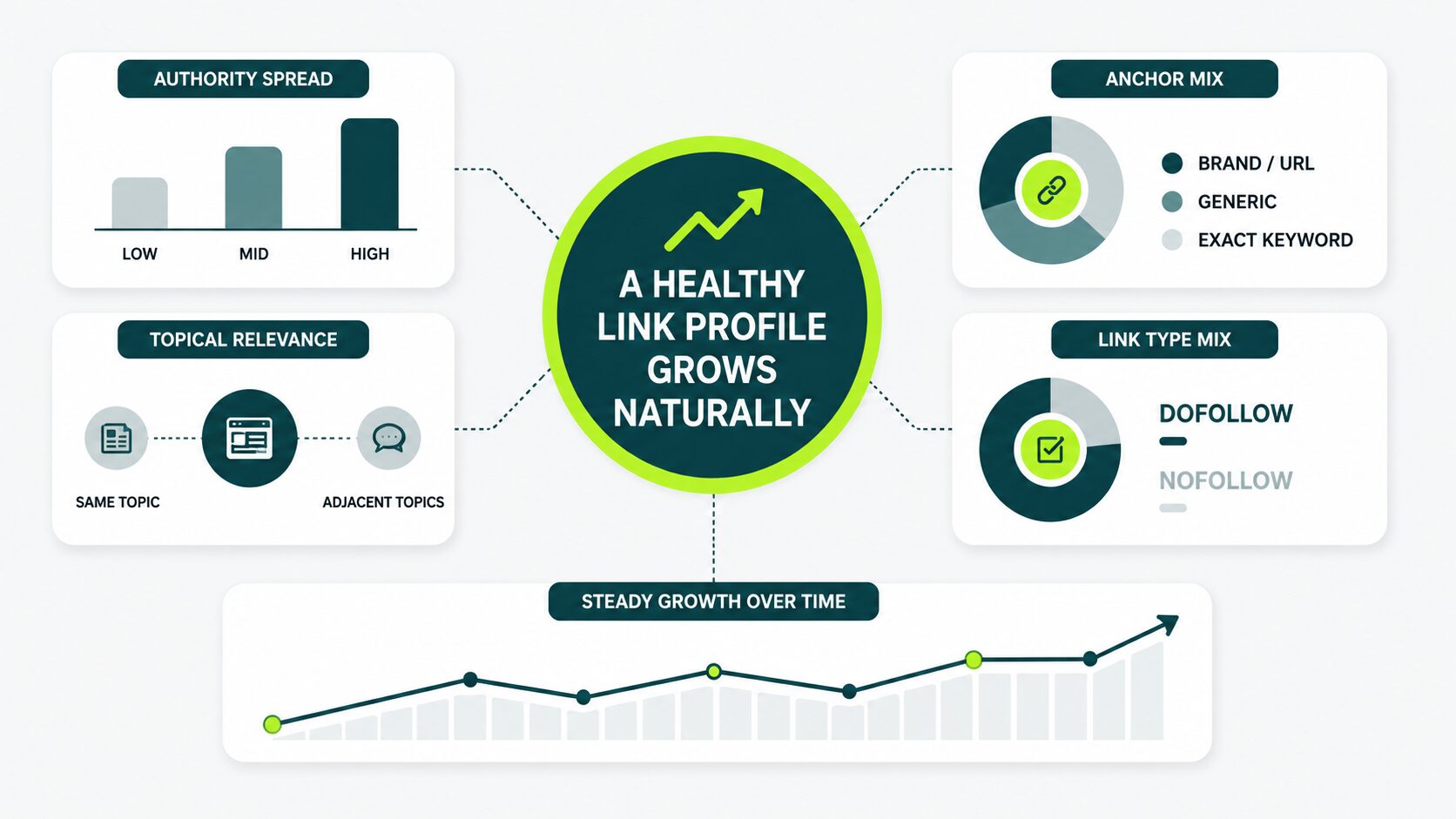
5 signs showing your growing profile is healthy and what to watch out for:
| SIGNAL |
WHAT HEALTHY LOOKS LIKE |
WATCH OUT FOR |
|---|---|---|
| Referring Domain spread |
Mix of low, mid, and high authority referring domains | All links from DR 70+ sites only |
| Anchor mix |
Brand and URL forms appear more than exact-keyword forms | Exact-match anchors dominating |
| Link type ratio |
Dofollow majority, with nofollow in the mix | 100% dofollow looks engineered |
| Topical coverage |
Links from publication and blogs in your topic, plus a few from adjacent topics | All links from the same niche cluster |
| Growth pattern |
Steady over time, even if individual months vary | Sudden spikes followed by long flat periods |
When every link in a profile is a DR 70+ guest post with matching anchors, the engineered look becomes obvious. Real links come with messy edges, and that’s a good sign.
The 2026 Layer: AI Search and Brand Signals
AI Overviews pull citations from the same sites that rank in organic search, so the backlinks that improve your rankings now also improve your AI citation rate.
In 2026, Google isn’t the only system reading your link pattern. AI Overviews and large-language-model search tools also weigh which sites appear in the answers.
Your link profile feeds into that judgment, alongside mentions of your brand , citations, and editorial visibility.
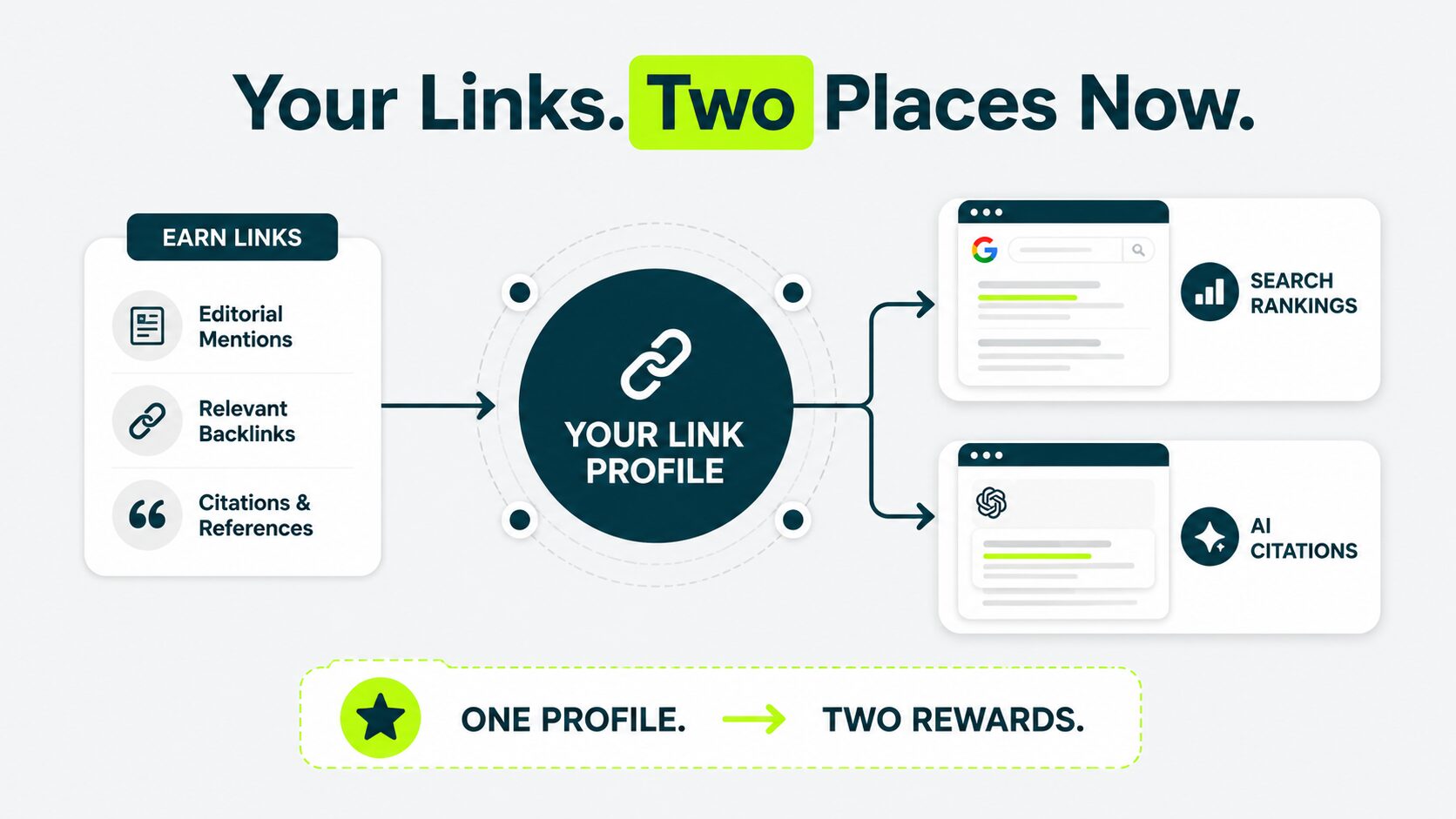
For a small profile, the practical shift is minimal. You still earn the same kinds of links from the same kinds of sites for the same reasons. The reward now lands in two places: search rankings and AI citations.
Two short notes on what this changed:
- Brand-related anchors, such as your company name or product name, carry slightly more weight than they did a few years ago because AI search prioritizes brand signals when deciding whom to cite.
- Topical clustering matters more. AI search systems pull from sources that appear to be authorities on a topic, not from sources that happen to have a few links.
Our AI Overviews SEO playbook covers how to earn those citations.
How to Check Your Backlink Profile (Free Path First)
You can see your backlink profile in three steps: open Google Search Console, run the free Ahrefs backlink checker tool, and switch to the paid tool when you outgrow the free ones.
Step 1: Open Google Search Console
Google Search Console is the free tool Google offers for tracking how your site shows up in search.
If you haven’t set it up, this is the first move. The setup takes about ten minutes and confirms you own the site by adding a small file or DNS record.
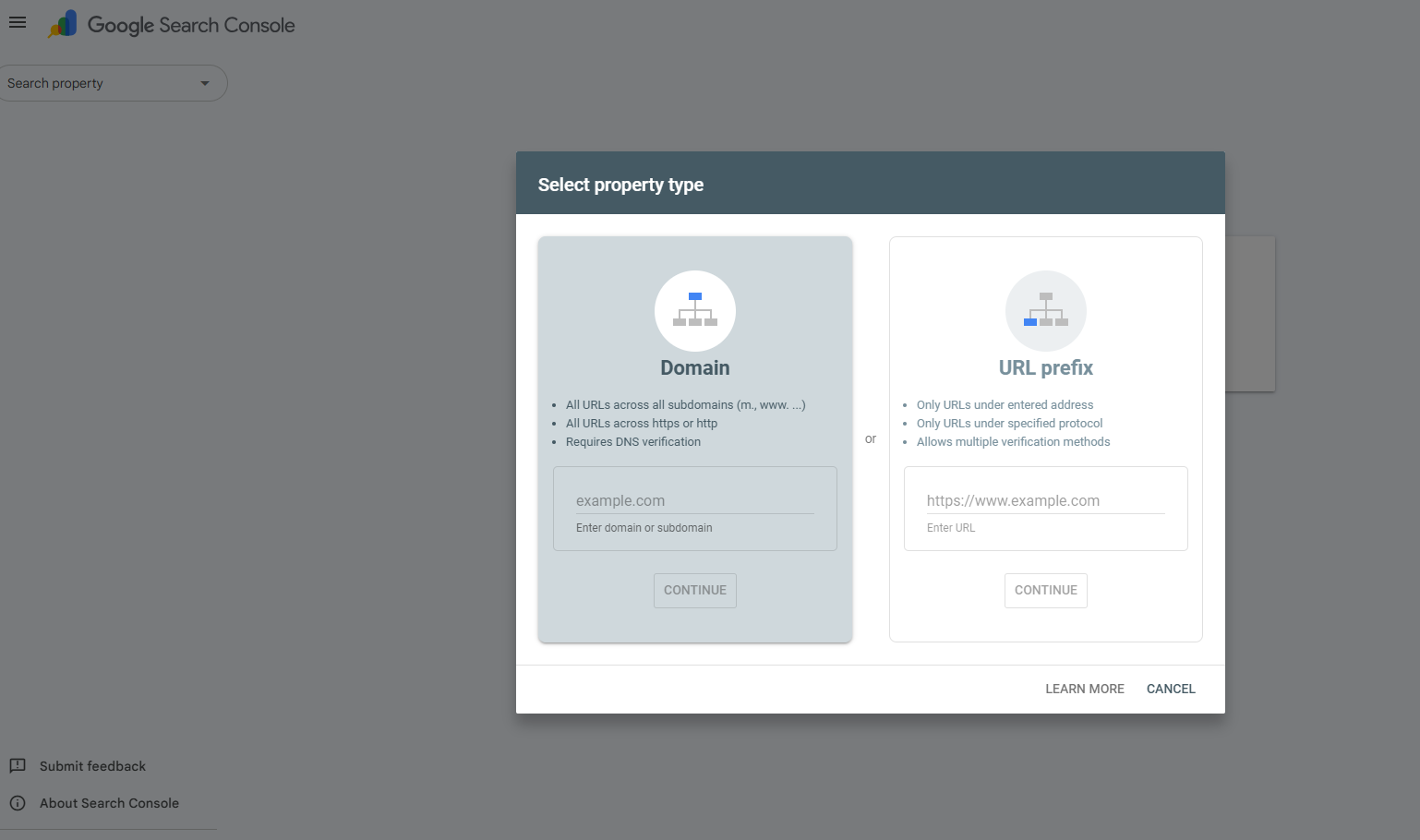
Once verified, open the Links report from the left sidebar. You’ll see two columns. The first lists the external sites linking to you. The second lists your own pages that receive the most external links.
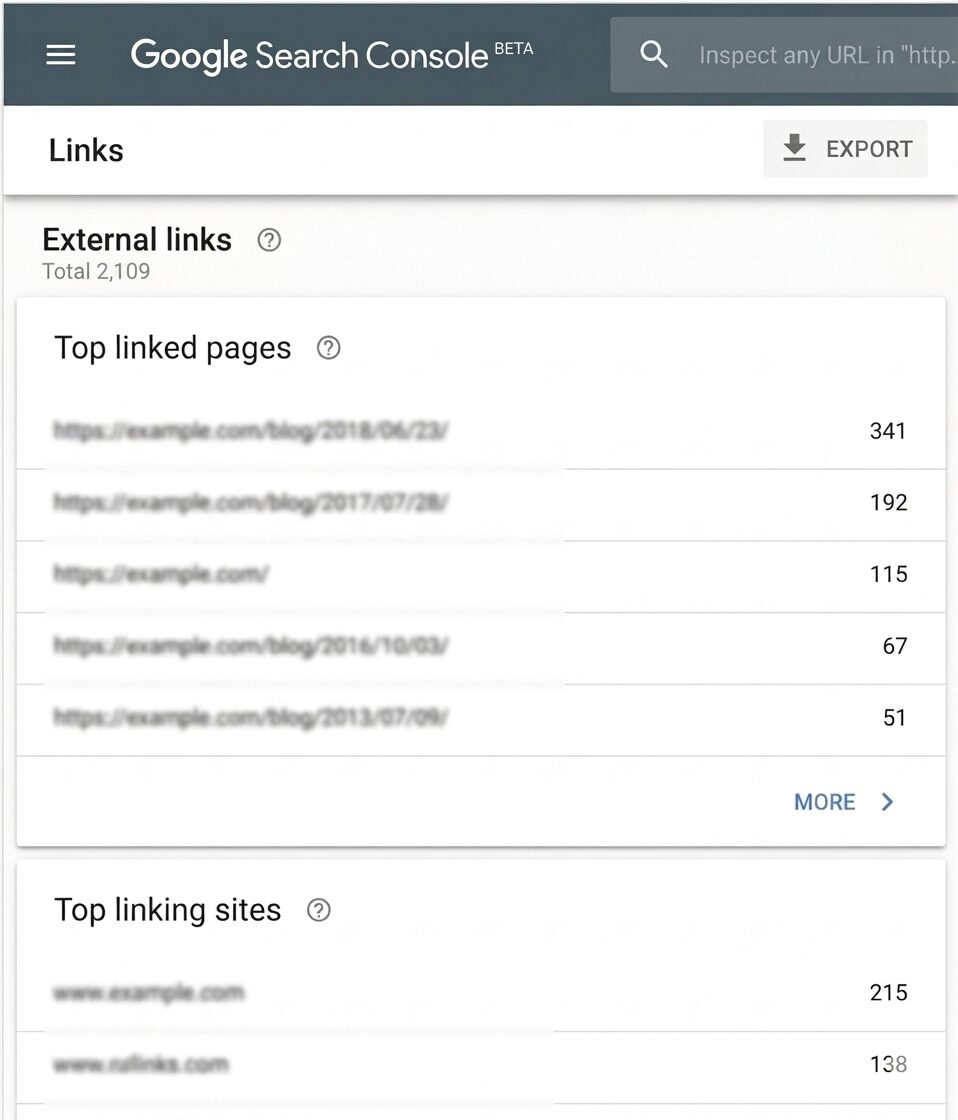
It’s the cleanest view of your backlink profile from Google itself, with no third-party guessing. Begin here.
Step 2: Run the Free Ahrefs Backlink Checker
Search Console shows what Google crawled and confirmed. A second free tool gives you a broader sense check.
Open the free Ahrefs Backlink Checker. Paste in your domain. You’ll see referring domain count, total backlink count, and DR estimate, plus a list of the strongest links pointing at you.
The free version caps at the top 100 backlinks. That’s plenty for a beginner profile. Here, for example, you can see all the details for the domain: slack.com
The free Semrush and Moz checkers offer similar quick views.
Step 3: Move to a Paid Tool When You Outgrow Free Ones
You’ll outgrow free tools at the point you start tracking movement, monitoring competitors, or running outreach campaigns at scale.
At that point, a paid Ahrefs, Semrush, or Moz subscription unlocks unlimited link data, lost-link alerts, and competitor backlinks comparisons. For most first-year sites, this is six to twelve months out. There’s no benefit to paying earlier.
For a deeper walk-through of which tools do what, see our piece on best link building tools.
Red Flags Worth Caring About and Ones Beginners Worry About for No Reason
Some link patterns deserve your attention, excluding a small profile.
This section helps you distinguish between the ones you need to pay attention to and the ones beginners don’t need to worry about, so you focus your energy on what actually matters.
Patterns Worth Your Attention
These patterns can hurt your rankings or signal something off. When you spot them, take a closer look. Three patterns to watch out for:
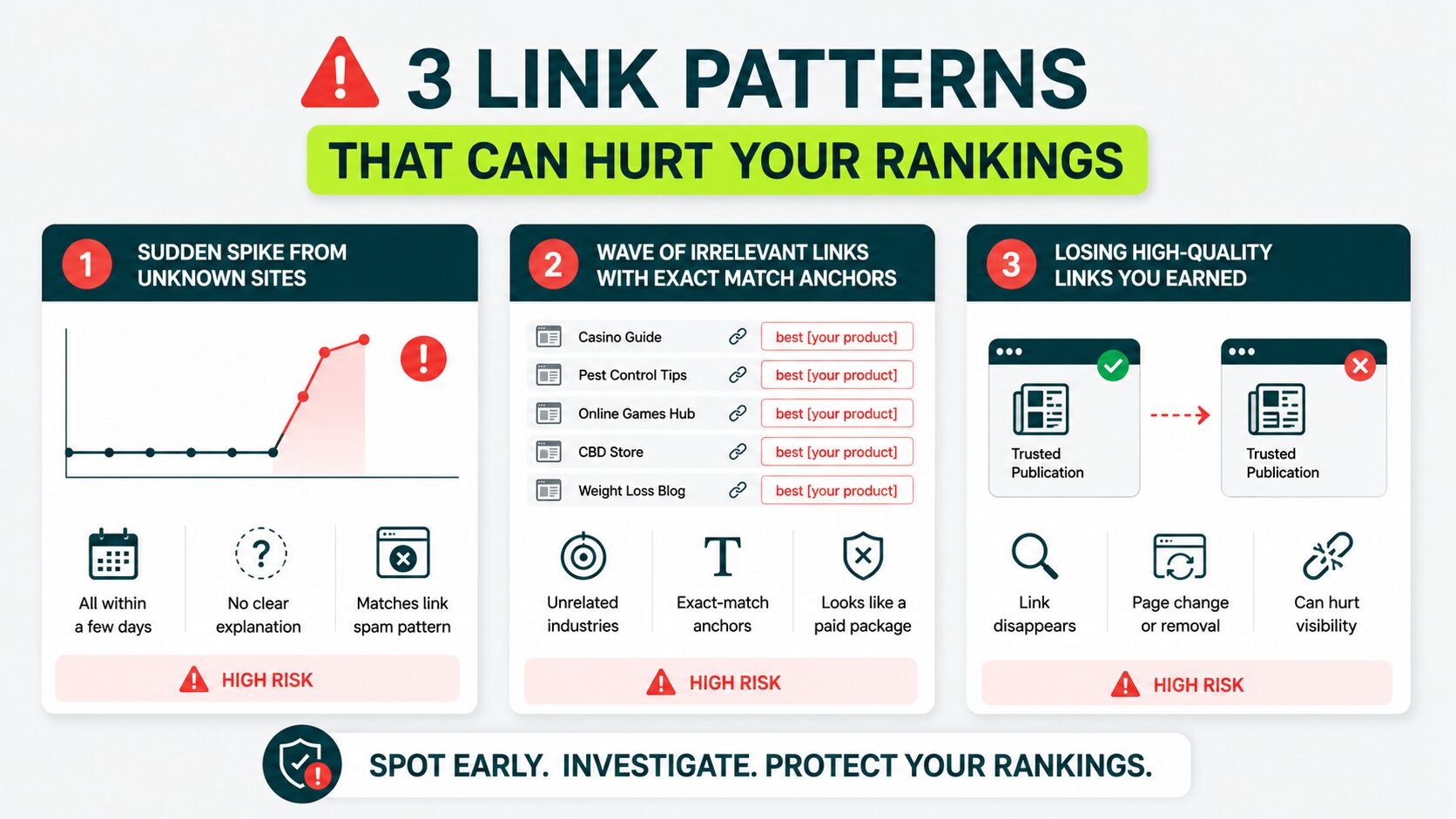
1. Watch for a Sudden Spike in New Backlinks
If unrecognized sites link to you all within a few days, and no press release or content push explains it, treat it as a clear warning sign.
Google’s link spam policy defines link spam as links created primarily to manipulate search rankings. A spike with no organic explanation fits that pattern exactly.
2. Watch for a Wave of Exact-keyword Anchors From Unrelated Industries
Five new links in one week using “best [your product]” as anchor text, all from low-quality, off-topic sites, signal a bought link package. That pattern stands out to Google.
3. Watch for Lost High-Quality Links From Sites You’ve Earned
If a publication removes your link, run a quick check using a free backlink monitoring tool. Find out whether the page got redesigned or whether something else changed.
For the full audit workflow once you’ve got the data, run a backlink analysis.
Things Beginners Worry About That Don’t Matter
Tools flag things that look alarming. Most of the time, they aren’t. Four things you don’t need to worry about:
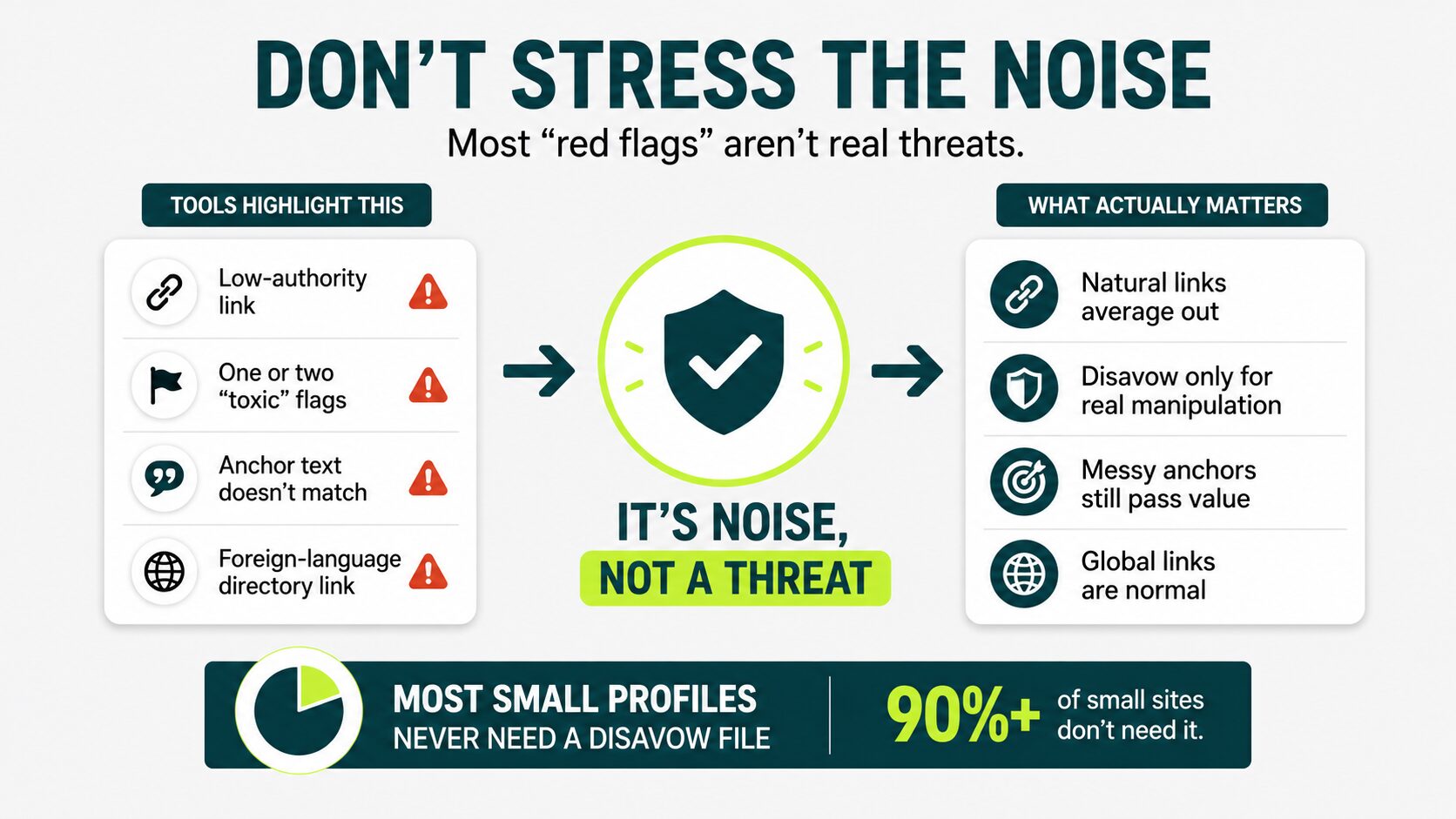
1. A Single Link From a Low-Authority Site Won’t Hurt You
Profiles naturally attract small links from forums, community pages, and aggregators. These average out. They don’t harm a real site.
2. One or Two “Toxic” Flags on a Tool Rarely Need A Disavow
Use the disavow file for active manipulation patterns, not for a random low-quality link that a tool’s algorithm flagged. Most small profiles never need a disavow file at all.
3. Anchor Text That Doesn’t Perfectly Match Your Page Topic
Real anchors are messy. A guest post on a relevant blog that links to you with “this guide” or “click here” still passes value.
4. A Foreign-Language Directory Linking to You Isn’t an Attack.
Sites attract links from everywhere. A handful of off-language directory links is completely normal.
In smaller-profile audits, we often find that site owners are more concerned about toxic links than the data would justify. In many cases, strengthening the profile with relevant links has a greater impact than removing existing ones.
Building a Profile From Scratch When You Have Zero or One Link
If your profile currently has zero links, don’t optimize anything yet. Publish something worth linking to. Then get your first three to five links in front of the right people.
Below are the three actions that earn your first ten referring domains, and the mistakes that quietly slow you down at this stage.
The First Ten Referring Domains
Many sites earn their first 10 referring domains through a clear set of 3 actions.
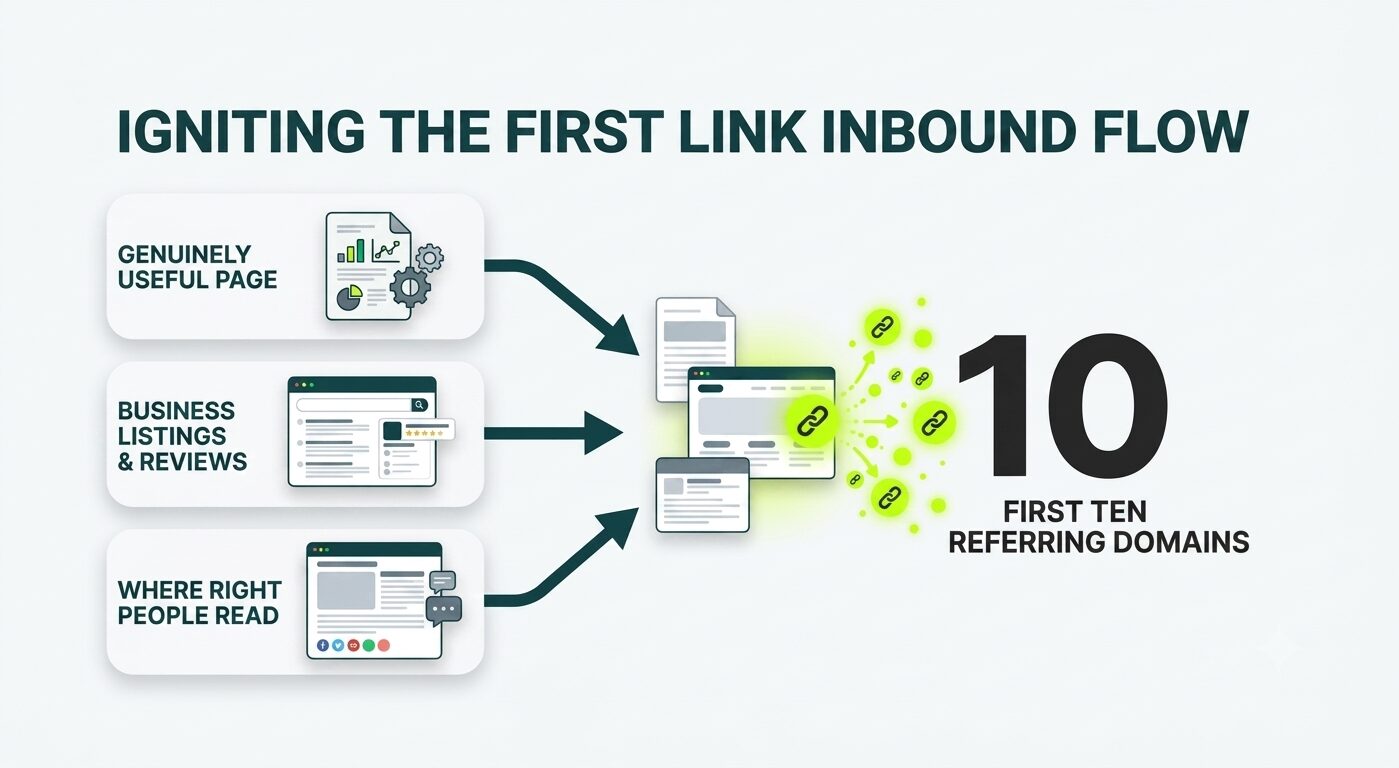
1. Build a Page That Earns Links by Being Genuinely Useful
Write a clear how-to, an honest comparison, a piece of original data, a free tool, or a deep explainer of any complicated concept. Pages that earn links are pages that people send to others. For more, see our piece on what makes content worth linking to.
2. List Yourself Where Real Businesses in Your Space Already Appear
Industry directories, local business listings, supplier or partner directories, toolmaker customer pages. These are the places from where you can earn referring domains.
3. Show Up Where the Right People Are Reading
Answer questions in your niche-relevant community threads, such as on Reddit, X, or Slack. Write a guest article on a smaller blog in your niche. Appear on a podcast. Offer a quote to a journalist working on a story in your space.
In our experience, for a typical first-year e-commerce client, the path from 1 to 10 referring domains takes a few months with consistent publishing.
Businesses that want to accelerate that process often work with a trusted link building agency to handle prospecting, outreach, and relationship-building at scale.
What Not to Do at This Stage
A few moves look productive but quietly hurt new profiles instead. These are three mistakes that quietly slow you down:
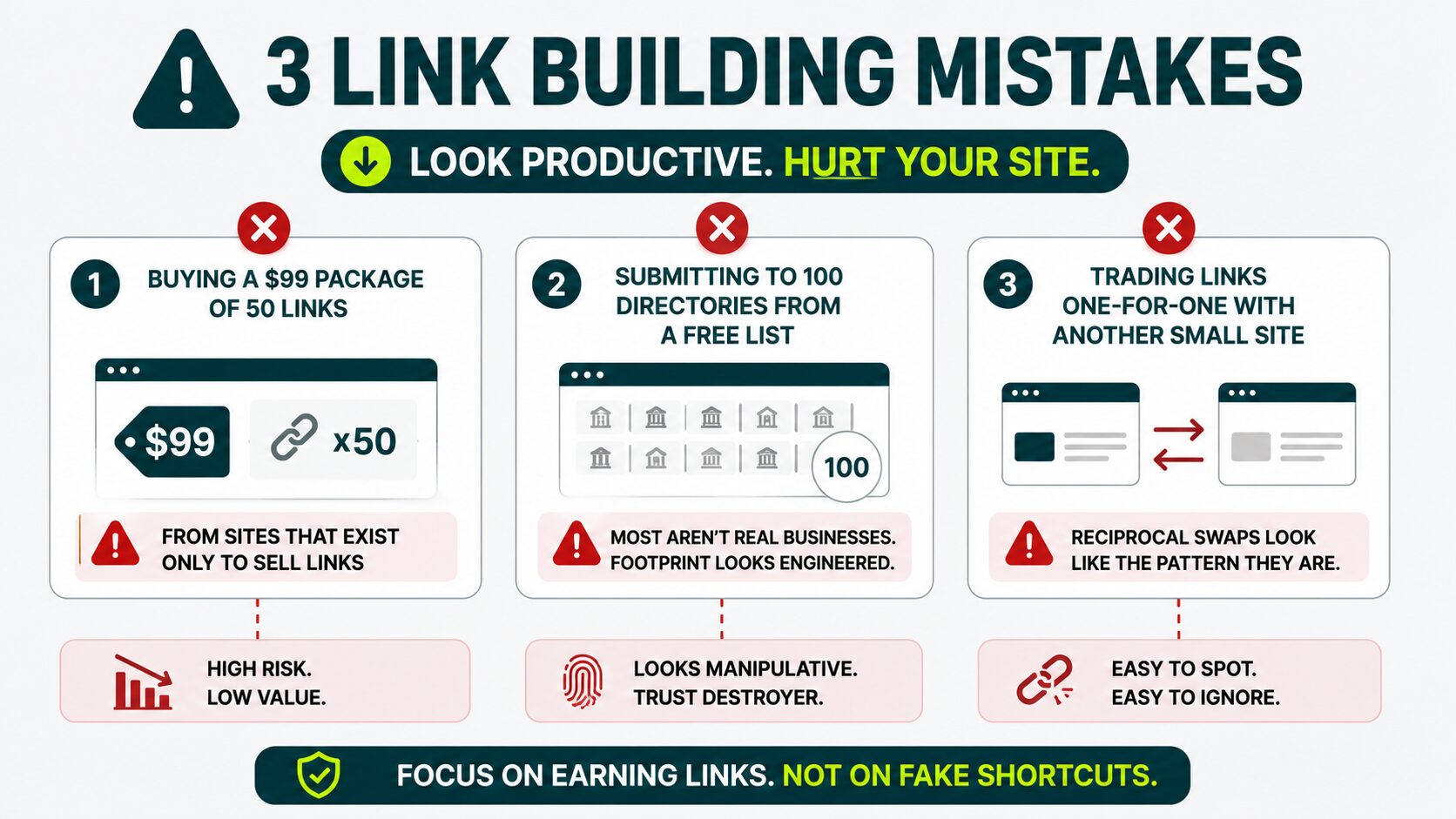
1. Buying a $99 Package of 50 Links
This is the most expensive cheap thing you can do. Those links come from sites that exist only to sell links, and Google has seen that pattern thousands of times before.
2. Submitting Your Site to 100 Directories From a Free List
Most of those directories aren’t real businesses. The link footprint reads as engineered, because it is.
3. Trading Links One-For-One With Another Small Site
Reciprocal swaps look like the pattern they are.
How Often to Look at Your Profile and When to Actually Act
Skip the weekly backlink checks. Your profile builds over time. Weekly checks add noise without clarity.
Check in monthly, spot what’s growing, and focus on what advances your authority. A reasonable cadence is key to your profile size:
| PROFILE SIZE |
CHECK FREQUENCY |
|---|---|
| Under 30 referring domains |
Once every 6 to 8 weeks |
| 30 to 100 referring domains |
Once a month |
| 100 to 300 referring domains |
Twice a month |
| 300+ referring domains |
Weekly, with alerts in between |
Three situations should trigger an immediate check:
- You notice a sudden drop in rankings with no clear on-site reason
- You spot a burst of new links you never earned
- You lose a high-value link you counted on
For what comes next, read our full guide on ongoing backlink management.
Start With What You Can See
Open Google Search Console today. Pull up your links report and check your real backlink profile.
Earn a few high-quality links this quarter from relevant sites in your niche. Ignore the toxic-link panic until your profile is big enough for patterns to mean something. Check your report every six to eight weeks.
Are you ready to build a strong backlink profile?
You know which links move rankings. The next step is earning the right ones.
How many backlinks should I have?
There’s no fixed number. Your topic, your competition, and your ranking goals all shape the right count for you.
Aim to reach 10 to 30 real referring domains in your first year. Quality beats volume every time.
If you’re still working toward those first referring domains, learn how to get backlinks that actually contribute to long-term growth.
Ten referring domains from a varied, relevant spread outperform 50 links piling in from a single source.
For a deeper look at the volume question, see our piece on how many backlinks you need.
What is a natural backlink profile?
A natural backlink profile looks like people are choosing to link to you, not like someone bought or traded those links.
Look for varied anchor text, a mix of dofollow and nofollow links, links from different site types in your niche, and slow, uneven growth over time.
Think of “natural” as a quality, not a checklist. You’ll recognize it when you see it.
Can I check a competitor’s backlink profile?
Yes. Tools like the Ahrefs free checker and the Semrush free checker both let you view any site’s link profile. Google Search Console only shows you your own data.
Competitor profiles tell you which sites in your space are open to linking out. Sites that link to a competitor will link to strong content in the same niche. For the exact workflow, check out our guide on competitor backlinks.
Should I use a disavow file?
No. Don’t use a disavow file if your profile has fewer than 30 referring domains.
Google built the disavow tool for clear cases of active manipulation, like a previous SEO buying thousands of low-quality links.
If your profile grew organically and you have a few odd-looking links, disavowing them does more harm than good. Most “toxic” flags in tools don’t match how Google actually evaluates links.
If you know for certain that manipulation happened, disavow. If you’re unsure, leave it alone.For the full process on when and how to use it, see disavowing backlinks.
How is a backlink profile different from a backlink analysis?
Your backlink profile is the collection of links pointing to your site. A backlink analysis is what you do with that collection, pulling the data, checking quality, spotting patterns, and deciding what to act on next.
The profile is the thing. The analysis is how you read it.