Link building takes consistent effort. You research, pitch, follow up, and land placements.
Over time, some of those links stop working. They get removed, break, or quietly redirect somewhere else.
Link reclamation helps recover those lost links (ones you’ve already earned).
Those missing links hurt your SEO value, and recovering them restores it.
What You’ll Learn
- Link reclamation recovers what you already earned. No cold outreach needed.
- Score each lost link on loss reason, domain authority, and relationship.
- Broken redirects recover at 8–15%. Editor removals rarely do.
- Thirty minutes monthly beats any quarterly campaign.
- Five habits prevent most losses before they hit your report.
What Link Reclamation Actually is
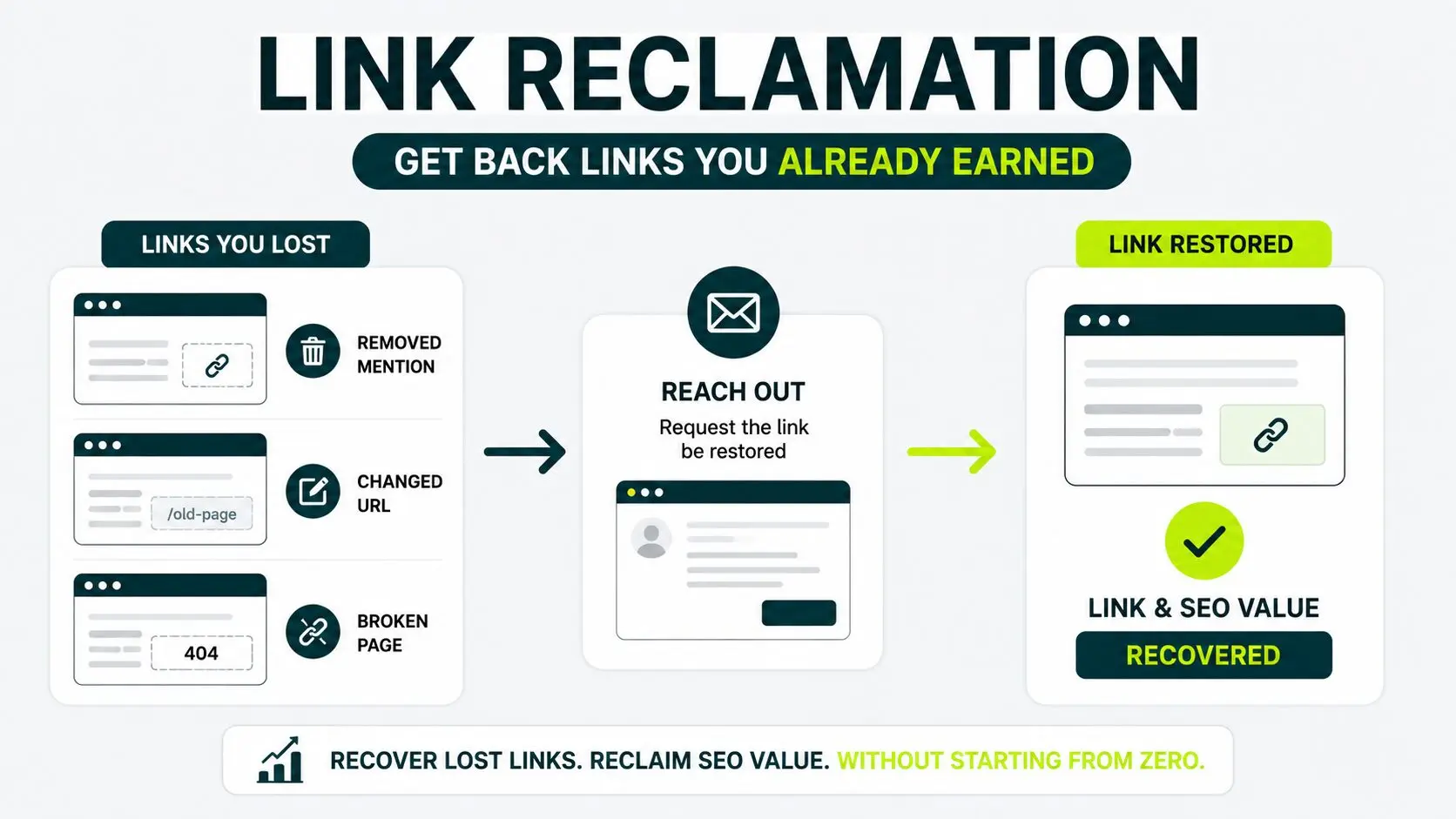
Link reclamation is the process of recovering lost or broken backlinks that once pointed to your site.
These are the backlinks that you had already earned but lost, maybe due to a removed mention, a changed URL, or a broken page.
So you reach out to those site owners to have links restored.
You’ve spent time earning those high quality backlinks, and if one disappears, you lose real SEO value.
The work of link reclamation is to get you that value back without having to start from zero.
But reclamation isn’t one single tactic. Below are the two other tactics, along with link reclamation, that sound similar but solve different problems:
| TACTIC |
WHAT IT TARGETS |
EFFORT VS REWARD |
|---|---|---|
| Link reclamation |
Backlinks to your site that broke, got removed, or were redirected incorrectly. | Low effort, high reward (you already earned the link once) |
| Unlinked mention work |
Brand mentions on other sites that never included a link | Low effort, moderate reward (you’re making a new ask, not restoring one) |
| Broken link building |
Broken links on other sites pointing at someone else’s content, which you replace with yours | Medium effort, low to medium reward (worth one recurring campaign and not a core strategy) |
The first two tactics are about the value you have already earned. The third is about going after a stranger’s broken link to win something new.
Our broken link building playbook walks you through the third approach step by step.
For the unlinked brand mention side specifically, how to convert those mentions is covered separately.
Why Backlinks Vanish in the First Place
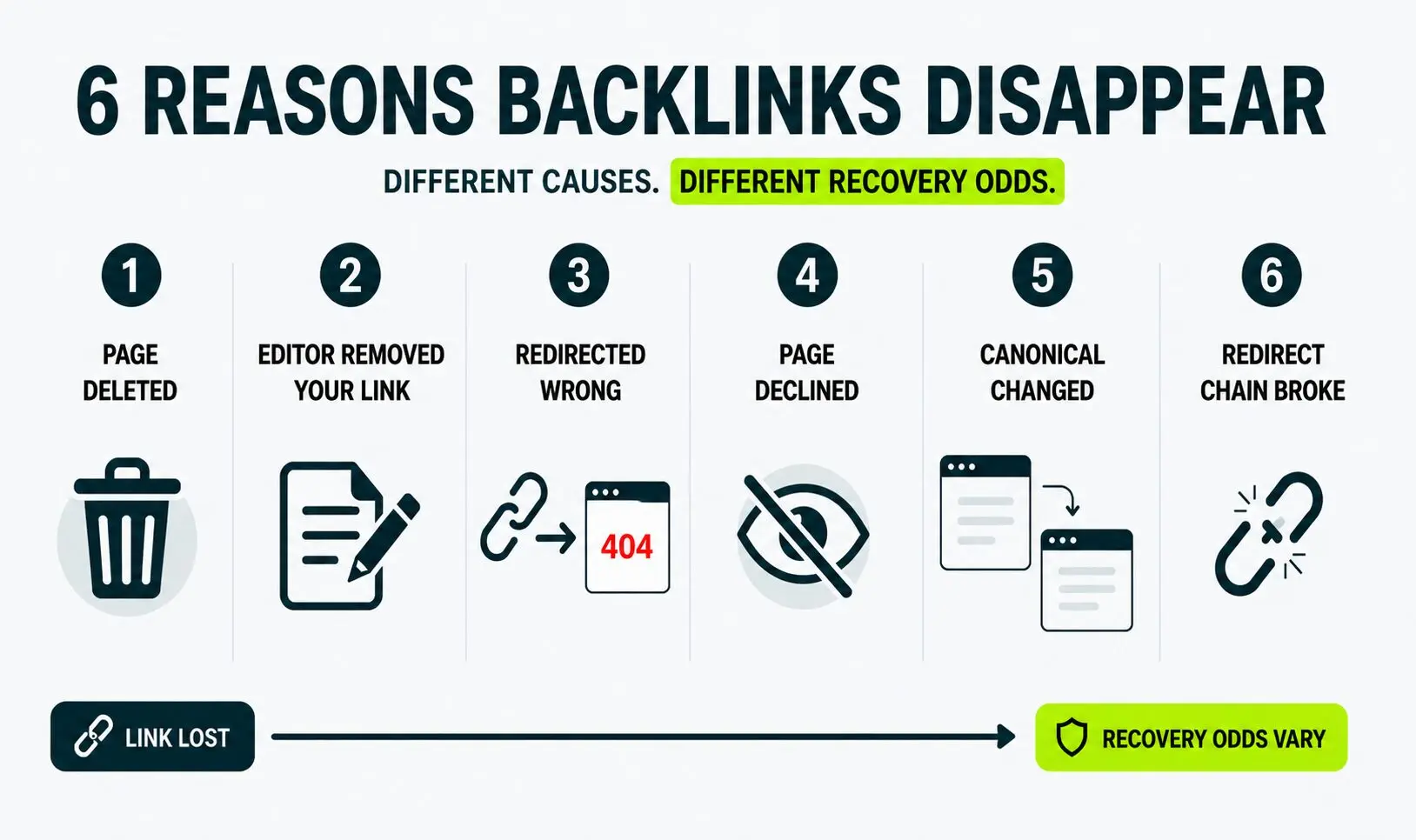
Backlinks disappear for six common reasons, such as the page was deleted, the editor removed your link, the page got redirected incorrectly, the page was deindexed, the canonical changed, or the redirect chain broke.
1. The Page Was Deleted
The linking page has been deleted and no longer exists (404 error). Someone took it down. The link can’t be recovered because the page itself is gone.
Sometimes the page is available in the Wayback Machine.
What is the Wayback Machine?
It’s a free archive of old web pages. You can still see what the original context looked like, but the link itself is dead
2. The Editor Removed Your Link
The editor removed your link from the linking page because he decided your link wasn’t useful anymore. The page is still live, but your link isn’t.
The illustration below compares how it looks when a backlink is present and when the link is removed, leaving only a plain-text brand mention.
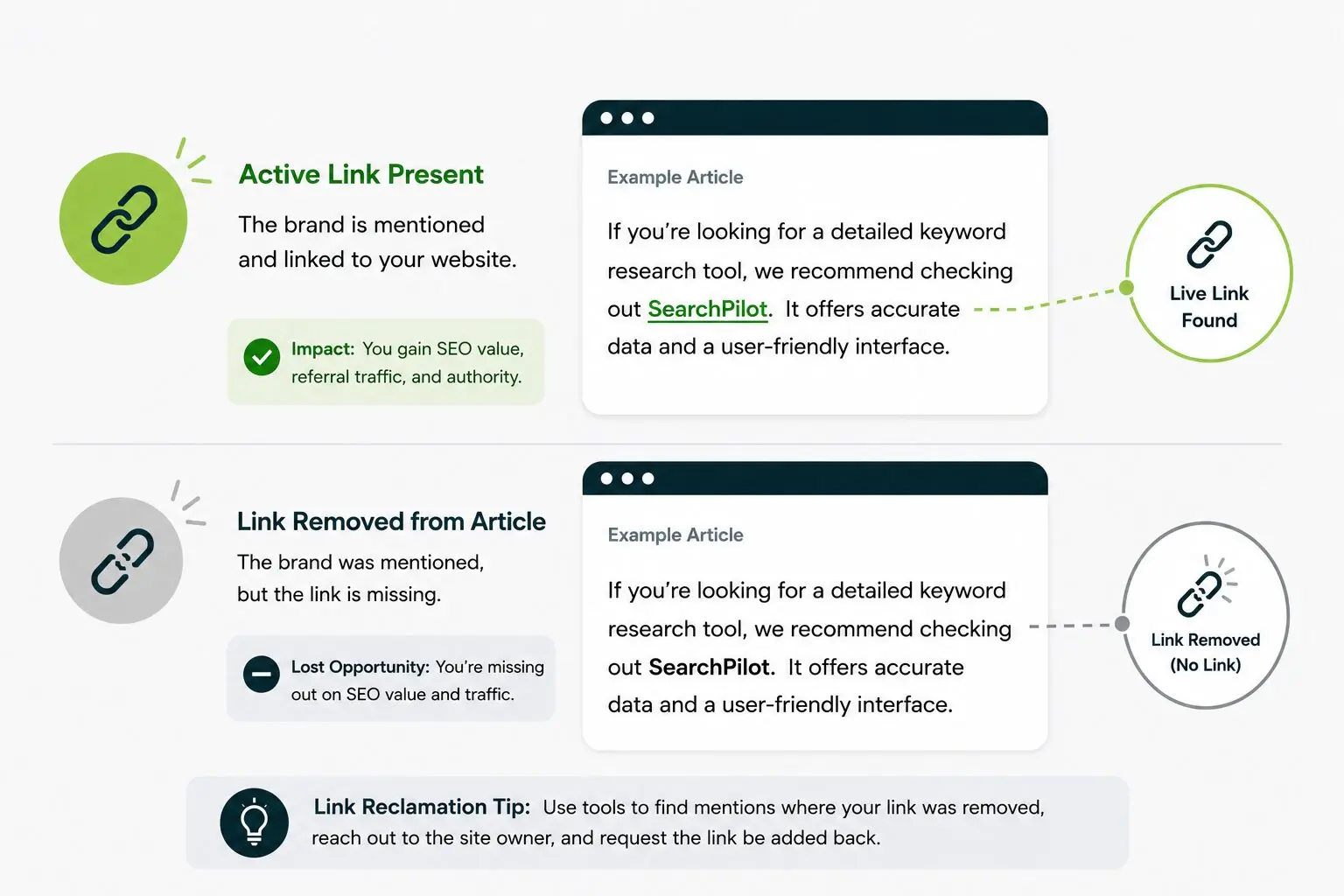
This happens when your linked content has gone stale, when the editor cleans up old articles, or when a competitor wins the slot.
3. The Page Got Redirected to the Wrong Page
The site moved your link’s destination URL during a redesign or migration, and the new URL doesn’t resolve.
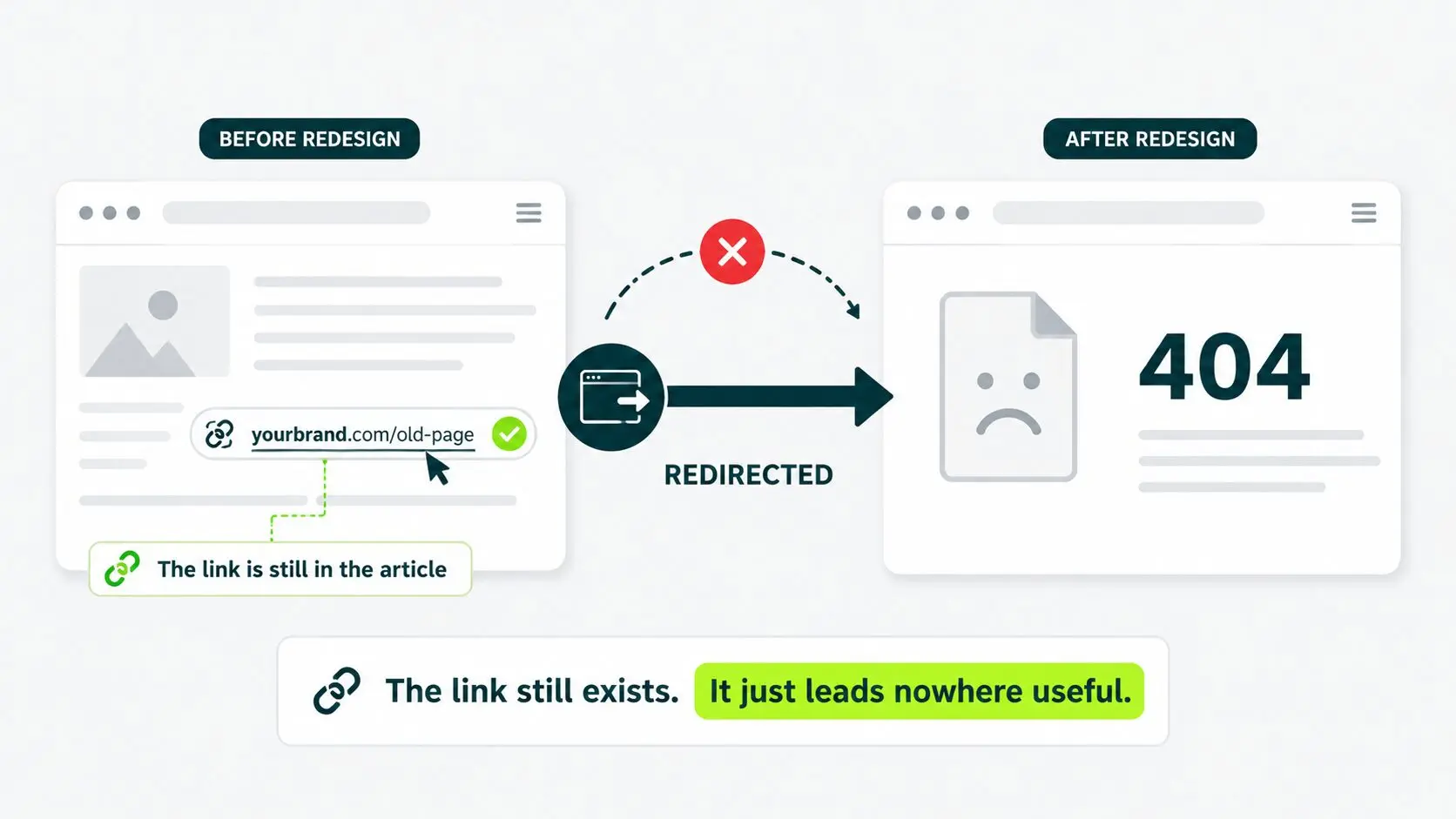
The link’s still in the article. It just points nowhere useful now. You see this constantly when a site rebrands.
4. The Page Was Deindexed
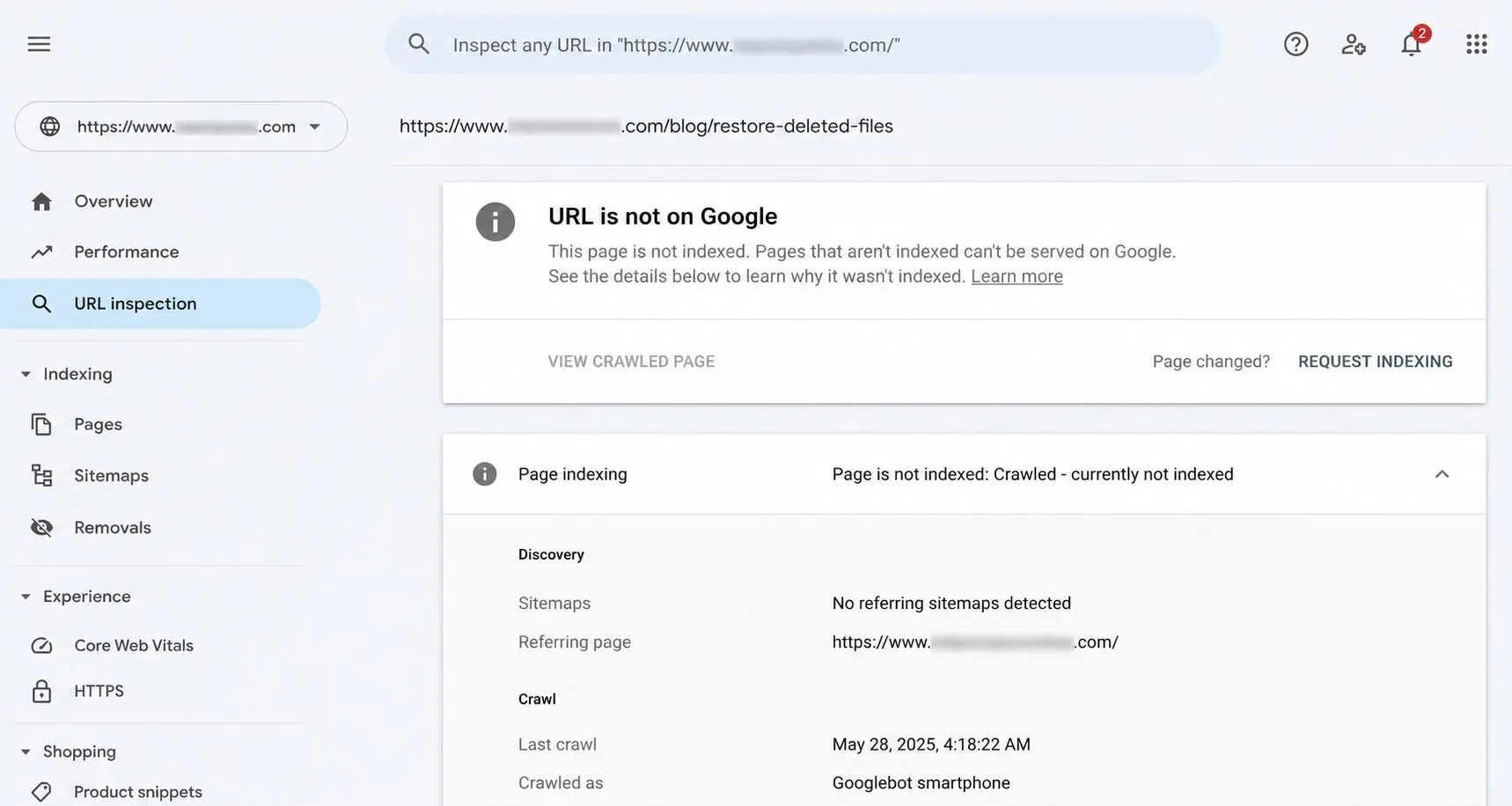
The page that linked to you got a “noindex” tag added, telling Google to remove it from the search index.
The page is still live and accessible to visitors, but it no longer appears in Google Search. As a result, the SEO value of that backlink is significantly reduced.
Google Search Console indicating that the page is not indexed, a common sign that a previously indexed page has been removed from Google’s search results.
You can also check whether your page is indexed in our free Google Index Checker tool.
5. The Canonical Changed
A canonical tag tells Google which version of duplicate or similar pages is the “real” one.
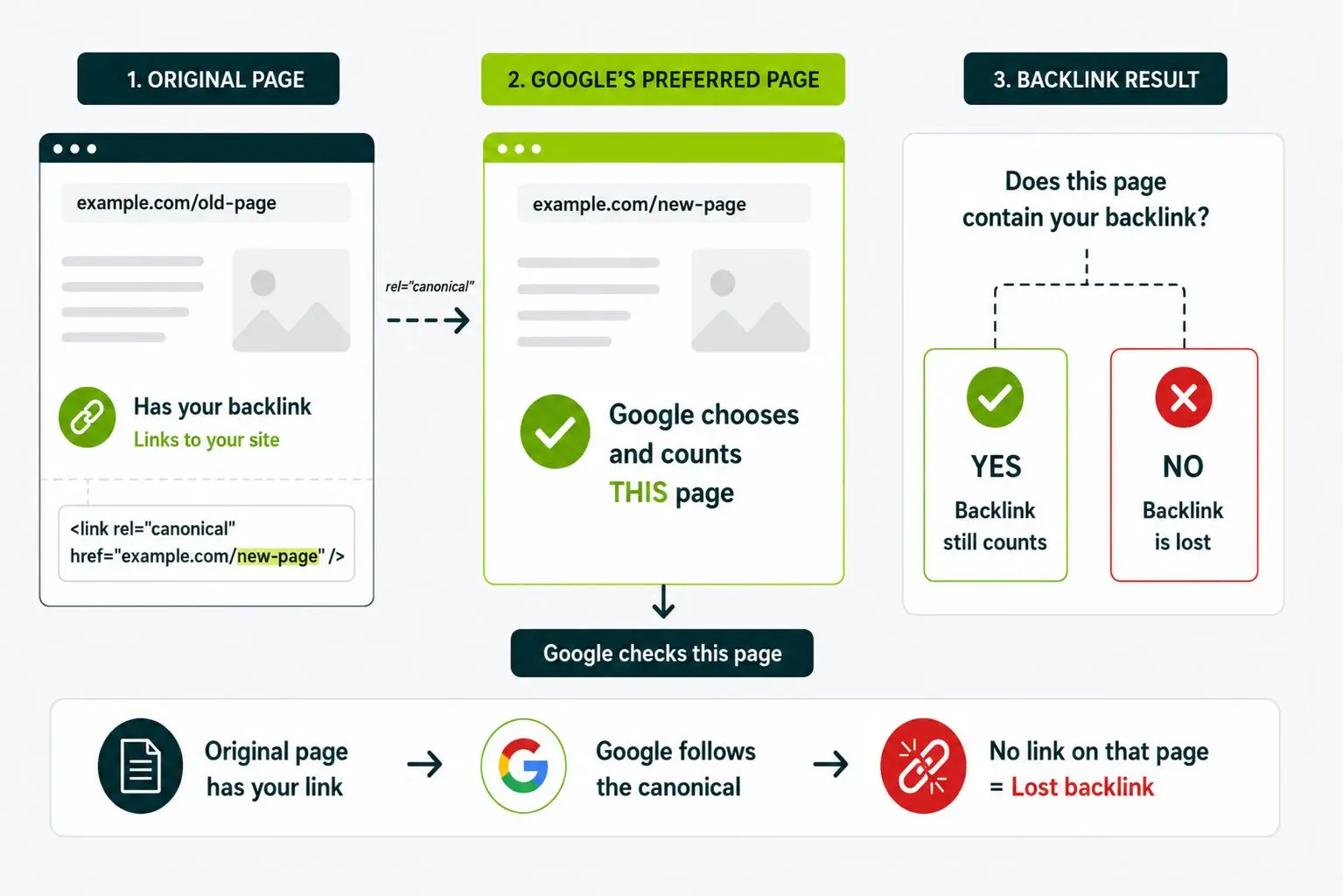
When the linking page’s canonical points to a different page, your link counts only on that other page. If that page doesn’t include your link, you’ve lost it.
6. The Redirect Chain Broke
A 301 redirect is a permanent forward from one URL to another. One of these redirects is used to send Google from the linking page through to your page. That chain broke. The link looks fine in the article. Google can’t follow it through to your domain.
How to Find Your Lost Backlinks
To find your lost backlinks pull a lost-links report from any backlink tracking tool and cross-check what it shows against your live site.
Your tool options are split into free and paid. Most teams run two in parallel. No single tool catches everything.
1. Outreach Desk’s Broken Link Checker (Free)
Outreach Desk has a free broken link checker tool that shows you which backlinks pointing to your site are no longer active.
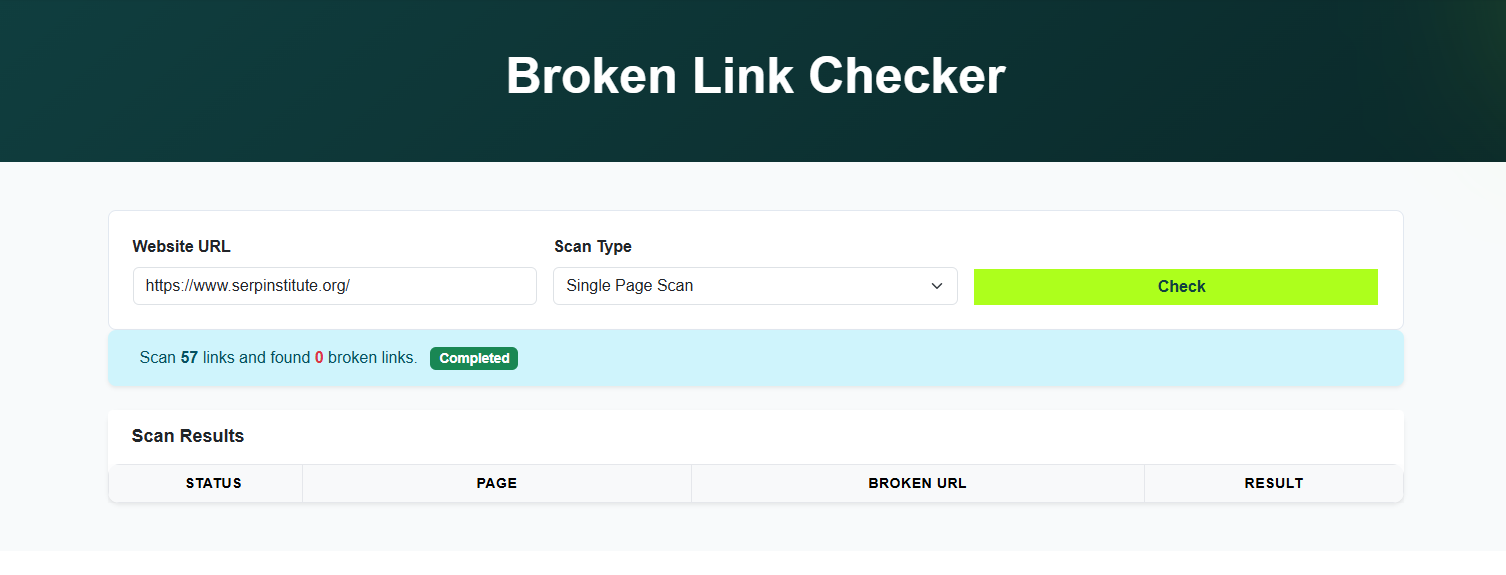
You can see the scan results quickly and you don’t need any login. It flags every backlink pointing at your site that’s gone dead.
Find your lost backlinks in four steps:
- Drop your domain into the broken link checker
- Let the scan finish
- Look through every URL, flagging an error or returning nothing
- Cross-reference that list against your active backlinks to see what’s worth reclaiming.
With this tool, dead links surface in seconds. Your reclamation outreach list is ready before spending time on manual checks.
2. Google Search Console (Free)
Google Search Console (GSC) is Google’s free tool for site owners. The backlink data is real, just slower and less sortable than paid alternatives.
Build your own lost-links view in GSC. Open Links > export ‘Top linking sites’ > save a copy with today’s date.
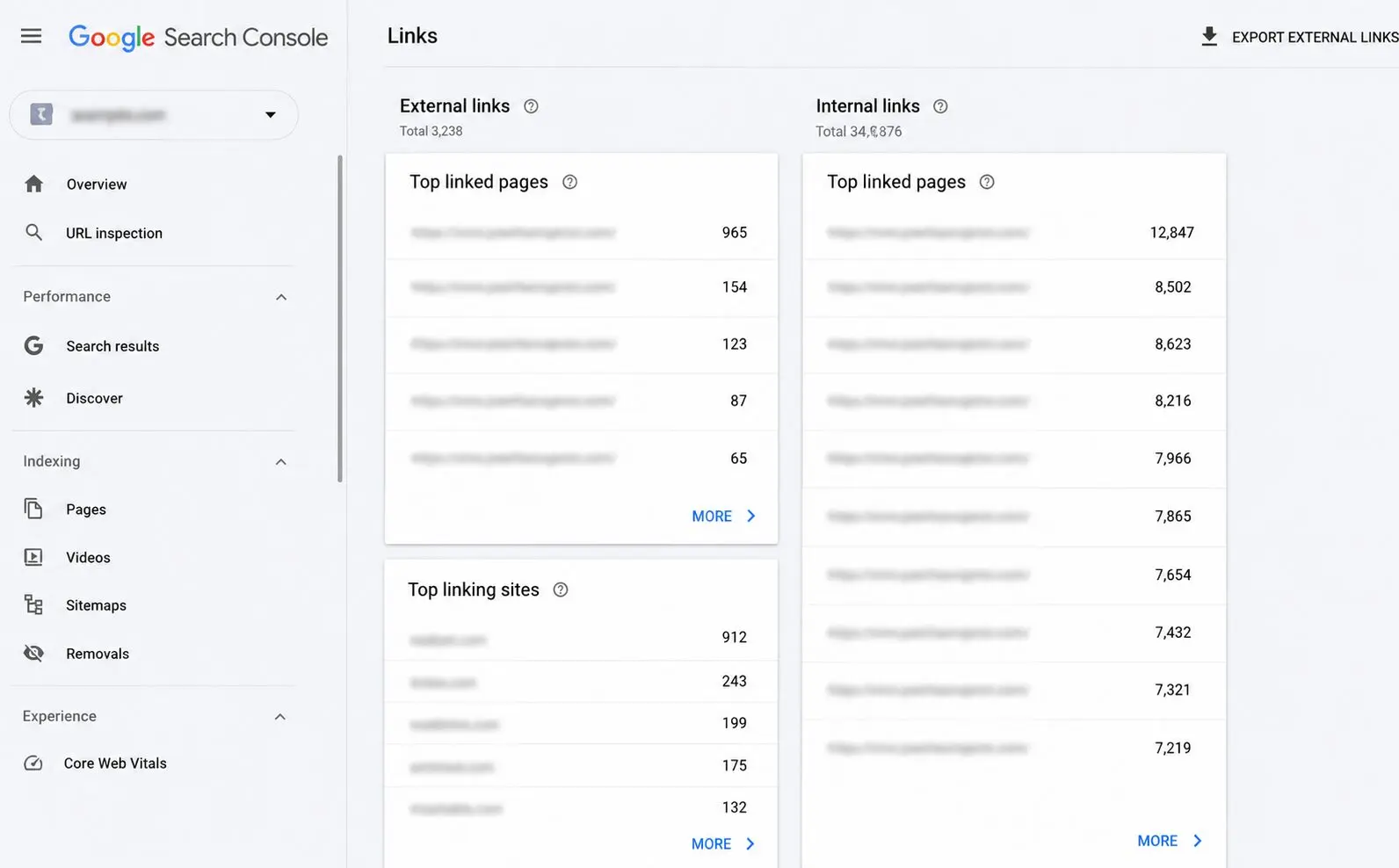
Repeat next month. Anything missing is a dropped link.
You’re building your own change log. It works and it costs nothing. If you’re not paying for an SEO tool yet, this is how you stay in the game.
3. Ahrefs Site Explorer
Ahrefs is a paid SEO tool with a strong backlink database. The Site Explorer feature lets you put in your domain and see who links to you.
Pull your lost links. Open Site Explorer > type your domain > click ‘Backlinks’ in the left menu > change the filter from “All” to “Lost” > Set the date range to the last 30 to 90 days.
The image shows lost Ahrefs website links as an example.
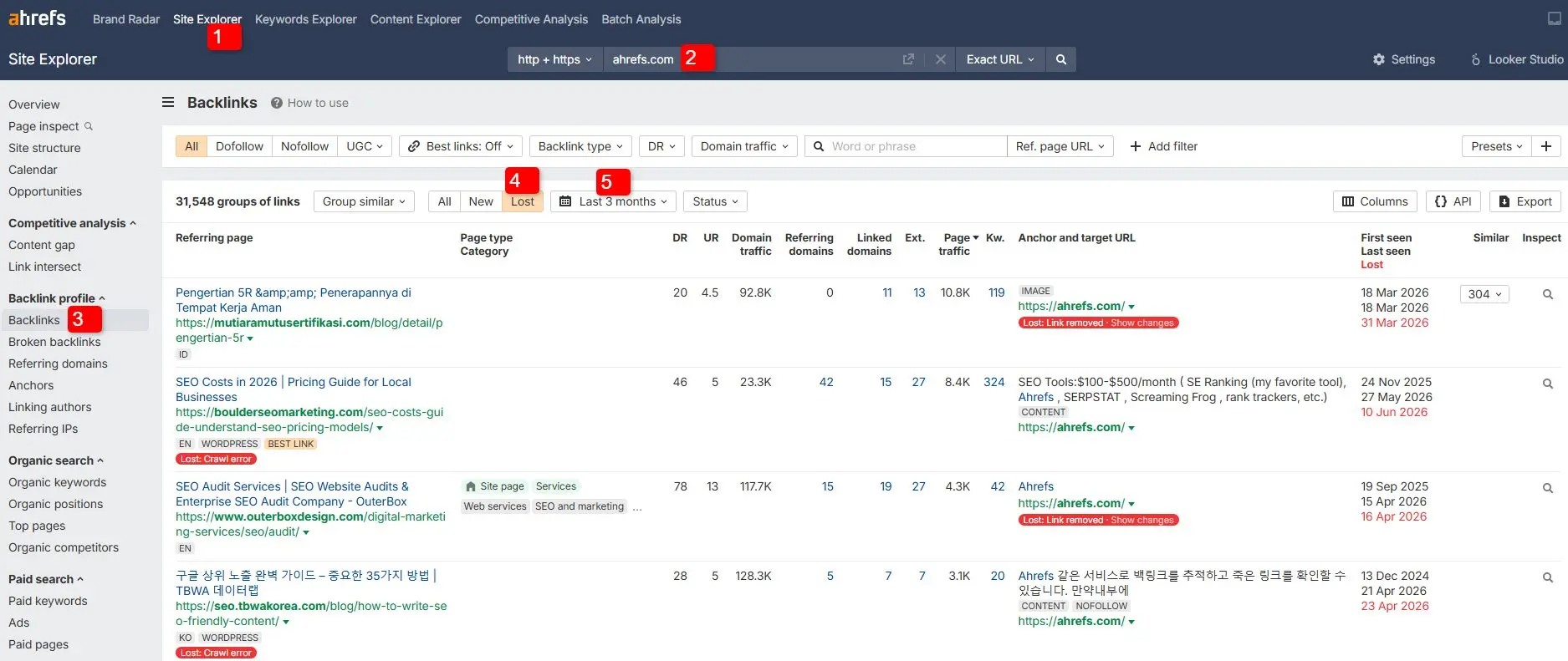
Every dropped backlink Ahrefs detected in that range appears in your list. Three columns matter most:
| COLUMN | MEANING |
|---|---|
| Referring page | The article or page that had your link |
| Anchor text | The words that were clickable and linked back to you |
| Domain Rating (DR) | Ahrefs’ 0–100 measure of how authoritative that website is |
4. Semrush Backlink Audit
SEMrush is another paid SEO platform. Its Backlink Audit tool flags lost links in a way similar to Ahrefs’. It has a Toxic Score column that saves you from chasing links you’d rather not have back.

If you already pay for SEMrush, use this. If you’re choosing between SEMrush and Ahrefs purely for reclamation work, Ahrefs has the larger known backlink index. Its Lost filter is also cleaner.
5. Moz Link Explorer
Moz Link Explorer is the third major paid option. It has a lost & discovered section for dropped links, with thinner coverage than either Ahrefs or SEMrush.
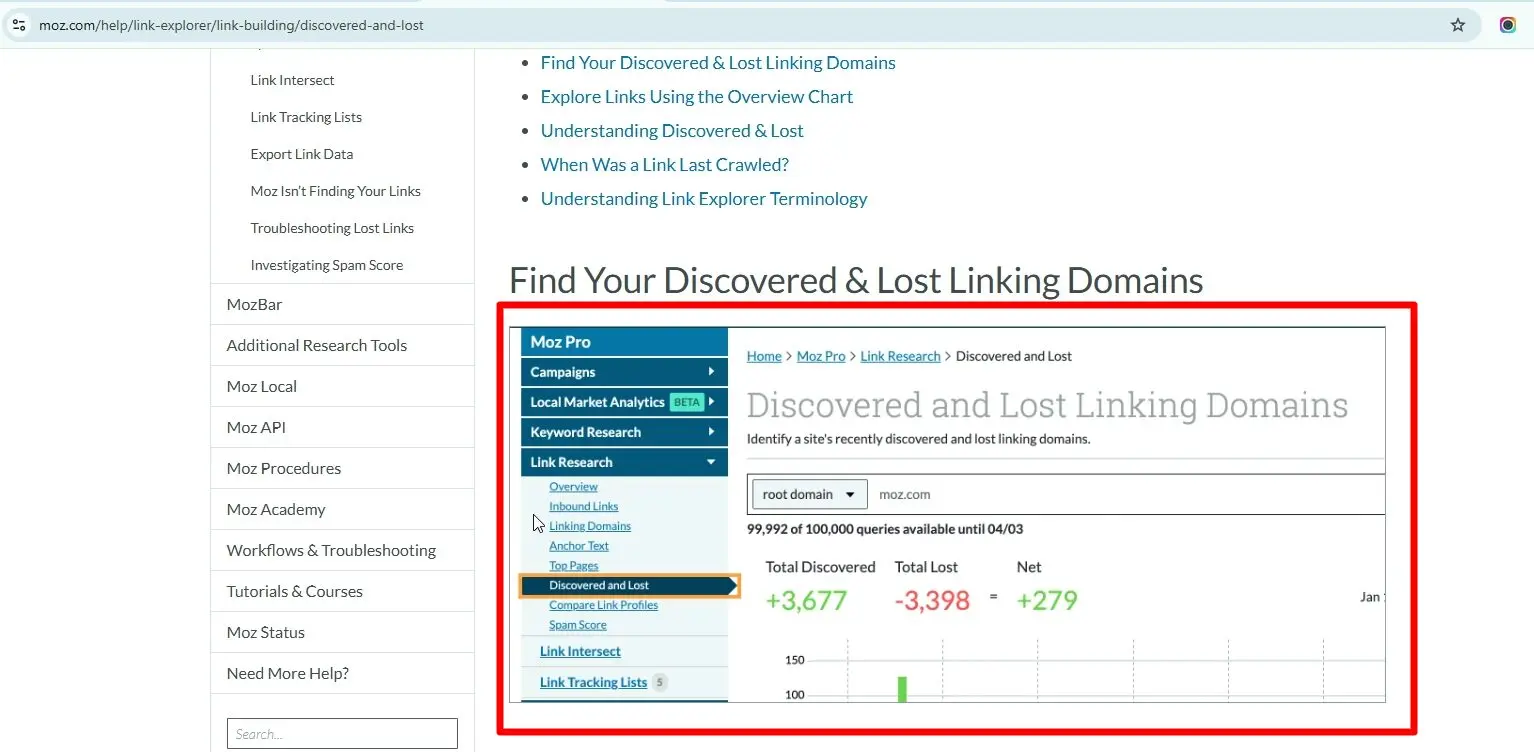
Source: Moz – “Discovered & Lost”
If budget is the constraint, then use one paid tool that is Ahrefs. If you don’t want to pay, lean on GSC.
You can also pull from a free round-up of link building tools like the one we maintain.
How to Find Unlinked Brand Mentions
Your brand name is already out there, on pages that mention you but never link back to you. Find those pages and convert the mention into a backlink.
Three paths get you there. Two costs nothing, and one needs tools.
Path 1: Google Search Operators (Free)
Google lets you exclude your own domain from results. That makes it easier to find external pages that mention your brand.
Use this Google search operators to find the list of pages that mention your brand on their sites.
“YourBrand” -site:yourbrand.com
The example below uses Riverpine Studio. Searching for:
“riverpinestudio” -site:riverpinestudio.com/
The search results return all the pages across the web that mention the brand.
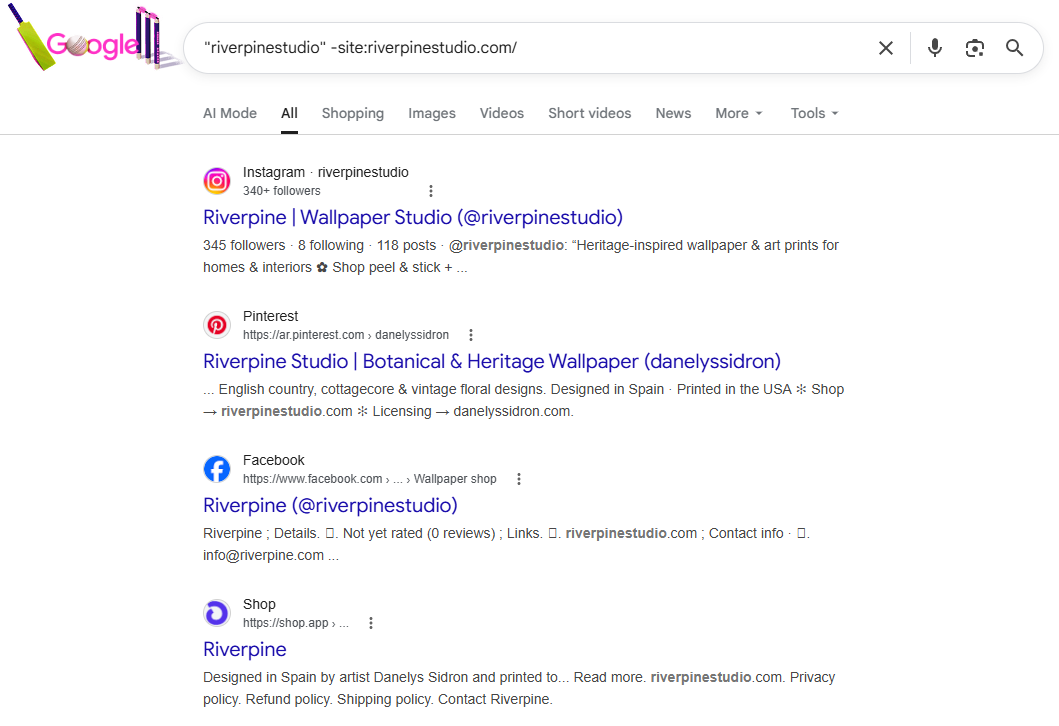
In the same way, use the search operator for your site to get a list of all sites that mention your brand.
Review those pages and check whether they link to your website. Pages that mention your brand without linking to you are your link reclamation opportunities.
To narrow it further, layer in date or quote operators:
| OPERATOR | WHAT IT FILTERS FOR |
|---|---|
| “YourBrand” -site:yourbrand.com after:2026-01-01 |
Only mentions from the last few months |
| “YourBrand founder” -site:yourbrand.com |
Only articles where someone quoted you directly |
For example, searching with the operator below shows pages whereRiverpine Studio was mentioned after March 28, 2026:
“riverpinestudio” -site:riverpinestudio.com/ after:2026-03-28,
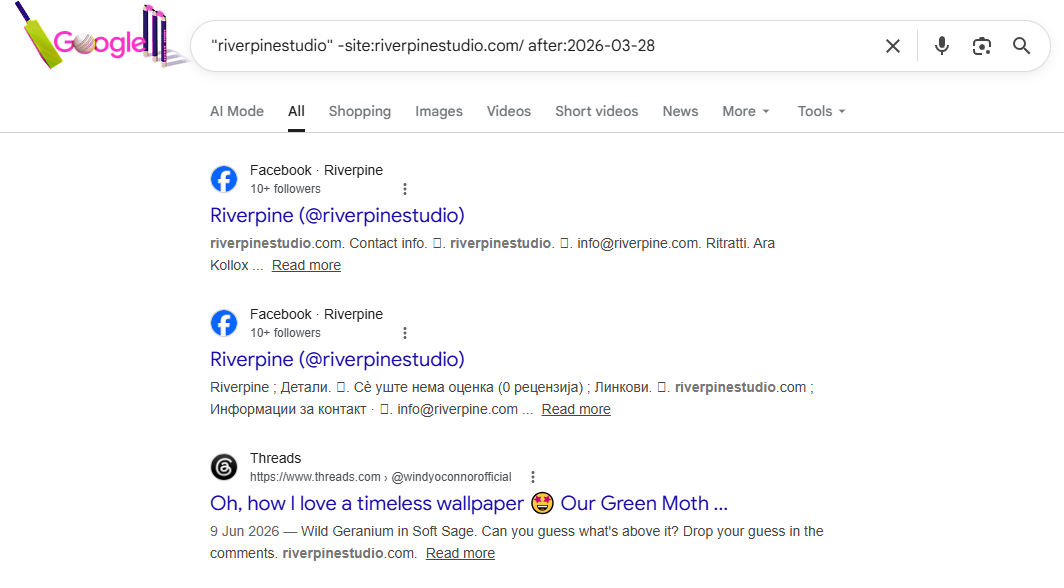
From there, review each page and create a list of websites that mention your brand but don’t link to it.
One limitation is that common brand names can return many irrelevant results.
If your brand consists of generic words, keep it inside quotation marks and add context, such as your founder’s name, product, or industry, to make the results more relevant.
Path 2: Google Alerts (Free)
Google Alerts emails you when new pages mention a term you’ve subscribed to.
Set up a Google Alert for your brand name. The moment a new page mentions it, a notification lands in your inbox. That instant notification is the whole point.
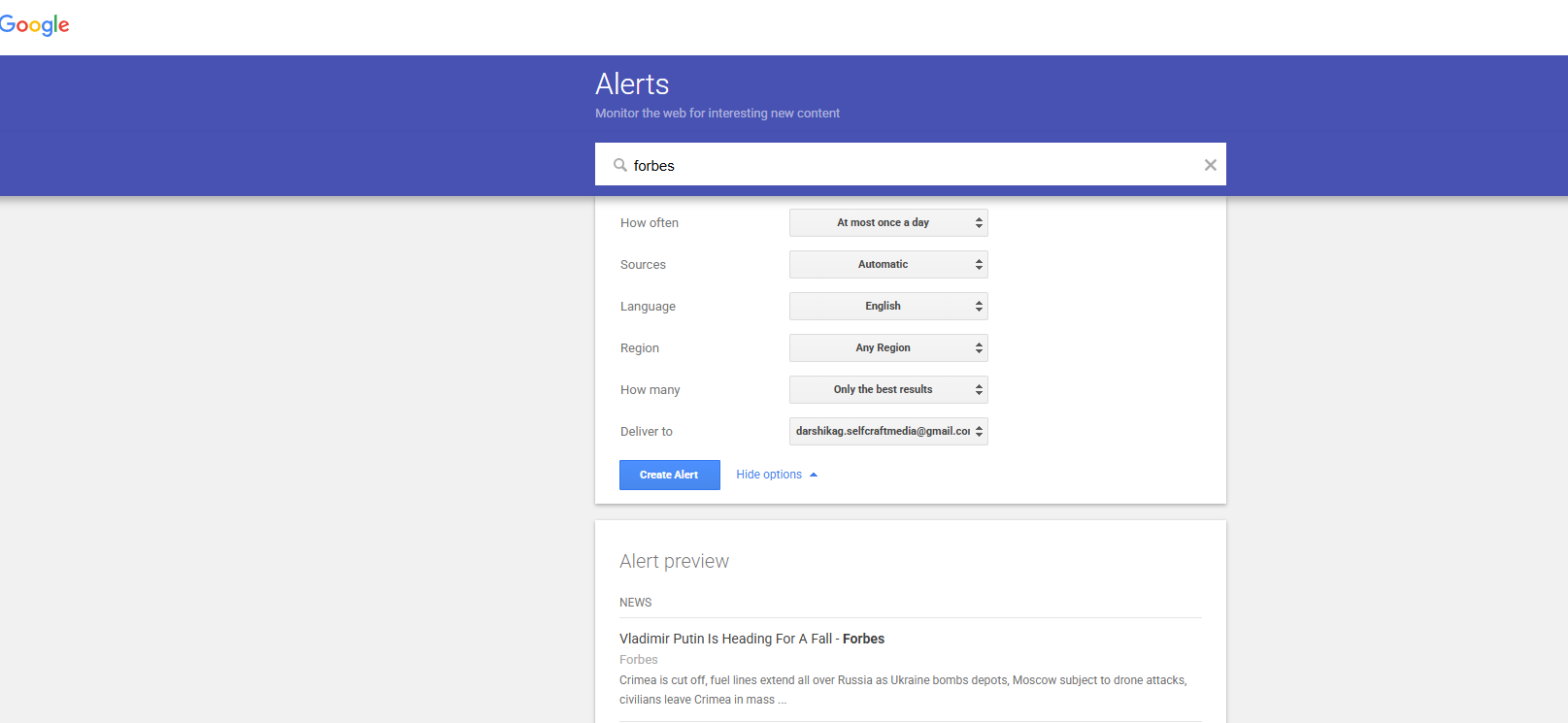
Editors forget, and articles go cold fast. The sooner you reach out, the better your odds of getting the link added. This is the cheapest way to stay early. A week-old mention gets replies. A six-month-old one gets ignored.
Path 3: Paid Mention Trackers
Three paid mention tracker tools are Ahrefs Content Explorer, BrandMentions.com, and Mention.com.
Beyond what Google indexes, these platforms pull in mentions from social, podcasts, and PDFs. These are the channels Google Alerts misses entirely.
These tools are worth the cost when you’re doing reclamation across dozens of branded terms like product names, founder names, and common misspellings. For one or two terms, the free path is sufficient.
If you want to track brand mentions across more channels, our brand monitoring basics guide covers the full process and tool comparisons.
A Triage Matrix for Which Links to Actually Chase
Three signals that tell you which links to actually chase are why the list was lost (and its recovery odds), referring domain authority, and relationship history.
Your lost-links report is not a to-do list. It’s raw material, and most of it doesn’t qualify.
Ahrefs regularly returns 400 to 800 lost links for a site a few years old. Chasing all of them is impossible.
These three signals tell you which 30 to 60 lost links are worth your time this month. The rest get skipped or batched.
Your outreach tone shifts based on how the link originally came in. Direct. No filler.
Signal 1: Why the Link Was Lost (and Its Recovery Odds)
Recovery odds live or die on the reason the link was lost. This is the honest picture:
| LOSS REASON |
RECOVERY ODDS |
WHY |
|---|---|---|
| Broken redirect chain |
High | The site owner usually doesn’t know it’s broken, and a polite note gets it fixed within a week |
| Page got redirected to the wrong place |
High | Same reason. They redirected, but the target URL is broken or wrong |
| Canonical changed |
Medium | The fix is technical on their side and requires the right person on the team |
| Page was deindexed |
Medium-low | Sometimes intentional, sometimes a mistake. Worth one polite ask |
| Editor removed your link |
Low | The editor made a decision. Reversing it usually requires fresh value (a refreshed asset, an updated stat) |
| Page was deleted |
Near zero | The page is gone. Move on unless the page is archived and the editor is rebuilding |
Skip any row where the loss reason column says “Near zero.” Spend those 30 seconds on a link with higher odds.
Signal 2: Referring Domain Authority
Sites with a DR over 50 drive meaningful link equity. Below DR 20, the gain is marginal unless the site is hyper-relevant to your niche.
What is Link Equity?
Link equity is the SEO value a backlink passes from one page to another, influencing the linked page’s authority and ranking potential.
Skip lost links from DR under 30 unless the site is in your specific niche.
The recovery email costs you the same five minutes whether the site is DR 12 or DR 87. Spend those minutes where the link will move the needle.
Signal 3: Relationship History
This one’s underrated. If you earned the original link through outreach (you pitched, they linked), you already have an email thread.
Reply to that thread to flag the broken link. It takes 60 seconds, and it converts at high rates because the editor already knows you.
The reply rate depends on how the link originated:
Outreach-earned Link
You already have the email thread, so reply directly to flag the broken link. This converts at high rates because the editor already knows you.
Editorial Mention or Community Write-up
You’re closer to cold outreach here. They linked organically because they found you, not because you pitched, so expect a lower reply rate.
Paid Placement or Guest Post
The deal determines the dynamic. Some publishers honor “we keep the link live” agreements, and some don’t, so don’t burn the relationship over a single lost link if you have ten more in flight.
How to Use the Three Signals Together
Combine the three into a simple priority order:
| PRIORITY | WHAT IT LOOKS LIKE |
|---|---|
| Chase first | High-recovery reason + DR 30+ + you already have a relationship |
| Chase next | High-recovery reason + DR 30+ + cold contact |
| Chase third | Medium-recovery reason + any DR + relationship exists |
| Backlog or skip | Everything else |
On a 600-link report, this usually leaves 30 to 60 links worth chasing in the current month. The other 540 either go in the prevention bucket or get skipped entirely.
In our experience, the matrix flips the obvious list. The links easiest to recover are rarely the ones a raw export puts at the top.
How to Fix Lost Links on Your Own Site
Fix broken redirects with a 301 and update any internal links pointing at dead canonicals.
Some of the lost links in your report aren’t really lost. They broke because of something you did on your own site. You can fix them in 10 minutes without emailing anyone.
Path 1: Set up a 301 Redirect for the Missing Page
Imagine a referring site links to “yourbrand.com/old-page”, but the URL no longer exists.
What to do here is map a 301 redirect from the dead URL to the closest live equivalent.
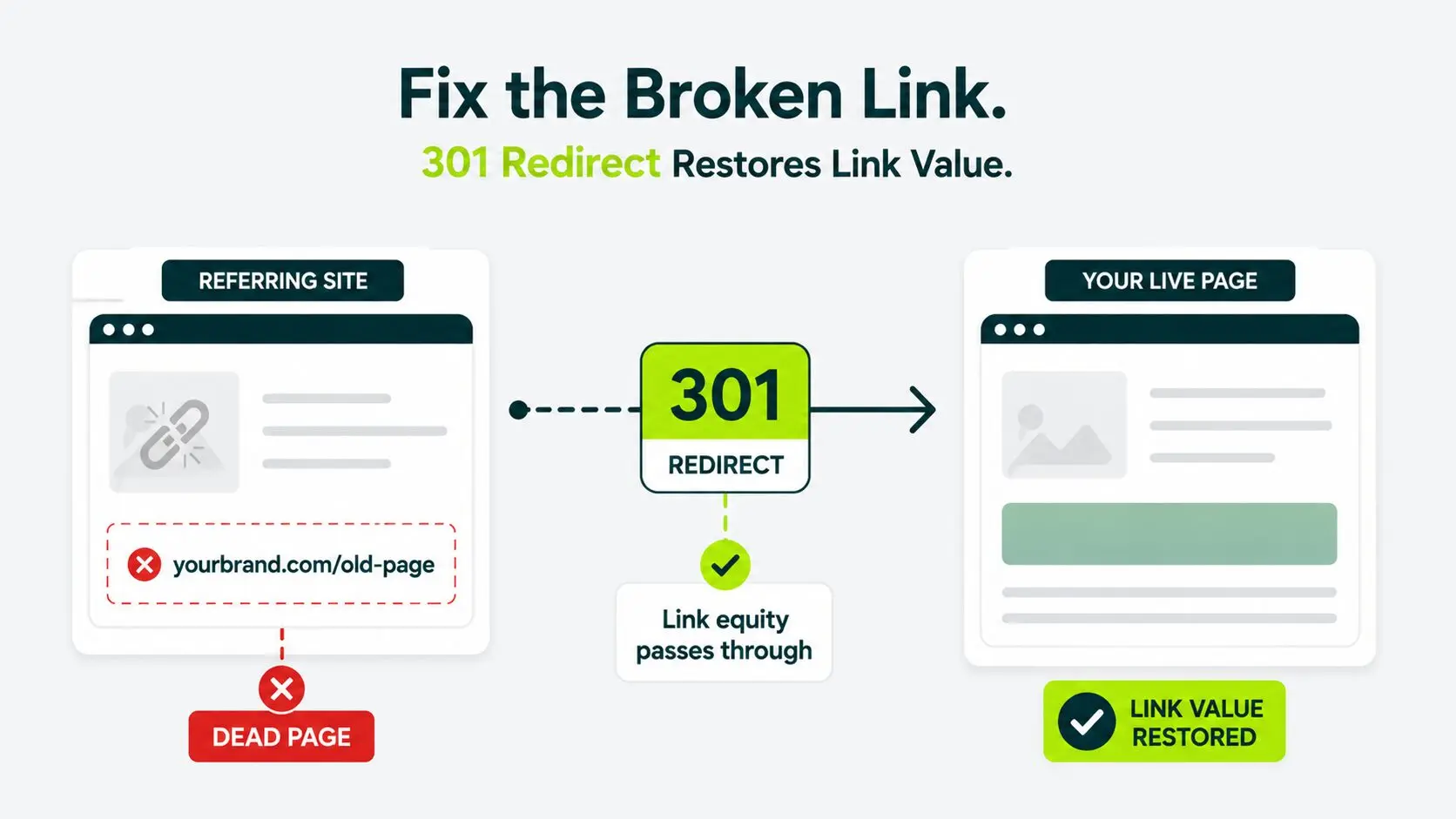
This works because Google follows the redirect and credits link value to your live page. The referring site’s editor doesn’t need to touch a thing.
Different platforms let you set up an alert in different ways:
| Platform | Where to go |
|---|---|
| WordPress | Redirection plugin |
| Shopify | Built-in URL redirects setting |
| Custom stack | Server config or routing layer, usually one line |
One rule that matters is to send the redirect to the most relevant page instead of your homepage. A topically mismatched redirect passes less equity. Topical Relevance matters to Google here.
Path 2: Update Internal Links Pointing at Dead Canonicals
This is a subtle path. Sometimes the “lost link” problem is on your end. The referring site’s link is fine. But your page’s canonical tag now points to a different URL, so Google ignores the version it links to.
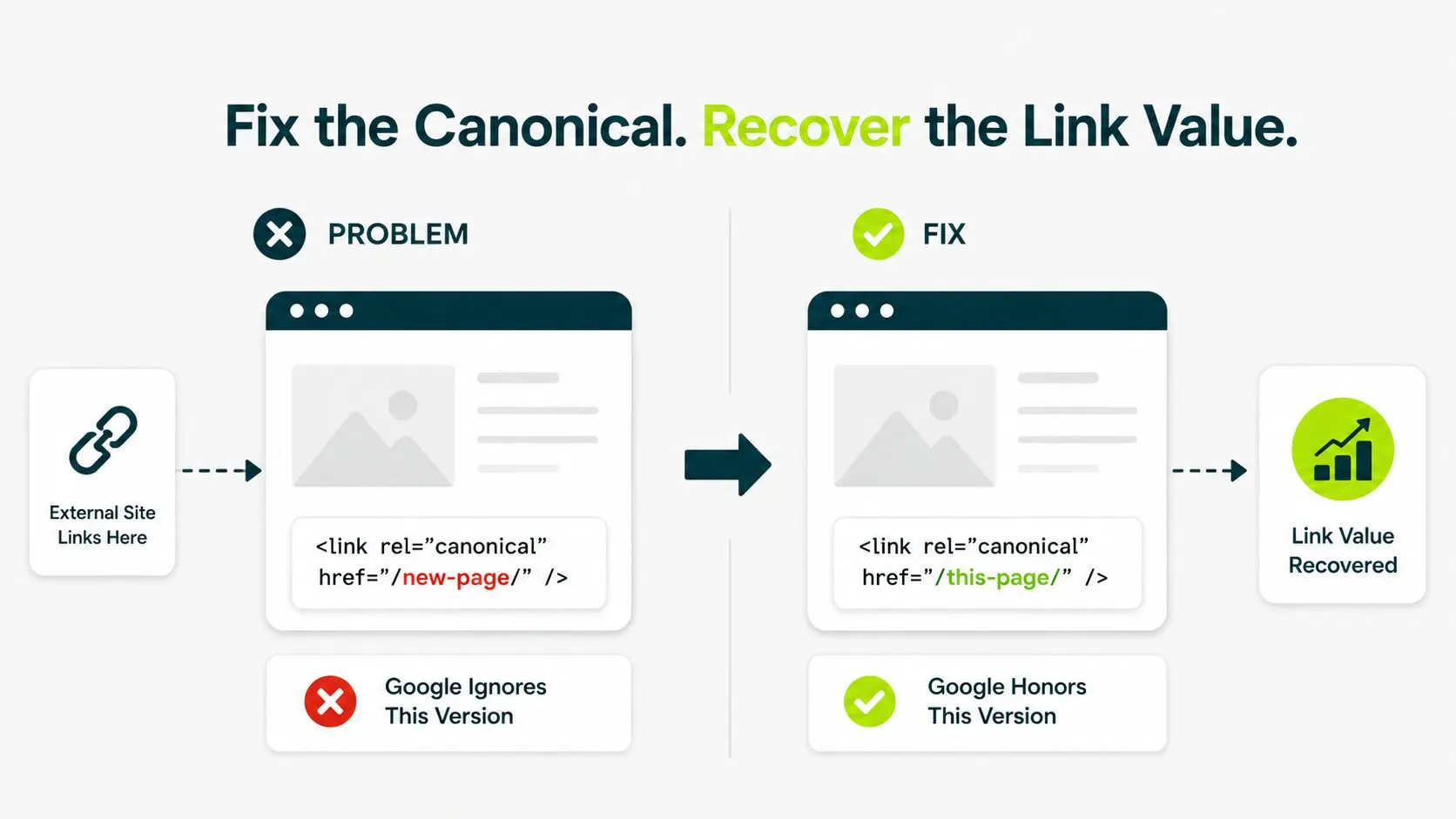
What to do here is fix the canonical so it matches the linked page. Or redirect the ignored version to the canonical if that change was deliberate.
Fix these first every month. No email needed. No relationship required. Pure efficiency.
Outreach That Actually Gets the Link Back
Outreaches that are short, specific, and easy to act on get a response.
Generic email fails. “Please link to my site” emails go straight to the trash.
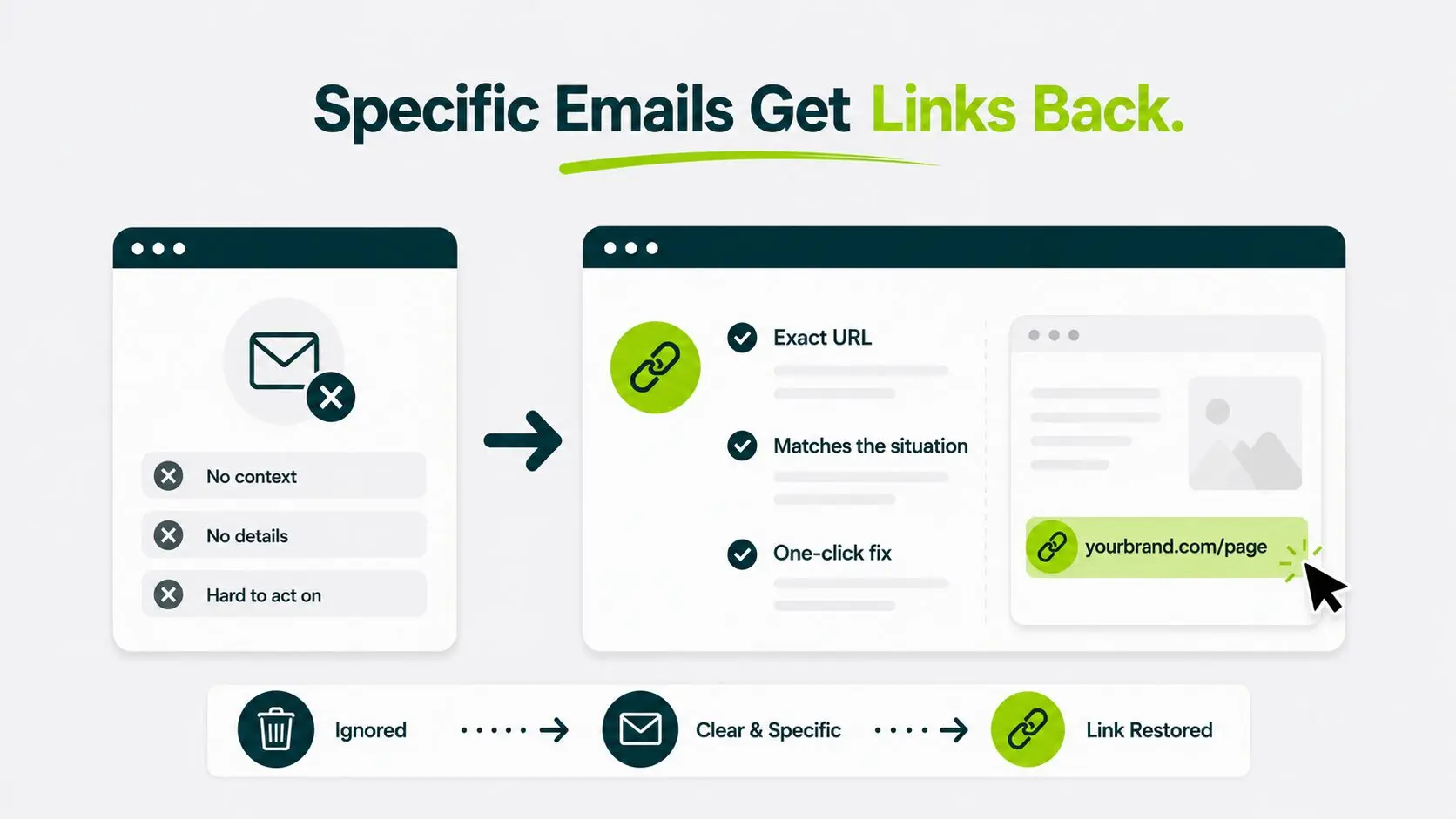
What works is naming the exact URL, matching your message to the exact situation, and giving the editor a one-click fix.
Scenario 1: The Mention Already Exists but Doesn’t Link
Use this outreach template when you find your brand in an article with no link attached. Editorial response rates on these are the highest in reclamation work.
Subject: Quick note on the [BrandName] mention in your [Article Topic] piece
Hi [Editor First Name],
Loved your piece on [article topic], especially the part on [specific section].
Quick note: you mentioned [BrandName] in the [section / paragraph], and I noticed there’s no link. If you’d be open to adding one, here’s the URL: [yourbrand.com/most-relevant-page].
Either way, thanks for the mention.
Best,
[Your Name]
It converts well as there is one ask, one URL, and no extra content requests. Editors can action this in under a minute, and they usually do.
Photographers face a visual version: venues and vendors publish their shots uncredited, the starting point of photographer link building.
Scenario 2: The Link Existed and Got Removed
Use this template after confirming the link existed previously and is now missing.
Subject: Update on the [yourbrand.com/page] link in your [Article Title] article
Hi [Editor First Name],
I was checking the referring links and noticed the link from your [Article Title] piece to our [page topic] resource isn’t live anymore. Did the page get reworked, or was the link intentionally pulled?
If it was unintentional and you’re open to restoring it, the original link was [URL]. We’ve updated that page recently with [specific update], so it’s even more useful than when you first linked.
Happy to send a version that fits if anything has changed in the article’s angle.
Best,
[Your Name]
The framing works because “Did the page get reworked?” sidesteps any accusation. “We’ve updated it” gives them a real reason to add the link back, rather than just a favor.
Scenario 3: The Link Hit a Broken Redirect
Use this outreach template when their article links to you, but the URL is dead on arrival.
Subject: Broken link to [yourbrand.com] in your [Article Title] piece
Hi [Editor First Name],
Heads up: the link to our site in your [Article Title] article isn’t resolving anymore. Looks like the URL we used to host the page got moved during a recent migration.
The live equivalent is here: [URL].
Easy update if you have a moment. No worries either way.
Thanks,
[Your Name]
Broken-link emails get the highest reply rate because you’re solving a problem on their page rather than asking for a favor.
Broken links hurt their site too; you’re the one who flagged it.
Finding the Right Person to Email
If the byline is missing a direct email, work through this in order:
- The author’s name plus “@” plus the site’s domain (most editorial sites use first.last@domain or firstinitial.last@domain).
- The “Editor page” or “Contact us page” on the site.
- LinkedIn (prefer sending a message instead of a connection request, if you’ve never met).
- Hunter.io or Apollo (use their free tier for low-volume work).
If you can’t find a direct address within 5 minutes, use the site’s generic editorial inbox (editorial@, hello@, press@).
Conversion drops, but you save the 20 minutes you’d otherwise spend hunting.
For subject lines, follow-up timing, and personalization that lift replies, our SEO outreach guide has the full breakdown.
What Realistic Response Rates Look Like
For cold reclamation outreach, a 5 to 10% reply-and-relink rate is normal.
For unlinked brand mentions, the rate jumps to 20 to 40 percent. The jump is because you’re asking the editor to finish a job they already started.
Without anchors, a 7% recovery looks like failure when it’s actually a healthy result. Knowing the realistic numbers stops you from over-engineering the outreach campaign or quitting too soon.
| SCENARIO |
EXPECTED REPLY-AND-RELINK RATE |
|---|---|
| Cold reclamation, no prior relationship, editor removed link | 3 to 8 percent |
| Cold reclamation, no prior relationship, broken redirect | 8 to 15 percent |
| Warm reclamation, existing email thread with editor | 25 to 50 percent |
| Unlinked brand mention from a large publication | 20 to 40 percent |
| Unlinked brand mention from a small blog | 10 to 25 percent |
These ranges reflect what experienced link teams typically see. They aren’t guarantees. They’re benchmarks to interpret your own results.
As per our experience, warm reclamation consistently outperforms cold by a factor of three or more.
The scenario that surprises most teams is broken redirect emails, where you’re solving a problem on their page and converting closer to the warm end than the cold.
Three Things That Move Response Rate Numbers
1. Timing Compresses Response Rates
The sooner you reach out to a blogger after an article publishes, the better your odds of getting the link added.
In our experience, response rates on same-week outreach run 2 to 3x higher than on articles a few months old. Google Alerts keeps you in that window.
2. Personalization Outreach Templates
Personalized outreach can improve response rates when it is based on real context. An email that proves you read the article can include a specific data point or a quote you noticed.
In our experience, one specific line beats three generic ones every time. Editors notice when you’ve read the piece. They notice faster when you haven’t.
3. Follow-up Matters More Than You Think
The table below mentions when a follow-up should be taken and what it does:
| FOLLOW-UP | WHAT IT DOES |
|---|---|
| Day 7 follow-up |
Meaningfully lifts your reply rate |
| Day 21 follow-up |
Adds more lift on top |
| Third follow-up or beyond |
Damages the relationship more than it helps |
How to Read Your Recovery Numbers
If you’re seeing a 4 percent recovery on cold reclamation, the issue is probably your subject line or your follow-up cadence.
The tactic itself is working. If you’re seeing 15 percent on unlinked mentions, your tactic is working, and you should run more volume.
The 30-minute Monthly Link Reclamation Routine
The 30-minute monthly link reclamation routine is simple:
- Pull the lost links report in the first 5 minutes
- Apply the triage matrix in minutes 6 to 12
- Send your outreach from minutes 13 to 22
- Check for fresh unlinked mentions in minutes 23 to 26
- Fix self-inflicted losses in minutes 27 to 29
- Log your sends in the last minute and move on.
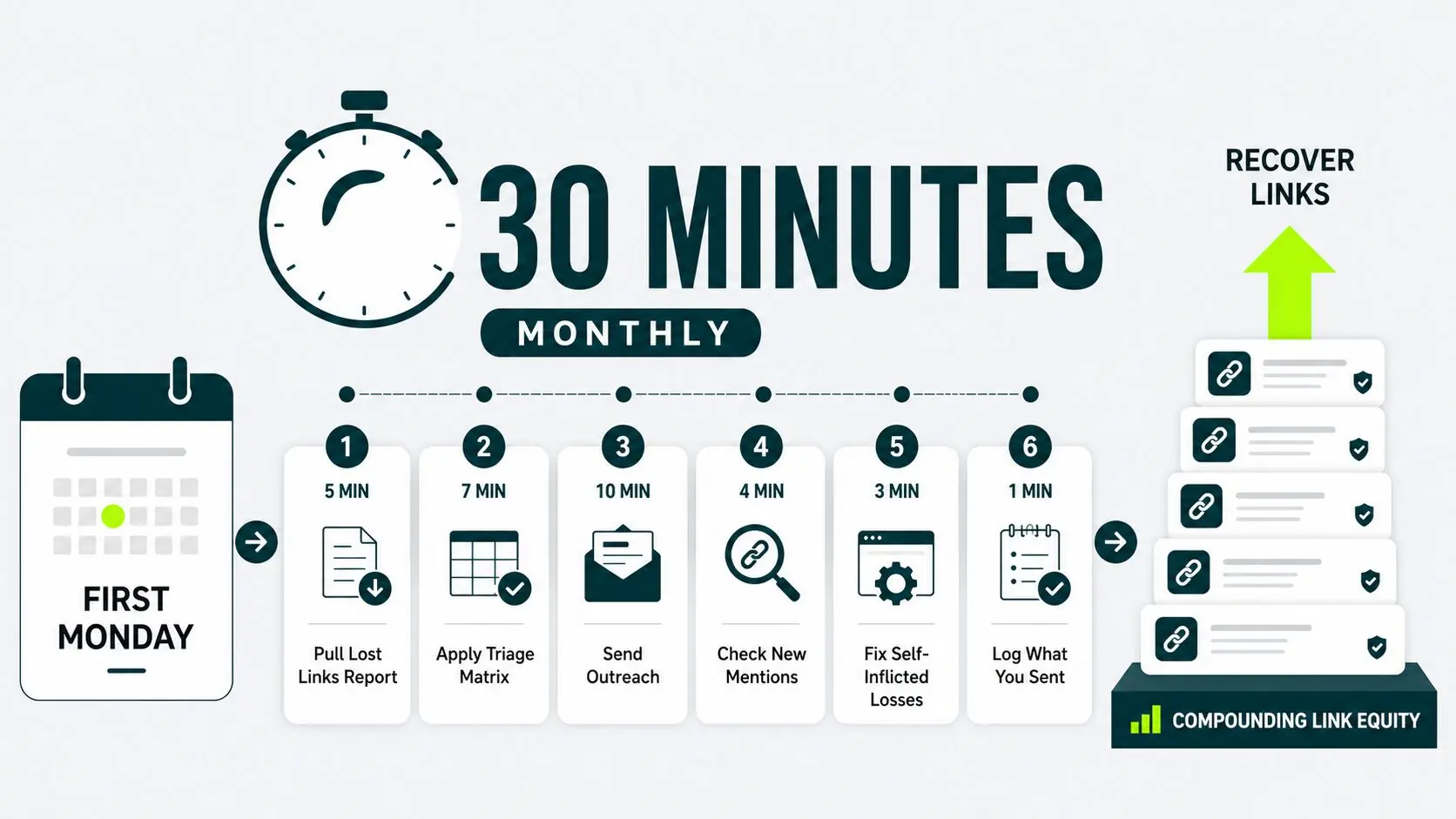
Let’s go through each one by one:
Minutes 1 to 5: Pull the Lost-links Report
Open Ahrefs Site Explorer or GSC > lost links from the last 30 days > export to a Google Sheet.
Copy and diff against last month’s export if you’re using GSC only.
Minutes 6 to 12: Apply the Triage Matrix
Apply the three signals, loss reason, DR, and relationship, to every link on the list. Mark each row with one of three labels: Chase, Backlog, Skip.
Most months, you’ll have 5 to 15 “Chase” rows. That’s normal.
Minutes 13 to 22: Send the Outreach
Open your email. Use the outreach templates from the earlier section. Personalize the one-variable sentence per email (you’ll get faster the more you do this).
If a row has no contact info, spend 60 seconds (not five minutes) trying to find it. If you can’t, push it to the next month’s batch and move on.
Minutes 23 to 26: Check for New Unlinked Mentions
Search for new brand mentions “YourBrand” -site:yourbrand.comfiltered to the last 30 days. Add any new unlinked mentions to the outreach queue.
Minutes 27 to 29: Fix Self-inflicted Losses
Scan the “Backlog” rows for anything that’s a self-fix (broken redirect on your side, a deindexed page, or a bad canonical). Spend two minutes setting up the easy redirects.
Minute 30: Log What You Sent and Move on
Note the emails sent, scenarios covered, and the date. Done.
Check next month for which ones are converted.
Use our free backlink monitoring tool to track gained, lost, and restored backlinks between scheduled reviews.
This is the sequence we recommend. The order matters. Triage before outreach, self-fixes before emails, log before closing the tab.
Skip a step, and the next month’s report starts with gaps you can’t explain.
Treat the slot as sacred, and you’ll recover many links per year from a site that previously silently lost them.
That’s link equity worth real money if you priced the equivalent paid placements.
For the bigger picture on how this fits into a full SEO program, see our pillar on core strategies to earn links.
How to Stop Losing Links in the First Place
Five habits will eliminate most preventable losses before they ever appear in your report.
These include avoiding URL changes on pages with backlinks, redirecting old URLs during site migration, not deindexing pages with strong backlinks, monitoring for unintentional canonical changes, and warning referring sites before removing a page.
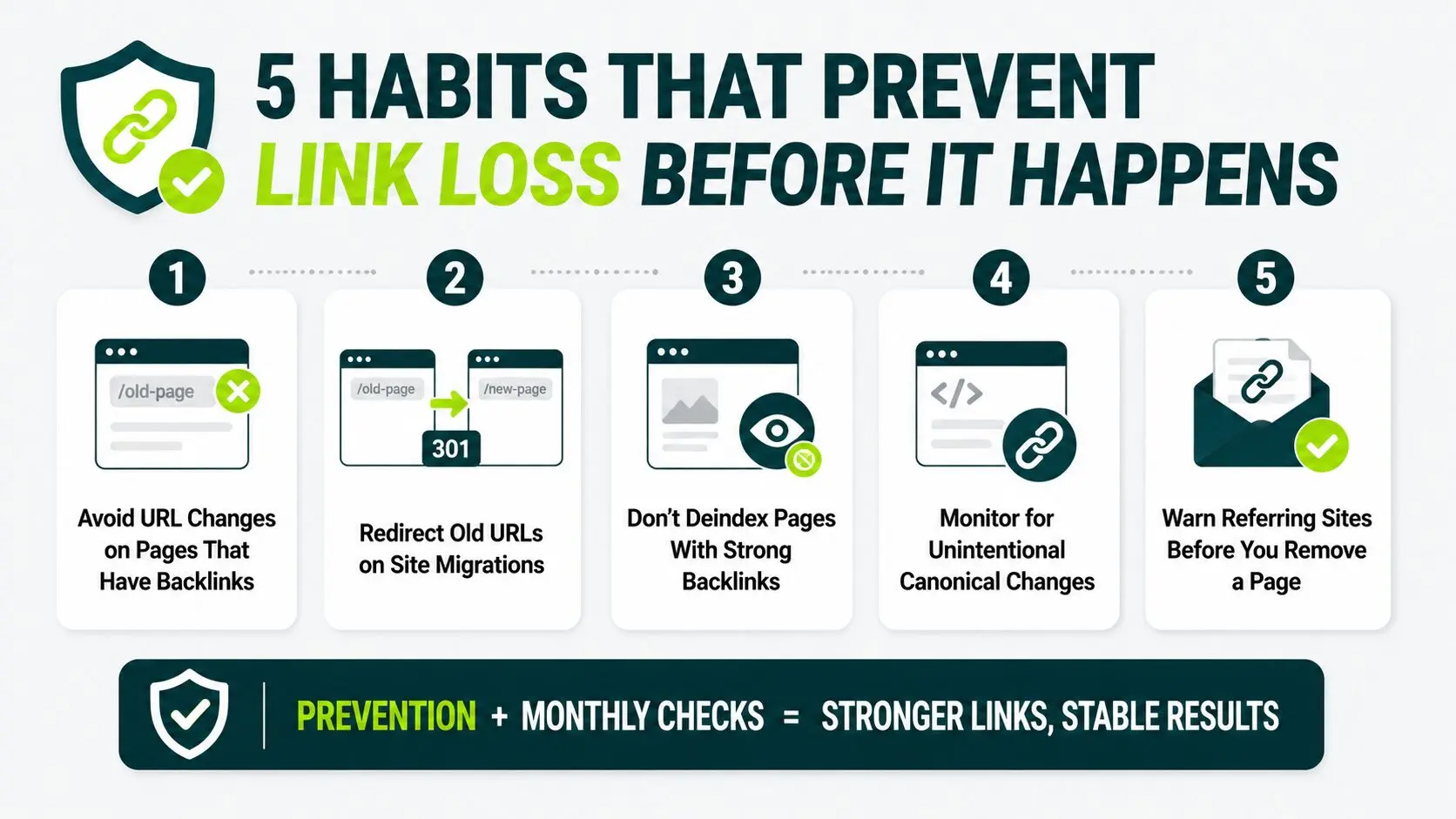
1. Avoid Url Changes on Pages That Have Backlinks
Any page with more than two referring domains has a permanent address.
Before you touch the slug or restructure the URL, check its backlink count. Either leave it alone, or have the 301 ready and live before the change goes out.
2. Redirect Old Urls on Site Migrations
Migrations break more backlinks than anything else you’ll do to a site.
When you move a site, redesign, or change platforms, build a redirect map for every URL, including its referring domains. Map old to new, test in staging, and verify it works after launch.
3. Don’t Deindex Pages With Strong Backlinks
If a page has 50 referring domains and you suddenly mark it noindex, you’ve quietly thrown away years of accumulated link equity.
Always check the backlink count before adding noindex. If the page has strong inbound links but you don’t want it indexed for some other reason, redirect it instead.
4. Monitor for Unintentional Canonical Changes
Platform updates and plugin changes sometimes flip canonical tags without anyone noticing.
Set up a monthly check (it’s part of the 30-minute routine) to confirm key pages still self-canonicalize.
5. Warn Referring Sites Before You Remove a Page
If you’re sunsetting a page that other sites link to, email the top three referring sites a week before you take it down.
Give them a heads-up and an alternative URL. Most editors will swap the link rather than leave a broken one in their article.
When you combine these five habits with a monthly link reclamation routine, your backlink management strategy becomes proactive instead of reactive.
You catch issues early, protect the links you’ve earned, and spend less time recovering lost SEO value.
When Link Reclamation Isn’t Worth Your Time
Three conditions that show you that link reclamation isn’t worth your time are: the referring site has a DR under 30 and no niche relevance; the page was deleted, and there’s no archive; or the link was already disputed before removal.
The walk-away rule protects your 30-minute slot. Low-probability outreach is how a tight routine balloons into two hours of work with nothing to show for it.
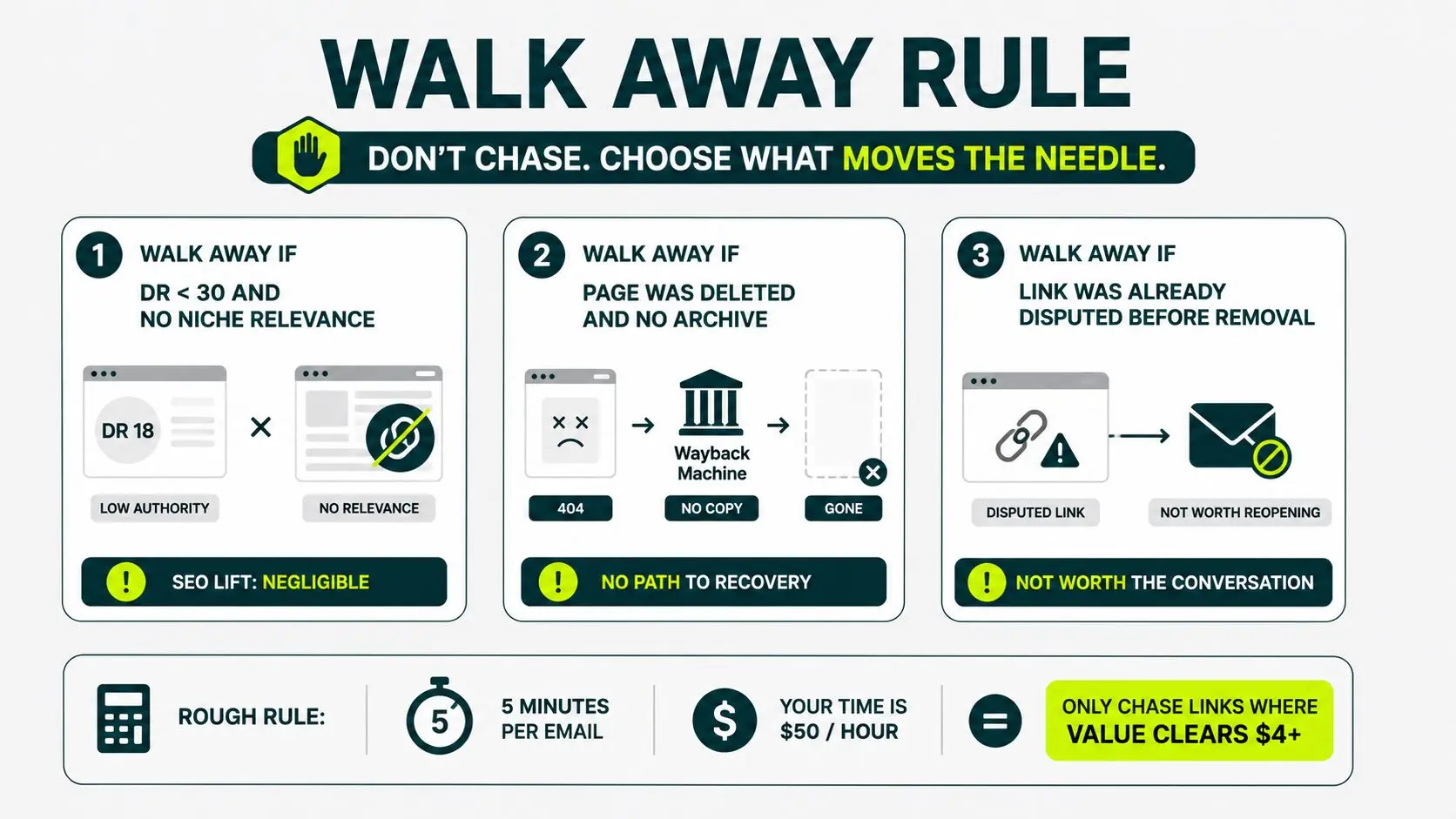
Walk Away If: The Referring Site Has Dr Under 30 and no Niche Relevance
Links from weak, unrelated sites don’t move your rankings, even when you recover them. A DR 18 site outside your industry isn’t worth five minutes of your time.
One exception is if a DR 15 site that’s the go-to trade publication for your specific niche passes more relevance value than a DR 50 generalist. Niche context beats raw authority here.
Walk Away If: The Page Was Deleted and There’s no Archive
No page. No URL. No Wayback Machine copy. There is nothing left to link from and no editor who can restore what doesn’t exist.
Spend the time on better candidates or analyzing competitor link profiles, which can sometimes lead to easier wins.
Walk Away If: The Link Was Already Disputed Before Removal
An editor who removed your link after a reader complaint, a disputed fact, or a correction isn’t going to add it back because you emailed.
Reopening that conversation means reopening the disagreement. Leave it.
Five minutes of your time at $50/hour = roughly $4 in cost per email.
Only send it if the link’s recovered value clears that bar. If you can’t build that case, move on.
Start Your First Reclamation Routine This Monday
Block 30 minutes on the first Monday of next month. Pull the report, run the triage matrix, send three emails. That’s the whole routine.
Build this into your monthly process, and it compounds. More recovered authority, a stronger backlink profile, and better organic visibility, without adding another full campaign to your plate.
Not sure how many backlinks or brand mentions you’re missing?
Get a strategy for reclaiming valuable links and strengthening your backlink profile.
How do you reclaim lost backlinks?
Start with a lost-links report from Ahrefs or Google Search Console.
Diagnose the reason each link dropped. Anything fixable on your end, such as broken redirects or bad canonicals, gets handled without outreach.
For the rest, send a short email matched to the specific situation. Thirty minutes a month handles most sites.
Can link reclamation be outsourced, or is it better handled in house?
It works fine in house at 30 minutes a month for most sites. It becomes worth outsourcing once you’re tracking reclamation across multiple sites or alongside a larger outreach campaign. A dedicated link building agency typically folds reclamation into ongoing campaigns rather than treating it as a separate task.
What is the difference between link reclamation and broken link building?
Link reclamation recovers backlinks that used to point to your site or mentions that should link to you.
Broken link building targets broken links on other sites. Those broken links point to someone else’s content. You offer your content as a replacement.
Reclamation is defensive (recovering what you had). Broken link building is offensive (winning new links).
Why do backlinks get lost?
Six causes cover almost all cases:
- A page got deleted.
- An editor removed your link.
- A redirect landed on the wrong URL.
- The page was deindexed.
- A canonical tag changed.
- The redirect chain broke.
Few of the backlinks decay within the first year from these causes combined.
How often should you do link reclamation?
The most sustainable cadence is 30 minutes on the first Monday of every month.
Less often than that, and you miss the warm window when editors are still reachable. More often, you’re spending time on diminishing returns.
A site with under 50 referring domains can probably run the routine quarterly without losing much.
Is link reclamation worth it?
For any site with over 20 referring domains, yes.
The input is a 30-minute recurring habit. The output is a 5–40% recovery rate for lost links, depending on the scenario, and over a full year, which amounts to dozens of restored backlinks you didn’t have to earn from scratch.