Picture a founder one month into their first push to rank on Google. A vendor emails them with a guest-post slot on a marketing blog. The price is fine, the site looks busy, and the founder pauses on the obvious question: Is this link actually relevant?
A relevant link comes from a page about a similar topic that provides value to the real readers. That’s the short answer. The longer answer is the six-check test, which you can run on any prospect in under a minute. Build relevant backlinks to rank higher in search results.
What You’ll Learn
- What a relevant link actually is, in plain words.
- Why Google now weighs relevance heavily.
- The two layers of relevance: page and domain.
- The Outreach Desk six-check relevance scorecard.
- When authority outweighs relevance, and when it doesn’t.
- How to find relevant prospects without paying for premium tools.
- What to do with the irrelevant links you already have.
What a Relevant Link Actually Is
A relevant link is a backlink from a page that closely matches your topic, industry, or audience and would naturally help the reader.
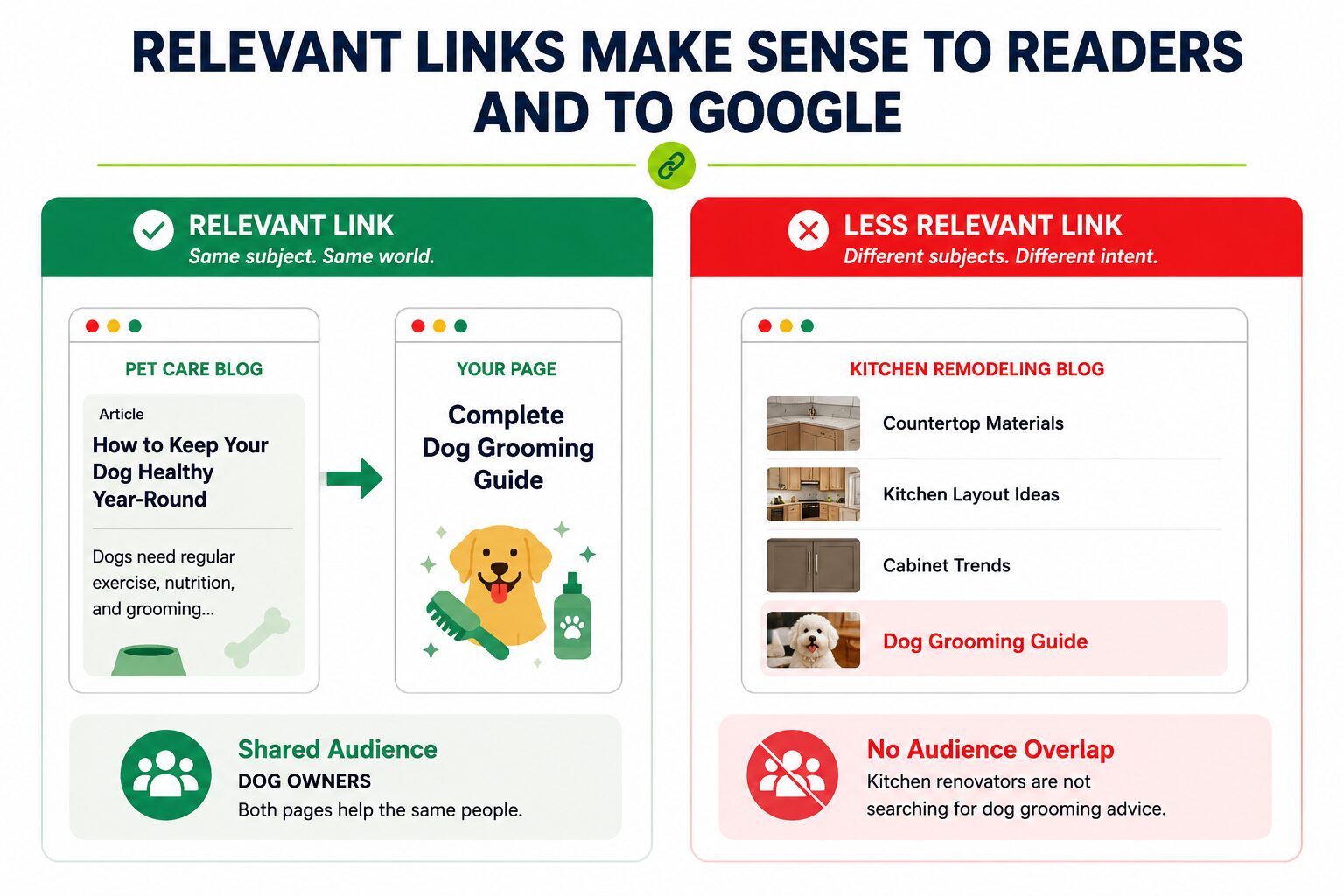
Understand this with a simple example.
Imagine you own a local dog-grooming business. A pet care blog publishes an article about keeping dogs healthy and links to your grooming guide.
That link feels natural because both pages serve people who own dogs and are looking for pet-care advice.
Now, imagine the same grooming guide gets linked from a website about kitchen remodeling. The link still exists, but there’s no obvious connection between renovating a kitchen and grooming a dog.
The first link is relevant because the topics naturally overlap. The second isn’t even if the website itself is genuine.
Why Google Now Weighs Relevance Over Raw Link Count
Google weighs relevance because raw link count by itself stopped being a clean signal years ago. When anyone can buy a thousand links in a week, the count alone tells Google almost nothing about whether a page is trustworthy. Topical relevance is what’s left when you strip out the noise.
Google’s been hinting at this for a while.
In 2022, John Mueller said that link weight would drop over time. Mueller is the Google representative who answers public ranking questions. The reason he gave was that Google’s understanding of how each page fits the wider web keeps improving.
Search Engine Land’s report on Mueller’s comment on link weight has the full quote.
The lesson isn’t that links don’t matter. The lesson is that the few links you do build have to carry more meaning.
If you’re still figuring out what separates a strong backlink from a weak one, see what makes a backlink high quality.
The Two Layers Every Relevant Link Has
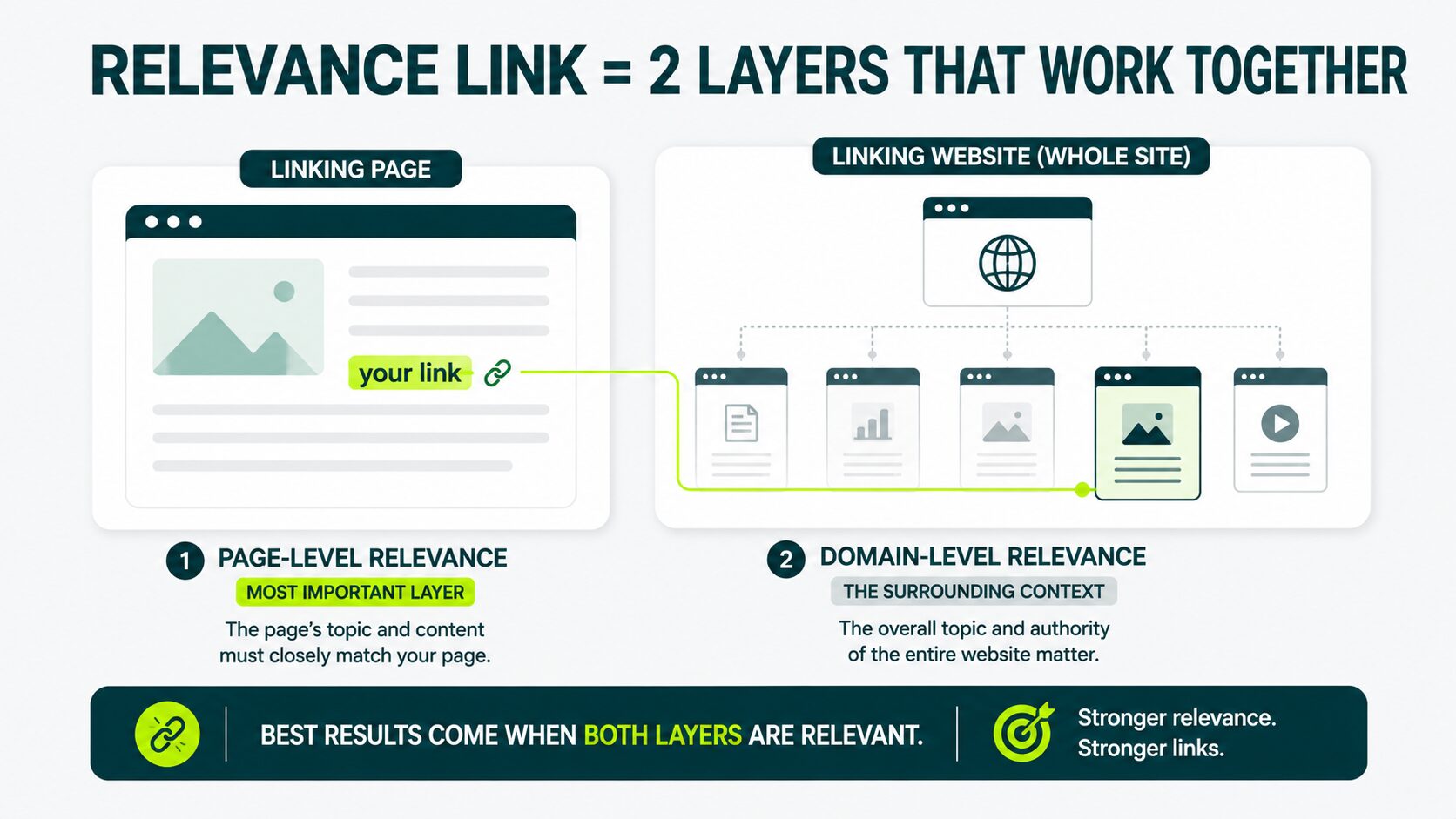
A relevance link works on two layers at once: the page sending the link, and the whole site sending the link.
Both of them matter, but not equally.
Page-Level Relevance (Most Important Layer)
Page-level relevance is the match between the specific page sending the link and the specific page receiving it.
Suppose your dog-grooming page gets a link from a post titled “How to Keep Your Dog Healthy and Happy.” That’s high-page relevance.
The clickable words are the anchor text, and the surrounding sentence matters too.
A link anchored “dog grooming tips” inside a sentence about pet health reads naturally. Google reads it the same way. A link anchored “click here” inside a sentence about restaurant licenses reads suspicious to search engines.
For more on how this works inside body copy, see in-content link placement.
Domain-Level Relevance (The Surrounding Context)
Domain-level relevance is the match between the whole site sending the link and your whole site.
A pet-care blog linking to a dog-grooming business is high domain-level relevance.
A general animal-care magazine linking to a dog-grooming business is still relevant, just less specifically. A general “business tips” site that links to anyone is of low domain-level relevance regardless of what the specific page says.
Here’s the call this guide makes: page-level relevance is the more important layer, and beginners underweight it.
A page-level fit on a moderately on-topic site usually beats a perfect domain match unnaturally placed into an off-topic page.
The Outreach Desk Relevance Scorecard
The Outreach Desk’s relevance scorecard consists of a six-check test. We run this test on every client prospect before pitching them. Each check is either yes or no.
Add the “yes or no” answers.
- Five or six is a green light (good to go)
- Three or four is a yellow light (proceed with caution)
- Anything under three is a red light (don’t go forward, we don’t pitch)
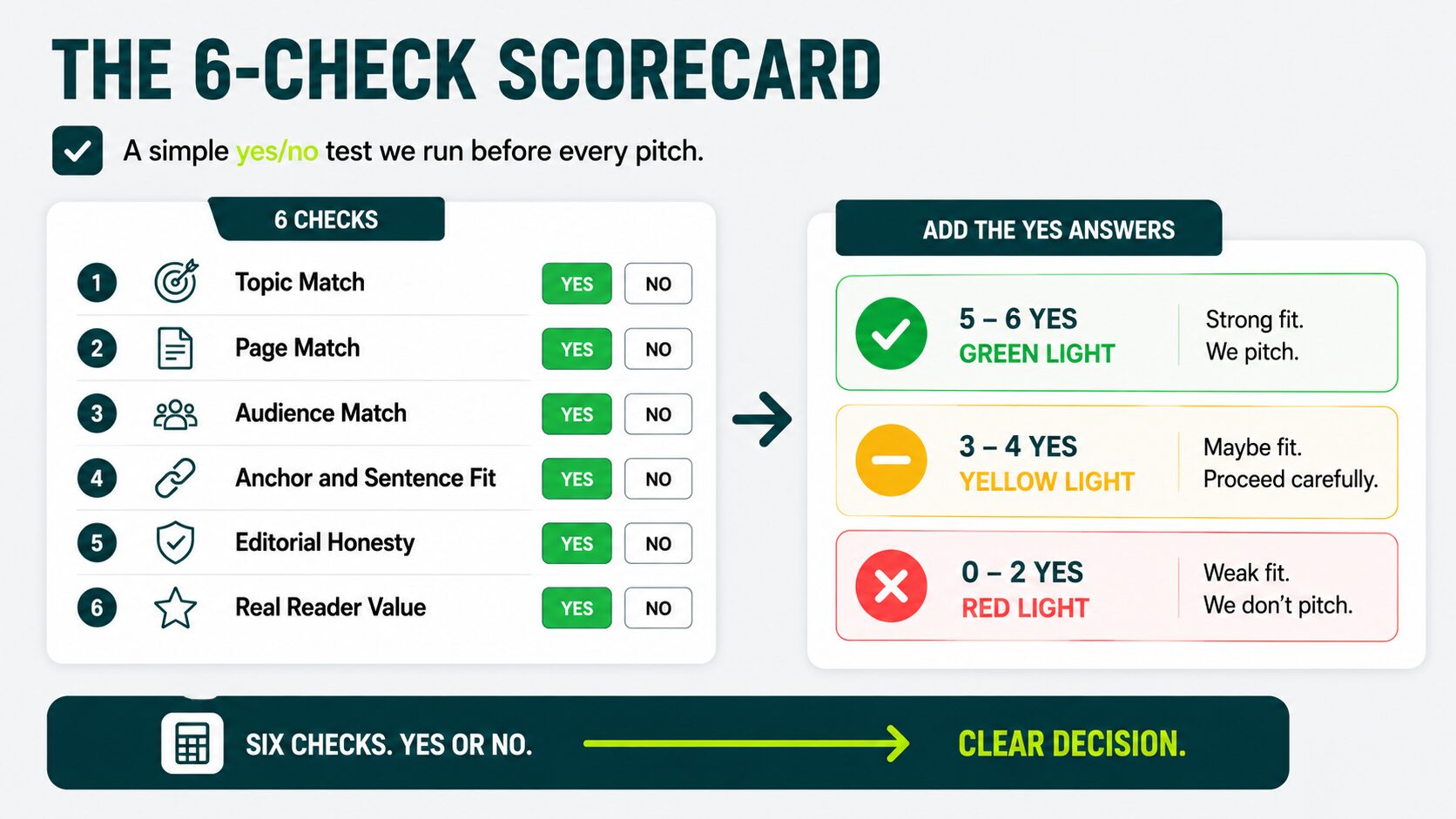
Check 1: Topic Match
The first check, topic match, is whether the linking site covers your subject area.
A “yes” looks like a pet-care blog, a dog trainer’s site, or an animal-care magazine that runs dog health and grooming features. A “no” looks like a generic business blog or a generic “tips” site where pet care doesn’t appear on the topic list.
If the site doesn’t cover your subject area, the rest of the checks don’t matter.
Check 2: Page Match
The page match asks whether the specific linking page covers your page’s topic. A “yes” is the post titled “How to Keep Your Dog Healthy and Happy,” linking to your dog-grooming page. A “no” is the post titled “How to Start a Restaurant” linking to your dog-grooming page from a one-line aside.
Page match is the most decisive check on the scorecard.
Check 3: Audience Match
The audience match is all about whether a real reader of that page would actually want what’s on your page.
A “yes” is a reader finishing a post on dog health tips, clicking through to read about dog grooming. A “no” is a reader finishing a post on restaurant licensing, clicking through to dog grooming, which they wouldn’t.
The audience check matters because Google now uses readers’ behavioral signals as well. A link that no reader ever clicks doesn’t help anyone.
Check 4: Anchor and Sentence Fit
The anchor and sentence fit check asks whether the surrounding sentence reads naturally with the link in it.
A “yes” is a sentence like “Many dog owners keep their pets healthier when they follow a regular grooming routine.” The link could sit on “regular grooming routine” and read naturally.
A “no” is a sentence shoehorned to fit the link. “Speaking of services, dog grooming is also a thing some people use.”
Remember
If the sentence reads natural to you, it reads natural to Google.
Check 5: Editorial Honesty
The editorial honesty check is about whether the link is an editor’s choice, not a paid slot or a swap.
A “yes” is a link or a real editor chose to include because the dog-grooming resource was useful. A “no” can be a sponsored link. It can be a link from a site whose business is to sell them.
It can even be swapped, with you placing one for them in return.
You can’t always know this from outside, but you can usually tell. Sites that sell links openly advertise it on a “write for us” page.
Some sites have a backlink profile dominated by footer-area links pointing to other sites in the same network. That’s easy to spot in any backlink tool.
Check 6: Real Reader Value
The real reader value check says whether clicking the link actually helps the reader, not just the linker. A “yes” is a link that takes the reader to a page that answers a question the article raised.
A “no” is a link that takes the reader to a sales page or the homepage, with no specific answer.
In our experience, fewer than half of cold prospects survive the complete six checks. Page match and editorial honesty are where most fail.
When Authority Beats Relevance (and the Reverse)
Authority beats relevance when the score is yellow (three or four checks), and the link comes from a trusted publisher in an adjacent topic. The editorial setup has to be honest.
Relevance beats authority when the score is yellow, and the linking domain is generic, without a name, or openly sells links.
A red light score loses regardless of how high the authority is.
To make this concrete, look at the domain rating. DR is a 0 to 100 score from the backlink-checking tool Ahrefs. It estimates the strength of a site’s backlinks.
DR tells you the authority of the linking site. It doesn’t tell you whether the link is relevant. Both can be true, but they’re separate measurements.
Most beginner link campaigns fail not because the links are low-authority, but because they’re low-relevance and nobody scores them.
The vendor sells the high DR number. The buyer assumes high DR means high value. Three months later, the rankings haven’t moved.
In practice, the relevance score should drive the decision, with DR acting as a tie-breaker when the score is unclear.
| Relevance Score | DR / Authority | Recommendation |
|---|---|---|
| Green (5–6 checks) | Any reasonable DR | Take the link |
| Yellow (3–4 checks) | High DR | Consider it |
| Yellow (3–4 checks) | Low DR | Usually pass |
| Red (0–2 checks) | High DR | Reject it |
| Red (0–2 checks) | Low DR | Reject it |
Remember
- If the score is green, take the link regardless of DR.
- If the score is yellow, use DR as a tie-breaker.
- If the score is red, walk away even at DR 90.
How to Find Relevant Prospects Without Paying for Premium Tools
To find relevant prospects without premium tools, look at who already links to your competitors and run each candidate through the scorecard.
Step 1: List Two or Three Competitors
Pick a competitor whose readers are the same as those who would buy from you. A dog-grooming business picks two other pet-care brands and one dog trainer, not a restaurant supply company.
Step 2: Pull Their Links Using Free Options
Search Google for the competitor’s domain with mentions of your topic to find pages that reference them. Free-tier tools like Moz’s free backlink checker also work for the first 10 results.
Step 3: Filter to Topic-Matched Pages
Open each linking page. Skim the headlines and the first paragraph. If the page isn’t about your subject area, drop it. If it is, copy the URL to a sheet.
Step 4: Run the Scorecard
For each surviving page, run the six checks. Mark with green, yellow, or red.
Step 5: Outreach to the Green and Strong Yellow Links
Send a short, specific pitch. Reference what their page already covers, and explain why your page is useful to their readers. The pitching mechanics are in the reaching out to relevant sites guide.
This is also how the Outreach Desk team builds the first version of a client prospect list before paid tools are in place.
Links That Look Relevant but Score Badly
Some links look relevant on first glance and fail the scorecard once you actually run it. These are the most common false positives a beginner sees.
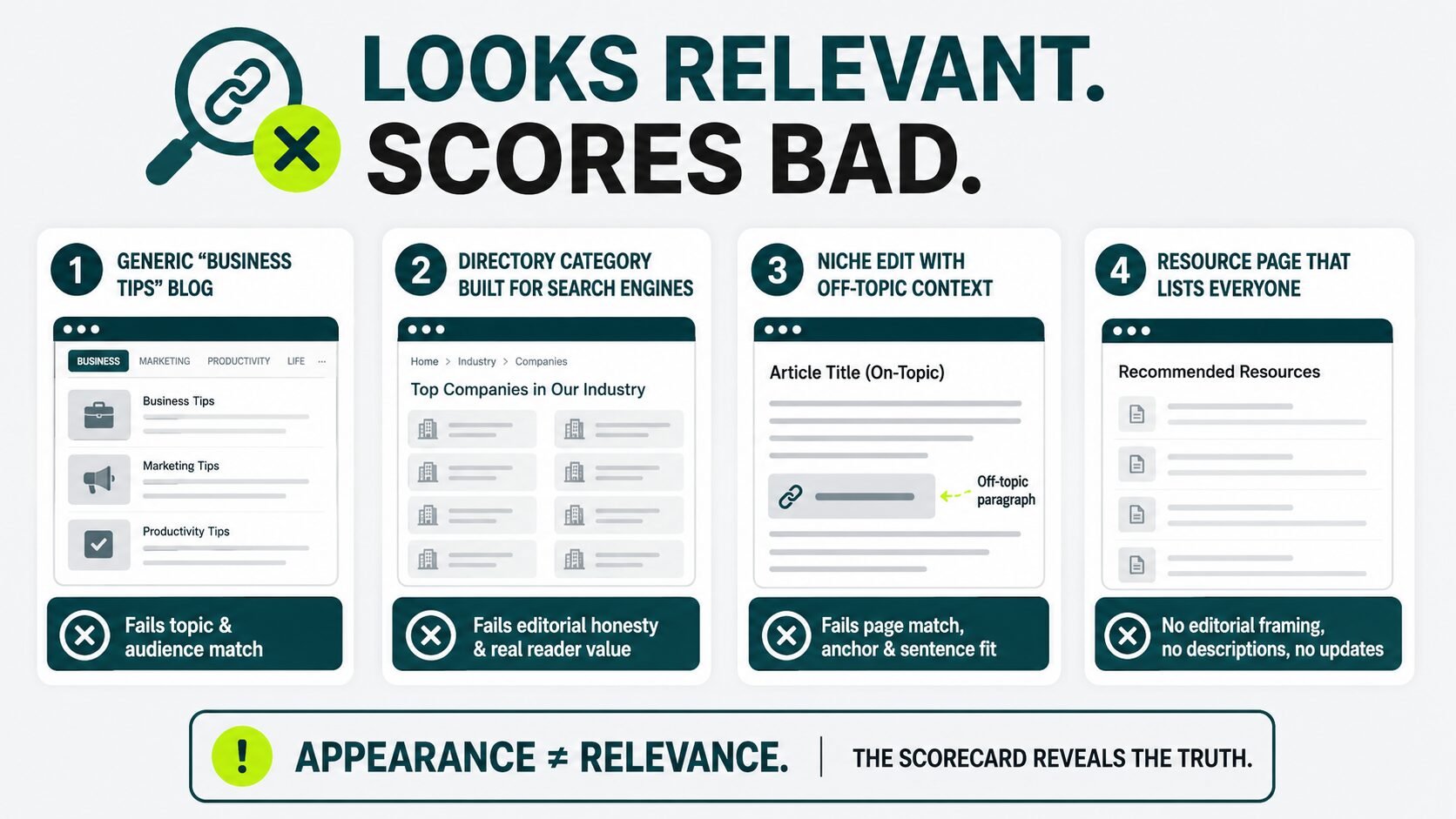
The Generic “Business Tips” Blog Sold as a Niche Fit
A blog covers business tips, marketing tips, productivity tips, and seventy other topics. A vendor pitches it as a fit because it sometimes covers your niche.
The scorecard fails on the topic match and usually on the audience match as well. The reader of a generic tips blog isn’t your buyer.
The Directory Category Built for Search Engines, Not Readers
A directory has a category for your industry. Those category pages list fifty companies. None of the page text is about anything specific.
The scorecard fails on editorial honesty and real reader value. These are usually red lights.
The Niche Edit Whose Surrounding Paragraph is Off-Topic
A vendor offers to add your link to an existing post on a relevant site. The post is on-topic, so the domain check passes.
But the vendor inserts your link into a paragraph about something else inside that post. The scorecard fails on page match, anchor, and sentence fit.
For more on this tactic, see niche edits explained.
The Resource Page That Lists Everyone
A resource page in your niche lists every competitor, plus you, and looks relevant.
Look closer: the page has no editorial framing, no descriptions, and no recent updates. The scorecard usually grades it yellow at best.
For a broader look at the categories, these patterns fall under the main type of backlinks breakdown, which maps them out.
Cleaning Up the Irrelevant Links You Already Have
To clean up irrelevant links, score them with the scorecard, and dilute the weak ones with new relevant links. Disavow only as a last resort.
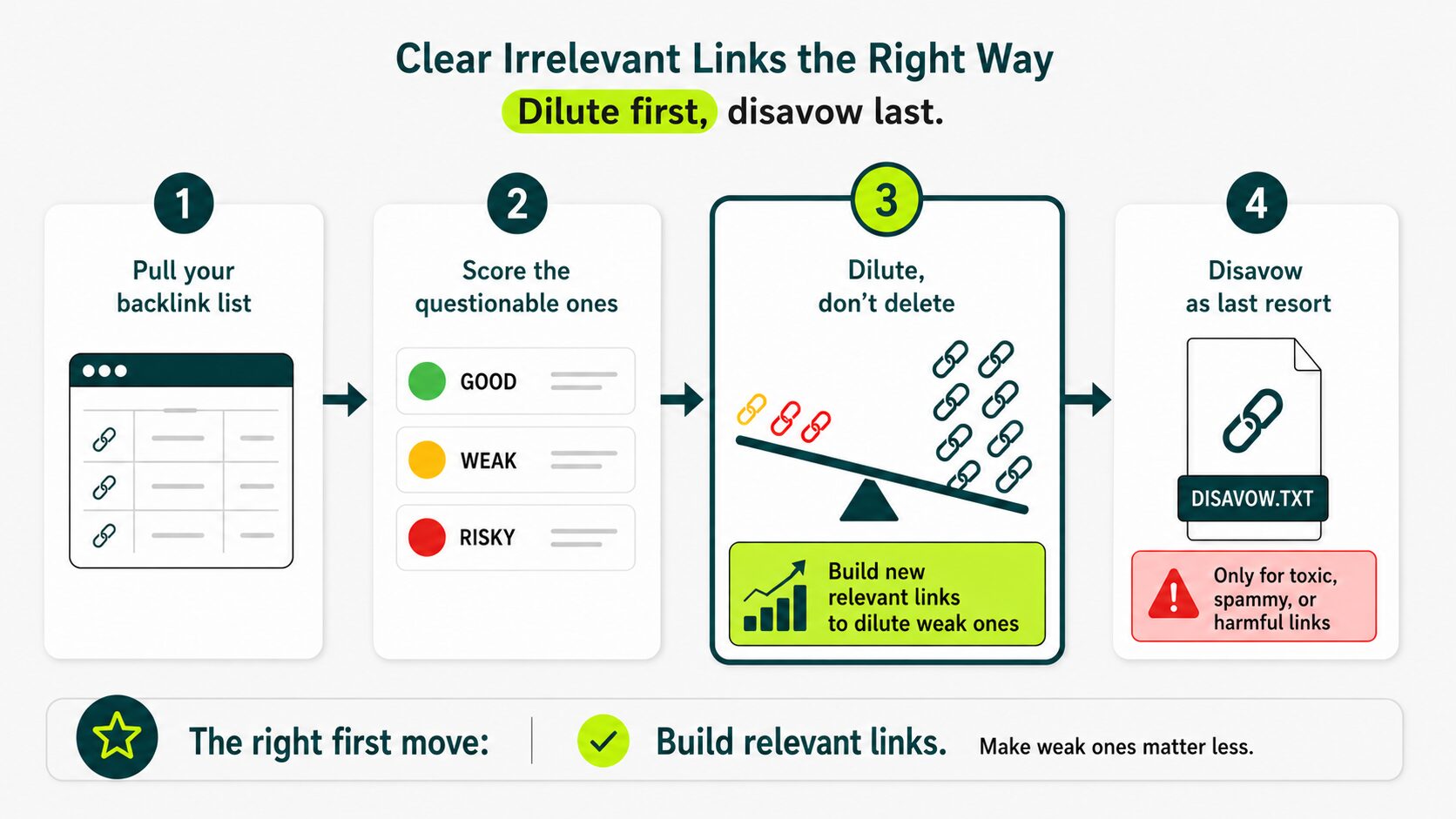
Step 1: Pull Your Current Backlink List
Get a list of every page that links to you. Free tools work for a first pass. If you’ve never seen this list, now’s a good time to audit your link profile.
Step 2: Score the Questionable Ones
Run the scorecard on every link you suspect might be weak. Mark them green, yellow, or red.
Step 3: Dilute, Don’t Delete
For yellow links, keep them as they are. Build new relevant links above them so the percentage of weak links in your profile drops over time. Relevance dilution works better than removal for most beginners.
Step 4: Disavow as the Last Resort
For red-light links from spammy domains, hacked sites, or sites with no real content, use Google’s disavow tool. The disavow tool is a file you upload telling Google to ignore specific incoming links.
Here’s the editorial position this guide takes: disavow is the wrong first response to most irrelevant links a beginner has. The right first response is to build new relevant links so the weak ones matter less.
We disavow rarely in real audits.
Quick Tip
Next time you’re about to accept a new link, run it through the scorecard first. The link quality basics page covers what the strongest links have in common.
Running the Scorecard on Your First Prospect
The smallest useful next step: pick one prospect you’re already considering, and run the six checks on it once.
If the score comes back green, pitch. If it comes back yellow, decide whether the link is worth the time. If it comes back red, move to the next prospect.
That single pass changes how you read every link offer you’ll get from then on.
Not sure whether the links you’re building are actually relevant?
Get a strategy focused on earning backlinks that align with your audience, content, and goals.
Do irrelevant links hurt your rankings?
They don’t, but they don’t help either. From what we see, Google’s spam systems usually ignore obviously irrelevant or low-quality links rather than punishing them.
The real cost is opportunity cost: the time you spent acquiring them was time you could’ve spent acquiring relevant ones. Heavy patterns of paid or spammy links can cause harm, which is where disavowing comes in.
Is relevance more important than domain rating?
Yes, on most prospects. A green scorecard link from a moderately authoritative site outperforms a red scorecard link from a high-DR one.
DR tells you that the site has authority. The scorecard tells you the link is relevant. You want both, but if you have to pick, pick the one that matches your topic and your reader.
Does every link on your site need to be relevant?
No. A handful of off-topic links from high-authority sites won’t hurt you. What matters is the overall pattern. If the majority of links pointing to your site come from topically unrelated pages, Google has a harder time understanding what your site is about.
Aim for relevance as the default. Work with a professional link building team that vets publishers by topic, not just domain rating.
What anchor text works for a relevant link?
A short descriptive phrase that reads naturally inside the sentence. Three to six words is the typical sweet spot.
Don’t use exact-match anchors on every link. A profile full of “professional dog grooming services” looks artificial. Mix branded anchors, partial-match anchors, and natural-reading phrases.
How many relevant links do you need?
There isn’t a single number, because it depends on how competitive your space is. A new sleep brand competing with two-year-old competitors needs more links than a new niche brand with one.
Fifteen to thirty relevant links built over six months move the ranking on a focused new site. The distribution of relevance across them matters more than the count.
How long until relevance starts moving rankings?
Three to six months is the realistic window for a new site. The first month, Google sees the new links. In the second and third months, rankings start to adjust. By the fourth month, the pattern is usually clear.
Beginners quit at month two, which is the worst possible time.
Do AI overviews change link relevance?
Yes, tools like Google’s AI Overviews, ChatGPT, and Perplexity favor sources that are topically focused and consistently linked from other topical sources.
Relevance becomes more important for getting cited inside an AI answer, not less. For more on this, see showing up in AI Overviews.