You check your backlink report and see two numbers that don’t match. 500 backlinks, but only 40 referring domains.
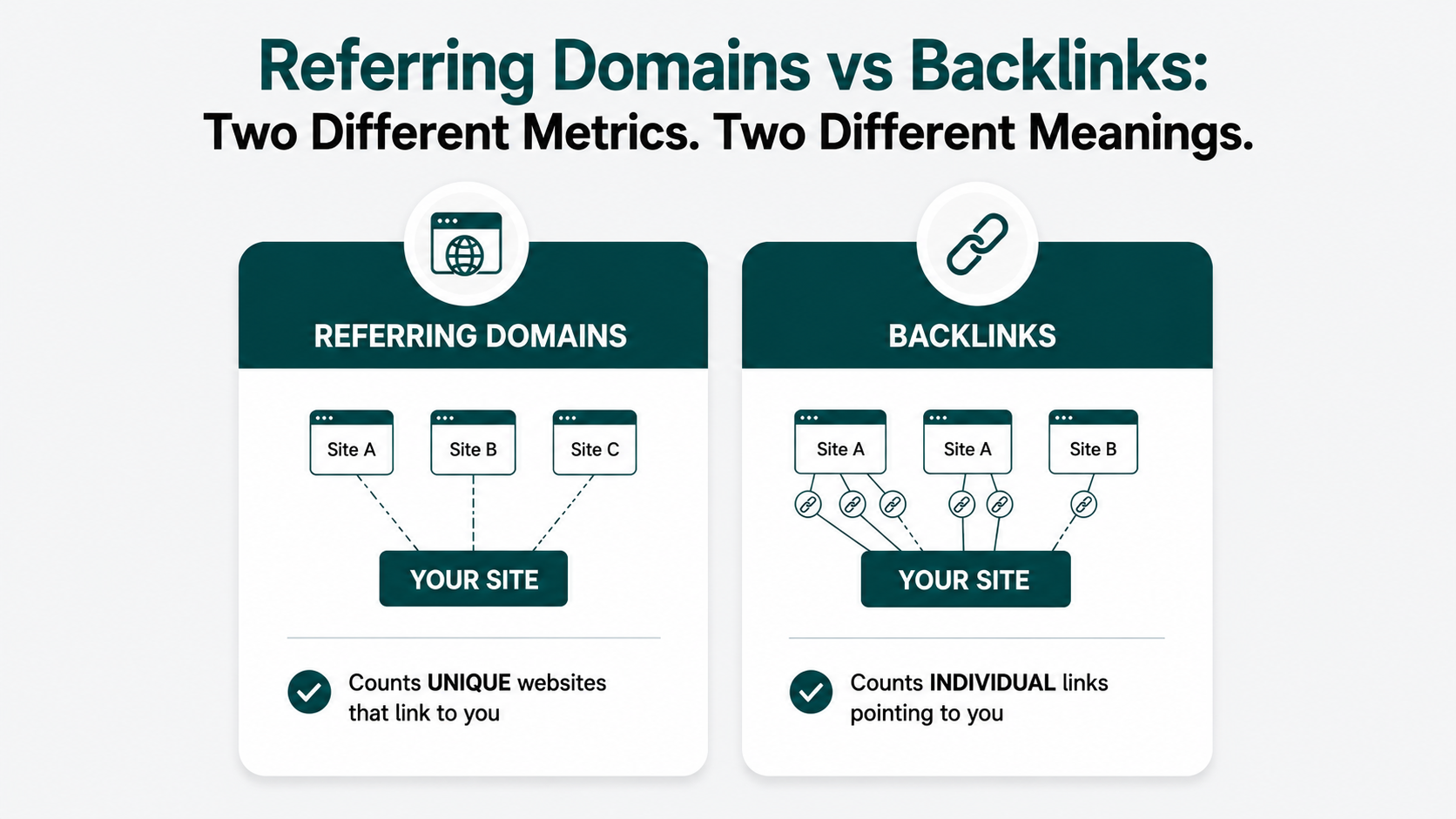
Backlinks and referring domains measure different things. Backlinks are individual links pointing to your site; referring domains are unique websites from which those links come.
One page can link to you 50 times, giving you 50 backlinks, while 50 links from the same site still count as just 1 referring domain.
If you’re wondering which number matters more, referring domains usually tell you more about the breadth of sites linking to you. However, the real question is when each number deserves your attention and what a healthy gap looks like.
Key Takeaways
- Referring domains matter more than raw backlinks for trust.
- One site can create many backlinks, but it only ever counts as one referring domain.
- High backlink-to-domain ratios often reflect repeated sitewide links.
- Domain quality matters; relevance beats referring domain quantity.
- Grow new, relevant domains before chasing extra links.
Backlinks and Referring Domains: What You’re Actually Measuring
Websites link to other websites when they reference a source, mention a company, or point readers to something useful. Those natural recommendations are called backlinks.
Search engines use links as one of several signals for understanding pages and their relationships on the web.
If TechCrunch (a technology news publication) links to your tech company site three times, you have three backlinks but one referring domain. A referring domain is a unique website linking to your site, regardless of how many links it sends. Backlinks tell you how many links you have, while referring domains tell you how many separate websites those links come from.
Get a deeper explanation of what backlinks are, what makes a link valuable, and how those links can strengthen your site’s authority over time.
Your Report’s Two Numbers Count Different Things
Your referring domain and backlink counts measure different things. Referring domains count the unique websites linking to your site, while backlinks count the individual links pointing to it.
You can check both numbers in Ahrefs by searching your site’s URL in the search box.
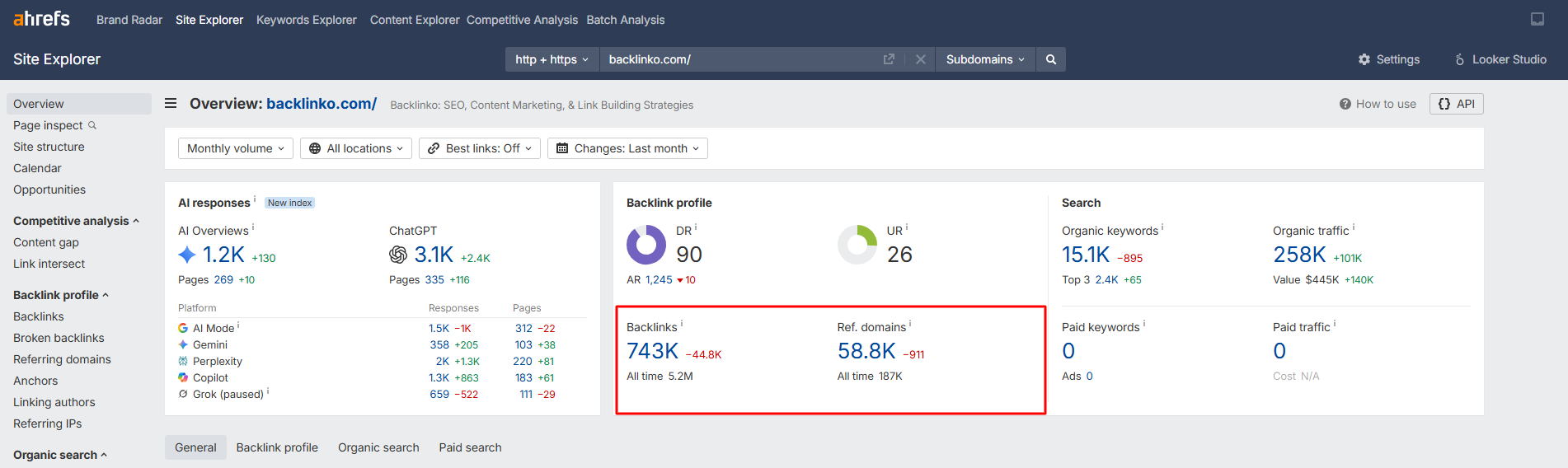
The example shows the referring domains and backlink count of the site Backlinko.
There are two different numbers: one indicating the number of referring domains and the other indicating the number of backlinks.
The report is easy to glance at; if you see that the number of backlinks exceeds the number of referring domains, you might think the site is strong.
Your backlink count will almost always be bigger than your referring domain count, because most sites that link to you once tend to link to you more than once.
That gap is normal; what matters is understanding what each number is actually reporting before you decide which one to chase.
What Separates Referring Domains and Backlinks
The one-site, many-links mechanic is the whole story. Every link is a backlink, but only the first link from a given site creates a new referring domain.
The table breaks down factors that separate backlinks from referring domains.
| FACTORS |
BACKLINKS |
REFERRING DOMAINS |
|---|---|---|
| What it counts |
Every individual link points at you. | Every unique website links to you at least once. |
| What it signals |
Volume of links in total. | Breadth of sites that trust you. |
| Where you’ll see it |
Ahrefs “Backlinks,” Semrush “Backlinks,” Search Console “External links.” | Ahrefs “Referring Domains,” Semrush “Referring Domains,” Search Console “Linking Sites.” |
| Can it rise without the other moving |
Yes, easily. One site is adding more links to you. | No. A new referring domain always adds at least one backlink, too. |
Sitewide and footer links are the most common reason backlink counts inflate without referring domains moving much.
One link placement in a global template can generate hundreds of individual link instances from a single site.
The complete breakdown of backlink types covers where those appear.
Why 30 Links From One Site Don’t Beat 30 Sites
Thirty links from one website aren’t worth anywhere near what 30 links from 30 different websites are worth. Google reads each additional link from the same site as a smaller and smaller vote, because it already knows that site’s opinion of you.
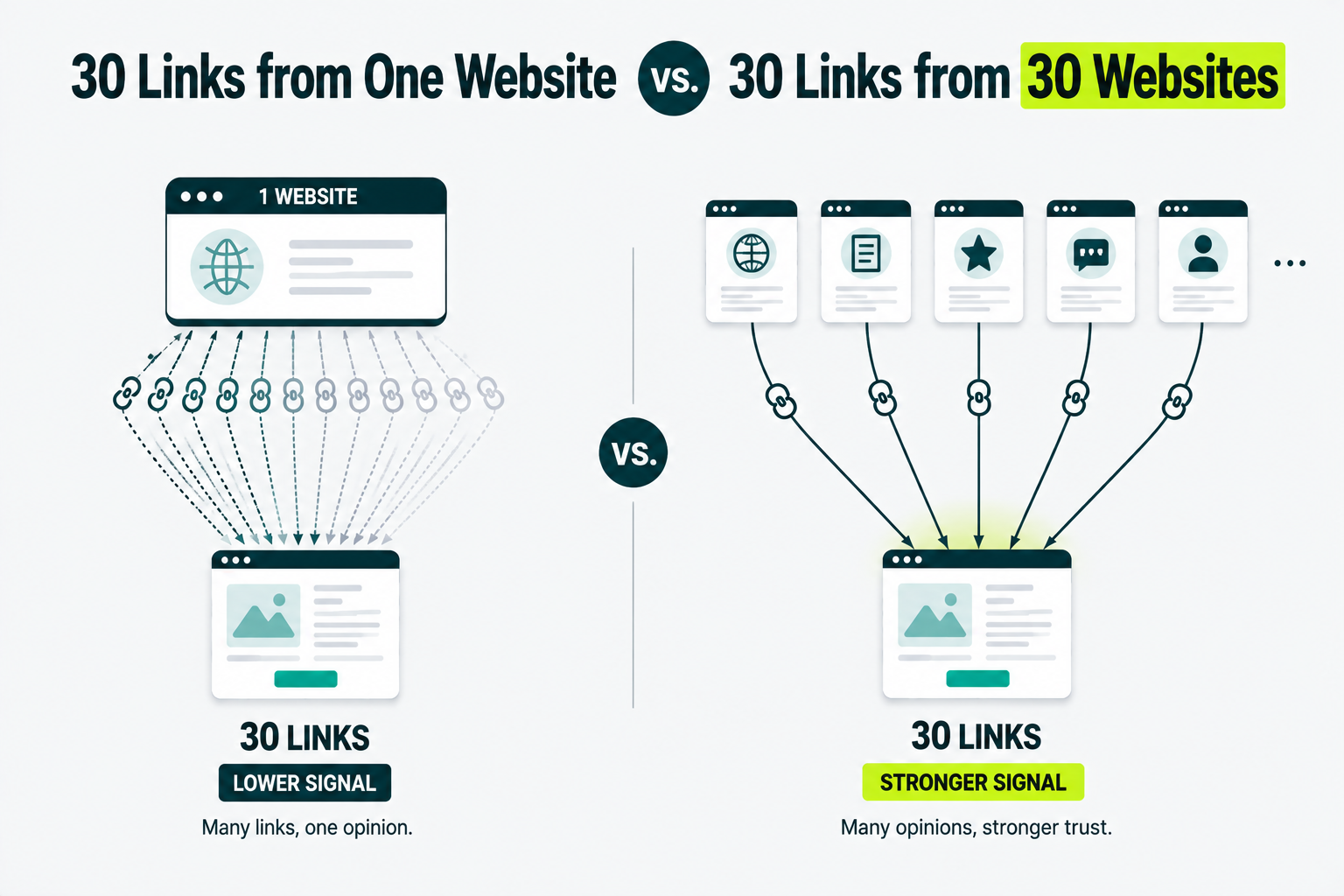
The first link says something new. The tenth from the same domain barely moves the needle. Thirty separate sites each choosing to link to you is a far stronger signal of genuine trust than one site linking to you thirty times.
We’ve audited backlink profiles where the total backlink count looked strong at first glance, but most of those links came from only a handful of domains.
The total backlink count looks much larger without adding any new referring domains.
This is the same idea behind how link equity works: the mechanism that decides how much value a link actually passes.
30 Different Sites Aren’t Automatically Better
A higher referring domain count only tells you that more unique websites link to you. It doesn’t tell you whether those websites are relevant or worth earning links from.
A site with 150 referring domains from irrelevant blogs and generic directories can have a weaker link profile.
A competitor with 60 domains from relevant industry publications can easily beat it.
Before you count a new referring domain as a win, check three things:
- Does the site cover your topic or industry?
- Does it exist for a genuine audience rather than primarily to publish links?
- Does your link make sense in the context of the page where it appears?
Those checks tell you more about the domain than adding one more number to your report.
So when you compare referring domains with a competitor, don’t stop at 150 versus 60. Look at which domains link to them, and why, before deciding which profile is actually stronger.
Chasing quality backlinks from new sites will move your rankings further than adding a fourth or fifth link from a site that already links to you.
Reading the Ratio Between Them
500 backlinks, 40 referring domains, a ratio of 12.5 links for every domain. Is that gap a problem?
No, not really. The ratio is a diagnostic, rather than a target, and there’s no clean published benchmark for what a “good” ratio looks like. What the ratio tells you to do is to look at where the extra links appear.
| IF YOUR RATIO IS… |
GO CHECK… |
|---|---|
| High, and you know of one or two big sites linking to you repeatedly. | Whether those are sitewide, footer, or template links is normal and not a red flag on its own. |
| High, with no obvious explanation. | Whether an older campaign that built many links from a small set of sites is worth diversifying going forward. |
| Close to 1-to-1. | Whether you actually have enough total links yet, since a low ratio with a low domain count often just means an early-stage profile |
When we see a 10-to-1 gap between total backlinks and referring domains, our first move is to identify which domains are responsible for most of those links. We check whether the gap comes from legitimate sitewide links or repeated placements from the same small group of sites before deciding whether there’s anything to address.
Hitting a specific ratio doesn’t define a healthy backlink profile. Where the links come from and whether new domains keep showing over time define it.
Why Your Numbers Don’t Match Across Tools
SEO tools use their own crawlers and crawl methods to discover links across the web, so their referring domain counts rarely match exactly.
Ahrefs counts a link per page, even if a page links to you twice, whereas some other tools count each instance separately.
Also, Ahrefs only counts live links it can currently verify, while some indexes still include links that have since gone dead, which inflates their totals.
When we checked the HubSpot.com website in both tools, Ahrefs showed 113k referring domains.
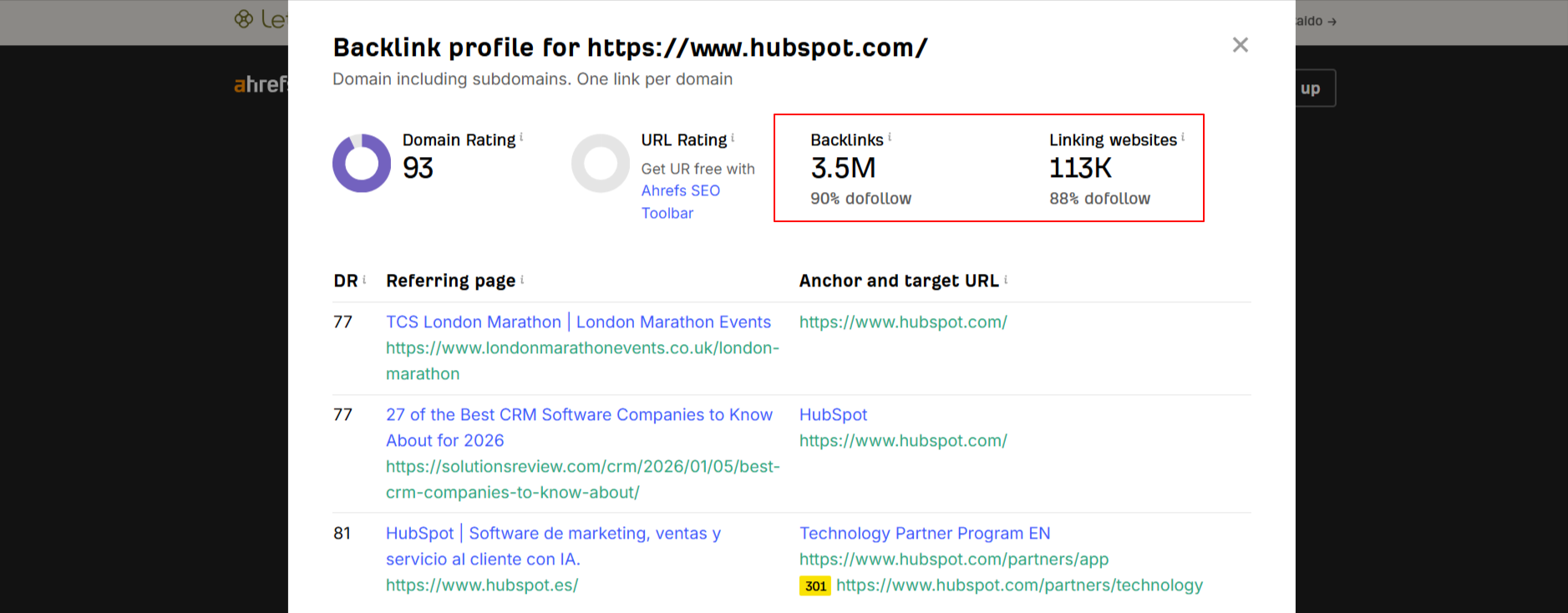
Semrush showed 423k referring domains for the same site. Both numbers are valid; they’re just measuring slightly different things.
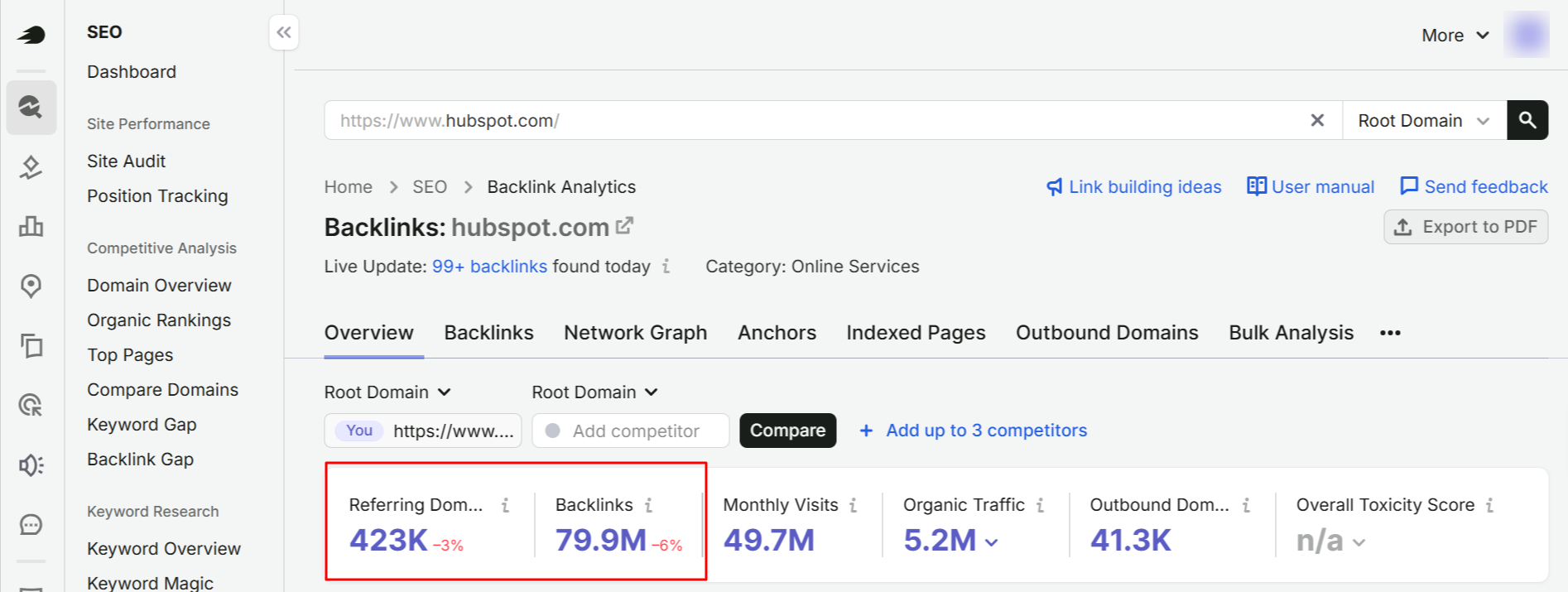
Open the same site on both Ahrefs and Semrush. You’ll often see two different counts of referring domains, sometimes by a wide margin.
Google Search Console adds a third version of the story. Its links report groups by root domain and often shows a sample rather than a complete list.
That makes your Search Console number the smallest of the three.
None of the three numbers is wrong. They’re each answering a slightly different question about the same site. If you want to see how a specific rival stacks up using a single, consistent tool, checking your competitor’s referring domains is a good way to do that.
Do Nofollow and Sponsored Links Add a Referring Domain?
Yes, a nofollow or sponsored link still shows up as a referring domain in most tools because the site is still linking to you. It still counts as a new referring domain, although the amount of ranking value it passes may differ.
- A nofollow link tells Google not to treat the link as a regular recommendation, but the website still counts as a referring domain.
- Sponsored links come from paid or sponsored placements, but the website still counts as a referring domain.
- Users add UGC links in content such as comments or forum posts, and the website is still counted as a referring domain.
- Dofollow links are the default link type and use no special rel attribute. They can pass ranking signals, and the linking website counts as a referring domain.
Google’s outbound link guidance says links carrying these attributes generally will not be followed. That makes them a weaker signal than an ordinary editorial link, even though the referring domain still shows up in your reports.
Don’t build a strategy around nofollow links. They add breadth to your referring domain count, and that’s genuinely worth something, but they won’t carry the same weight as dofollow links that pass complete value.
Which Number to Grow First?
Between the two, referring domains are the number worth growing. That’s the short version.
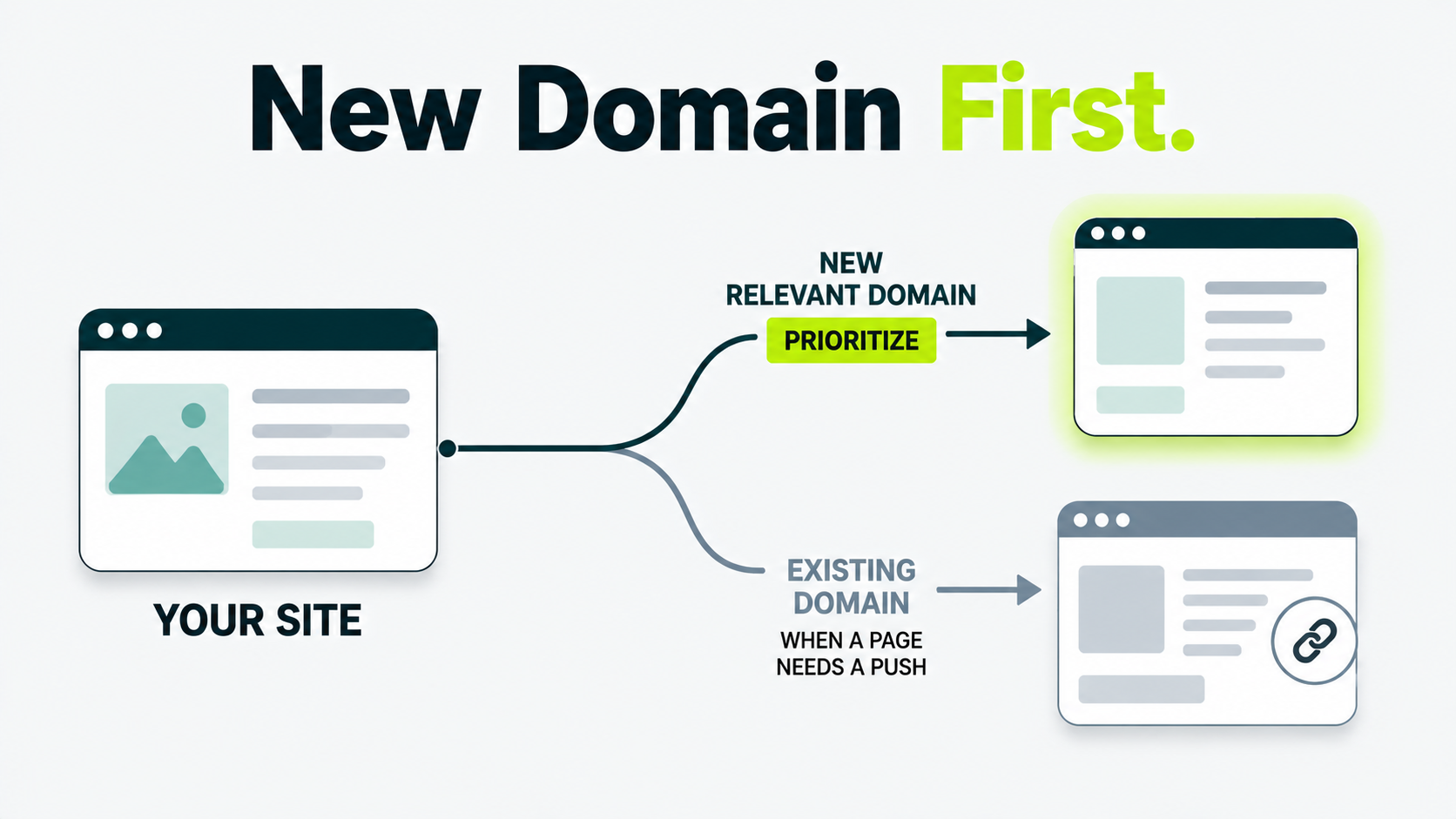
New domains add trust and breadth. A tenth link from a site that already links to you adds very little on top of what you already have, unless that specific page needs a targeted push.
Count unique referring domains as your primary trust metric. Use backlinks per domain to understand how your links spread across domains. Only stack extra links onto a domain you already have when one particular page genuinely needs the boost.
For an early-stage client, we provide unique sites without repetition; however, in some cases, if the site is high-quality and relevant at the time, we use repeat placements as needed by the client.
This is the framework Outreach Desk applies when planning a new campaign: prioritize the next new domain over the next repeat placement, unless there’s a specific reason to double up.
For a target number of referring domains to aim for, how many links you need is covered by real data.
Open Your Report and Count the Domains
Open your backlink report right now and find your referring domain count. Check whether that number has grown in the last few months, separate from your total backlink count.
If your backlinks went up but referring domains stayed flat, that growth came from sites you already had, rather than new ones.
For sustained authority growth, you want to see new relevant referring domains joining your backlink profile over time.
Not sure if your backlink growth is actually building authority?
Get a clear strategy for growing quality referring domains with relevant links instead of simply adding more backlinks from the same sites.
What’s the difference between a backlink and a referring domain?
A backlink is one link. A referring domain is a single website, regardless of how many separate links it sends your way. A site can give you dozens of backlinks while only counting as a single referring domain.
What counts as one referring domain?
Any unique website with at least one link pointing to your site counts once, regardless of how many pages on that site link to you or how many times.
Do referring domains matter more than backlinks?
Yes, referring domains measure how many separate sites trust you, which is harder to fake and more predictive of rankings than a raw link count that one site could inflate on its own.
How can you increase the number of referring domains?
The most effective way to grow referring domains is to earn links from relevant websites that have not linked to you before.
This can come through digital PR, guest contributions, resource outreach, and other editorial opportunities. A dedicated link building agency can help you identify new websites, approach relevant publishers, and steadily expand the number of unique domains linking to your site.
Do nofollow links count as referring domains?
Yes, in most tools. A nofollow, sponsored, or ugc link still adds the linking site to your referring-domain count, even though it passes less ranking value than an ordinary link.
Is a high backlink-to-referring-domain ratio bad?
Not automatically. It usually means a handful of sites are repeatedly linking to you, often through sitewide or footer placements.
Check where the extra links come from before deciding whether it’s a problem.
Why do different SEO tools show different backlink numbers for the same site?
Because they build their indexes differently. Some count every link instance, while others count one per page, and some include dead links that have since disappeared. Neither number is wrong. They’re measuring slightly different things.