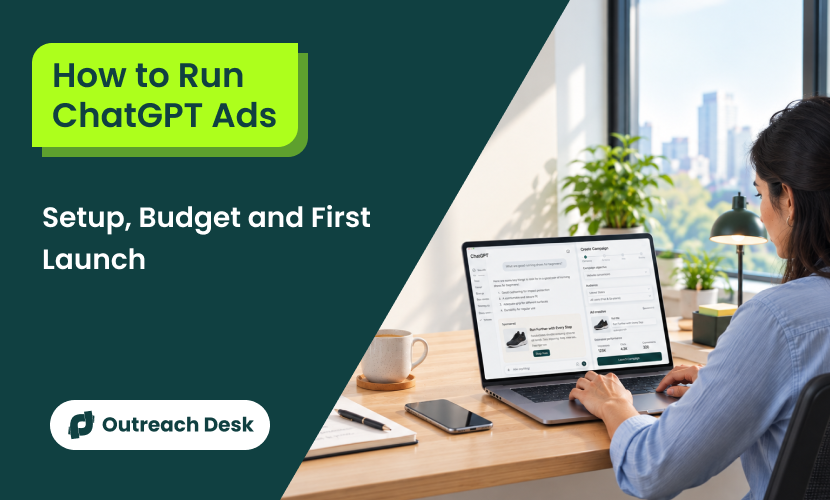
ChatGPT ads are paid promotions that appear below responses when a business’s products or services relate to a user’s conversation.
Say you run an online store selling gym shoes. A shopper might ask ChatGPT what to look for in a good pair. While ChatGPT explains features such as cushioning, fit, and grip, your store’s ad could appear separately below the answer, giving the shopper a way to discover your products.
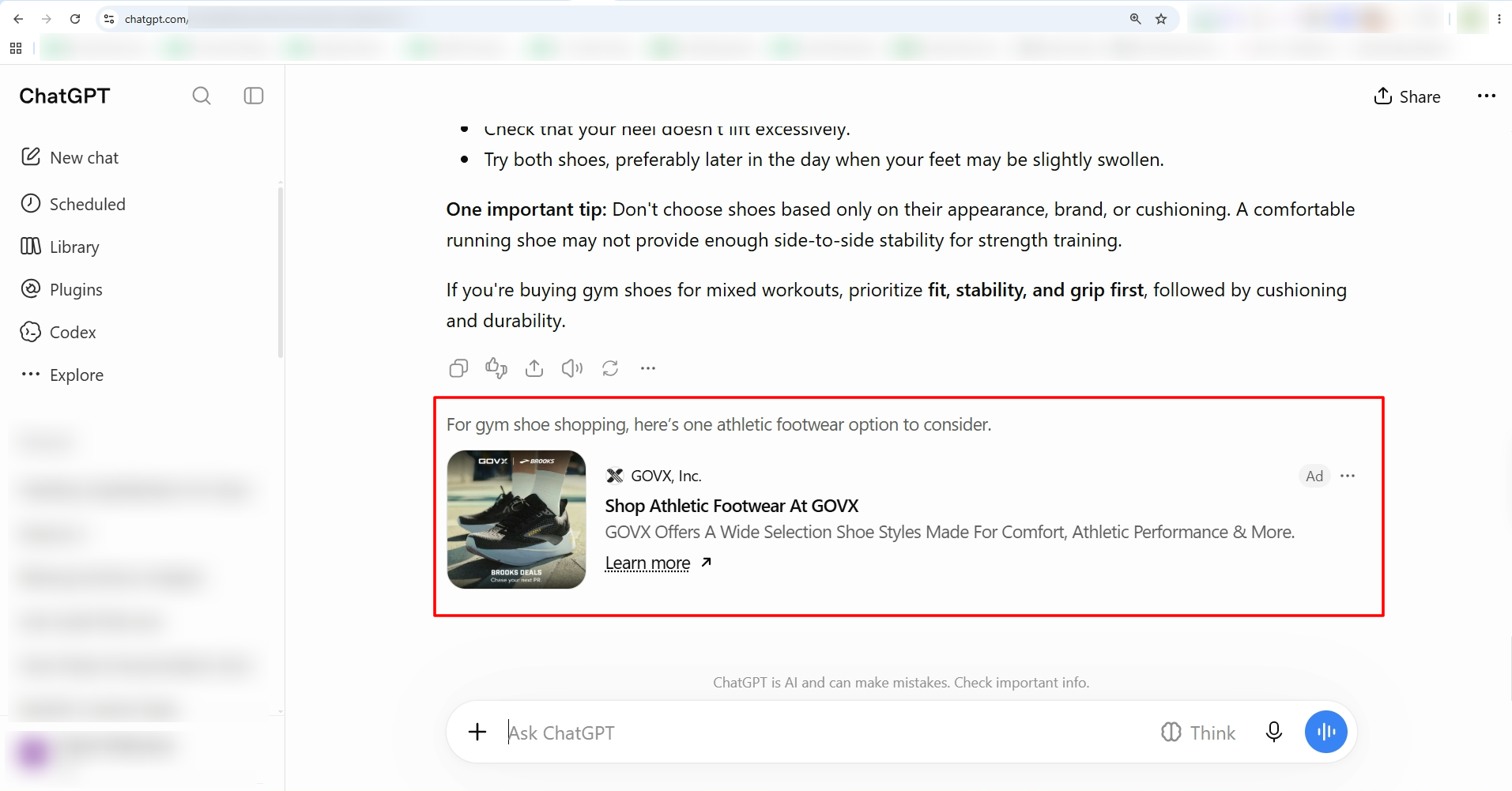
That’s the basic idea behind ChatGPT ads. They let businesses reach people as they explore topics related to their products or services. The ads are clearly marked as sponsored and appear separately from ChatGPT’s answer.
Quick Summary
- ChatGPT shows ads below its answers for Free and Go plan users.
- Verify country, category, billing, and account details before launching campaigns.
- Build 3 levels: a campaign, one ad group per theme, and ads inside each group.
- Allow OpenAI’s crawler, add the OpenAI Pixel, and write context hints for each idea.
- Start with $25 daily, then optimize using conversion data.
How ChatGPT Ads Work and Who Sees Them
A ChatGPT ad appears under its answer, marked as an ad and set apart from the text above it.
According to OpenAI, ads may appear for people on the free and go plans, including logged-out use. Plus, Pro, Business, and Enterprise plans. And Edu accounts never see ads.
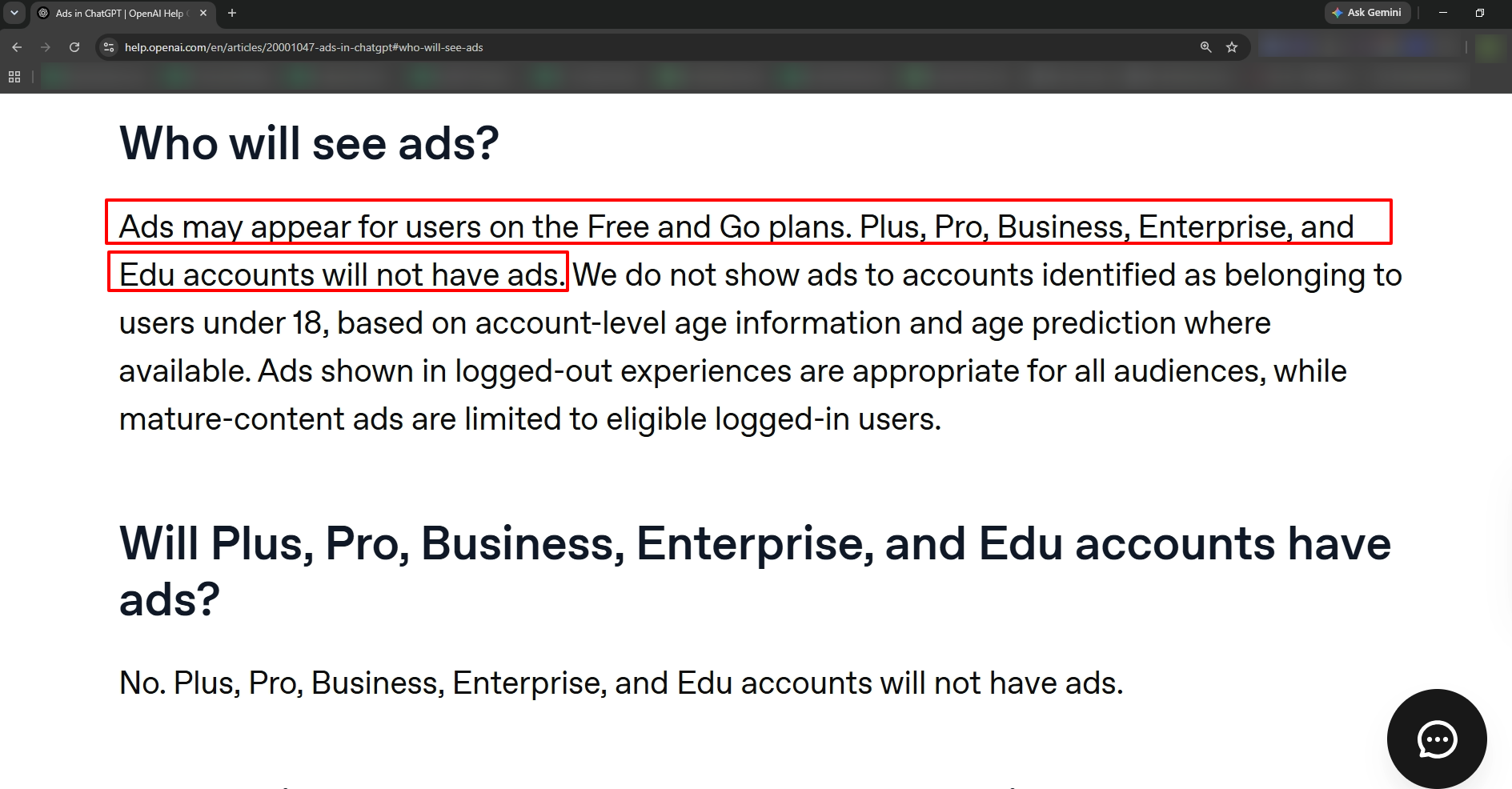
Free users can also turn off ads. But they’ll get a lower usage limit. So not every free user will see your ad.
Important Note
OpenAI doesn’t place ads near personal health, mental health, or any topics related to political conversations.
Every ad has six parts. Below are those parts:
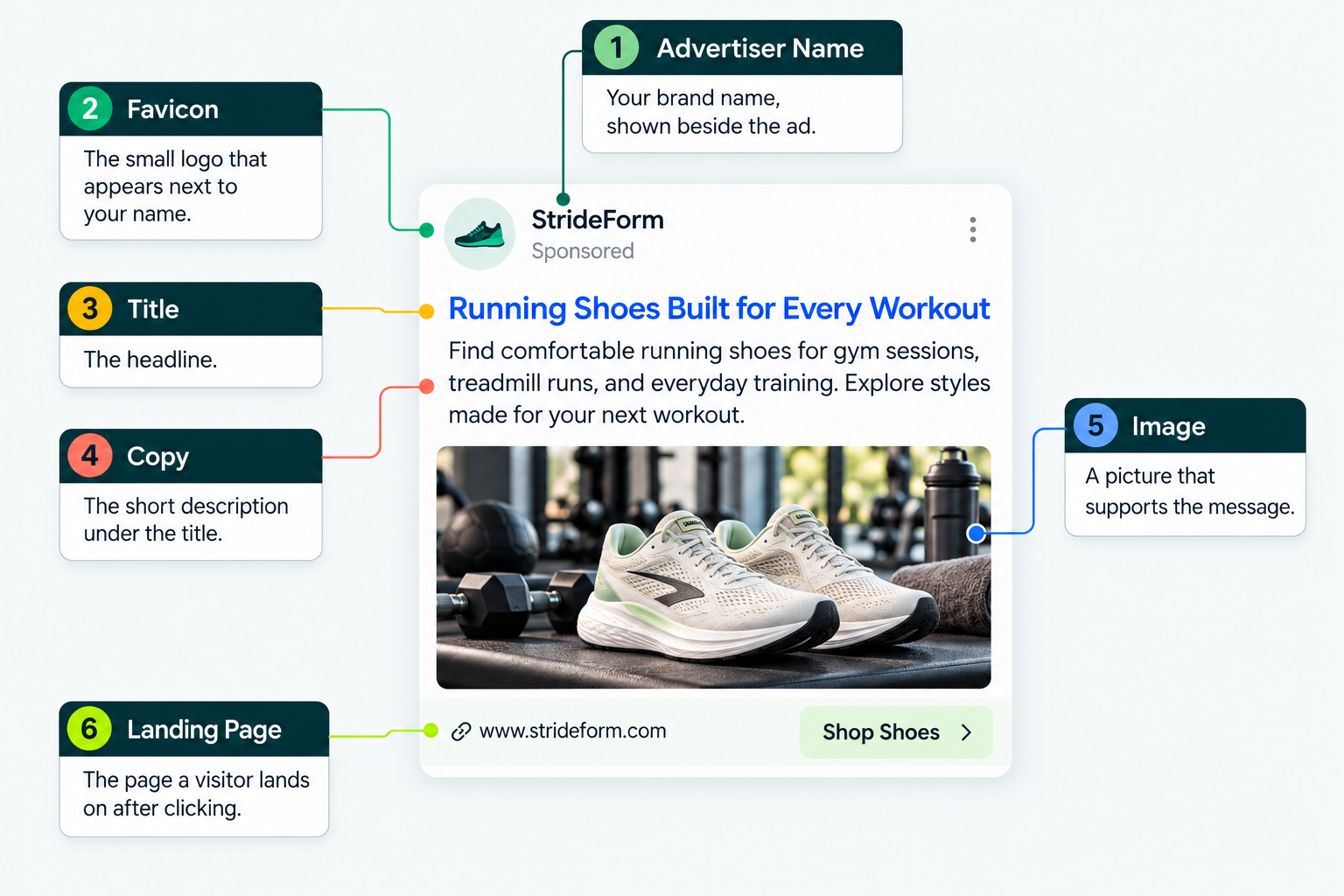
| PART |
WHAT IT IS |
|---|---|
| Advertiser Name |
Your brand name, shown beside the ad |
| Favicon |
The small logo that appears next to your name |
| Title |
The headline |
| Copy |
The short description under the title |
| Image |
A picture that supports the message |
| Landing Page |
The page a visitor lands on after clicking |
How an Ad Gets Matched to a Conversation
ChatGPT ads don’t work from keyword lists you type in and match word for word. Instead, you describe your offer in context hints.
A context hint is a short note, written in everyday words, that tells ChatGPT when your ad is relevant. You attach hints to an ad group, which is a set of ads built around one theme.
Hints aren’t exact-match keywords, and they don’t guarantee your ad will appear in any particular conversation.
Ads don’t appear in every ChatGPT conversation. Google Ads behaves the same way: Google doesn’t put an ad on every search.
When Does an Ad Actually Show?
An ad shows only when all four conditions are true:
- You’re on a plan that gets ads.
- An ad fits the conversation.
- The ad passes safety and relevance checks.
- An advertiser has a relevant ad available.
An Ad Doesn’t Change the Answer
Ads don’t influence what ChatGPT answers. According to OpenAI, ads run on separate systems from the chat model, and advertisers can’t shape, rank, or alter a response.
When you pay, your ad shows up below the answer. Your brand won’t be mentioned inside the answer. To get named in the answer, you need better visibility in generative search (GEO). That means making your brand a name ChatGPT picks on its own.
Can Your Business Advertise on ChatGPT?
Yes, your business can advertise on ChatGPT if it meets two key requirements: Your billing entity is in a country OpenAI supports, and your offer fits with its ad policies. Your billing entity is the legal business responsible for advertising and paying the bill.
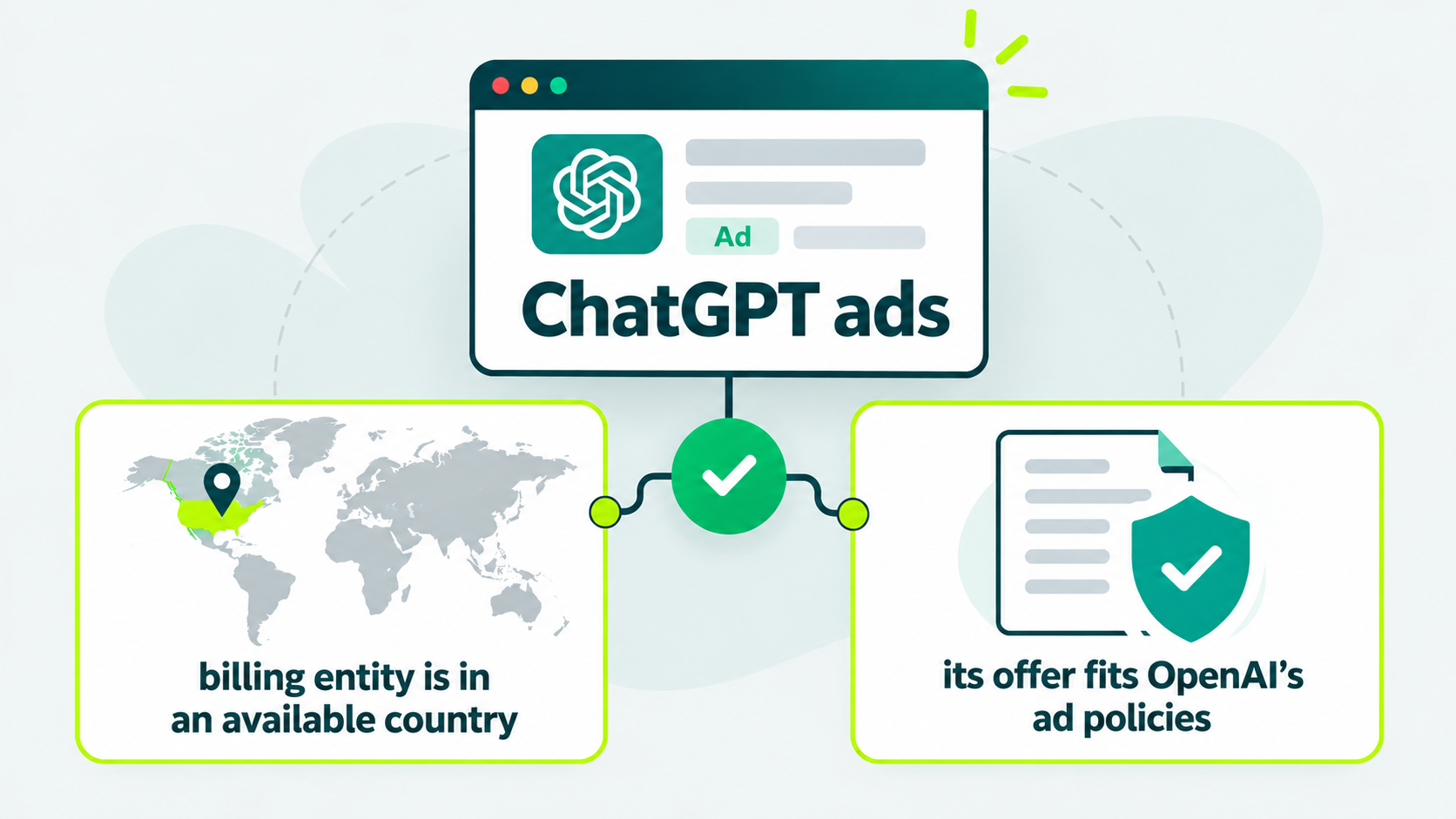
The billing entity is the legal business that advertises and pays the bill.
Check this before you build anything. A refused account wastes every hour you spend on setup, and the launch category list is short.
Check the Country
OpenAI publishes a list of available countries for self-serve access. They include the United States, Canada, the United Kingdom, India, Brazil, and every European Union country.
You can create an account in an unlisted country, but you won’t have access until your country is supported.
Check the Category
OpenAI’s ad policies, updated September 10, 2026, limit the launch phase to five customer categories: household and consumer goods, local services, travel and entertainment, digital products, and education.
Everything else isn’t allowed at launch unless the policy says otherwise.
Find your business type in the table to see where you stand.
| IF YOUR BUSINESS IS… |
THEN… |
|---|---|
| In one of the launch categories | You’re in the launch set. Check your wording and landing page against the policy |
| Financial, health, or legal, and based in the United States | OpenAI reviews each advertiser by hand and may ask for proof of a license. Licensed lawyers can apply |
| Financial, health, or legal, outside the United States | Plan on a refusal. The policy prohibits legal ads outside the United States and generally prohibits financial and health ads there |
| Adult content, alcohol, tobacco, gambling, recreational drugs, or political advocacy | Not allowed |
| Selling software or services to other businesses | The policy doesn’t name this group. Ask OpenAI’s ads support before you build |
If you sell software or services to other businesses, the policy doesn’t say if you’re allowed. Ask OpenAI’s Ads Support before you start setup.
Steps to Open Your Ads Manager Account
Start by signing in at ads.openai.com with your OpenAI login. Then add billing details first, because campaigns can’t deliver without them.
OpenAI’s quickstart guide covers the same path in three steps, with a linked YouTube video for a more practical understanding.
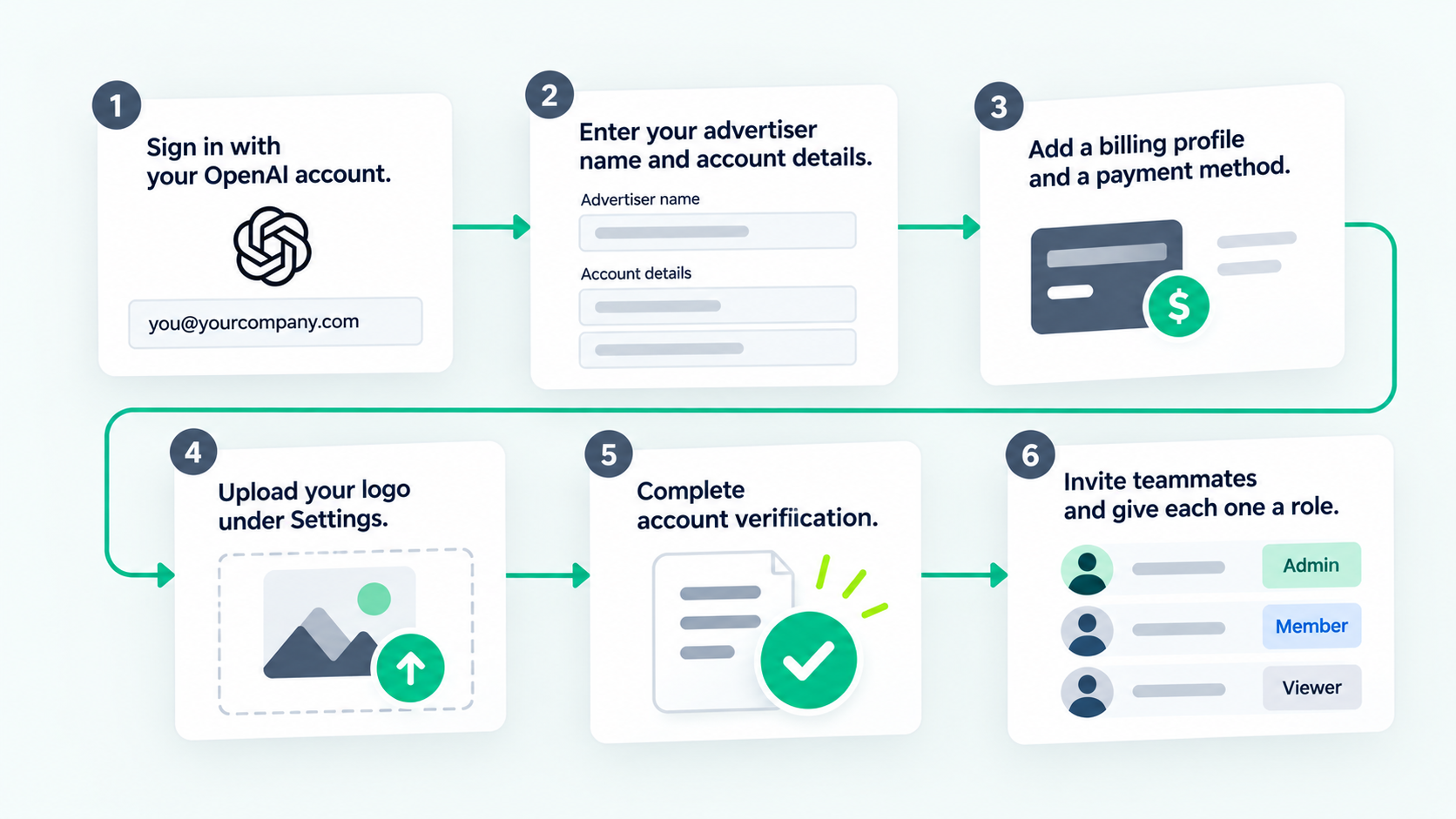
Use these steps in order to create your ads manager beta account:
- Sign in with your OpenAI account tied to your work email, or create a new one.
- Enter your advertiser name and account details.
- Add a billing profile and a payment method.
- Confirm your logo and names under Settings, then General.
- Complete account verification.
- Invite teammates under Settings, then Users, and give each one a role.
You must set up billing details before campaigns can deliver, and ads may not serve until your account is verified.
OpenAI can also draft your first ad from your website address during sign-up. Review that draft before you accept it.
ChatGPT Ads Account Roles and Permissions
Every person on the account has one of three roles: Admin, Member, or Viewer.
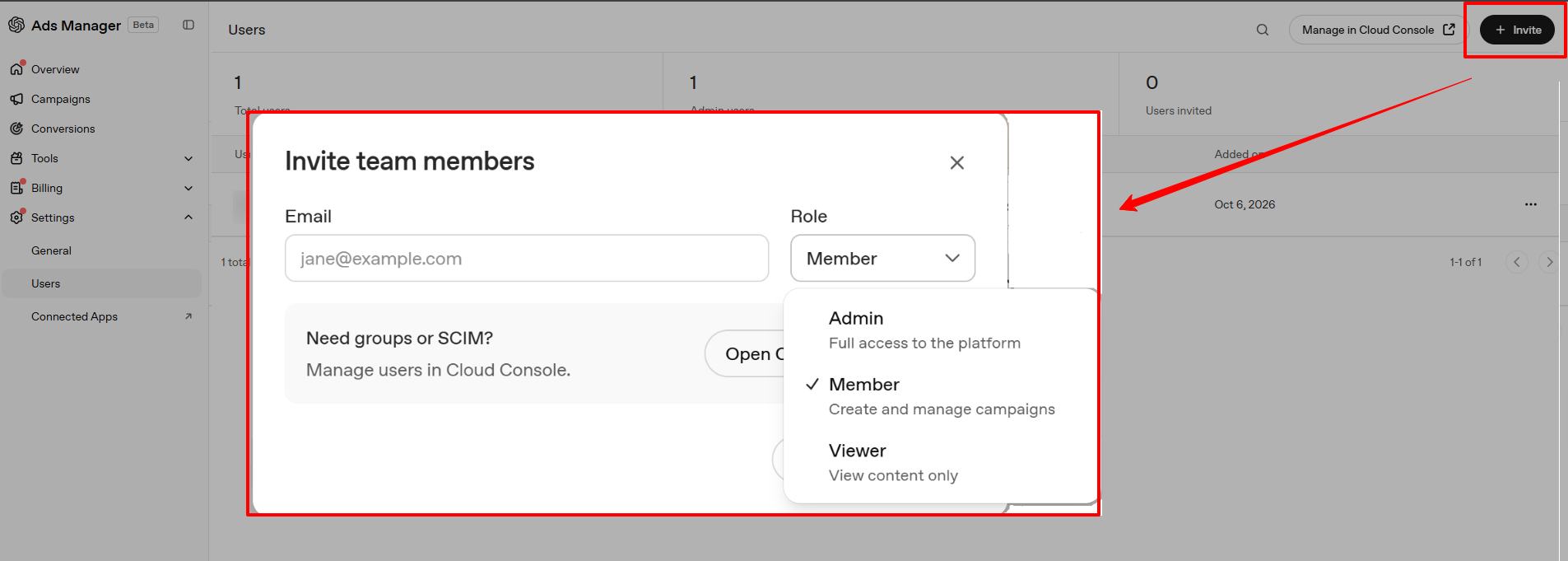
One person creates the account and invites everyone else.
- Admins have complete access.
- Members can create and manage campaigns.
- Viewers can view content only.
Details You Can’t Change After Sign-Up
Your country or region, currency, and time zone are locked once the account exists. Choose them carefully.
Your advertiser name initially fills three fields: Account Name, Brand Name, and Legal Name. Brand Name is the public name shown on your ads. Since September 25, 2026, you can edit each one separately under Settings, then General.
Changing your Brand Name pauses ad serving until OpenAI approves it. Changing your Legal Name restarts business review and can also pause serving.
If you manage more than one advertiser, create a separate account for each.
Build the Campaign, Ad Group, and Ad
This is where your ideas become a live ad. Work through the three levels in order: campaign, ad group, and ad.
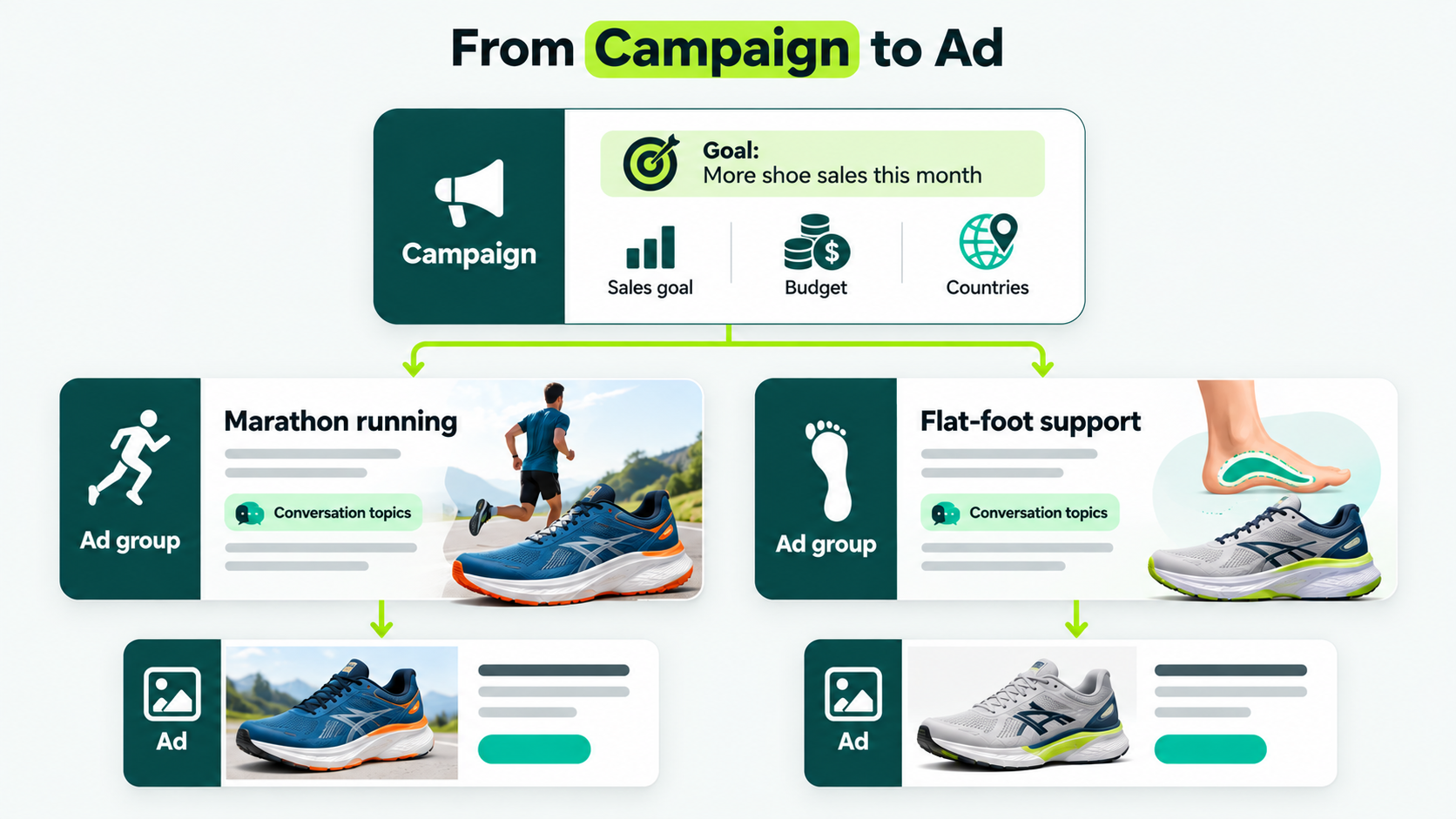
Say your running shoe store wants more sales this month. That’s your goal. You also decide how much you’ll spend and which countries you want to reach.
Now think about who might ask ChatGPT for help.
- One shopper is a marathon runner who wants shoes for long distances.
- Another has flat feet and wants supportive shoes.
These are different conversations, so you’d want different ads for each. ChatGPT ads are set up the same way, in three levels.
- The campaign is your big goal, and it holds your budget and countries. For the shoe store, the goal is “more shoe sales this month.
- An ad group is one theme, plus the conversation topics (context hints) that match it. Marathon training is one ad group, and the flat-foot support is another.
- An ad is the single card people see under the answer. The marathon group might run an ad about cushioning, and the flat-foot group an ad about stability.
Choose the Objective
OpenAI’s campaign setup guide lists three objectives: views, clicks, and conversions. The objective determines how you’re billed and what OpenAI aims to achieve.
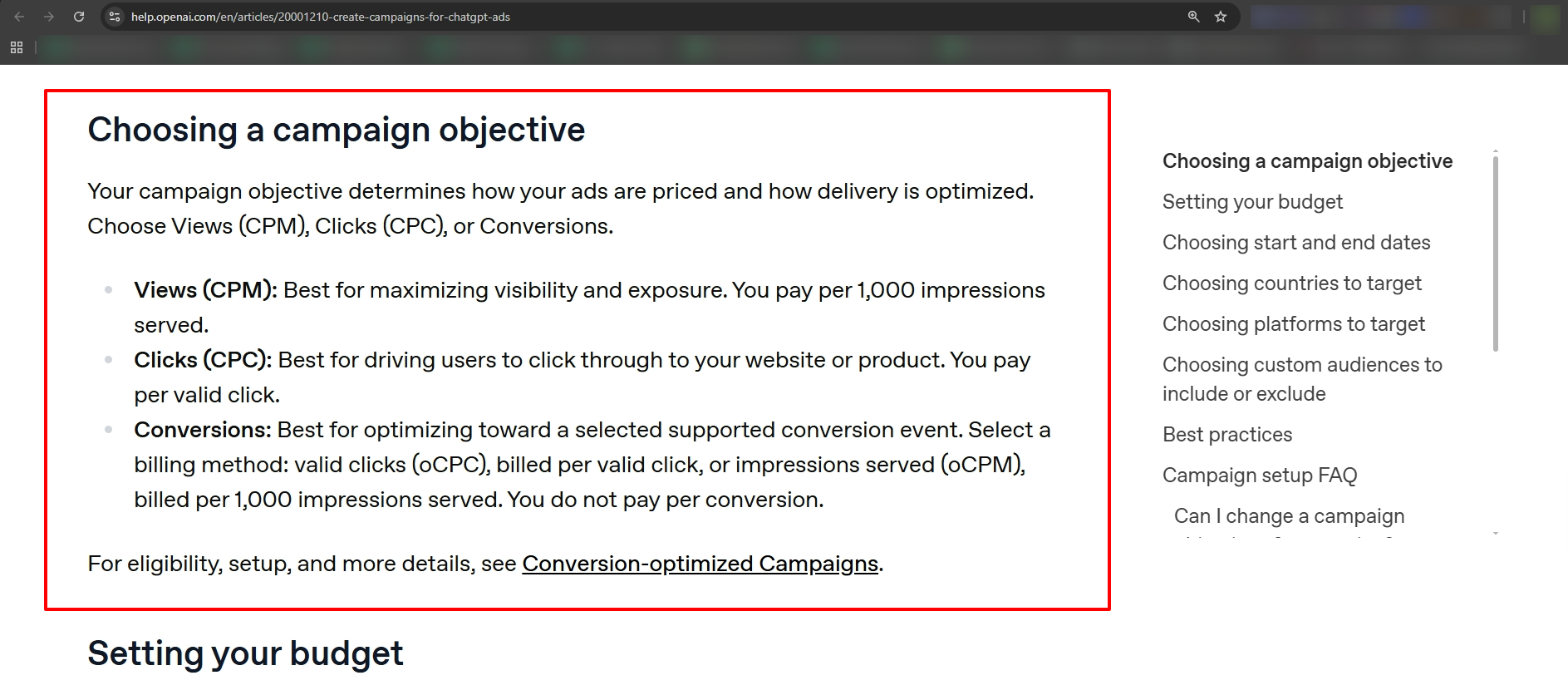
A conversion is an action you care about, such as a purchase or a form submission. The table below shows the three listed in the OpenAI setup guide.
| OBJECTIVE |
YOU PAY FOR |
PICK IT WHEN |
|---|---|---|
| Views |
Every thousand times your ad is shown | You want your name seen |
| Clicks |
Each valid click | You want visits to your site |
| Conversions |
Each valid click or every thousand showings | Tracking is live, and you want OpenAI to aim at a sale or sign-up |
Clicks are the simplest first choice. OpenAI recommends starting CPC campaigns with a maximum bid of $3 to $5 per click.
What You Can’t Edit Later
You can’t change the objective after you create the campaign. If you picked the wrong one, build a new campaign.
Cloning doesn’t make an exact copy of that campaign. It lets you start a new campaign with a different goal or billing type. So you can’t clone a Clicks campaign into another Clicks campaign.
Your first campaign may not show the start and end dates before you publish it. Don’t publish just to look for them. Your ads could go live even before you set a schedule.
Select the Countries Carefully
Some new accounts can only advertise in their home country at first. To unlock other countries, your identity verification must be approved, and you must reach the required spend in your home country.
To target only the United States, select the United States explicitly. Excluding other countries alone doesn’t restrict where your ads run.
Options You Can Skip for Now
Skip custom audiences and bulk upload on your first campaign.
Custom audiences let advertisers use their own customer lists to target or exclude people in ChatGPT ads. Audience size requirements depend on how you use the audience.
Bulk upload creates many campaigns at once from a template file. It doesn’t work for product-feed campaigns, which build ads from your product catalog.
Write Context Hints and Ad Copy That Match Real Conversations
Write context hints as short, clear phrases. Each one should answer three questions: What do you offer? Who is it for? When does it fit?
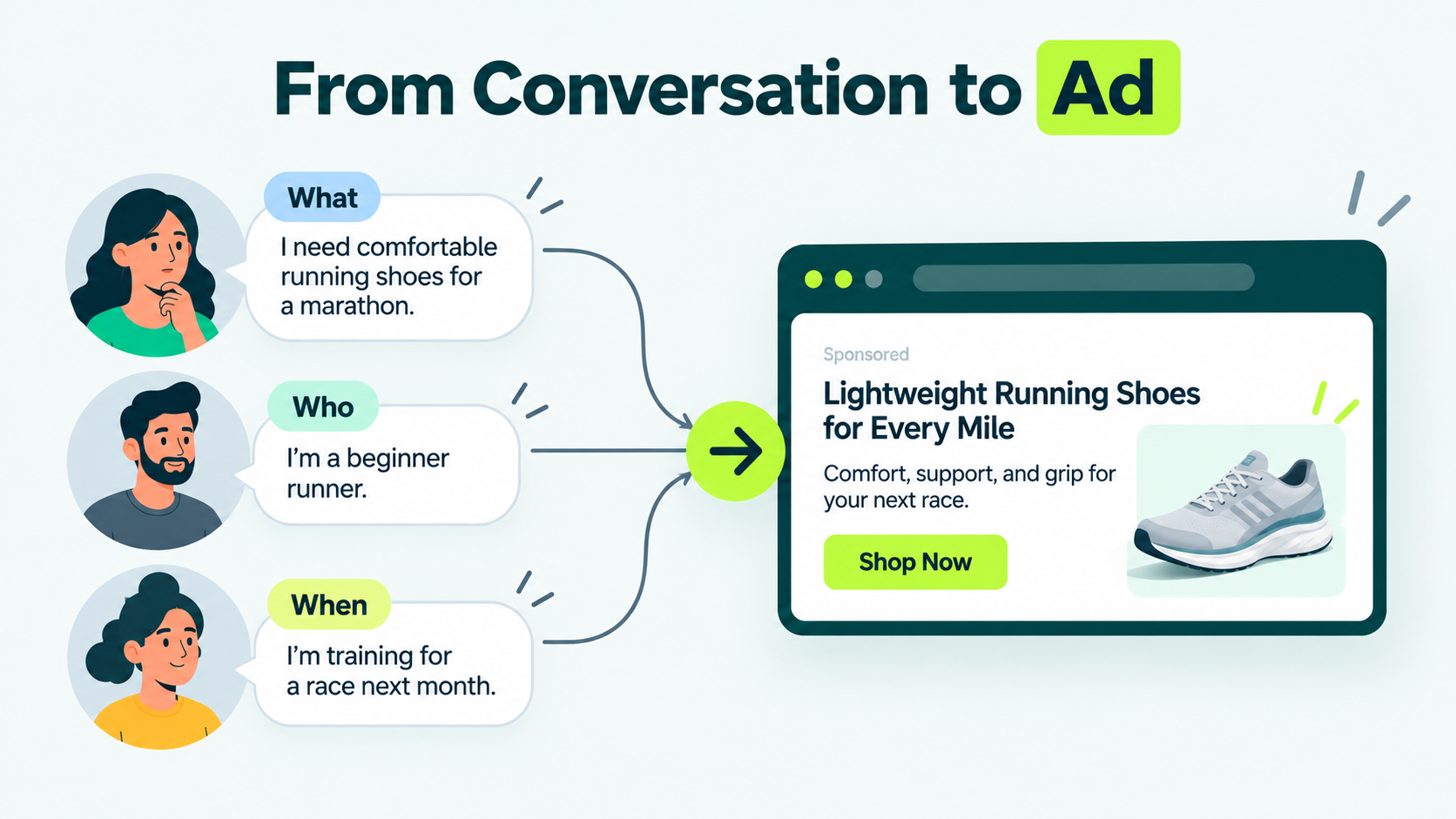
Hints That Describe the Offer
A hint tells ChatGPT what your ad is about. It can’t control where, when, or who sees your ad.
“Standing desk for small apartments” is a good hint. It describes your product. However, “show this ad only to people in Ontario” is not a good hint.
Hints can’t carry instructions like that. Use the campaign’s country and location settings instead.
The table shows how three businesses can tighten a hint. Use it as a pattern, and write your own wording.
| BUSINESS |
WEAK HINT |
STRONGER HINT |
|---|---|---|
| Online Desk Store |
Standing desks | Adjustable standing desks sized for small apartments and spare bedrooms |
| Wedding Photographer |
Wedding photographer | Documentary-style photography for weddings under 50 guests |
| Online Course |
Learn photography | A beginner course for people who just bought their first camera |
The stronger versions say who the product is for and when it fits. A hint that says only “standing desks” gives ChatGPT nothing to match against.
Group Hints by Theme
One ad group should have one theme. Open a second ad group when the message or the landing page changes.
Write the Ad Itself
Write 3 or more titles and descriptions for each offer, each with a different angle. Don’t reword the same message; it adds no value.
Say what the product does, who it’s for, and when it helps. A catchy line with no benefit wastes space. Link to the specific page that matches the ad. Add UTM parameters to the link.
What is UTM?
UTM stands for Urchin Tracking Module. UTM tags are short labels added to the end of a web address. Your analytics tool reads them to show where a visit came from.
The images must be square, no larger than 1200 by 1200 pixels, and saved as a .png or .jpg file. They also need a public link that opens the image itself.
A preview page or a sign-in page won’t work.
Check the current title and description limits in Ads Manager before you write your copy.
Check That OpenAI’s Crawler Can Reach Your Landing Page
According to OpenAI’s crawler guidance for advertisers, you must allow its OAI-AdsBot crawler on your landing page.
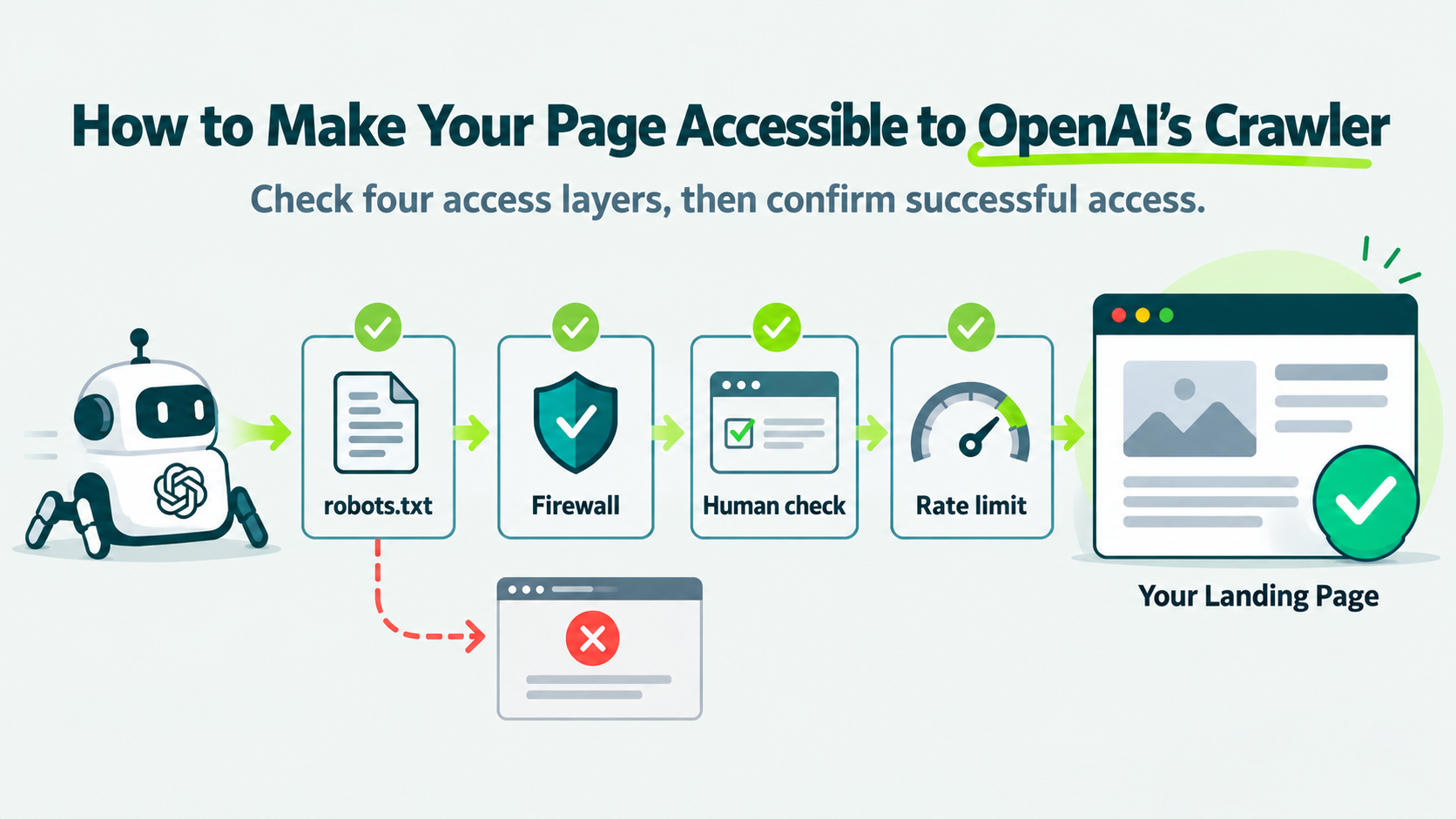
A crawler is a program that automatically visits web pages. OAI-AdsBot works like a building inspector: it visits your landing page before the ad can run. OpenAI recommends allowing a second crawler, OAI-SearchBot, which reads public web pages.
This check is easy to skip because your page loads fine in your own browser. You see nothing wrong while the crawler gets turned away at the door.
A crawler passes through four layers before it reaches your page. Any one of them can stop it.
Layer 1: Your robots.txt File
Robots.txt is a plain text file at the root of your website that tells automated visitors which pages they may open. OpenAI’s crawlers respect it, and a Disallow rule stops them immediately.
OpenAI’s guidance gives this example for allowing both crawlers:
User-agent: OAI-SearchBot
Allow: /
User-agent: OAI-AdsBot
Allow: /
Open yourdomain.com/robots.txt in a browser. Look for any rule that blocks OAI-AdsBot by name, or a blanket Disallow that applies to every crawler.
Layer 2: Firewalls and Bot Protection
Firewalls and bot protection can block OAI-AdsBot even when your page loads fine for you. Security tools like Cloudflare and Akamai can sometimes block legitimate crawlers when their security rules flag requests as suspicious. These blocks may return a 403 Forbidden error.
To fix this, allow the crawler by its user agent. A user agent is the name a crawler gives when it visits your site, and this one is OAI-AdsBot. OpenAI says Cloudflare already trusts it. If your system only accepts IP address lists, OpenAI publishes them in two files: adsbot.json and searchbot.json.
Layer 3: Human-Check Puzzles
Some sites use picture puzzles, checkbox tests, or JavaScript checks to block bots. A crawler can’t pass these, even if it gets past the first two layers.
So if your site uses them, allow OpenAI’s crawlers by user agent there too.
Layer 4: Rate Limits
A sudden burst of crawler visits can trigger rate limiting, which returns a 429 Too Many Requests error. Larger bulk uploads can cause exactly that burst.
Upload ads in smaller batches over a longer period.
How to Confirm It Worked
Check your server or firewall logs for requests from OAI-AdsBot. Review the HTTP status code for each request.
- 200: Your server returned a successful response.
- 403: Your server denied the request.
- 429: Your server limited the request because of rate limits.
Use a landing page that opens in a normal browser with no login. App-store links, deep links, and pages that need a sign-in may not give the crawler enough to review.
Once you fix access, upload or resubmit the affected ads. OpenAI advises against relying on a manual workaround.
Set Up Tracking Before the First Click
Set up tracking before you launch. Add the OpenAI Pixel to your site. It’s a small piece of code that tells OpenAI what a visitor did after clicking your ad, like buying something or filling out a form.
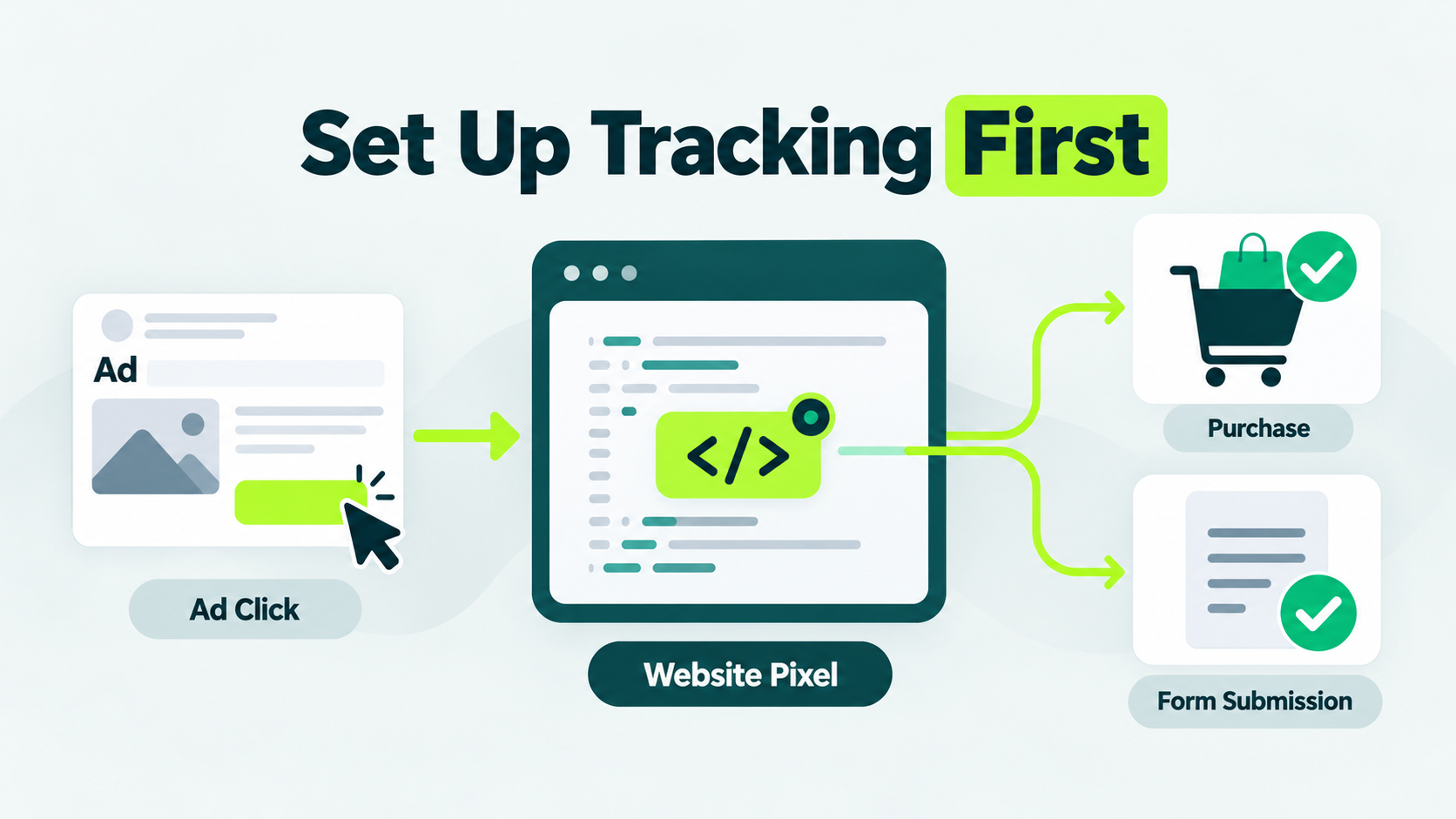
Without tracking, you’d pay for clicks and not know what they led to. That’s why this step comes before your budget.
How the Click Gets Matched
You create a data source in Ads Manager to receive your conversion events. Then you send those events through the Pixel, the Conversions API, or both.
The Conversions API lets your server report events directly, instead of relying on the visitor’s browser.
If you send the same conversion through both the Pixel and the Conversions API, give it the same event identifier. That lets OpenAI count it once.
What Each Campaign Setup Includes
There are three ways to track your ads. Each one shows you a little more than the last.
| SETUP |
WHAT YOU CAN SEE |
|---|---|
| UTM tags only | Visits from ChatGPT ads in your analytics tool, but no conversions inside Ads Manager |
| Pixel | Conversions reported in Ads Manager when an event matches an eligible click |
| Pixel plus Conversions API | The same, with sturdier matching when browser data is missing |
UTM tags need no Pixel at all, so add them even if everything else is late.
Why the Numbers Won’t Match
Ads Manager and your analytics tool will show different conversion numbers. That doesn’t always mean something is wrong. Each tool counts a sale within its own time window after a click.
They also use different time zones and handle consent and duplicate events differently.
Only send conversion data where the law and OpenAI’s terms allow it. Tell visitors what you collect, and ask for consent where it’s required.
Set a Budget and Bid You Can Learn From
According to the daily budget rules for OpenAI publishers, ChatGPT ads need a daily budget of at least $25 in the United States. The figure is an average across a Sunday-to-Saturday week.
OpenAI recommends starting click campaigns with a maximum bid of $3 to $5 per click. The daily minimum depends on your billing currency: it’s 15 euros if you bill in euros and 15 pounds if you bill in pounds.
Cost per click is what you pay each time someone clicks. Your bid is the most you’ll pay, and in a second-price auction, you may pay less.
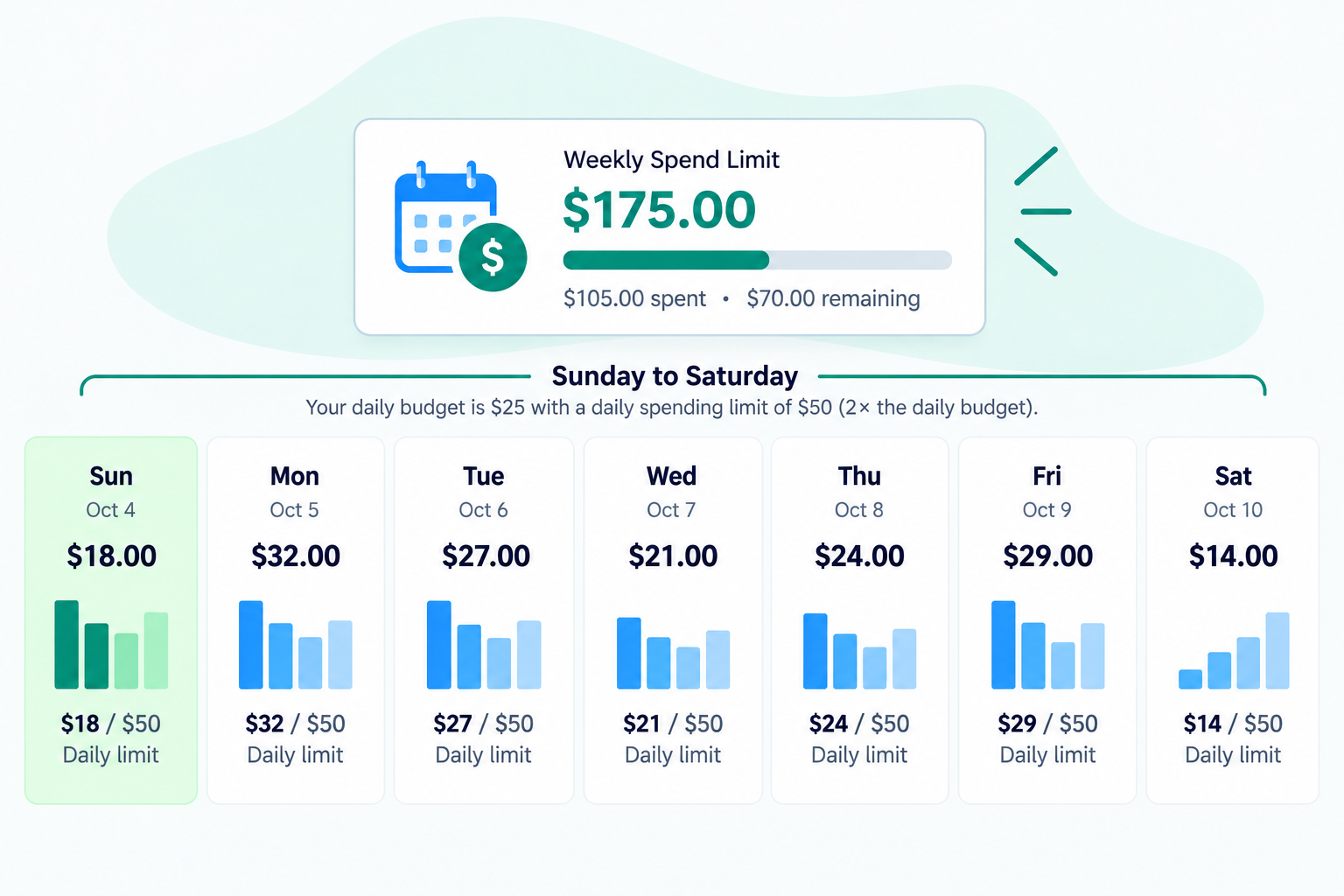
The chart shows a $175 weekly spend limit, with $105 spent and $70 remaining, along with daily spending limits from Sunday to Saturday.
How the Daily Budget Behaves
Your daily budget is an average, rather than a fixed amount. One day can reach twice your daily budget. The week can’t exceed seven times it. The budget week runs Sunday to Saturday in your account’s time zone.
A campaign that uses its weekly allowance early can stop delivering until the next budget week, even while it’s marked active. Always look at the week’s total, rather than today’s spend.
If you’re new to the platform, OpenAI recommends a daily budget over a campaign-total budget. Changing a campaign-total budget to a daily one is permanent: you can’t switch that campaign back.
What a $25 a Day Test Can Show You
With a $25 daily budget, your campaign can spend up to $50 in one day and $175 in one week. At a $5 maximum bid per click, you could get 35 clicks if every click costs $5.
At $3 per click, you could get about 58 clicks. Your actual click count depends on your average cost per click and how much your campaign spends.
| DAILY BUDGET |
MOST YOU CAN SPEND IN ONE DAY |
MOST YOU CAN SPEND IN A WEEK |
CLICKS A WEEK AT $5 |
CLICKS A WEEK AT $3 |
|---|---|---|---|---|
| $25 | $50 | $175 | 35 | 58 |
You may pay less than your bid per click, so you could get more clicks.
Now say 1 in 50 visitors buy from you. 58 clicks would give you about one sale. One sale can’t tell you if ads work for your business.
OpenAI’s frequently asked questions page says ChatGPT Ads has no benchmarks yet. That means no standard number across advertisers, industries, or campaign types. Your results depend on your goal, ad, landing page, and setup.
Treat the first two weeks at the minimum budget as a test of your setup.
Why a ChatGPT Ad Is Rejected or Not Serving
A ChatGPT Ad fails to show when review isn’t finished, verification or billing is incomplete, the budget or end date has run out, or the landing page blocks OpenAI’s crawlers.
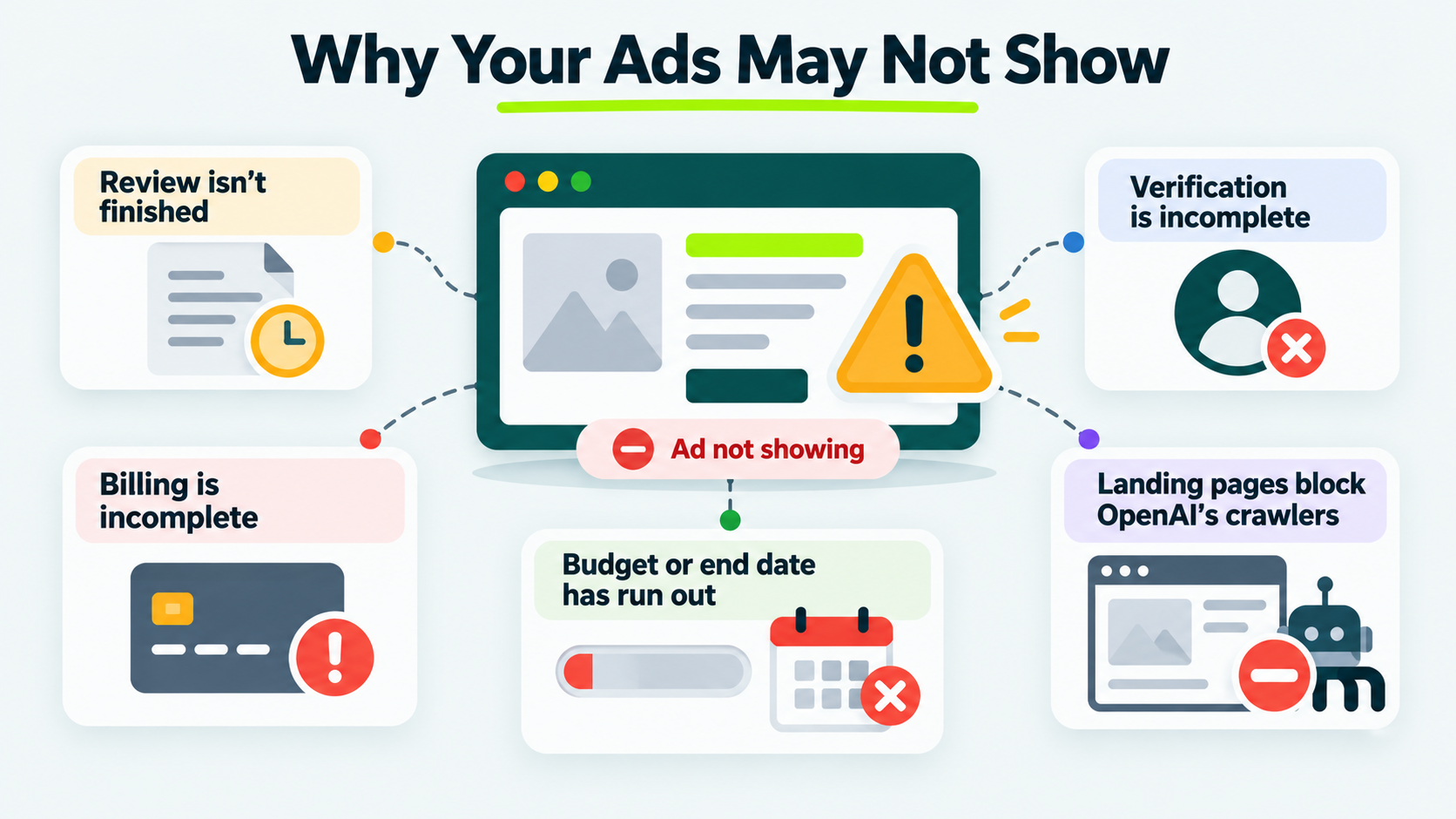
OpenAI’s troubleshooting guide for Ads Manager lists these causes.
Open the Ads tab and check the status column. If it says “Not serving,” hover over it to see why. Give it at least 24 hours after launch before you worry about zero impressions.
Spend numbers can also lag by 7 to 8 hours, so seeing $0 doesn’t mean you haven’t been charged.
Find what you see in the table, then start with the fix next to it.
| WHAT YOU SEE |
CHECK THIS FIRST |
|---|---|
| Status says “Not serving” | Hover for the reason, then edit and resubmit the ad |
| Rejected for policy | Compare the title, copy, image, and landing page with OpenAI’s ad policies, because all four are reviewed and they must agree |
| Rejected or stuck, and the policy check is clean | Test whether OAI-AdsBot can open the landing page |
| No impressions after 24 hours | Confirm review is complete, verification and billing are done, the dates include today, and budget remains |
| Delivery stops mid-week | Check whether you’ve used the weekly allowance early |
| Serving stopped after you renamed the brand | Wait for OpenAI to approve the new name |
| Images won’t upload | Use a square .png or .jpg, no longer than 1200 by 1200 pixels, at a public link that opens the image itself |
| Delivery outside your home country | A new self-serve account can be limited to the home country at first |
If you believe a rejection is a mistake, you can request another review. Otherwise, edit the ad and resubmit it.
Fix the cause before you resubmit. A submitted ad with the same landing page problem fails the same way.
Reading the First Two Weeks Without Overreacting
Ads Manager Beta shows seven numbers, including impressions, clicks, spend, click-through rate, average cost per click, average cost per thousand impressions, and conversions.
You’ll only see conversions if you’ve set up conversion tracking.
| NUMBER |
WHAT IT TELLS YOU |
HOW FRESH IT IS |
|---|---|---|
| Impressions |
How many times your ad was shown | Refreshes about every 15 minutes |
| Clicks |
How many valid clicks it got | Refreshes about every 15 minutes |
| Click-Through Rate |
Clicks divided by impressions | Refreshes about every 15 minutes |
| Spend |
What you’ve been charged | Can lag 7 to 8 hours |
| Average Cost Per Click and Per Thousand Impressions |
What each really cost you | Updates later, after spend settles |
| Conversions |
Actions that matched a click | Needs tracking set up |
Change one thing at a time. If you change several, you won’t know which one moved the numbers. Add new ads with different angles, rather than the same message in new wording.
Many impressions with few clicks means the hint is probably too loose. Rewrite it around one idea.
Check brand mentions inside ChatGPT answers separately, because your ad report can’t show them.
There’s no benchmark to aim for yet. Wait until you have enough conversions to compare before you judge your results.
Run the Eligibility and Crawler Checks Before Anything Else
Before you open Ads Manager, run three checks today. Confirm your billing entity’s country is on OpenAI’s list. Confirm your category fits the ad policy.
Open your robots.txt file and firewall settings and make sure OAI-AdsBot isn’t blocked.
Once your ad is running, work on getting named inside ChatGPT’s answers.
Planning to Advertise on ChatGPT?
Complement your paid campaigns with relevant backlinks that strengthen your brand’s authority and organic visibility.
Are ads live in ChatGPT yet?
Yes, OpenAI began testing ads in the United States on February 9, 2026. It opened self-serve Ads Manager Beta after a pilot that ran from February through April.
Its availability page now lists 63 countries.
Do ChatGPT ads replace the need to show up in ChatGPT answers organically?
No. ChatGPT ads are paid placements that appear below responses, and OpenAI says ads don’t influence the answers ChatGPT gives. A brand can pay to appear under an answer without being named in it.
Being cited within answers depends on how trusted and widely referenced the brand is across the web, which a professional link building agency supports by earning placements on relevant, credible sites. Running both gives a brand paid visibility and earned visibility at the same time.
How do ChatGPT ads look?
An ad is a labeled sponsored unit below ChatGPT’s answer. It shows the advertiser name, a small logo, a title, a description, an image, and a link to the landing page.
Do ads change what ChatGPT answers?
No, OpenAI says ads run on separate systems from the chat model, and advertisers can’t shape, rank, or affect responses. Paying for an ad doesn’t make ChatGPT recommend you.
Can I run ChatGPT ads from outside the United States?
Yes, if your billing entity is in a country on OpenAI’s list of available countries. Say your business is registered in Spain, but most customers are in Canada.
Your account’s home country is Spain. A new self-serve account may deliver only there until identity verification is approved and you’ve reached the required spend.
How long does a ChatGPT ad take to be approved?
None of the OpenAI help pages used for this guide give an approval time. OpenAI’s troubleshooting guide says to allow at least 24 hours after launch before reporting that nothing is delivering.
Should you run ChatGPT Ads yet?
Run ChatGPT ads if your offer fits a launch category and you can fund a two-week test of about $350 at the $25 minimum.
Skip them for now if your category is financial, health, or legal outside the United States, because the policy prohibits or generally prohibits those ads there.