Did your Google ranking suddenly drop, and you can’t tell why? This is common, and it is usually fixable once you know what changed.
Run three checks: Confirm the drop is real, confirm Google still lists the page, then confirm the page lost position. Skip a check, and you fix the wrong problem while the real one stays in place.
Search Console (Google’s free tool for tracking how your pages perform in results) holds the evidence for all three.
What You’ll Learn
- A real ranking drop is a lower position on queries that held steady before.
- Search Console’s data anomalies page can explain a dip your site didn’t cause.
- Google says a small position drop can reverse without any fix.
- The URL Inspection tool shows whether Google still lists a page.
- Manual actions appear in Search Console, but automated updates send no message.
Why a Ranking Can Drop Without Any Change From You
A Google ranking can drop without any change on your sitebecause Google’s automated systems update how pages are ranked. Search Console can change how it counts your data, and a page’s listing can change without anyone noticing.
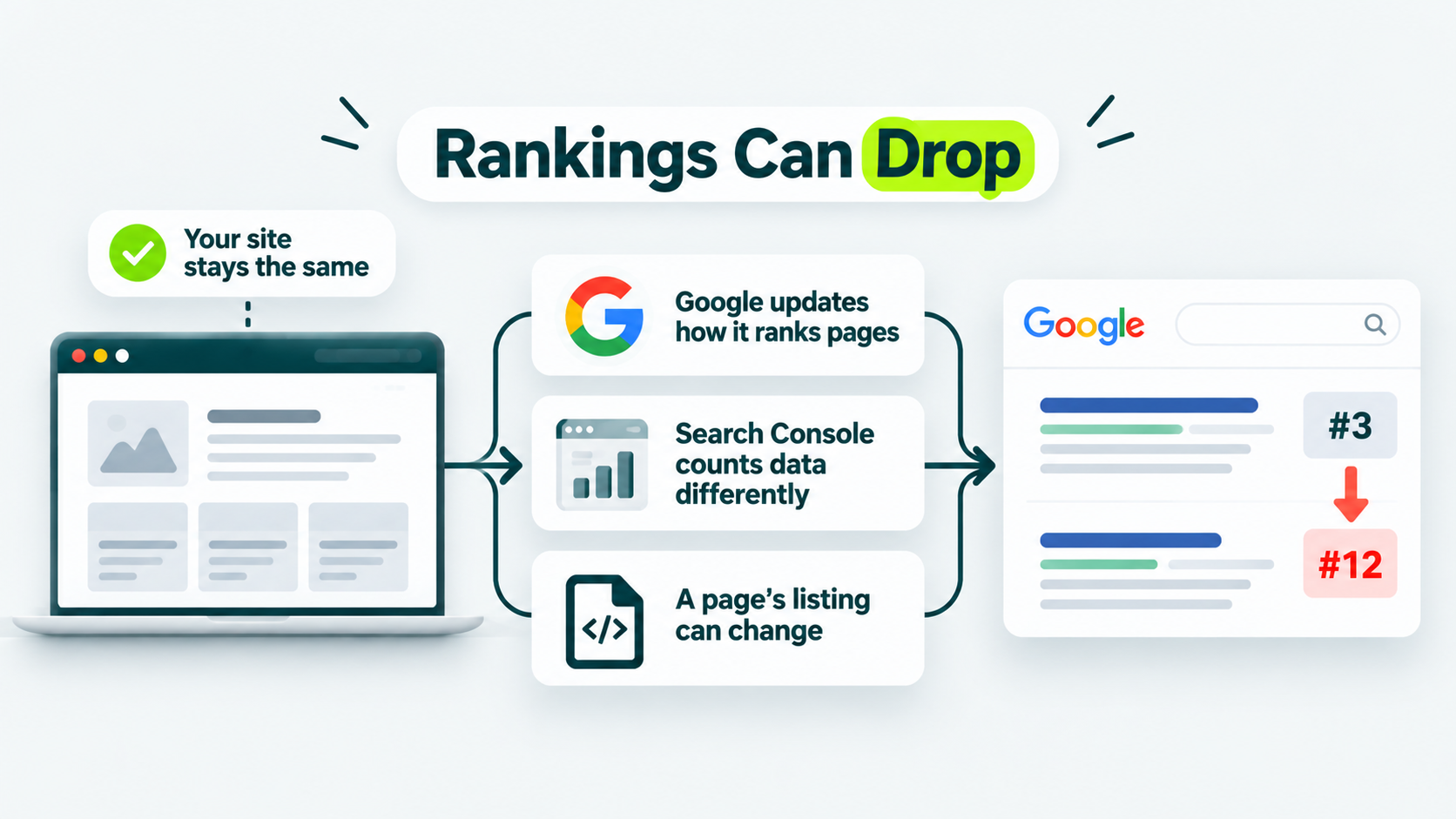
Each of these happens somewhere you aren’t looking. That’s why a drop can feel like it arrived from nowhere. Look for what changed, who changed it, and where you can see those changes.
| WHAT CHANGED |
WHO CHANGED IT |
WHERE YOU SEE IT |
|---|---|---|
| How Google Ranks Pages |
Google’s public list of ranking updates | |
| How Search Console Counts Your Data |
Data anomalies in Search Console’s help page | |
| Whether Google Lists A Page |
Your team, a developer, or site software may change indexing settings. Google’s systems can also change a page’s indexing status. | URL Inspection shows the current status. The Page indexing report shows site-wide indexing patterns. Site revision history and plugin logs can help identify setting changes and when they occurred. |
Google’s guide to debugging traffic drops names more causes: technical errors, security problems, spam-policy violations, seasonal changes in interest, and site migrations.
Three questions quickly sort those causes, and the order matters.
The first rules out a measurement problem. The second rules out a listing problem. Only the third leaves you with a real loss of position. Skip a step, and you’ll chase a wrong cause, possibly for weeks. Follow the order, and each answer narrows your next move.
Start with the first question.
Question One: Is the Drop Real?
Confirm the ranking drop exists before you spend an hour fixing it. Some drops show up in Google Search Console reports without any real change in how people find your site.
A ranking drop is real when clicks or average position fall on queries that held steady before. A drop isn’t real when your report counts something differently.
In Google Search Console, clicks show how many times people visited your page from Google Search. Average position shows where your page typically ranked in search results, while queries reveal the search terms people used to find it. Compare these metrics over time to identify what changed.
The performance report is the Search Console chart of your clicks, impressions, and average position over time.
Run these checks before you decide your Google ranking drop is real:
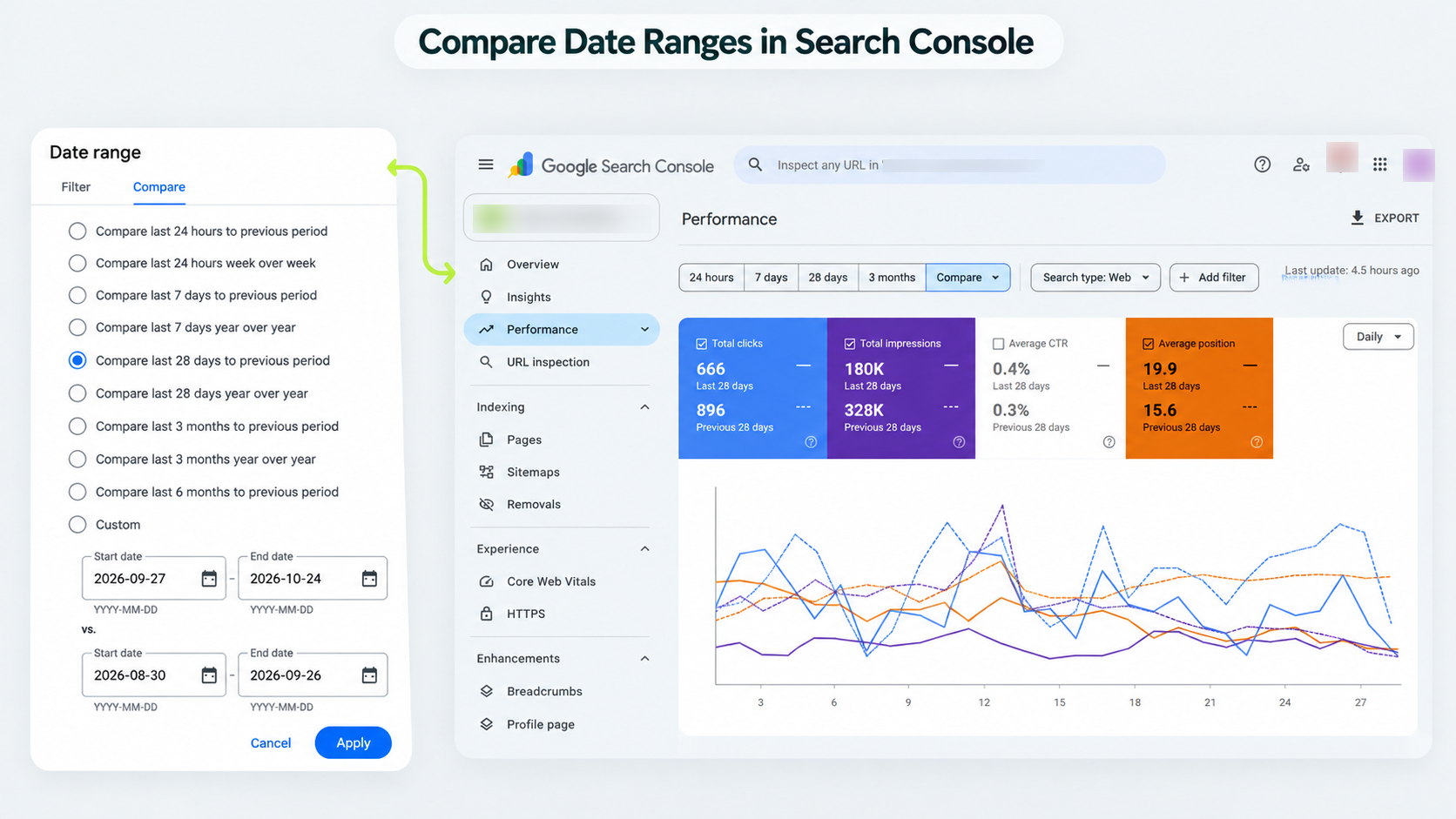
1. Open the performance report and use the Compare tab to set two date ranges side by side.
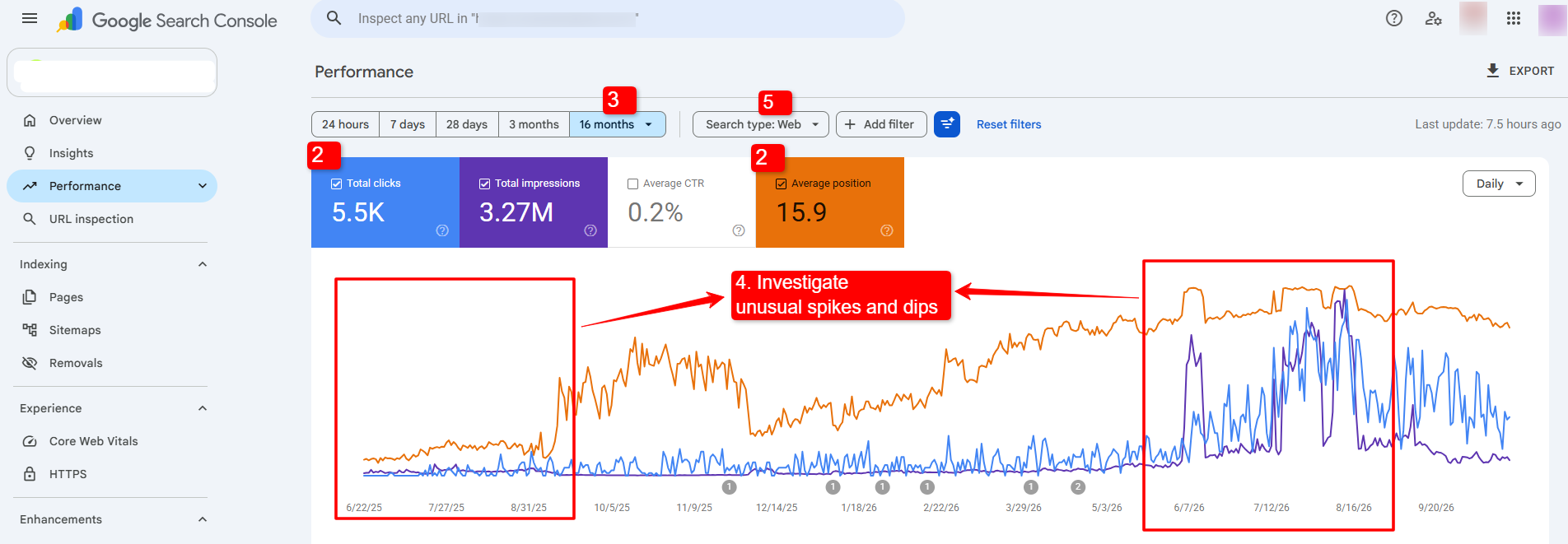
2. Look at clicks and average position rather than impressions alone.
3. Switch the date range to the last 16 months to see whether the same dip happened last year.
4. Read Search Console’s data anomalies page.
5. Check the web, image, video, and news search types separately, in case the drop sits in only one.
Google says a drop “might be related to a change in the data processing or a logging error”.
The data anomalies page lists known problems with how Search Console recorded data. If an entry matches your dates and your report, treat the dip as a reporting problem first. Check the report before you touch a page, because a fix aimed at a counting change fixes nothing.
People read a page title and snippet before they choose a result. Google Trends is Google’s free tool for seeing whether interest in a query changed across the web rather than only on your site.
Your chart’s shape also points somewhere:
| WHAT YOU SEE |
WHAT IT POINTS TO |
WHERE TO CHECK |
|---|---|---|
| Impressions and clicks both fell | One of the main causes in this guide | The checks below, in order |
| Impressions held, and clicks fell | A page title and snippet that don’t draw clicks, or a more appealing result for the same search | Your page title and snippet |
| The whole site fell | A site-wide issue | The Page indexing report |
| A group of pages fell | A page-level issue | The URL Inspection tool, on a few pages |
| The same dip appears every year | Seasonality | The 16-month view and Google Trends |
Question Two: Is the Page Still Listed in Google?
The URL Inspection tool in Search Console shows whether Google lists a page. A page with a noindex tag tells Google not to list it. A noindex tag is a line of code that hides a page from results.
It works like a closed sign on a shop door that only Google can read. A misplaced one hides a page, and you won’t see a warning on the page itself.
Check the page in three steps:
- Paste the URL into the URL Inspection tool.
- Read the page’s indexing status.
- If it says excluded, find the tag or block that caused it.
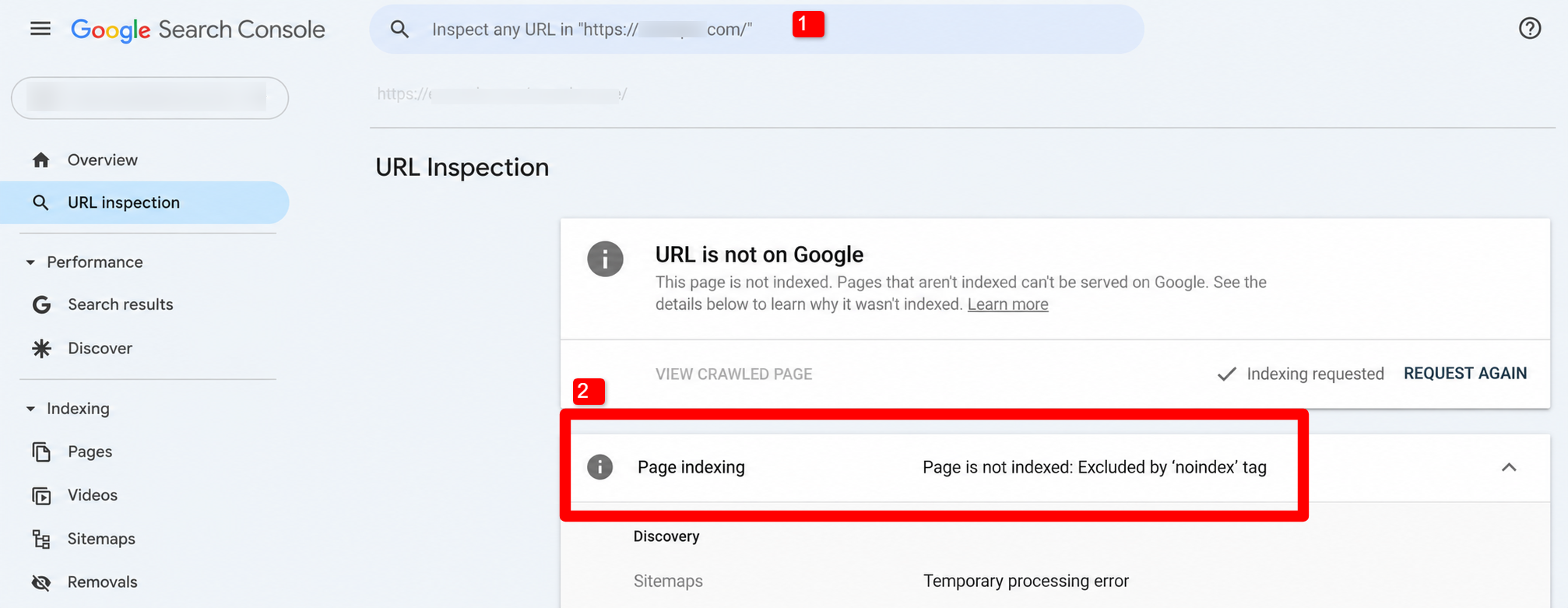
Google adds one detail worth knowing. A noindex tag only takes effect once Google’s crawler visits the page again. A crawler is the program Google uses to visit pages.
So traffic falls more slowly than in a site-wide outage. A page can lose its clicks days after the mistake that caused it. Don’t date the cause by the day you noticed the drop.
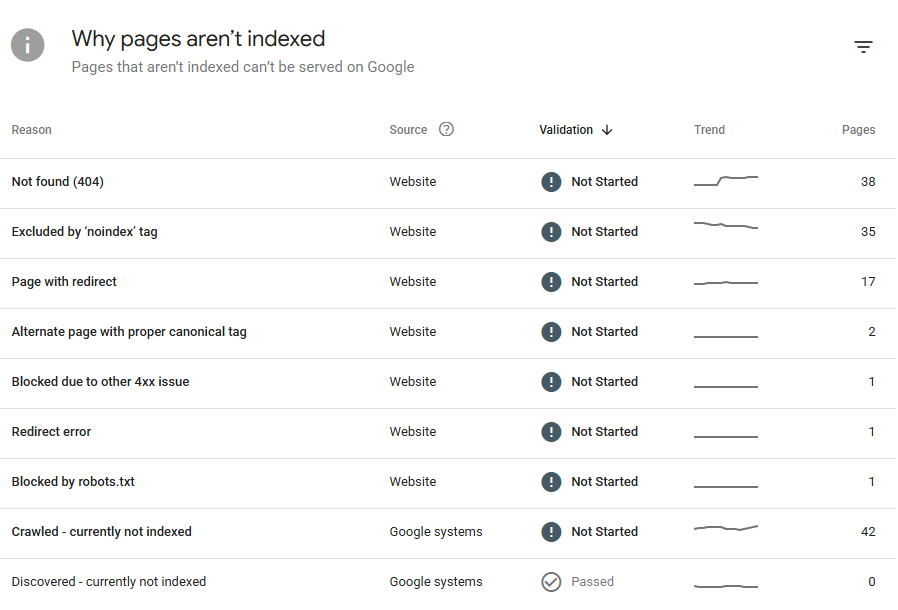
If traffic fell across your whole site, check the Page indexing report for site-wide indexing patterns. If the drop affects only a few pages, use URL Inspection to check each page’s current status. To investigate who changed an indexing setting and when, check your site’s revision history, CMS activity logs, or plugin logs, if available.
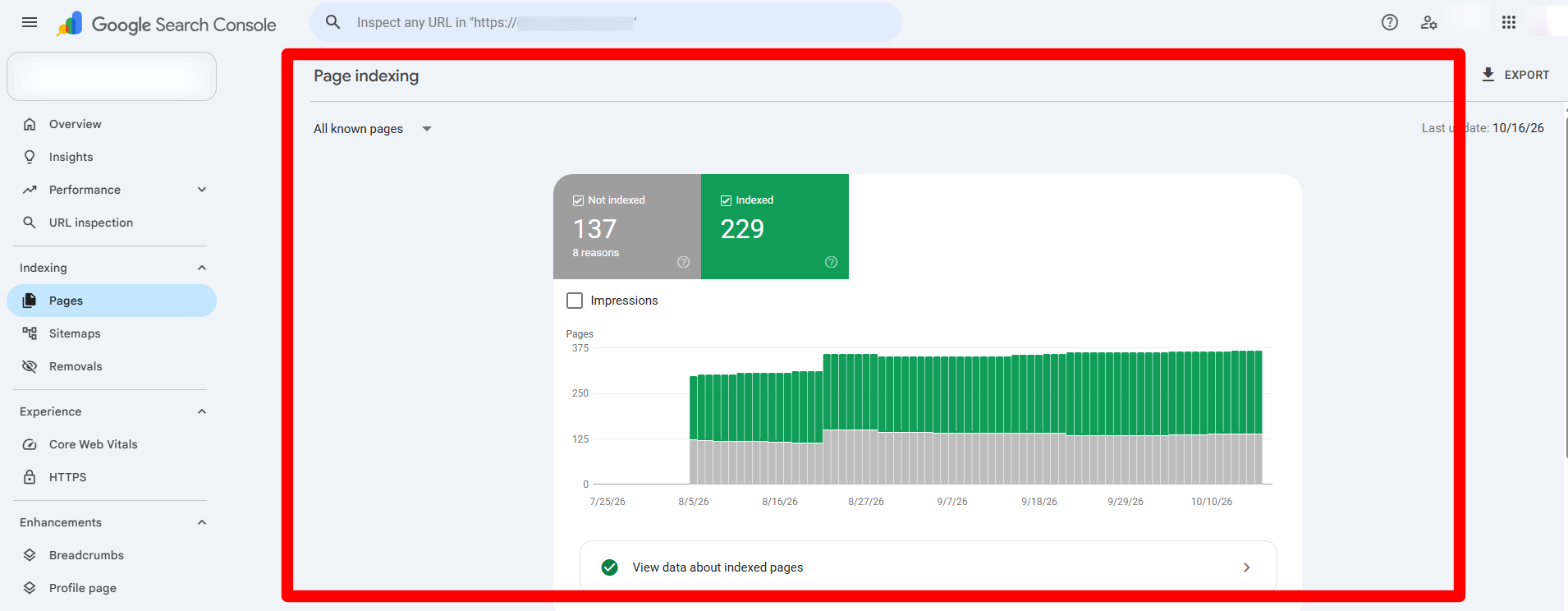
Google’s guide lists technical problems too: a site that’s down, a robots.txt file Google can’t fetch, and “page not found” errors. A robots.txt file is a plain-text page at the top of a site that tells crawlers where they may go.
Question Three: Did the Page Lose Position?
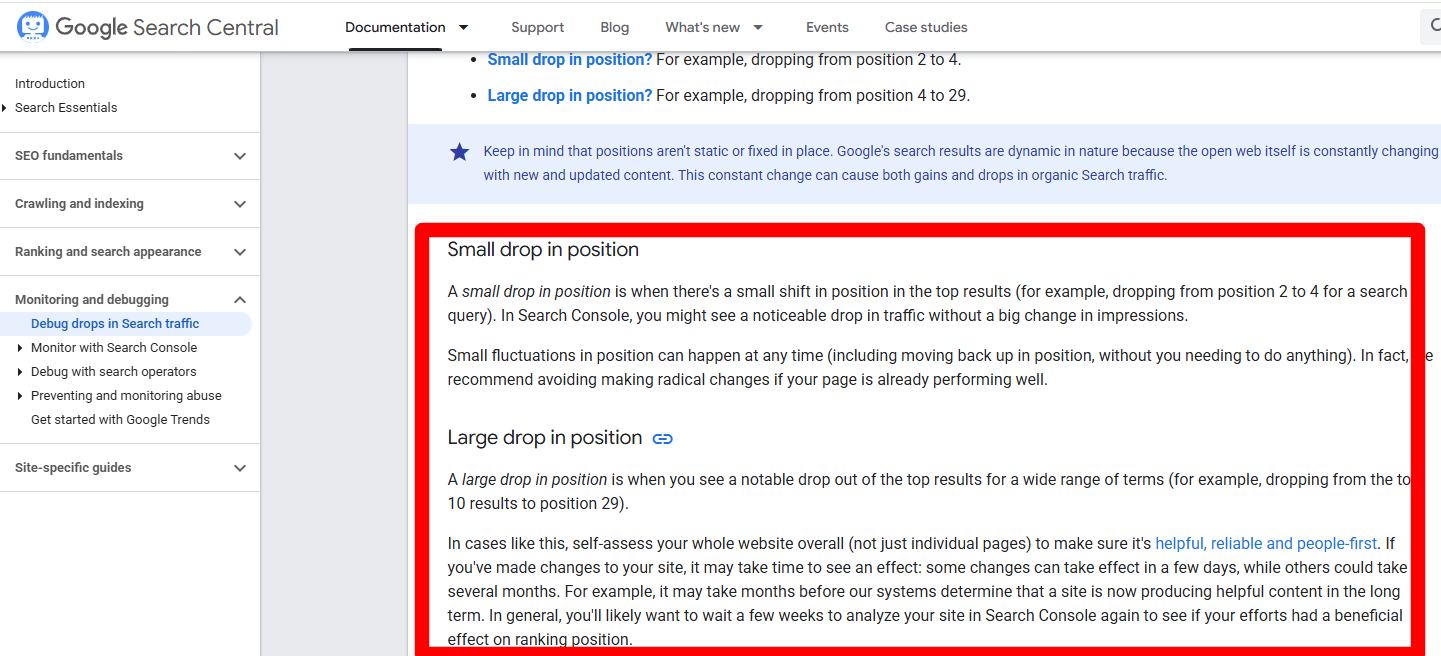
Google says a small ranking drop can reverse on its own, while a large ranking drop calls for a full site review.
A real position loss shows up as a lower average position for queries that held steady before. Google’s example of a small drop is a move from position 2 to 4. Its example of a large drop is a move from position 4 to 29, which isn’t subtle.
A small drop is mostly a reason to wait. Google says small fluctuations can happen at any time and can reverse on their own.
A large drop is a reason to look at the whole site instead of one page. Google says to check that your site overall is helpful, reliable, and written for people first. It also says an update can change how pages perform.
Find your own pattern in the Pages table below the main chart. Sort it by Clicks Difference between two periods, and the pages that lost the most clicks rise to the top.
Then look at whether the loss hit one page, a group of pages, or the whole site. They don’t share a fix.
If the position loss is real, one question decides what you do next: an automated update or a person at Google?
Was It an Automated Update or a Manual Action?
Google says it finds spam policy violations through both automated systems and human review. An automated update changes rankings across many sites at once, with no message to you.
Human review can result in a manual action, a penalty a Google employee applies to your site. Search Console’s Manual actions report lists it.
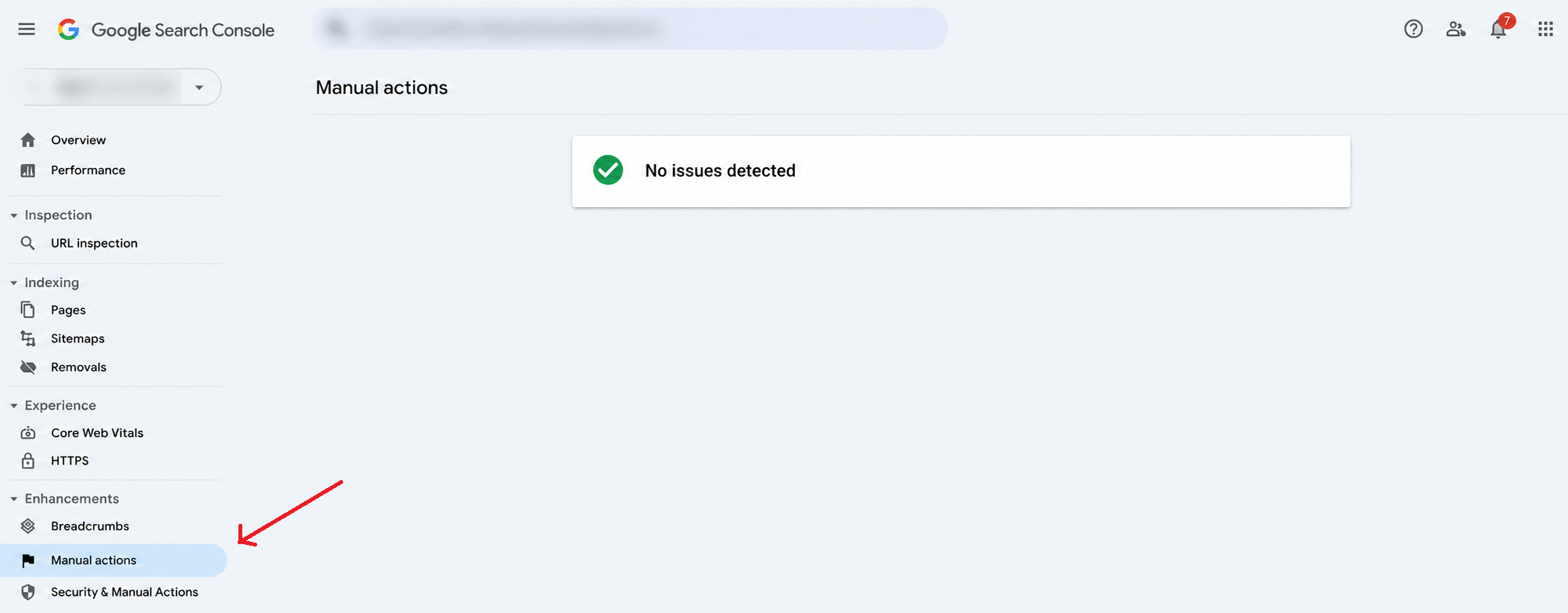
Search Console shows ‘No issues detected’ when Google has found no manual actions against your site. This rules out a reported manual action, but it does not confirm that an algorithmic update caused the ranking drop.
| WHAT YOU SEE |
WHAT IT POINTS TO |
WHERE TO CHECK |
|---|---|---|
| The manual actions report lists an issue | A manual action from a person at Google | The manual actions report in Search Console |
| The report is empty, and your position fell near a logged update | A possible automated update | Google’s public list of ranking updates |
| The report is empty, and no update is near | Another cause, such as a technical error or seasonality | The URL Inspection tool and the 16-month chart |
A timing match between a drop and an update isn’t proof that the update caused it. Nobody outside Google can prove that, and your own reports can’t either. Hold the match as a clue instead of a verdict. To see what the spam rules cover, read what Google’s link spam policy bans.
Other Causes to Rule Out While Investigating for Your Google Ranking Drop
Google’s guide names security problems, seasonality, site moves, and spam-policy problems as other main causes of a traffic drop. Check these four before you decide it’s your content.
Security Problems
If your site is under attack, Google may warn people before they reach it. A threat means malware (harmful software) or phishing (pages that steal logins). That can cut your traffic. The Security Issues report in Search Console shows whether Google has found one.
Seasonality and Changing Interests
Demand for a query can rise and fall through the year. It can also shift as people search for different things. Filter the Performance report to your biggest queries one at a time. Then check each on Google Trends to see whether only your site dropped.
Site Moves
If you change the URLs of existing pages, ranking can swing while Google revisits and relists your pages. The swing isn’t instant. Google says a medium-sized site can take a few weeks for Google to notice the change, and larger sites can take longer. A redirect sends visitors and Google from an old URL to the new one.
Spam-Policy Problems
A site that doesn’t follow Google’s spam policies can rank lower or not appear at all. Check the Manual actions report even when you don’t suspect a penalty.
Google’s own tools cover most of these four. The next five sit outside them, which is exactly why a clean report doesn’t let you off the hook.
Five More Checks From Our Own Practice
These five come from our own practice rather than from Google’s guide. Each asks about something outside Search Console, so a clean report doesn’t rule them out.
1. Did You Change the Page?
List what changed on the affected page and when. Then compare that date with the day the drop began. A rewrite made a week before the drop is a stronger suspect than an undated update.
2. Did a competitor overtake you?
Search the query yourself and see who now sits above you. Read what they publish that you don’t. A page that slipped one place to a better page needs a better page, not a panic.
3. Did links to you disappear?
A page that linked to you may have been removed, moved, or edited. Read what to check when links disappear before you assume it’s permanent.
4. Are two of your pages competing for one query?
When two pages on your site answer the same query, they can split clicks. Filter the Performance report to that query and read the Pages table to see which URLs show up, so you aren’t guessing.
5. Does the results page look different?
Search the query and look at what sits above the first result. Don’t assume the results page looks the same as when you last checked. AI Overviews are the AI-written summaries Google can show above results. If they or other new features appear, read what Google says about AI Overviews.
What Not to Do First
A hasty fix can cost you more than the drop did. Resist these four habits, because each feels productive while doing the damage.
Keep It If Still Indexed
Google recommends avoiding radical changes to a page that’s already performing well. A rewrite can erase what was working.
Don’t Disavow Links on a Hunch
Disavowing tells Google to ignore specific links. Read when disavowing makes sense before you try it.
Don’t Judge a Fix After a Few Days
Google says some changes take effect in a few days and others take several months. It suggests waiting a few weeks before you look at Search Console again.
Check Whether Backlinks Caused the Drop
If backlinks are the likely cause, review recent link losses and changes in your backlink profile. Check whether important links disappeared, became nofollow, or lost relevance. Compare these changes with the timing of your ranking drop before deciding what to fix. Audit the whole backlink profile first.
Open Your Performance Report and Split the Drop Three Ways
The worst move right now is the one that feels most like progress. Before you rewrite, redirect, or disavow anything, spend ten minutes on the one thing that tells you what you’re actually facing.
Open the Performance report today and compare two date ranges. Look at clicks and average position before impressions, because impressions alone can’t prove a drop. Then take your biggest losing page and check it with our free Google Index Checker tool.
The checker answers the second question: whether Google lists the page. The Performance report answers the first and third. Once you know which, every next step gets smaller and clearer.
Looking to Strengthen Your Search Rankings?
Earn relevant, high-quality backlinks that support your website’s long-term SEO growth.
Questions About a Google Ranking Drop
Why has my Google ranking suddenly dropped?
Start with three checks in order: whether the drop is real, whether the page is still listed, and whether it lost position. A sudden fall often turns out to be a change in your report or a page that left Google’s listings. Only a lower position for the same queries is a real ranking loss, and that’s the third check.
Why does my Google ranking keep changing?
Google keeps updating how it ranks pages, and what people search for keeps shifting. Google also says small position fluctuations can happen at any time. A page can move back up without you doing anything. A single week’s movement isn’t a trend.
Can link building prevent future ranking drops?
No single tactic can. Algorithm updates, indexing errors, and reporting changes affect sites regardless of their links. What a varied, relevant backlink profile does is make a page less exposed when any one link is lost or devalued. Most brands that keep that profile healthy over time work with an established link building agency rather than checking it by hand every month.
Can a ranking drop be caused by Search Console and not by Google?
Yes, because your report can change when your rankings haven’t. Google says a data processing change or a logging error can show up as a dip or a bump in your chart. Check the data anomalies page before making changes.
Why did my rankings drop but my traffic stay the same?
Google says impressions and clicks measure your site’s success. It advises against focusing too much on absolute position. It still says a dramatic, persistent drop in position is worth reviewing your content. A lower position that doesn’t cost you clicks isn’t a traffic problem yet. Keep watching clicks, and wait a few weeks before you act.
How long does it take to recover from a ranking drop?
Google gives a range instead of a number: some changes take effect in a few days, and others take several months. It suggests waiting a few weeks before you analyze Search Console again. Don’t judge a fix by the first few days.
Should I disavow backlinks after a drop?
Not on a hunch. Disavow links you can show are a problem, and it’s most useful when a manual action points at them. Check the Manual actions report first, as described earlier.