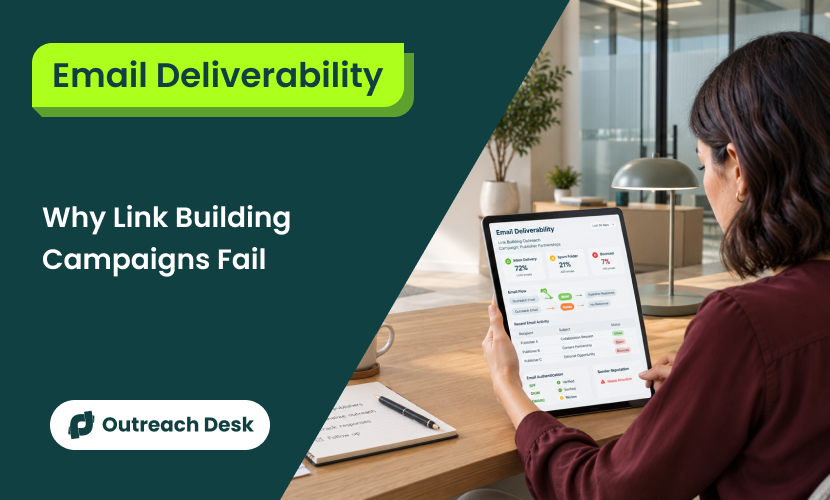
You send hundreds of emails every week; the response rate is minimal, and now you may be wondering why your link building campaigns are failing. But what if your well-written cold pitch actually lands in spam before an editor even sees it?
Email deliverability is the percentage of your outreach emails that reach the inbox instead of the spam folder.
Link building pitches often fail that test more than regular cold emails because you are asking straight for a link without building a relationship.
Quick Summary
- Link building emails get filtered harder than regular cold emails.
- SPF, DKIM, and DMARC go live before your first email.
- A new domain or inbox earns trust over several weeks of warm-up.
- Most solo campaigns run better on one well-managed domain than five undermanaged ones.
- Google blocks domains from Gmail once their spam rate crosses a set threshold.
- A poorly targeted prospect list can put your sender reputation at risk, even with a strong subject line.
Why Link Building Emails Get Filtered Harder Than Regular Cold Email
Link building emails fail because they’re uninvited, sent to someone you’ve never emailed before, and usually include an outbound link in the first message.
It’s like an uninvited, unknown guest asking you for something straight.
“But my sales pitch often hits the goal.” Yes, it should.
Here, you’re pitching a demo, and the recipient may already know you, your product, service, or brand.
But a link building pitch is a different game. No relationship means no reputation, which keeps your recipient from tapping the link in the email.
To a mail filter, a new sender, a first email, and an outbound link together look like phishing. And these filters read patterns.
Fact:
A high send rate means nothing if the emails all land somewhere the recipient never checks.
Editorial and guest post pitches carry an extra strike that sales sequences don’t carry. They go cold to someone who’s never heard of your brand. Also, they ask for something, a link or a mention, that benefits you more than the recipient.
Three Technical Setups: SPF, DKIM, and DMARC
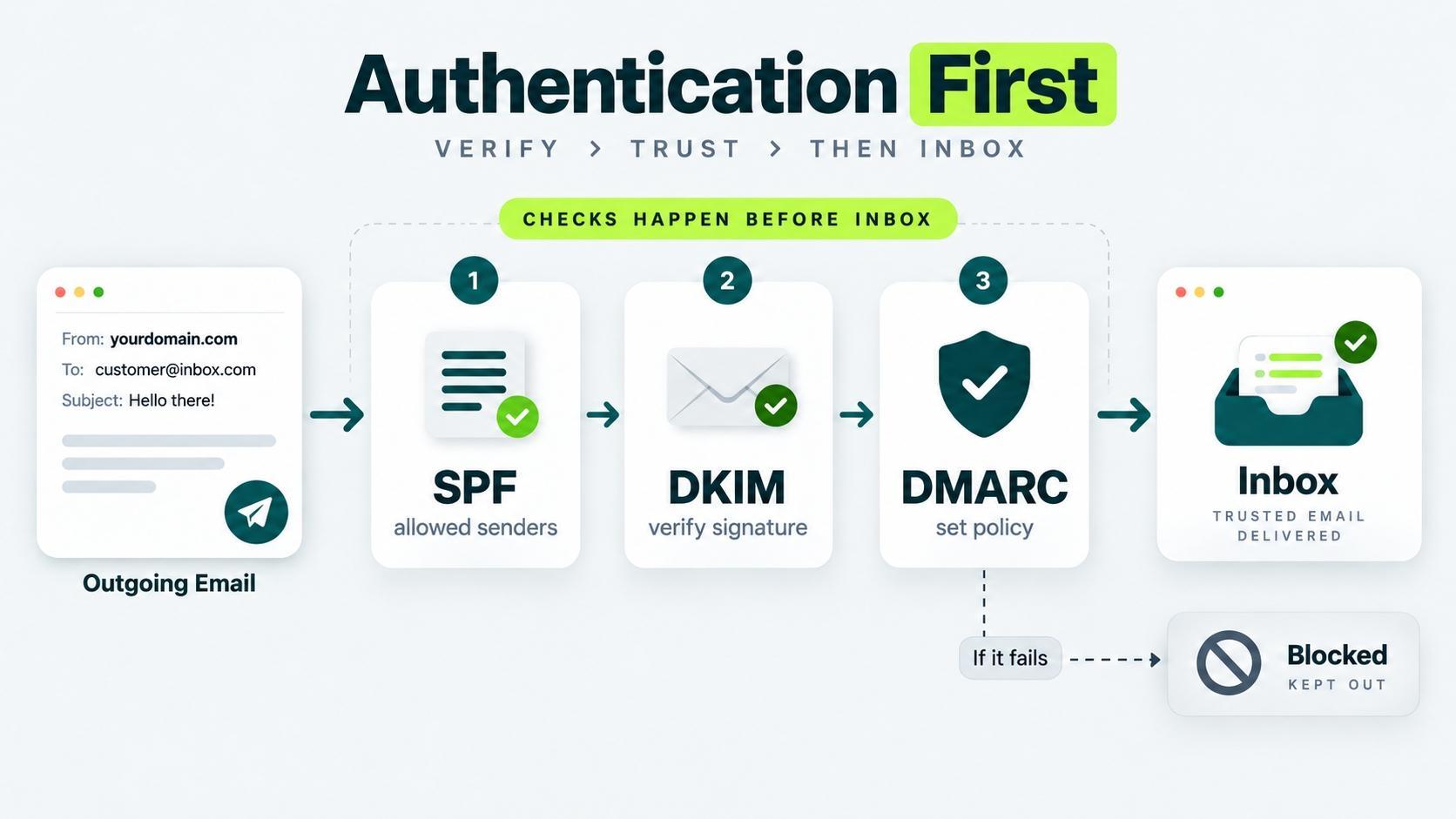
Set up SPF (Sender Policy Framework), DKIM (DomainKeys Identified Mail), and DMARC (Domain-based Message Authentication, Reporting, and Conformance). Because before anyone reads your email, mail servers check one thing first: are you really who you say you are? Three records do that job.
SPF (Sender Policy Framework)
Think of this technical setup as a guest list. You tell the world, “Only these servers are allowed to send mail using my domain name.” Any server not on the list fails the check.
DKIM (DomainKeys Identified Mail)
Here, every email gets a hidden signature attached. The receiving server checks that signature to confirm the message came from your domain and wasn’t changed along the way.
DMARC (Domain-based Message Authentication, Reporting, and Conformance)
DMARC is more like a boss who watches the other two. It tells receiving servers what to do with an email that fails the SPF or DKIM check, then sends you a report when that happens.
Set up these three in this order.
Add Your SPF Setting
- Go to your domain host (where you registered your domain).
- Open settings to manage how you send email.
- Add the entry your email or outreach platform gives you, usually a short block of text you paste in and save.
Add Your DKIM Setting
- Turn on DKIM inside your email or outreach platform.
- Add the key it gives you to your domain’s DNS settings as a new record, the same way you added the SPF entry.
Add Your DMARC Setting
- Start with a DMARC policy set to monitor only.
- Do not block yet.
- Move to a stricter policy once your reports come back clean.
None of this is optional, and none of it is a deliverability strategy on its own.
It’s the baseline every receiving server checks before it even looks at what you wrote. If you skip it, the receiver won’t read the mail even if you wrote a great pitch.
Warming Up a New Domain or Inbox Before You Send a Single Pitch
Warm up a new domain or inbox by sending a small number of emails a day and building up slowly, so mailbox providers learn to trust it before you run it at full volume.
A brand new domain has no sending history at all. To a mailbox provider, no history looks like risky history, so it treats your early emails with suspicion by default.
Week 1 to 2: Start Small
Send a certain number of emails a day, and send most of them to addresses likely to open and reply, like colleagues or warm contacts. Real opens and real replies are the fastest way to build trust early.
Week 3 to 4: Increase Gradually
Raise your daily volume in small steps, and keep watching your open and reply rates as you go.
A sudden jump in volume is one of the clearest signals mailbox providers use to flag an account.
Week 5 Onward: Run at Full Volume
Once your rates hold steady through the ramp, move to your normal outreach volume. Keep the increase gradual even here.
Don’t double your sending overnight just because the warm-up period technically ended.
Skipping warm-up is the most common reason a brand-new domain lands in spam within its first week.
How Many Sending Domains and Inboxes Your Campaign Actually Needs
Most solo campaigns need one sending domain and two to three inboxes.
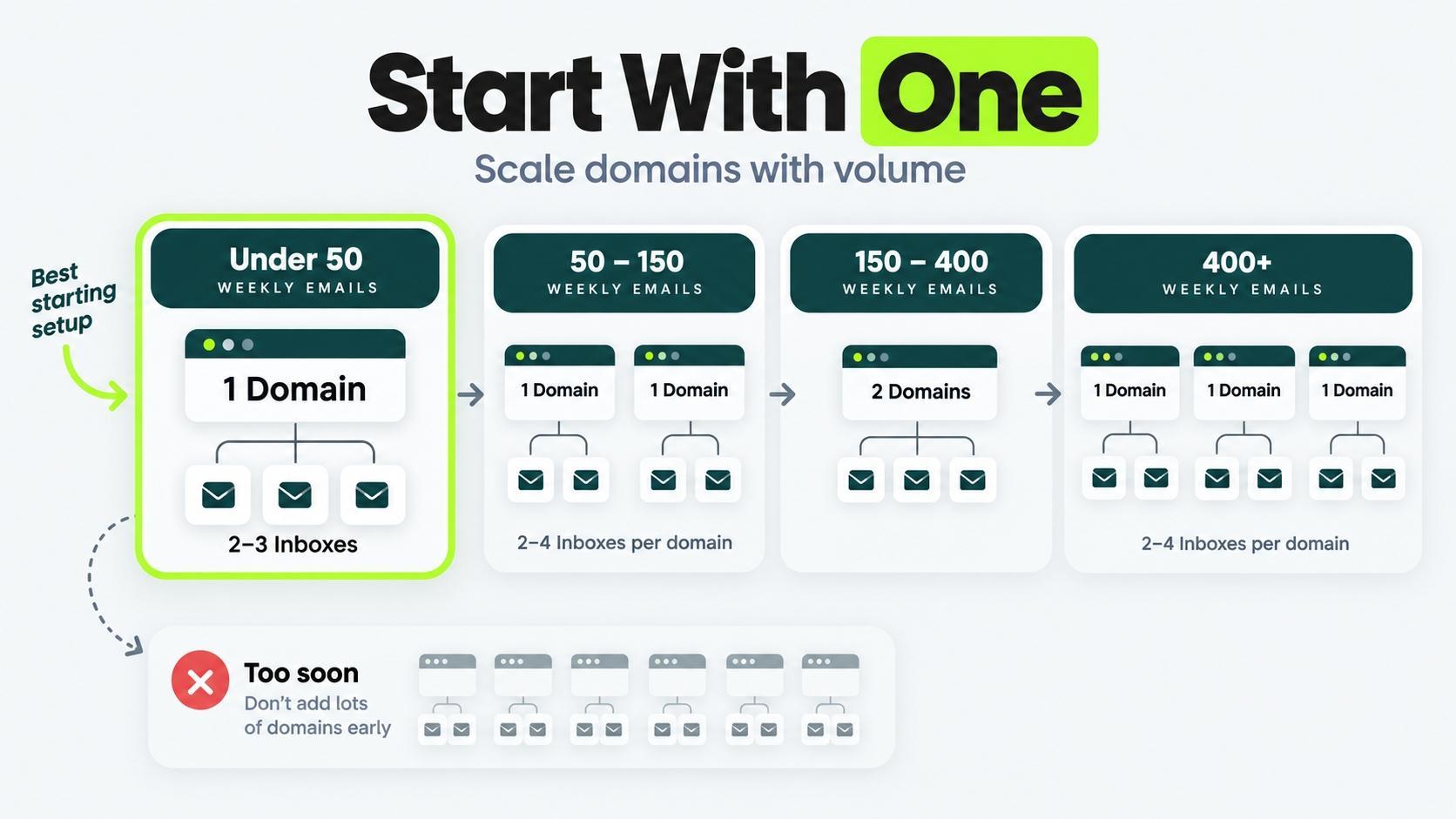
Multiple domains only help once your volume genuinely outgrows what one domain can send safely. For most link building campaigns, that comes later.
| WEEKLY OUTREACH VOLUME | DOMAINS NEEDED | INBOXES PER DOMAIN |
|---|---|---|
| Under 50 emails | 1 | 2 |
| 50 to 150 emails | 1 | 3 to 4 |
| 150 to 400 emails | 2 | 3 to 4 |
| 400+ emails (agency scale) | 3 or more | 3 to 4 |
If you think buying extra domains will speed up your process, then wait. An unwarmed second domain with poorly written pitches will drag your results down much faster than one well-run domain ever could.
Get one domain sending cleanly first. Add a second only when your volume actually calls for it.
A 2026 Mailforge benchmark found that dedicated sending domains hit 98% delivery when they’re set up and warmed the right way. A single active domain can reach that ceiling with time.
A pile of poorly managed domains won’t get you closer to that number.
Sending Volume and Frequency: How Fast You Can Actually Scale
Cap a new domain around 15 to 20 emails a day per inbox, and only raise that number once your open and reply rates hold steady for a week or more.
Speed feels productive, but a fast ramp is exactly what triggers the spam filters you’re trying to avoid.
| DOMAIN STAGE | SAFE DAILY VOLUME PER INBOX |
|---|---|
| Week 1 to 2 (warmup) | 5 to 10 |
| Week 3 to 4 (ramping) | 10 to 20 |
| Week 5+ (established) | 20 to 40 |
| Long-running, clean history | 40 to 50 |
Consistency matters more than the number itself.
A domain sending 20 emails a day, every weekday, without fail, builds more trust than one that sends 40 one day and 5 the next.
Mailbox providers read that kind of unevenness as a red flag.
Building a Prospect List That Doesn’t Wreck Your Sender Reputation
Sender reputation is the trust score mailbox providers quietly assign your domain, based on how recipients react to your emails. A bounce happens when the receiving server rejects your email and sends it back, usually because the address doesn’t exist.
A sloppy prospect list damages your reputation fast, because every bounce and every spam complaint counts against your whole domain. That damage doesn’t stay contained to one email.
Build your list with these habits.
- Verify every email address before you send, using a verification tool instead of guessing at a common format.
- Remove role-based addresses like info@ or contact@, since they bounce more and don’t usually reach a real decision-maker.
- Research each prospect individually instead of scraping a list in bulk, since scraped lists carry the highest bounce and complaint rates.
- Keep your list small enough to personalize every email, since generic mail merge pitches drive the complaint clicks that hurt your reputation most.
Building the list itself, the research and qualification part, is its own skill.
See the guide on how to build a prospect list that earns links for the full process. A clean list of 50 well-researched prospects will outperform a scraped list of 500 every time, both in replies and in keeping your domain out of trouble.
Subject Lines and Opening Sentences That Don’t Trip Spam Filters
Spam filters scan your subject line and opening sentence before a human ever reads them, so word choice matters as much as tone.
Avoid these patterns in your subject line and opening sentence.
- All caps or excessive punctuation, like “FREE OPPORTUNITY!!!”
- Words that spam filters weigh heavily, such as “free,” “guarantee,” or “act now.”
- A subject line that oversells what the email actually delivers.
- An opening sentence that reads like a template with your prospect’s name dropped in.
Write a pitch that talks to the email receiver.
A subject line like “Quick question about your [specific page] post” outperforms a generic pitch line, because it names something real and specific to that recipient.
The actual wording of your pitch, the templates and structures that get opens and replies, is covered in email outreach templates that get replies.
Reading Google’s Bulk Sender Rules So You Don’t Get Silently Blocked
Google enforces a hard number: keep your spam complaint rate below 0.30%, and stay under 0.10% if you want real margin for error.
If you cross that threshold, Google can block your domain from reaching Gmail inboxes entirely, with no warning email explaining why your replies suddenly stopped.
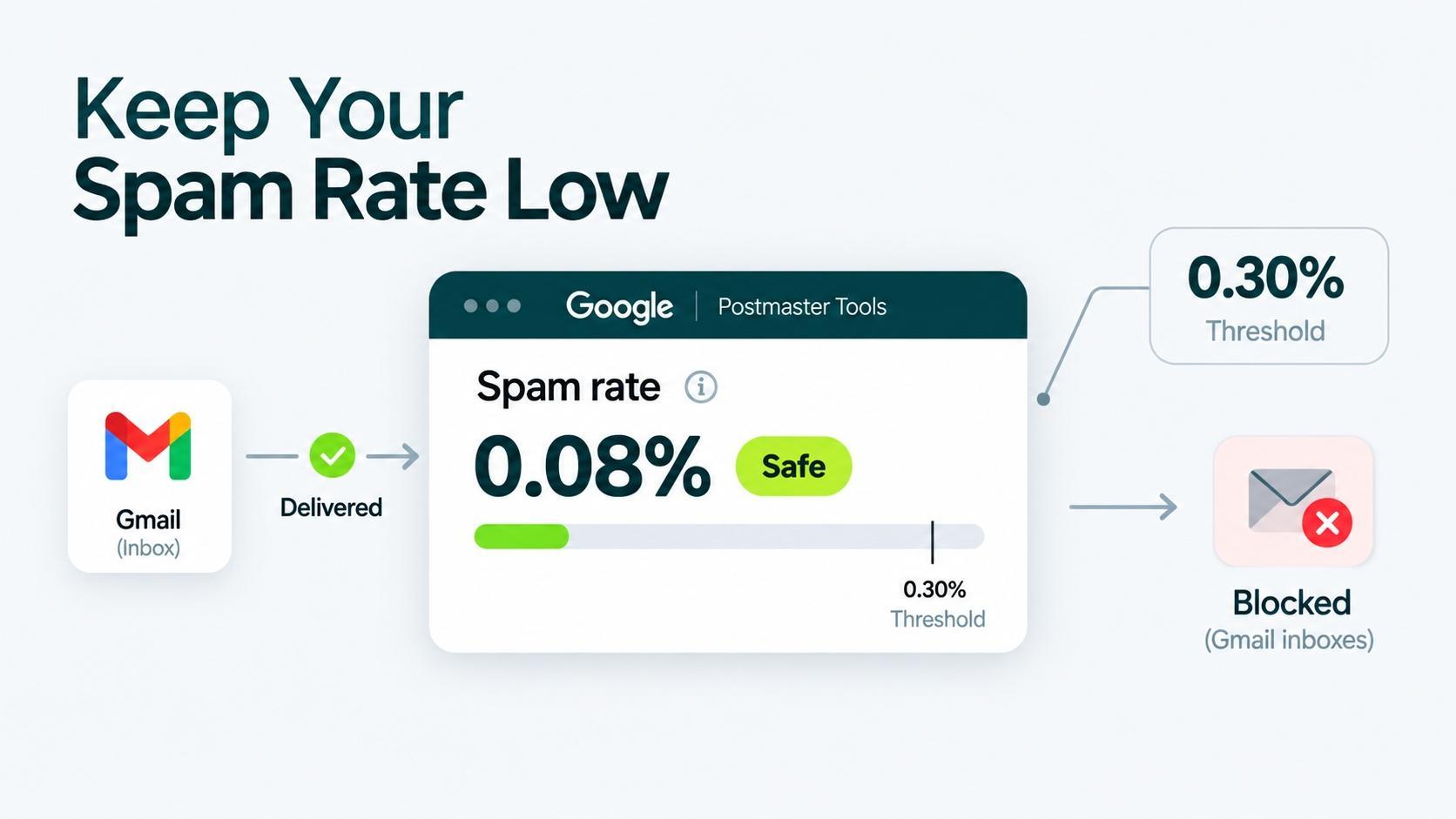
Google’s bulk sender guidelines apply to any domain sending a meaningful volume of email to Gmail addresses, which covers most link building campaigns once they’re running at full volume.
Check your spam rate in Google Postmaster Tools, a free tool that shows you this number directly, rather than leaving you to guess based on reply rates alone.
Set it up before you need it, not after your replies mysteriously dry up.
The 0.30% threshold sounds forgiving until you do the math: on 1,000 emails, that’s just 3 spam complaints before you’re at risk. A tiny, angry fraction of your list has more power over your deliverability than your entire subject line strategy.
Monitoring Sender Reputation and Getting Off a Blacklist
Check your sender reputation on a regular schedule, at least weekly, rather than waiting until replies stop coming in to look for a problem.By the time you notice silence, the damage is usually already a week or two old.
Monitor These Signals Weekly
A rise in complaints or bounces, or a sudden drop in opens, is worth investigating before it compounds into a bigger domain reputation problem.
A drop in any one of these, on its own, is worth investigating before it compounds into a bigger domain reputation problem.
If You Get Blacklisted
Getting blacklisted almost never comes out of nowhere. It’s usually the downstream result of skipped warm-up, a low-quality prospect list, or volume that ramped too fast, rather than a random event.
Fix the upstream cause first, then check your domain on the blacklist’s site (e.g., Spamhaus) and follow its removal process. Delisting without fixing the cause just earns you a second blacklisting, often faster than the first.
Monitoring gets easier with the right setup.
See tools that help manage outreach at scale.
A Pre-Send Deliverability Checklist for Your Next Campaign
Run through this before your next campaign goes out. It’s the fast version of everything covered above.
- SPF, DKIM, and DMARC are all live and confirmed working.
- Your domain or inbox has completed at least 4 weeks of warm-up.
- Your sending volume matches your domain’s stage.
- Your prospect list is verified, researched, and free of role-based addresses.
- Your subject line and opening sentence pass a plain read for spam trigger words.
- Google Postmaster Tools is set up, and your spam rate sits under 0.10%.
- You have a weekly slot on your calendar to check reputation signals.
This checklist covers deliverability specifically.
For the rest of the campaign, from prospecting to the pitch itself, see the full outreach process for earning links.
Want those weekly checks handled for you? Outreach Desk runs it for active link building clients.
Most link building campaigns fail on deliverability quietly.
No error message, no bounce notice, just fewer replies each month until someone finally checks Google Postmaster Tools and finds a spam rate that’s been climbing for weeks.
The setup in this article takes an afternoon. But staying on top of it takes fifteen minutes a week.
Check One Number Tomorrow
Open Postmaster Tools tomorrow and check the spam rate. If it’s under 0.10%, keep your current pace. If it’s above 0.10%, pause new sends and clean your list first.
Next campaign, build reputation checks into the weekly routine, not an afterthought. Track bounce and reply rate alongside spam rate, and catch drops early before they compound.
Worried outreach emails aren’t reaching inboxes?
Get a system for setup, warm-up, and monitoring, and stop losing replies to a problem you can’t see.
Can you use your main business domain for link building outreach?
No, use a separate subdomain or secondary domain, never your primary business domain. A spam flag or blacklist on your main domain can also knock out your website’s email deliverability, not just your outreach.
What counts as a good email deliverability rate for link building outreach?
Aim for inbox placement above 95% once your domain is fully warmed up.
Below that, a growing share of your list never sees the pitch, no matter how strong the copy is. New domains typically start lower and climb toward this range over four to six weeks of proper warm-up.
Should You Run Deliverability Yourself or Have Someone Manage it for You?
Either can work, but managing it well means checking spam rates, reputation signals, and warm-up pace every week without fail, on top of everything else outreach requires.
A managed link building service folds that monitoring into the campaign itself, so deliverability doesn’t quietly slip while attention goes to prospecting and pitching.
How long should you wait before following up with a prospect?
Wait at least three to five business days between your first email and a follow-up.
Sending too soon reads as pushy to the recipient and as suspicious volume to mail filters. Two to three total touches, spaced out, outperform a rapid-fire sequence for both replies and deliverability.
How long does it take to recover from a blacklist?
Recovery time depends on the blacklist: some remove you soon after you fix the cause and request delisting, while others require a clean sending period first.
Fixing only the symptom without the underlying cause (dirty list, skipped warm-up, fast ramp) often triggers a second blacklisting.
What’s the fastest way to check if your emails are landing in spam right now?
Send a test email to a tool like mail-tester.com or GlockApps and review the spam score it returns. This gives an instant read without waiting on real prospect replies.
Pair it with Google Postmaster Tools for an ongoing view once you’re sending at volume.