Most first link building campaigns produce nothing. The founder started before having anything worth pitching, or sent 100 emails in week one and burned the list.
A strategic link building checklist fixes that. It is a step-by-step playbook for running a campaign effectively from start to finish.
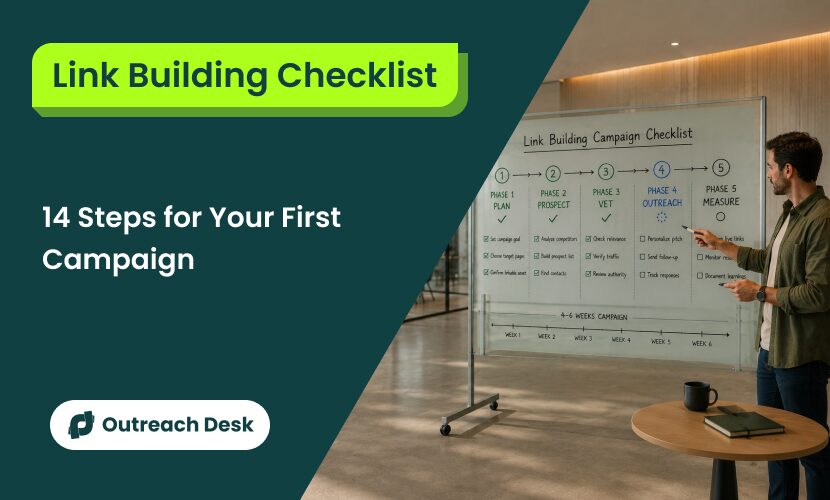
These 14 steps are organized across 5 phases and take 4 to 6 weeks. The process starts with 3 questions you must answer honestly before touching a spreadsheet.
What You’ll Learn
- The 3 pre-flight questions that decide if you’re ready to start
- The realistic week-by-week pace for the first campaign
- The 5-minute test that separates real prospects from junk
- The pitch and follow-up patterns that work for a first-timer
- The week 1 silence problem, and what it actually means
- The 4 mistakes that quietly kill most first campaigns
Before You Start the Checklist
These 3 questions decide whether your campaign is ready to start. If any answer is “not yet,” fix it first. That fix is day 1.
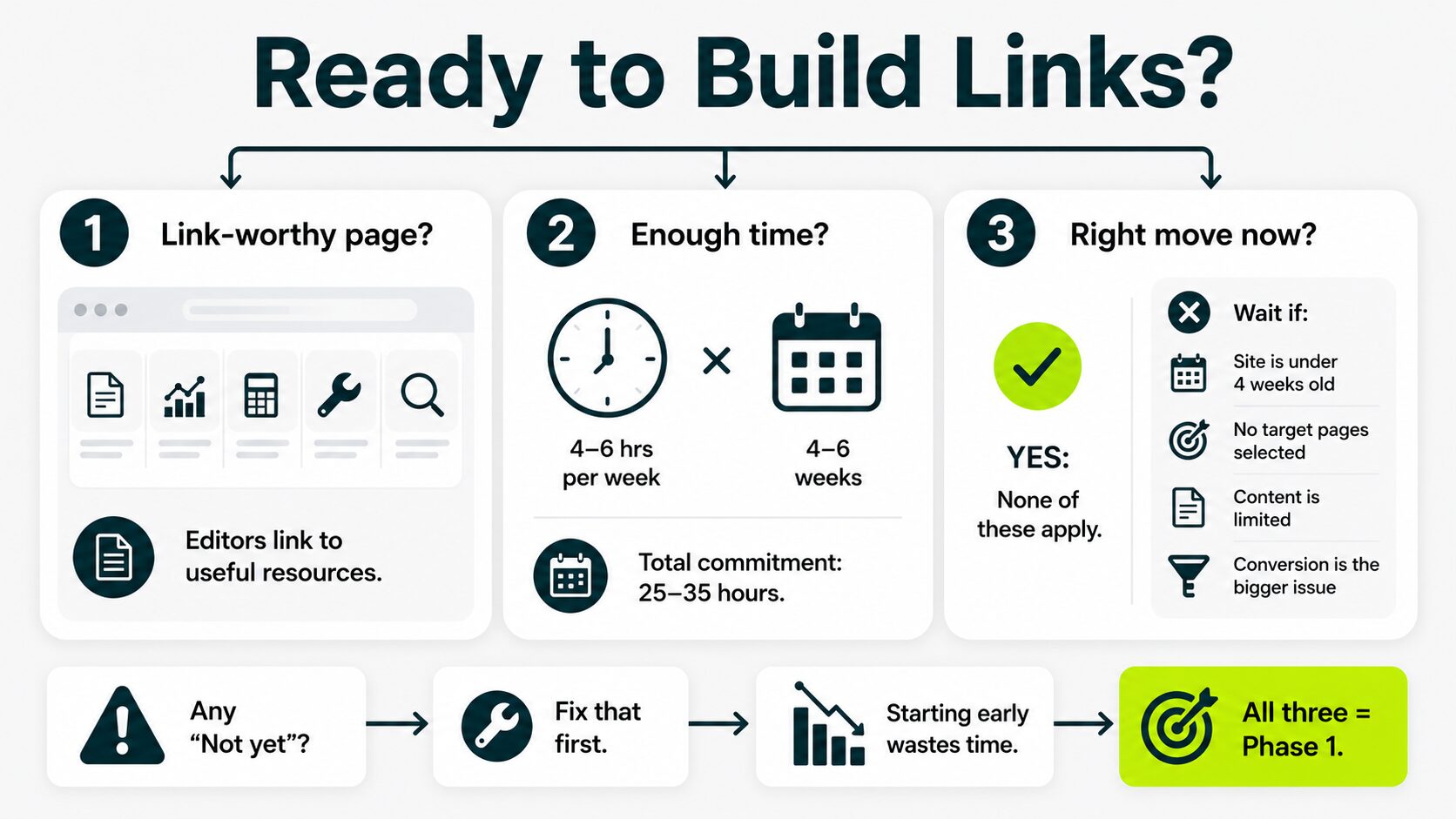
This step gates everything else. A campaign that starts before the prerequisites are in place spends a month producing zero links. Here, you need strong campaigns to earn links that help you boost rankings.
If you are unsure which pages, anchors, or tactics to prioritize, expert campaign guidance can help you build a cleaner campaign plan before outreach begins.
The cost of that wasted month has risen. Ahrefs research found that organic clicks on the top result drop 58% when an AI Overview appears. That means every link you earn now has to do more work to pull traffic.
Question 1: Do You Have a Page Worth Linking To?
Look at the page you want links to. Ask yourself: would another site’s editor add a link to it from inside one of their articles?
The honest answer is no if your page is a thin landing page with two paragraphs and a contact form.
Editors link to pages that explain something well, prove something, or compile something genuinely useful for their readers. The four types that earn links consistently:
- Real, detailed guides
- Data studies
- Calculators or free tools
- Original research
These high-value content pieces are known as linkable assets.
If you don’t have one yet, build it first. Pitching without it is the single most common reason first campaigns produce nothing.
Question 2: Can You Commit 4 to 6 Hours a Week, for 4 to 6 Weeks?
A first campaign needs 25 to 35 hours of focused work spread across 4 to 6 weeks. The minimum is 4 hours per week.
If 4 hours a week isn’t there, you’ve got two clean options. Cut something else from the calendar. Or hand the campaign to a team and learn by reviewing what they send back.
Half-attention produces a half-campaign. The campaign won’t wait for a lighter week.
Question 3: Is Link Building the Right Move Right Now?
For most early-stage sites, yes. Google decides which pages to trust enough to rank largely based on the backlinks you earn, and without them, you’re invisible.
A small number of cases say “not yet”:
- Your site is less than 4 weeks old
- It has almost no real content
- You haven’t decided which 1 to 3 pages you want to rank
- Your real problem is conversion, not visibility
If you’re outside those cases, the answer is yes. Move to Phase 1.
Phase 1: Plan the Campaign (Days 1 to 3)
Phase 1 sets up the campaign so the next 4 phases have something to work from. Do 4 things in the first 3 days.
Set One Measurable Goal for the Campaign
Pick one number you can hit.
For a first campaign, the right number is usually 2 to 5 live editorial backlinks across 4 to 6 weeks. Editorial backlinks are links a real editor decided to add, not paid or traded.
That sounds low. But it isn’t.
A first campaign with 3 real links from sites with audiences beats a third-party campaign with 50 links from anywhere. The first campaign is also where you learn what works for your niche.
Most first-timers send 30 to 50 outreach emails to earn a single editorial placement. But our data show that their first campaigns require about 35 outreach emails per editorial placement to secure a live link.
Write the goal at the top of the campaign sheet. That single number anchors every later decision.
Choose 1 to 3 Target Pages to Receive Links
Pick the pages on your site that need links most. For most first campaigns, that’s 1 to 3 pages, no more.
The strongest candidates: pages already ranking on page 2 or page 3 of Google for a search term you care about. A backlink to those moves them faster than a backlink to a brand-new page.
Lower-priority candidates: brand-new pages with no rankings yet. They need links eventually, just not in this campaign.
If you’re not sure which pages sit on page 2 or 3, do this:
- Open Google Search Console.
- Sort by position.
- Filter to positions 11 to 30.
Those positions are your candidates.
Confirm or Create the Linkable Asset Behind the Pitch
The linkable asset is the page an editor would look at and think, “Yes, this is worth linking to from my article.” The pre-flight section covered the test.
You’re not pitching the home page. You’re pitching one specific page. That page has to pass the test.
If the target page from the previous step is also the linkable asset, you’re set. If it isn’t, you have two clean options.
- Pick a different target page that already qualifies. This is the faster option.
- Improve the target page until it meets the criteria. This usually takes 1 to 2 weeks of focused work.
Don’t pitch a page that doesn’t qualify. The whole campaign rests on this single check.
Plan Your Anchor Text Mix Before the First Email
The anchor text is the clickable words inside a link, like a sign on a door that describes what’s inside.
The mix matters because too many identical anchors look manipulative to Google.
For a first campaign of 2 to 5 live links, a healthy mix looks like this:
- 1 link with a branded anchor (your company name)
- 1 to 2 links with descriptive anchors (a 3 to 6-word phrase describing the target page)
- 1 link with a partial-match anchor (containing part of your target keyword)
- 0 or 1 link with an exact-match anchor (your full target keyword)
Plan these on the campaign sheet before any pitch goes out.
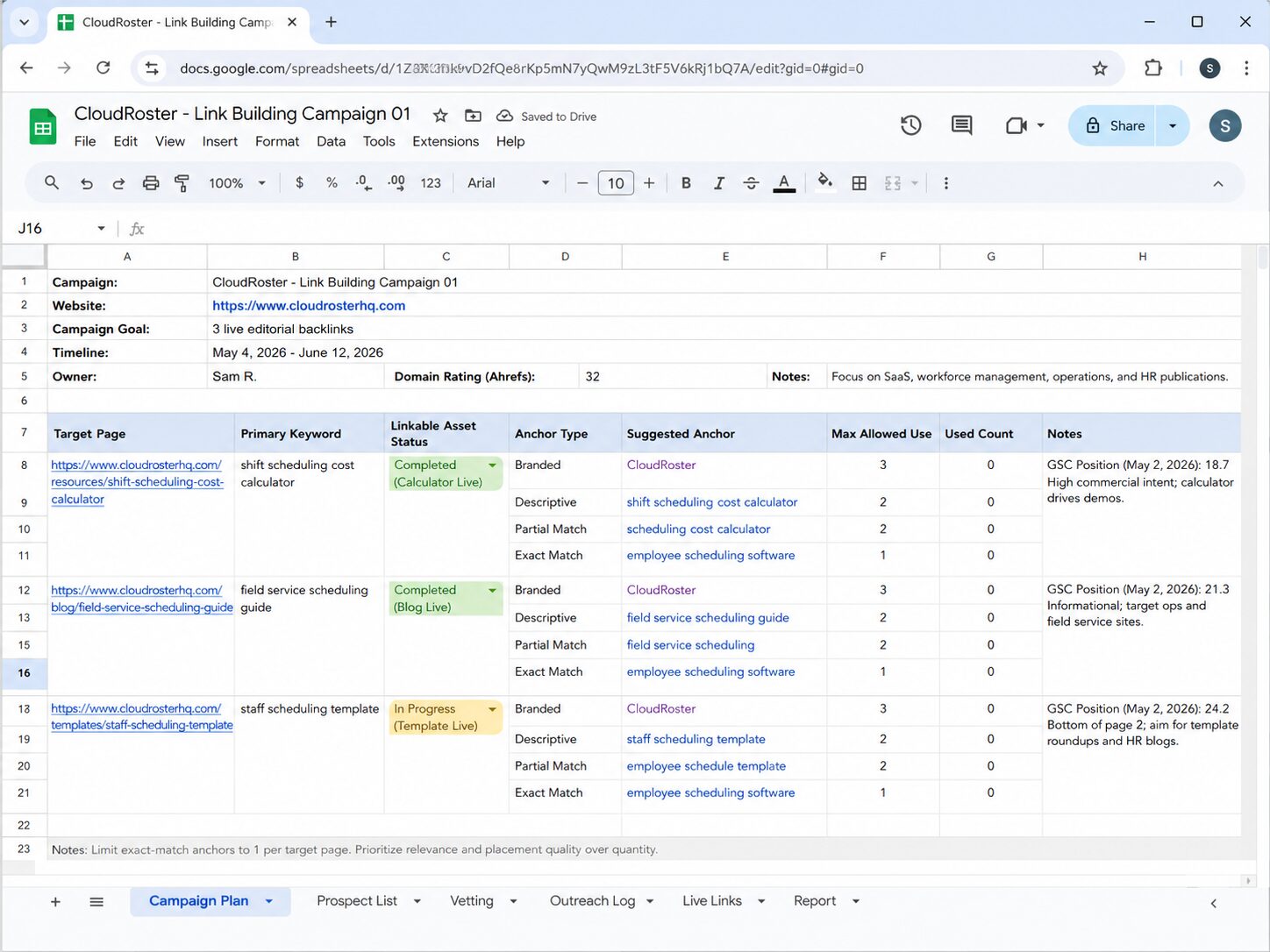
The anchor lives inside the pitch itself, usually as a suggested phrase the editor can use when adding the link.
Phase 2: Build the Prospect List (Days 4 to 7)
Phase 2 turns a fuzzy idea (“sites worth pitching”) into an actual working list. The work happens across days 4 to 7.
Audit Your Existing Backlink Profile (The Simple Version)
Know what links you already have before building new ones. The simple version takes 30 minutes.
Open a backlink checker. Ahrefs Webmaster Tools is free for your own site. Semrush has a free tier.
Google Search Console’s “Links” report works for a basic view.
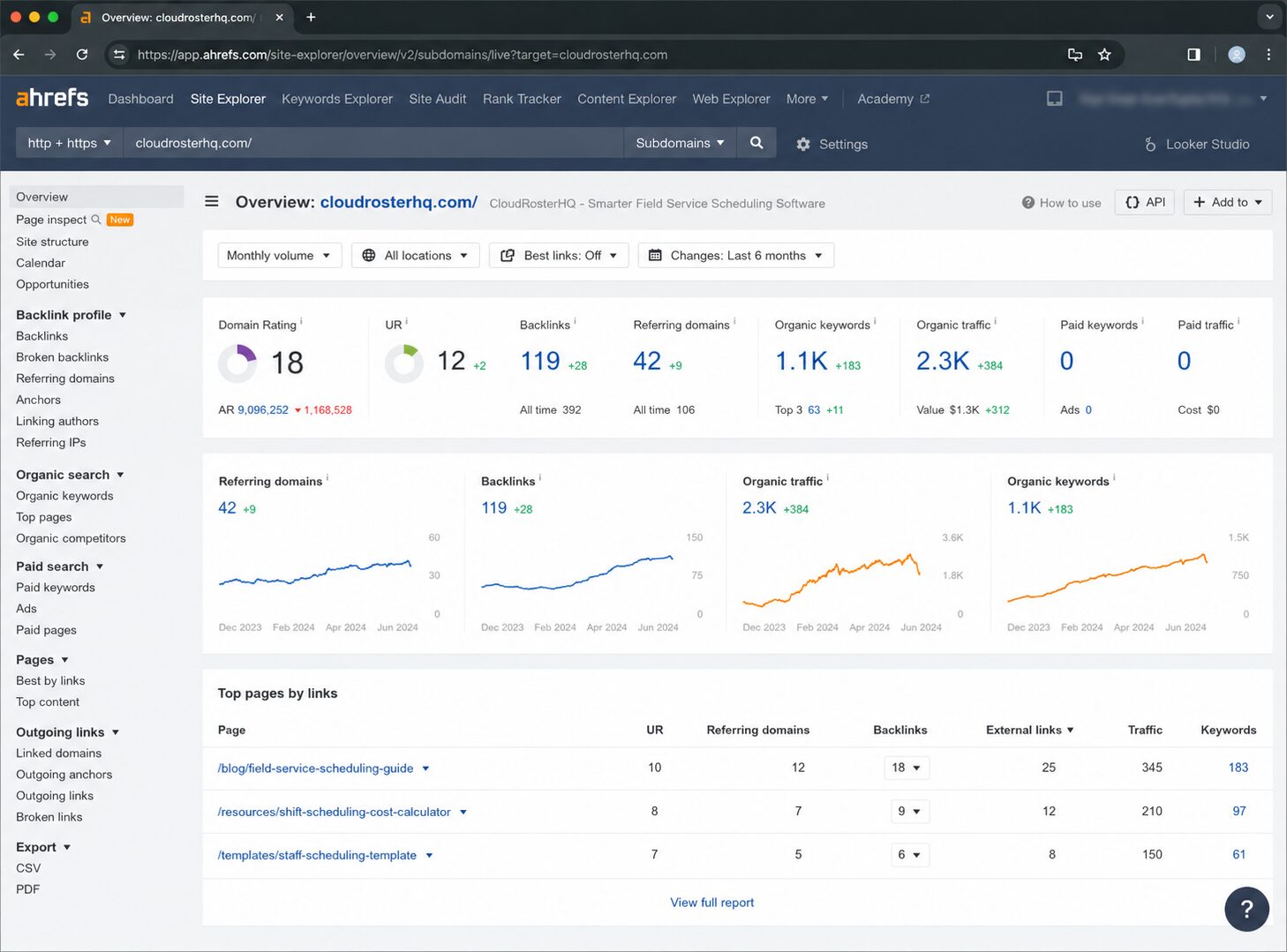
Note these three numbers:
- The referring domains count, which is the number of separate websites linking to your site
- The Domain Rating (DR, a 0 to 100 score from the SEO tool Ahrefs that estimates your site’s link strength)
- The pages on your site that already have the most backlinks
The third list is more useful than it looks. Pages that already attract links tend to keep attracting them, so they’re often the strongest candidates for the next campaign.
If you spot anything that looks spammy in the existing links, save the cleanup for later. The first campaign is about building, not pruning. Our guide on managing your backlinks over time covers the cleanup work when you’re ready.
Analyze a Competitor’s Backlink Profile
Pick one competitor who ranks in the top 5 for the search term you care about. Look at every site linking to them.
This step pays off more than any other in the phase. A site that already links to a competitor is open to linking to a similar page from you.
Because the topical relevance is already proven.
The simple version: open Ahrefs Site Explorer or Semrush Backlink Analytics, paste the competitor’s URL, and export their referring domains. Filter for:
- Domain Rating above 30 (strong enough to matter)
- Non-paywalled, non-syndicated sites (real editorial links, not press release wires)
- A page on their site, you can imagine linking to your page instead of theirs
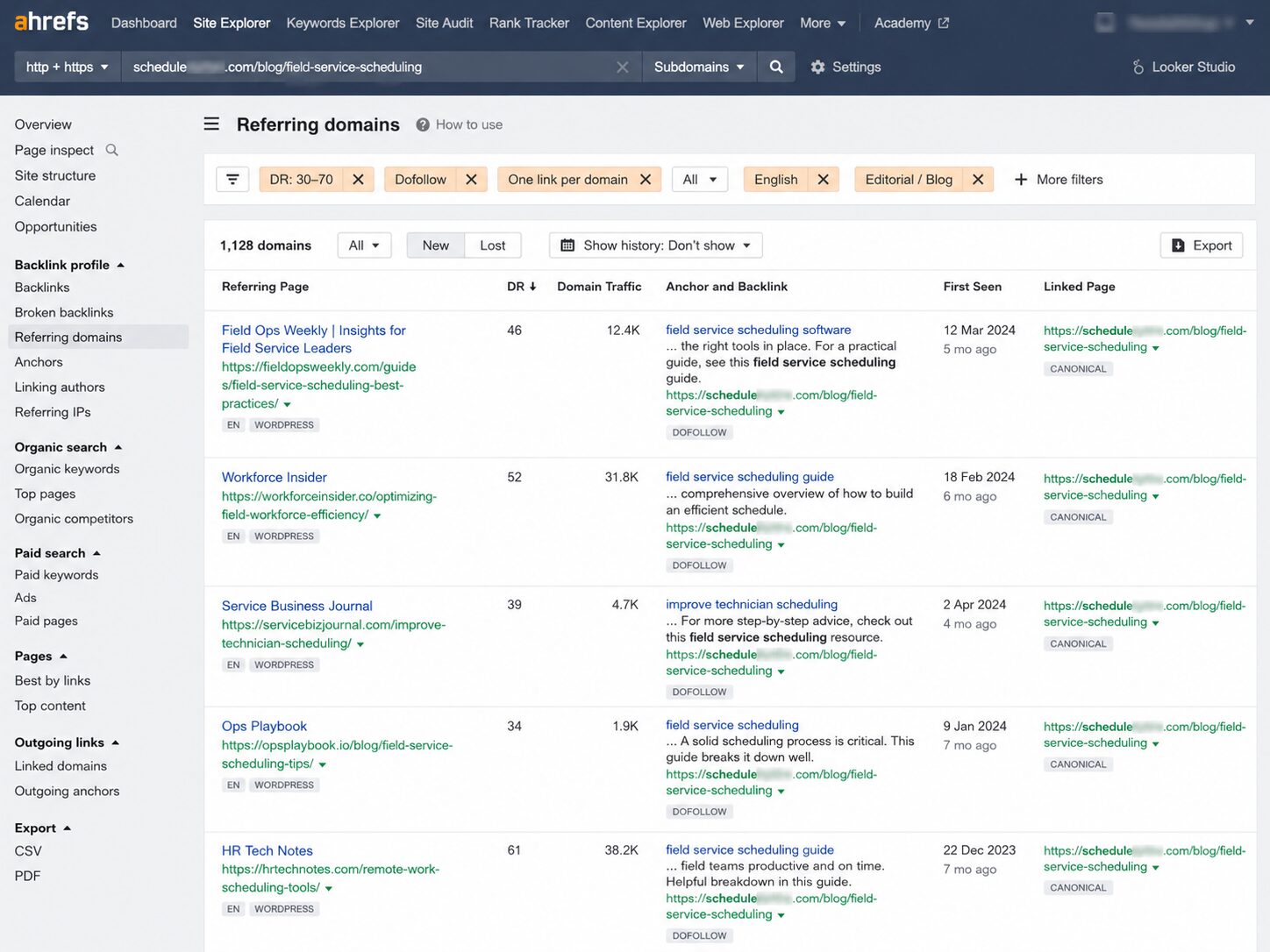
Even a 5-minute scan usually surfaces 10 to 20 candidates. Our guide on analyzing competitor backlinks goes deeper when you’re ready.
Build a Working Prospect List (The 30-Site Target)
The goal for phase 2 is a list of about 30 prospects, not 300. A first campaign with 30 well-chosen sites outperforms a first campaign with 300 randomly chosen sites every time.
Where the 30 usually come from:
- 10 to 15 from the competitor analysis above
- 5 to 10 from Google searches with operators like [your topic] “guest post” or [your topic] inurl:resources
- 5 to 10 from publications you already read in your industry
Add each prospect to a spreadsheet.
Use these columns: site URL, contact name, contact email, Domain Rating, traffic estimate, topical fit (yes or no), and outreach status.
A first prospect list of 100 raw candidates almost always trims to 25 or 30 truly worth pitching. That’s normal. Phase 3 does the trimming.
Phase 3: Vet Every Site Before You Pitch (Days 7 to 10)
Vet every site on the prospect list with 5 checks before pitching a single one. A pitch sent to a junk site is a wasted email, and a first campaign can’t afford many wasted emails.
Check Domain Rating and Referring Domain Count
For a first campaign, aim for sites with a Domain Rating between 30 and 70. Below 30 usually means the link won’t move much. Above 70 usually means the site won’t reply to a first-timer with no prior coverage.
Referring domains are the number of unique websites pointing to the prospect’s site. As a rough check, 100 or more is healthy.
If a prospect has DR 10 and 25 referring domains, drop it from the list. If it has DR 80 and 50,000 referring domains, treat it as a major publisher whose editors don’t read cold pitches. Drop it, too, for this campaign at least.
Check That the Site Actually Gets Organic Traffic
A high Domain Rating with zero organic traffic is a red flag. It usually means the site bought its links or built them inside a network.
The simple check: paste the prospect’s URL into Ahrefs Site Explorer or Semrush. Look at the organic traffic estimate.
- Over 1,000 monthly visits is a real audience
- 100 to 1,000 is small but legitimate
- Under 100 monthly visits with DR over 30 is a red flag, drop the prospect
This single check kills more prospects than any other.
Confirm Topical Relevance to Your Target Page
The link only counts if the prospect site writes about topics related to your page. A backlink from a marketing blog to a marketing page passes context. A backlink from a generic news site to the same marketing page does not.
For each prospect, scan the last 10 articles they published. Ask one question: would my page belong in their topic list?
If yes, keep them. If no, drop them, even if every other check passed.
Verify the Site Has a Real Audience
This check separates legitimate publishers from sites that exist only to sell links.
Real signs of an audience:
- A comment section with actual comments
- An email list with subscribe prompts
- Social media accounts with engagement
- A “Write for us” page that names topics, not pricing
- Author bylines that link to real LinkedIn profiles
Warning signs that the site is a link-for-sale operation:
- Every page reads the same and sits on a similar template
- No author bylines, or bylines that aren’t real people
- “Sponsored” notes are scattered across the content
- A pricing page for guest posts on a separate URL
If you see warning signs, drop the prospect. A link from a link-for-sale site is closer to a paid link than an editorial one. The editor’s silence on payment this time doesn’t change that.
Confirm the Linking Page Would Make Editorial Sense
For each surviving prospect, find the specific page you’d want to be linked from. Then ask: if I were that page’s editor, would I add a link to my page from here without being paid?
If the editorial fit is obvious, keep the prospect. If you can’t articulate why an editor would add the link, drop the prospect.
About half the sites that pass the DR and traffic checks still fail this last check. That’s normal. The 5-check vet is doing exactly what it should.
Phase 4: Send the Outreach (Days 10 to 21)
Phase 4 turns the vetted prospect list into actual emails sent. The phase spans 10 to 12 days because the outreach campaign happens in two waves: the original pitch and a single follow-up.
Find the Right Contact at Each Prospect
The contact you want is the person who decides what goes into the article you’d link to. That’s almost never an info@ or contact@ inbox.
For most prospect sites, the right contact is one of:
- The author of the specific article you’d be editing into
- The site’s content editor (often listed on the About or Editorial page)
- The site owner, for smaller blogs
Find them in this order:
- Article byline
- Site’s about page
- Official LinkedIn profile.
- Use a tool like Hunter.io or Findymail to get the email address.
(Both tools have free tiers that handle a low-volume first campaign.)
If you can’t find a real person after 5 minutes, drop the prospect.
Write the Pitch (And What a First-Timer’s Pitch Should Not Look Like)
The pitch does 3 things in 5 sentences or fewer:
- Name the specific article on their site you’re referencing
- State why your page belongs alongside that article (the editorial angle)
- Make one clean ask
Use this outreach template:
Subject: [Their topic], plus your specific angle
Hi [first name],
I came across your piece on [exact article title]. The section on [specific subtopic] tied directly to something I’d just published.
I wrote up [your page’s value, one sentence], and a reader of your post might find it useful as further reading on [specific subtopic].
If it feels like a fit, the URL is: [link]. No worries either way.
[Your name]
What a first-timer’s pitch should not look like:
- “Hi, I’d love to discuss a partnership opportunity.”
- “We have a high-quality article on a similar topic.”
- “We offer link exchange opportunities for relevant sites.”
- Anything past 7 sentences
- Anything that uses the words “monetize,” “rate,” or “we can offer”
If the pitch starts with you and ends with what you want, it won’t get a reply. If the pitch starts with their work and ends with a clean ask, it might.
Send the Follow-Up (One Is Enough, Three Is Too Many)
Most replies arrive after the second touch, not the first. So one follow-up is mandatory.
Send it 5 to 7 business days after the original. Keep it in the same email thread (don’t start a new one). Make it shorter than the original.
Subject: re: [original subject]
Hi [first name], just a quick nudge in case the original got buried. No worries if it’s not a fit for your piece.
[Your name]
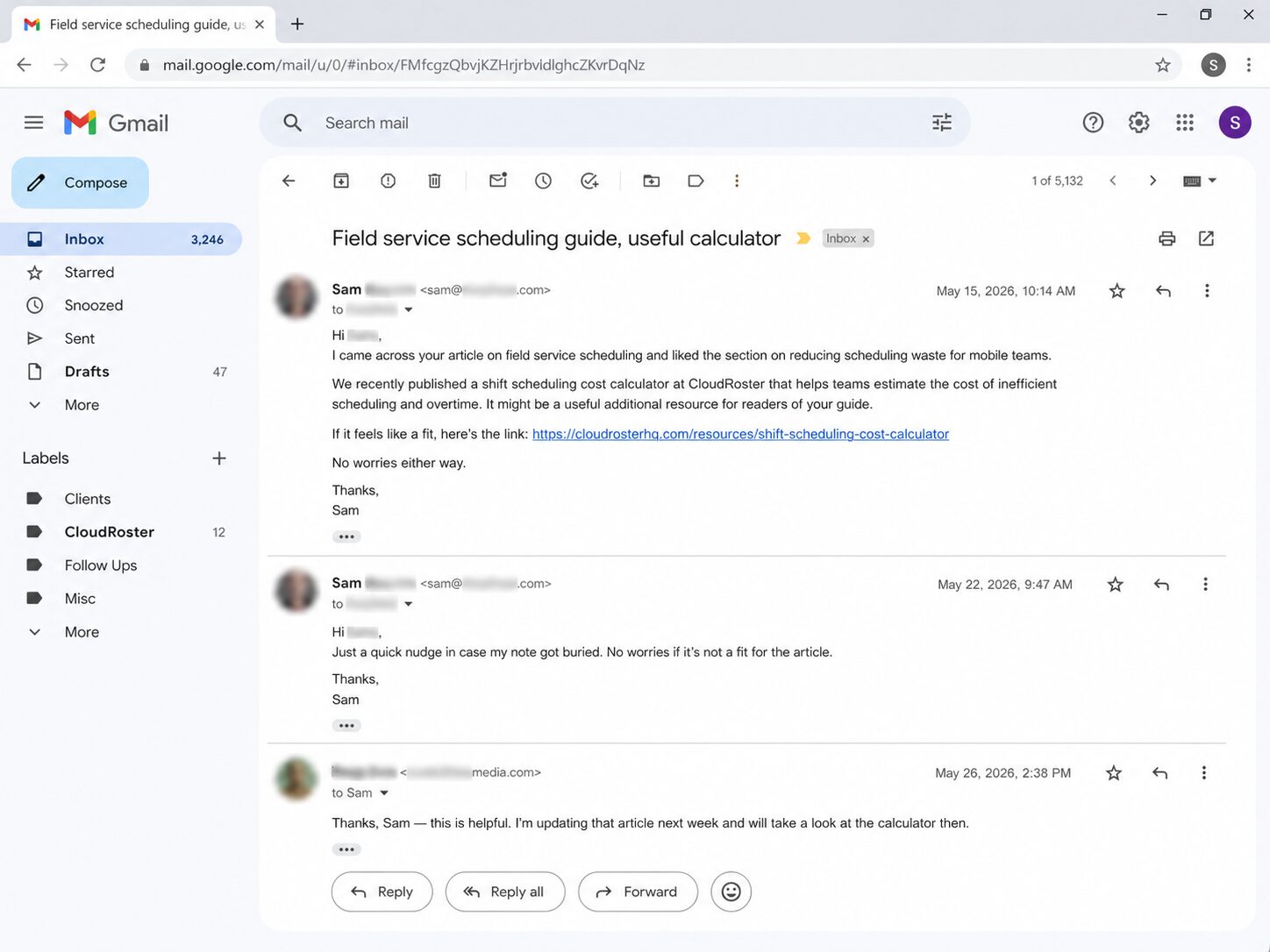
That’s the whole follow-up. After that, stop. A third email is what turns a polite cold pitch into the spam bucket of the prospect’s brain.
A real first-campaign reply pattern in the first 2 weeks usually looks like this.
Mostly silence at first. Then 2 to 3 short replies in week 2.
Then, 1 to 2 actual link placements will land in week 3 or 4.
If that’s roughly what you’re seeing, the campaign is working.
If you’ve sent 20 pitches and gotten zero replies after follow-ups, the issue is almost always the prospect list, not the pitch.
Re-run phase 3 on the next batch. For a deeper insight into the discipline itself, outreach as a discipline has its own page.
Phase 5: Track Wins and Learn (Day 21 and Beyond)
Phase 5 is the part most first-timers skip, and it’s the reason their second campaign doesn’t improve on the first.
Log what happened so the next campaign can be better.
Log Every Send, Reply, and Live Link in One Sheet
Use the same spreadsheet you built in phase 2.
Add 4 new columns: date sent, date follow-up sent, reply (yes or no), live link (URL or blank).
Update it daily during phase 4. By the end of phase 5, you should be able to read any prospect’s row and see exactly what happened.
This isn’t busy work. The patterns you spot in this sheet decide what changes in campaign 2.
Confirm Each Live Link Is DoFollow and Pointed at the Right Page
When an editor adds your link, two things can quietly go wrong.
- The link can be set to nofollow, which strips most of its search-ranking value. Or
- The link can point to the wrong page on your site.
Check both within 48 hours of the link going live.
Right-click the link in the editor’s published article, copy the URL, and confirm it matches your target page exactly. You can use a free backlink monitoring tool to check live links.
To check nofollow versus dofollow, right-click the link, choose “Inspect,” and look for rel=”nofollow” in the link’s HTML. If that attribute is there, the link is nofollow.
DoFollow links pass authority and move rankings. A nofollow link still has brand value, but it doesn’t move search needles directly.
If a nofollow link comes back from a site you wanted SEO value from, ask the editor politely to change it.
Review the Misses and Pick the One Change for Next Batch
After the campaign closes, look at the rows that went nowhere. Pick the single most likely cause.
If the misses cluster in week 1 with no replies at all, the issue is the prospect list or the contact. Sites weren’t right, or you found the wrong person at the right site.
If the misses cluster as polite “thanks but no thanks” replies, the issue is the pitch (the editorial angle wasn’t clear enough).
If the miss cluster says “send us your rate card,” the issue is the prospect type. Those sites sell links instead of earning them, and they belong off the list for campaign 2.
Change one thing in the next campaign. Just one. Changing 3 things at once means you’ll never know which change actually moved the result.
What to Do in Week 5 and Beyond
After the first campaign, the work shifts from outreach to maintenance and the quiet planning of campaign 2. The transition is gentler than first-timers expect.
Three small habits cover most of weeks 5 and 6:
- Check the live links once a week. Editors sometimes remove links during content updates. Catch it early.
- Reply to any late replies, even the ones that say no this time. The editor remembers the thread the next time you pitch.
- Add the editors who said yes to a “warm contacts” list. The next campaign pitches them last rather than cold, and the reply rate is usually 3 times higher.
Campaign 2 can start as soon as you have a new linkable asset or a new target page worth links. For most first-year founders, that’s about 6 to 8 weeks after campaign 1 closes.
Earlier than that, and the second campaign just pitches the same sites with the same asset and gets the same result.
Running a link building campaign on a quarterly cadence compounds. When you’re ready to pick new techniques for campaign 2, our link building strategies guide has the full list.
Common First-Campaign Mistakes (and How to Recover)
Every first campaign hits at least one of the 4 mistakes below. The fix is usually small. Spot the mistake first.
Mistake 1: Pitching Before Having a Real Linkable Asset
Pitching a thin page before it qualifies as a linkable asset kills most first campaigns before they start. The founder reads a checklist, gets excited, and starts pitching the home page or a thin product page.
Editors don’t link to thin pages. The campaign runs for 3 weeks, produces zero replies, and the founder concludes that link building doesn’t work for their niche.
Stop the campaign. Spend 1 to 2 weeks improving the target page until it qualifies as a linkable asset. Use the test from the pre-flight section. Restart with the same prospect list, and the reply rate doubles.
Mistake 2: Building a Prospect List From Rank-Only Metrics
Filtering by Domain Rating alone, without checking topical fit or real audience, fills your list with sites that won’t reply.
The founder filters prospects by Domain Rating alone (e.g., DR above 50) and skips the relevance and audience checks.
The result is a list of sites that look authoritative in a tool but don’t fit the founder’s topic. Or they don’t have real audiences. Or they won’t reply to a first-timer.
Re-run phase 3 on the existing list. Cut every prospect that fails the topical fit check or the real-audience check. Expect to lose half.
The remaining half is the working list, and the campaign restarts with a much higher reply rate.
Mistake 3: Sending Too Many Follow-Ups on the First Batch
A founder doesn’t hear back, panics, and sends a second follow-up, then a third. The editor goes from “I’ll get to this later” to “this person is pushy” to deleting the thread.
The recovery: stop the follow-ups today. Wait 4 weeks. If the editor was going to reply, they would have by now. Don’t email them again on this campaign.
Add them to the prospect list for campaign 2 with a different angle next time.
For every future campaign, the rule stays one follow-up only. Send it 5 to 7 days after the original. Then stop.
Mistake 4: Treating Week 1 Silence as Failure
Most first-campaign replies don’t arrive in week 1. They land in week 2 or 3, often after the follow-up. A founder who reads week 1 silence as “this isn’t working” abandons the campaign before replies arrive.
Read week 1 silence as expected, not as a failure. Keep working on the rest of the checklist. If 30 well-targeted pitches with strong follow-ups produce zero replies after 4 weeks, change the approach.
What it shouldn’t trigger is going out and buying backlinks as a recovery move. That solves a 4-week problem with a 6-month penalty.
When You Should Get Help
Some first-year founders are better served by outsourcing the first campaign than by running it themselves.
Building links in-house requires publisher relationships, outreach systems, and consistent follow-up. Each one takes months to develop. And all three compete with everything else on a founder’s plate.
The result is a slow start, inconsistent output, and placements that fall below the quality bar that moves rankings.
Outsourcing to a specialist link building agency in year one means your first campaign runs at full velocity from day one. You get established publisher relationships, proven outreach processes, and editorial standards already in place.
Once you’ve seen what a strong campaign looks like, you’ll know exactly what to expect when you bring it in-house.
Start Your First Campaign
Pick up the campaign sheet you’ll use for the next 6 weeks. Write the goal at the top. Answer the 3 pre-flight questions honestly.
If one of the three questions doesn’t pass, fix it first and start day 1 a week later.
Need help setting up your first link building campaign?
Get a personalized campaign plan and guidance from our experts today and start building editorial links that actually move your rankings.
How many backlinks do I need to rank?
There’s no single number. The honest answer: as many as it takes to match or beat the page directly above you in the search results.
For a low-competition page, that might be 5 to 10 strong editorial backlinks. For a competitive money page, the range is 50 to 200 over 6 to 12 months.
The page on what a realistic link target looks like has the formula based on your specific competitors.
Is it okay to buy links?
Officially, no. Google considers paid links a violation of its guidelines. The penalty can be a manual action that drops every page on your site from search results.
For a first-year founder running a first campaign, paid placements are not recommended, as the math doesn’t favor them and the risk of penalties outweighs any short-term gain.A penalty costs 6 to 12 months of recovery work. An editorial backlink earned the right way costs time, not a six-month recovery.
If running that outreach yourself isn’t realistic this quarter, working with an established link building agency keeps you on the safe side of that line without slowing the campaign down.
How long until the first campaign shows results?
The first live link usually lands between weeks 2 and 4 of the campaign. Ranking movement from that link, if any moves, typically arrives 2 to 6 weeks after the link goes live.
From ‘start the checklist’ to seeing movement in Search Console is roughly 6 to 10 weeks for your first campaign. That’s longer than you probably expect. It’s shorter than it takes to build a year’s worth of reputation links.
The campaign isn’t the right channel for this quarter if you can’t wait 10 weeks for the first sign of movement. Run paid ads in parallel, or improve conversion on existing traffic first.
Can I do all of this without expensive tools?
Yes, mostly.
The minimum tool stack for a first campaign costs $0 to $25 per month:
- Google Search Console for your own backlink profile and target page rankings
- Ahrefs Webmaster Tools (free for your own site) for a richer backlink view
- Hunter.io or Findymail free tier for 25 to 50 email lookups per month
- Google Sheets for the campaign tracker
Paid versions of Ahrefs or Semrush speed up competitor analysis, but they aren’t required for a campaign with 30 prospects. If the budget exists later, best link building tools cover what’s worth the upgrade.