Toxic backlinks are low-quality or manipulative links pointing to your website that can put your rankings at risk. You might panic when a toxic link checker tool flags your backlink as risky. Now, you’re wondering if your site is about to get penalized.
One toxic backlink rarely hurts your website because Google often ignores isolated low-quality links.The real risk starts when low-quality backlinks form a pattern. Patterns such as sudden link spikes, repeated spammy anchor text, or links from networks of untrustworthy websites.
Knowing that difference helps you focus on links that deserve attention rather than chasing every warning a tool flags.
What You’ll Learn
- Not every tool-flagged toxic backlink is actually dangerous.
- Google focuses on manipulative link patterns, not isolated bad links.
- Private blog networks, link farms, and anchors in bulk create real risk.
- Check search console and traffic patterns before disavowing backlinks.
- Disavow only with clear penalties; prioritize earning high-quality editorial links.
Not Every Flagged Link is Actually Dangerous
A toxic backlink is a link from another website pointing to your website that creates a genuine risk of ranking penalties.
In practice, most backlinks your SEO tool labels as “toxic” or “spammy” don’t require action. Use these flags as a prompt to investigate the links further before deciding whether to remove or disavow them.
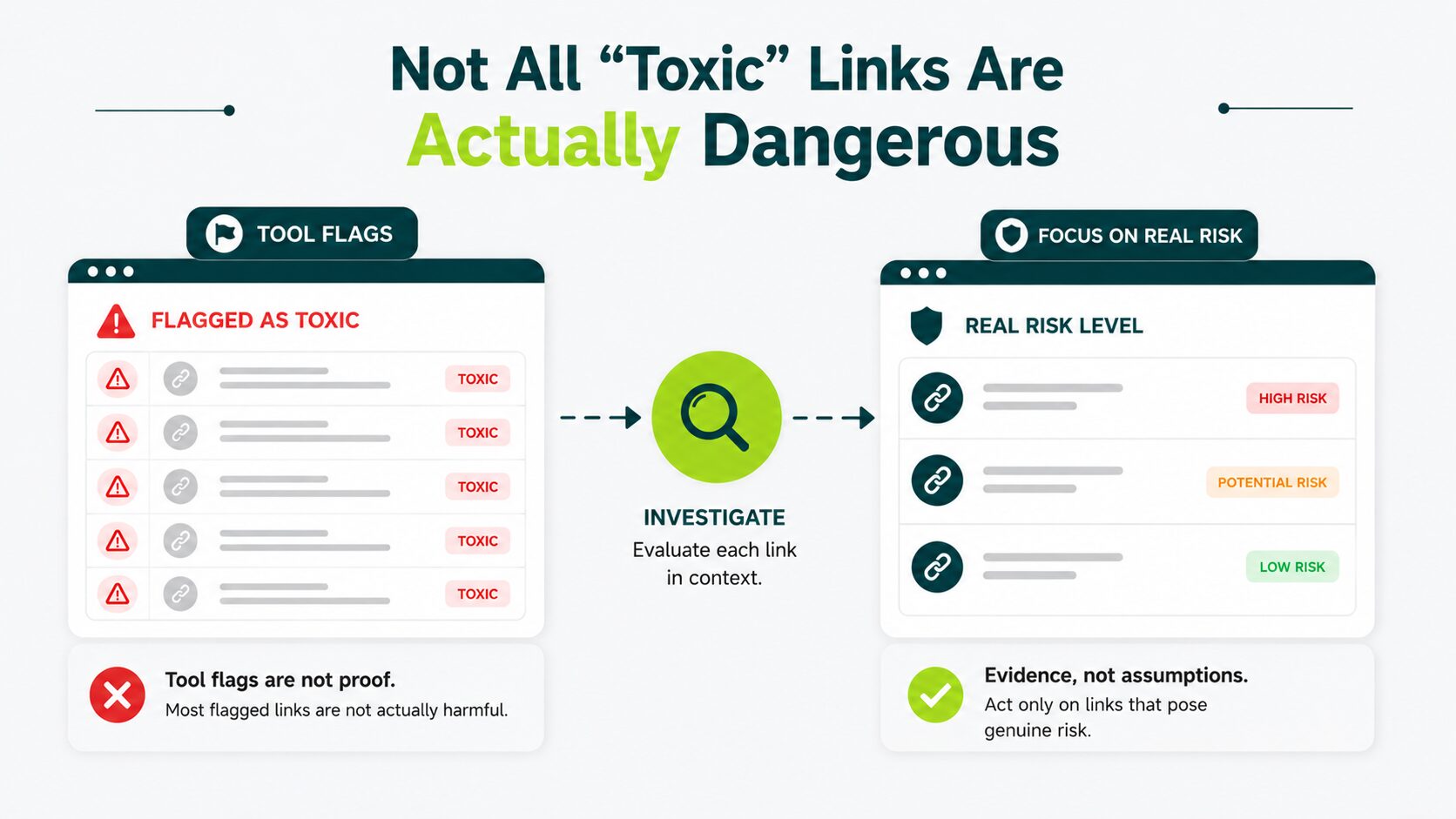
In most backlink audits, only a small fraction of flagged links, often less than 10%, actually require action such as removal or disavowal.
What Google Actually Calls These Links
Google doesn’t officially use the term “toxic backlinks.” Instead, it calls them “link spam”.
Google considers links that try to manipulate its algorithm and rankings to be link spam. These links violate Google’s spam policies because they attempt to influence rankings rather than reflect genuine editorial recommendations.
Google’s systems are built to identify manipulative link patterns. They use a spam detection system called SpamBrain to evaluate links and reduce the influence of those created to manipulate search rankings.
SpamBrain works like an email spam filter, but for backlinks. It detects link schemes and either ignores those links or strips away any ranking credit they carry, often without penalizing your site at all.
Why Tool Scores Are a Starting Point, Not a Verdict
There are tools that check the toxicity of backlinks. These include: Semrush’s toxicity score and Ahrefs’ spam score. These tools give a score (a number or percentage saying how “bad” the link looks).
Steps to Check Link Toxicity
- Copy the exact link.
- Paste it into any trusted toxic link checker tool and hit scan.
- The tool runs the link through multiple engines.
- Search engines vote: safe, suspicious, or a red flag.
- Tools then show the ratio (flagged count vs. total).
- Check which engines flag (trusted names weigh more, unrecognized names weigh less).
- Weigh ratio + engine trust + context (domain age, redirects, source). A quick domain age check separates an established publisher from a domain registered last quarter.
- Decide: Few weak flags = fine, many strong flags = avoid.
A high score means the link shares characteristics commonly found on sites that have received penalties. Review the link in context before deciding whether any action is necessary.
A toxicity score of 40 out of 100 doesn’t mean 40% of your links are dangerous. It means some of your links look like links that appeared in penalized profiles. That’s worth a look if you’re seeing ranking drops, but it isn’t a fire to put out today.
Using the disavowal tool isn’t the right response to a high tool score. Disavowing links Google is already ignoring can remove ranking signals that were helping your site.
What is a Disavowal Tool?
A Google tool that instructs Google to ignore specific links when calculating your rankings.
Read more about deciding whether to use the disavow tool before you submit anything.
What Makes a Backlink Genuinely Risky
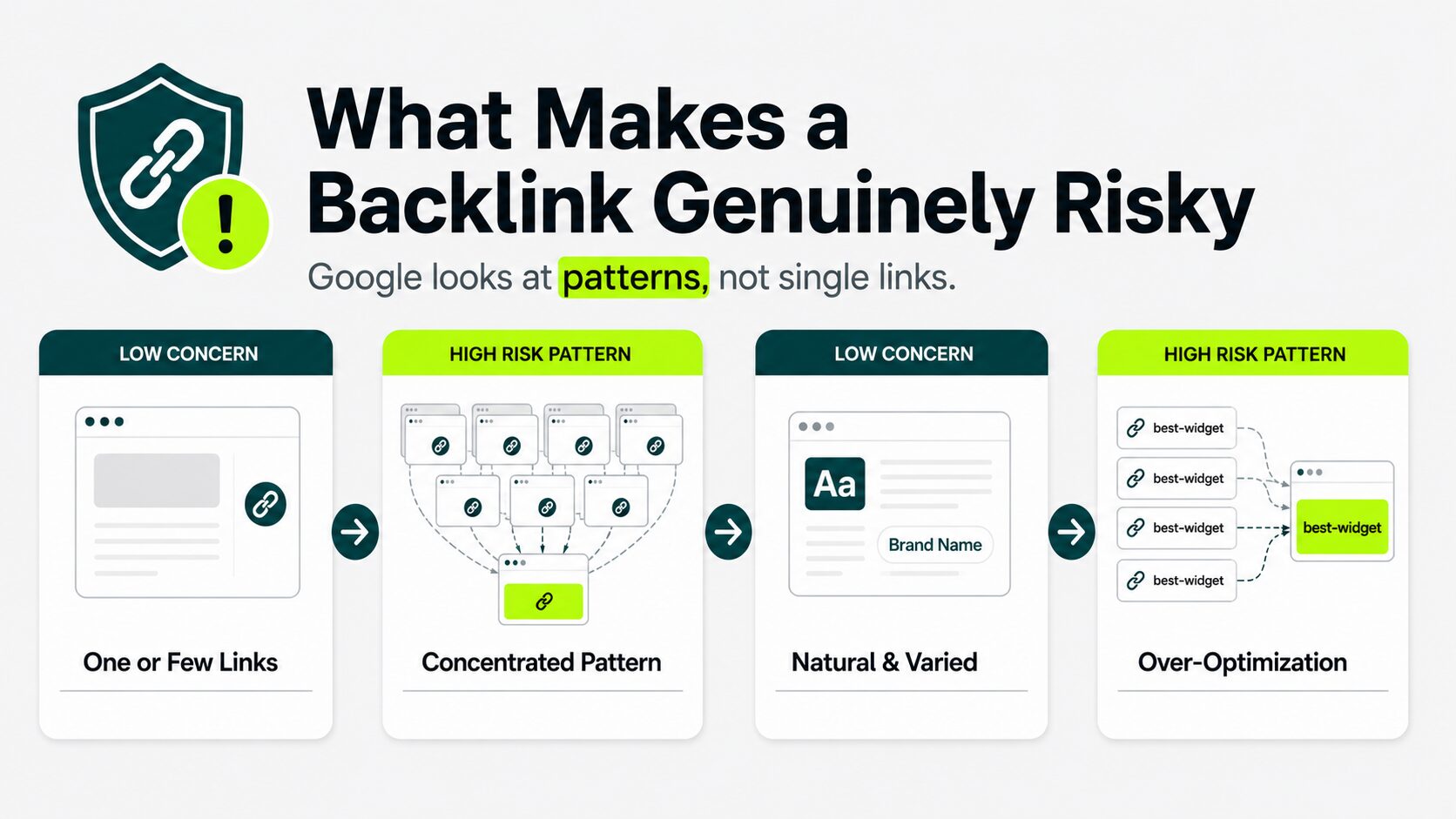
Backlinks are links from other sites pointing to yours. Google’s systems look for patterns, not individual low-quality pages.
A single link from a small blog with no traffic isn’t dangerous. A pattern of links from dozens of sites built purely to distribute links to other sites, all pointing to your homepage with the same keyword anchor text, is a different situation.
Private Blog Networks and Link Farms
Private Blog Networks (PBN) and Link Farms are both fake setups that trick search engines into thinking a site is popular or trusted. But in reality, it’s just an artificial boost.
A PBN is a group of websites the same person or group secretly owns. The site looks independent and real, but its owner built it to manipulate Google Search rankings. These aren’t real publications. They have thin, auto-generated content and no genuine audience.
Because one owner privately controls all the sites, the link patterns are unnatural and easy for Google’s systems to detect at scale. Manipulative link building practices often leave recognizable patterns that search engines can identify, making them less effective over time.
Link farms have a similar concept. Link farm owners create a group of sites (or pages) to distribute link juice and cross-link among themselves. It has little real content value, just links often with low-quality, thin, and spun text (auto-rewritten).
It links to hundreds of irrelevant sites all at once. One link from one of these sites rarely causes a problem. A concentrated pattern of them pointing to the same page of your site creates the kind of manipulative signal Google trains its systems to find.
Link farm schemes often follow recognizable patterns, making them easier to identify once you know what to look for.
Over-Optimized Anchor Text
Anchor text is the clickable word in a link; it helps users and search engines understand what the linked page is about.
Natural links from real readers use varied phrasing. When many low-quality sites link to your product page using the exact keyword phrase you’re trying to rank for, that repetition reads as artificial to Google. It’s the combination: exact-match keyword anchor text, coming from low-authority or low-relevance domains, all pointing to the same target page.
In our audits, sites that lost traffic often had too many exact-match anchors from low-quality or loosely related sites, usually pointing to just a few pages. Sites that stayed stable or grew had more natural anchor text, including branded, partial, and generic phrases, with links from a wider mix of relevant, high-quality sources.
Comment Spam and Site-wide Footer Links
Low-quality links in blog comment sections or site-wide footer templates are a lower concern, but they become a real problem in volume or when they carry exact-match keyword anchors.
A handful of old comment-spam links that Google has been processing for years? Those are almost certainly neutralized. A fresh wave of thousands of comment links, each with matching keyword anchors pointing to one page, is a different signal.
How to Check Your Own Backlink Profile for Risk
A backlink profile is a full list of links pointing to your site. Find toxic links before they hurt your rankings. Analyze your site’s backlinks before you start the audit with the free tool, not the paid one.
Google Search Console is the free dashboard Google provides to website owners; it shows something no third-party tool can (whether Google has already taken action against your site).
Check Google Search Console First
A manual action is a penalty a real human reviewer at Google applies after finding that a site violates spam guidelines. It’s the only signal that your backlinks are actively hurting your ranking right now.
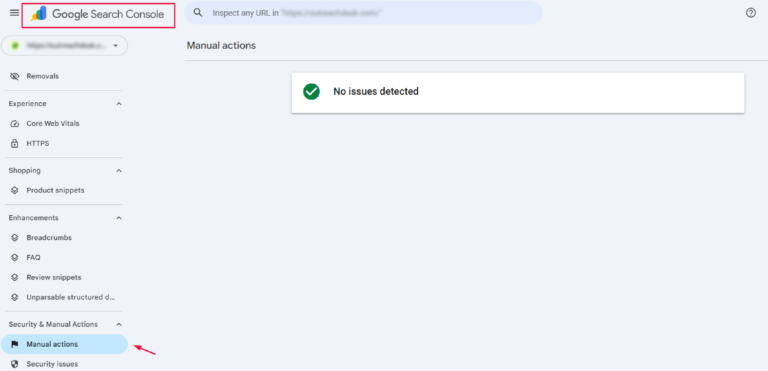
To check for manual actions in Google Search Console:
- Log in to Google Search Console
- Go to Security and Manual Actions on the left-hand sidebar
- Click on Manual Actions
If you see “No issues detected” as shown in the image above, then you don’t have a manual action. That’s the most important thing to confirm before doing anything else.
A manual action tied to unnatural links means remediation is urgent.
Use a Backlink Tool to Pull Your Full List
If you have access to a backlink tool, Ahrefs and Semrush both produce a full report of your inbound links sorted by risk score. Ahrefs measures link strength using Domain Rating (DR), a 0 to 100 score estimating how strong a site’s backlinks are.
Filter for flagged or high-toxicity links, and look for the following patterns: links from sites with no real content, links using exact-match keyword anchors, and links from domains that appear to exist solely to send links to other sites.
If you don’t have a paid tool, download your link data from the links report in Google Search Console and manually check the referring domains in a browser. It’s a slower process, but it works.
For a complete step-by-step process covering every stage of a link profile review, auditing your entire link profile walks through each step.
If you want alerts when new risky links appear before they accumulate, setting up ongoing backlink monitoring is the next layer.
Ask These Three Questions Before You do Anything Else
Before contacting webmasters or creating a disavow file, ask yourself these three questions. If the answer to all three is no, the links flagged in your SEO tool most likely don’t require action right now.
This simple check helps you avoid removing or disavowing links that aren’t actually harming your site.
In many toxic link audits, the correct recommendation is to take no action because the flagged backlinks don’t present a meaningful SEO risk and are already being ignored by Google’s algorithms.
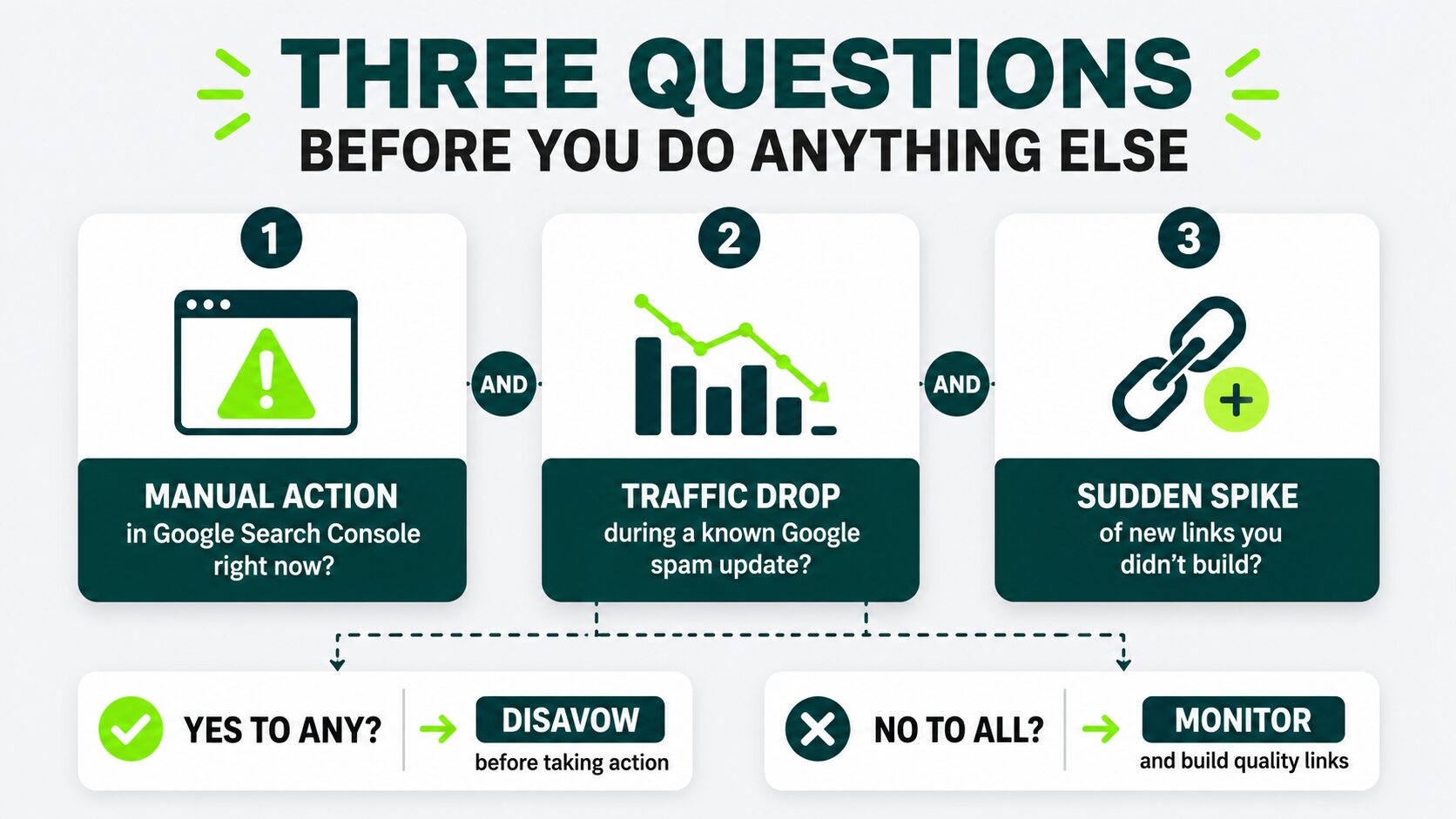
Question 1: Is There a Manual Action in Google Search Console Right Now?
This is the only definitive signal that Google has reviewed your links and found a violation.
If there is a manual action present in your GSC, cleanup is urgent; move directly to the action steps below.
If there is no manual action, your site is operating without a direct Google penalty. That doesn’t mean every link is clean, but there’s no active penalty to resolve.
Question 2: Did Your Traffic Drop During a Known Google Spam Update?
Google periodically releases updates targeting link spam, and those updates roll out on publicly tracked dates.
If your organic traffic dropped sharply and the drop started within the window of a known spam algorithm update, that correlation is worth investigating further. A general traffic decline that is not related to any algorithm update window is usually a content or competition issue, not a link-based penalty.
If your traffic dropped after the update, pull your risky link list and look for patterns before deciding whether to act.
If traffic didn’t drop, backlinks are unlikely to be the problem.
Question 3: Did Hundreds of New Links Appear That You Didn’t Build?
This is a negative SEO scenario: someone deliberately directs low-quality links to your site to damage your rankings. It’s less common than link tool vendors suggest, but it does happen.
Kinsta, a major web hosting company, documented a case where its site received hundreds of spammy dofollow links from .tk domains after a WordPress.org mention.
The links came from automated scrapers, not a deliberate attack, but the pattern was identical to a negative SEO attack: a sudden spike of low-quality links pointing to one page. According to Kinsta’s negative SEO case study, in severe attacks, sites have been hit with more than 20,000 bad links at once.
If you see a sudden spike of links from irrelevant, low-quality domains all pointing to one page, especially with matching anchor text, check whether the timing correlates with a content piece that attracted attention in the wrong places.
If you answered yes to any of these three questions, disavowing backlinks is your next step before taking action.
If you answered no to all three questions, monitor your profile regularly and invest your time in building links that strengthen rather than threaten your site.
If You Need to Act, Here is How
If your site has a manual action or a confirmed pattern of manipulative backlinks, follow these three cleanup steps.
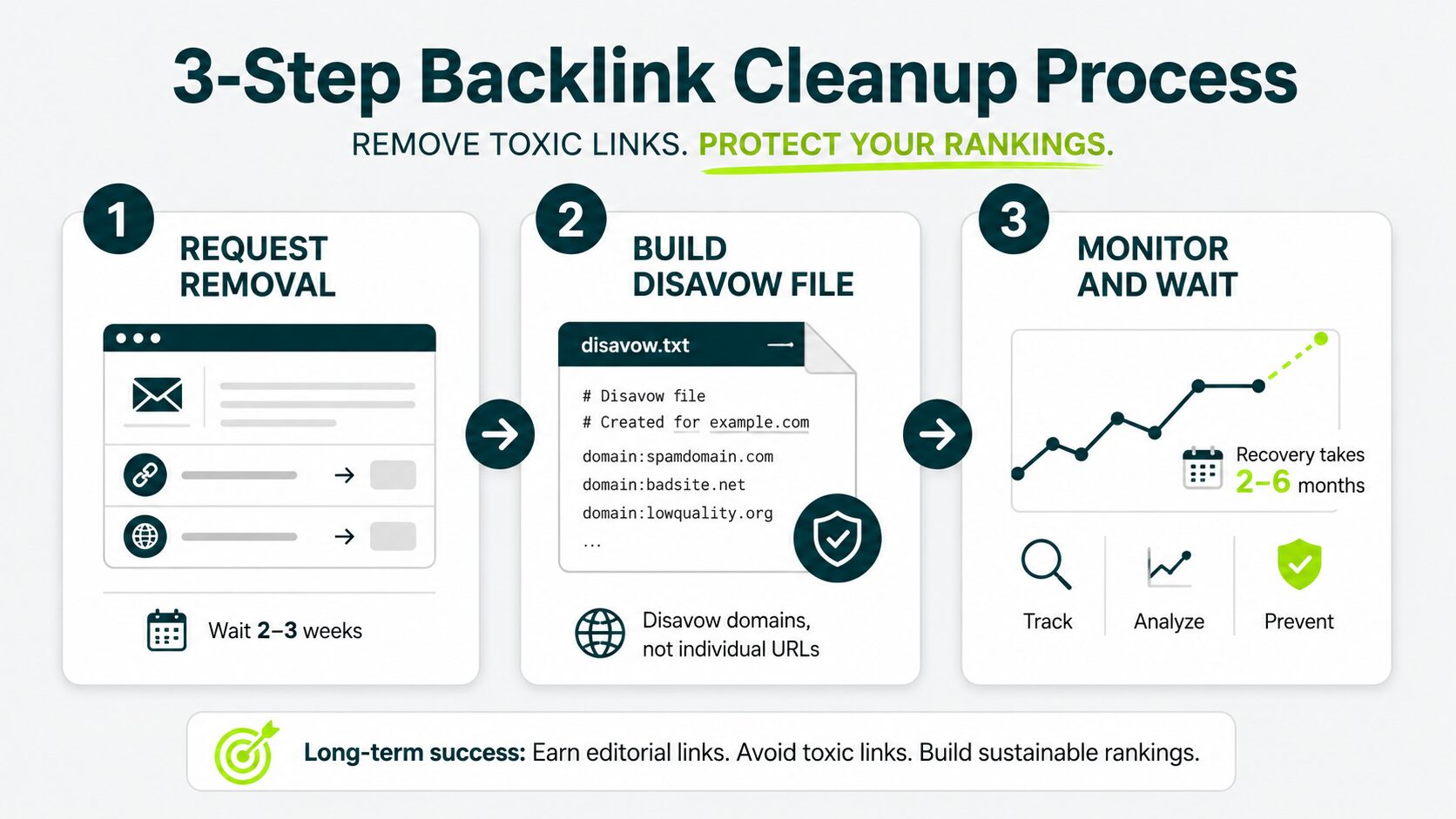
Step 1: Request Removal From the Linking Site
Find the contact information for the website linking to you. Send a short and direct email that includes:
- The specific page on their website containing the link
- The page on your website the link points to
- A request to remove the link
Then wait two to three weeks. Most site owners won’t respond, and that’s okay.
If you move to the next step, what matters is having a documented removal request.
Step 2: Build a Disavow File
A disavowal file is a plain-text file you upload through Google Search Console to tell Google to ignore specific backlinks when evaluating your website.
If removal requests go unanswered, add the offending domains rather than individual URLs whenever possible.
Disavowing an entire domain affects both existing and future links from that domain. The disavow process has specific formatting requirements.
Step 3: Monitor and Wait
Recovery after backlink cleanup is not immediate.
According to recent industry analyses by3wBiz, most manual action reconsideration requests are reviewed within 2 to 4 weeks, while full ranking recovery after link cleanup and disavowal typically takes 2 to 6 months, depending on crawl frequency and algorithm refresh cycles.
If you received a manual action and submitted a reconsideration request through Google Search Console, Google typically reviews the request within a few weeks and lets you know whether it removed the manual action.
Ranking recovery often takes longer than the review itself. For algorithmic penalties, recovery happens only after Google’s spam systems refresh. That process can take months.
Set up tracking and manage your links over time so you catch new patterns before they accumulate into a bigger problem.
The best long-term strategy is to avoid creating cleanup work in the first place. Earning links through editorial outreach (where a real editor links to genuinely useful content) doesn’t appear on toxic backlink reports because they aren’t link spam.
In your Google Search Console, check the Manual Actions report first.
If it says “no issues detected,” close the toxicity report and spend your time building high-quality editorial backlinks instead.
Conclusion
Pull your Google Search Console manual actions report right now. If it’s clean, close every toxicity tab you have open and spend this week earning one editorial link instead.
This way, you protect your site’s long-term search performance without wasting time on unnecessary cleanup.
Concerned about toxic backlinks affecting your rankings?
Get a strategy for identifying harmful links, separating real risks from false alarms, and protecting your site’s long-term SEO.
What’s the difference between a toxic backlink, a spammy backlink, and a bad backlink?
These terms are often used interchangeably, but they describe different things. A spammy backlink typically means a low-quality link from a site with thin content, no real audience, and little trust in Google’s systems. A bad backlink is any link you’d rather not have, including spammy links.
A toxic backlink is a link that poses a genuine risk of a ranking penalty. This usually happens when it forms part of a pattern that appears to be deliberate link manipulation, such as private blog network links, link farm schemes, or exact-match anchor text from many low-quality sources at once.
Most spammy links don’t fall into this category and are unlikely to trigger a penalty on their own.
How long does it take to recover from cleaning up toxic backlinks?
It depends on the penalty type. A confirmed manual action lifted via reconsideration request typically clears within a few weeks of Google’s review, though ranking recovery can take several more weeks after that.
Algorithmic penalties, where Google’s systems flagged your links without human manual action, recover at the next spam algorithm update, which can be months away. There’s no way to speed up the refresh cycle.
How often should I audit my backlink profile?
For most websites, reviewing your backlink profile every one to three months is sufficient. You may want to check more frequently after a major link building campaign, a significant ranking drop, or a manual action. Regular monitoring helps you identify unusual patterns early without overreacting to individual low-quality links.
Can toxic backlinks from another website cause a manual action or hurt my rankings?
Usually not. Google evaluates backlink patterns rather than isolated links and is designed to ignore many unnatural backlinks that you didn’t create. A manual action is more likely when your backlink profile shows evidence of deliberate link manipulation, such as large-scale paid links or link schemes.
If you notice a sudden surge in suspicious backlinks alongside ranking losses or a manual action, investigate the pattern before deciding whether to submit removal requests or use the disavow tool.
Should I remove toxic backlinks or build more high-quality backlinks?
If your site has no manual action or a confirmed pattern of manipulative links, focus on earning high-quality backlinks rather than chasing every questionable link. Strong, relevant backlinks improve your overall link profile, while unnecessary link removals often provide little benefit.
Can old toxic backlinks still affect my website
Yes, if they remain part of a broader pattern of manipulative link building. Google may continue to evaluate historical link signals, especially when unnatural links haven’t been removed or disavowed after a manual action.
If Google is already ignoring those links, however, they are unlikely to affect your rankings. If you’re unsure, a dedicated link building agency can audit your profile and prioritize what actually needs attention.”